
การแนะนำ
The Solid State Logic SSL 12 is a high-performance 12-in/8-out USB audio interface designed for professional recording and mixing environments. It features studio-quality audio conversion, robust preamps, and flexible monitoring options to enhance your audio production workflow. This manual provides essential information for setting up, operating, maintaining, and troubleshooting your SSL 12 interface.

รูปที่ 1 : ด้านหน้า view of the Solid State Logic SSL 12 USB Audio Interface.
การตั้งค่า
Follow these steps to set up your SSL 12 audio interface:
- การติดตั้งซอฟต์แวร์: Before connecting the hardware, download and install the latest drivers and SSL 360° software from the official Solid State Logic website. This software is essential for full control and functionality of your interface.
- เชื่อมต่อกับคอมพิวเตอร์: Connect the SSL 12 to your computer using the provided USB cable. The interface is bus-powered via USB.
- เปิดเครื่อง: Press the power button located on the rear panel of the unit. The power indicator LED on the front panel will illuminate.
- เชื่อมต่อไมโครโฟน/เครื่องดนตรี: Use XLR or 1/4-inch TRS cables to connect your microphones or instruments to the combo inputs (1-4) on the rear panel. For instruments, use the dedicated 1/4-inch instrument inputs (INST 1, INST 2) on the front panel for optimal impedance matching.
- Connect Monitors/Headphones: Connect your studio monitors to the 1/4-inch TRS outputs (1-4) on the rear panel. Plug your headphones into the dedicated 1/4-inch headphone outputs (A, B) on the front panel.
- ADAT and MIDI Connections (Optional): If expanding your setup, connect ADAT compatible devices to the ADAT IN port and MIDI devices to the MIDI IN/OUT ports on the rear panel.

Figure 2: SSL 12 with various cables connected for a typical studio setup.
คำแนะนำการใช้งาน
Understanding the controls and connections of your SSL 12 is crucial for effective operation.
แผงควบคุมด้านหน้า

รูปที่ 3: ด้านบน view of the SSL 12, highlighting front panel controls.
- ช่องทาง 1-4: Each channel features a GAIN knob to adjust input level, a +48V button for phantom power (for condenser microphones), and a LINE button to switch between microphone/instrument and line-level inputs. The LED meters provide visual feedback on input levels.
- Legacy 4K Buttons: These buttons activate the '4K' mode, which emulates the sound characteristics of the classic SSL 4000 series console, adding harmonic enhancement and a high-frequency boost.
- ระดับการตรวจสอบ: The large blue knob controls the overall output level to your main studio monitors.
- ช่องเสียบหูฟัง (A และ B): Two independent headphone outputs with individual level controls allow for separate monitoring mixes.
- พูดคุยกลับ: The built-in talkback microphone allows communication with artists in a separate recording space. Use the TALK button to activate, CUT to mute, and ALT to switch between alternative monitor outputs.
การเชื่อมต่อแผงด้านหลัง
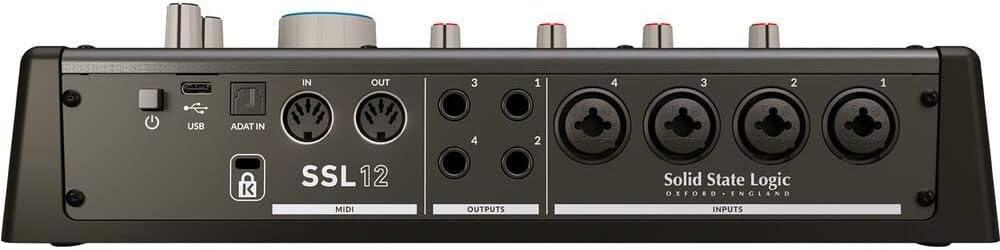
รูปที่ 4: ด้านหลัง view of the SSL 12, showing input and output connections.
- อินพุต 1-4: Combo XLR/TRS jacks for connecting microphones and line-level sources.
- ผลลัพธ์ 1-4: 1/4-inch TRS balanced outputs for connecting studio monitors or other outboard gear.
- MIDI เข้า/ออก: Standard 5-pin DIN connectors for connecting MIDI controllers or other MIDI-enabled devices.
- ADAT In: Optical input for expanding your input count with an ADAT-compatible device, providing up to 8 additional channels.
- ยูเอสบี: USB-C port for connection to your computer.
- พลัง: สวิตช์เปิด/ปิดสำหรับตัวเครื่อง
การซ่อมบำรุง
เพื่อให้มั่นใจว่า SSL 12 ของคุณจะมีอายุการใช้งานยาวนานและทำงานได้อย่างมีประสิทธิภาพสูงสุด โปรดปฏิบัติตามแนวทางการบำรุงรักษาเหล่านี้:
- การทำความสะอาด: Use a soft, dry cloth to clean the exterior of the unit. Avoid abrasive cleaners or solvents. For stubborn dirt, a slightly damp cloth can be used, ensuring no moisture enters the unit.
- การป้องกันฝุ่น: Keep the unit covered when not in use to prevent dust accumulation, which can affect internal components and ventilation.
- การระบายอากาศ : ตรวจสอบให้แน่ใจว่าอากาศไหลเวียนรอบตัวเครื่องอย่างเพียงพอ อย่าปิดกั้นช่องระบายอากาศ
- การจัดการสายเคเบิล: จัดระเบียบสายเคเบิลให้เรียบร้อยเพื่อป้องกันแรงดึงที่ขั้วต่อและการหลุดโดยไม่ตั้งใจ
- การอัปเดตซอฟต์แวร์: ตรวจสอบวงจรโซลิดสเตทลอจิกเป็นประจำ website for firmware and software updates to ensure compatibility and access to the latest features and bug fixes.
การแก้ไขปัญหา
If you encounter issues with your SSL 12, refer to the following common problems and solutions:
- ไม่มีไฟฟ้า: Ensure the USB cable is securely connected to both the interface and your computer. Verify the power button on the rear panel is in the 'On' position. Try a different USB port or cable.
- ไม่มีเสียงออก: Check that your monitors and headphones are correctly connected and powered on. Verify the Monitor Level and Headphone Level knobs are turned up. Ensure the correct output device is selected in your computer's sound settings and your Digital Audio Workstation (DAW).
- ไม่มีสัญญาณอินพุต: Confirm that microphones/instruments are properly connected to the correct inputs. Check the GAIN knob for the respective channel is turned up. Ensure +48V phantom power is enabled for condenser microphones. Verify the correct input is selected in your DAW.
- Audio Clipping/Distortion: Reduce the GAIN on the input channel. Ensure your input source is not sending an excessively hot signal. Check your DAW's input levels. The 32-bit float converters offer high dynamic range, but extreme input levels can still cause clipping.
- ปัญหาความล่าช้า: Adjust the buffer size in your DAW's audio settings. Lower buffer sizes reduce latency but require more processing power. Ensure your computer meets the minimum system requirements.
- ซอฟต์แวร์ไม่รู้จักอินเทอร์เฟซ: Reinstall the SSL 360° software and drivers. Try connecting the interface to a different USB port. Restart your computer.
ข้อมูลจำเพาะ
| คุณสมบัติ | ข้อมูลจำเพาะ |
|---|---|
| ยี่ห้อ | ลอจิกโซลิดสเตต |
| หมายเลขรุ่น | 726705X1 |
| เทคโนโลยีการเชื่อมต่อ | ยูเอสบี |
| จำนวนช่องสัญญาณ | 14 (12-in, 8-out) |
| สูงสุด Sampเลอ อัตรา | ความถี่ 192 กิโลเฮิรตซ์ |
| ความลึกบิต | 32 บิต |
| ไมค์เกน | 62เดซิเบล |
| อุปกรณ์ที่รองรับ | หูฟัง, คอมพิวเตอร์ส่วนบุคคล |
| ซอฟต์แวร์ที่รองรับ | SSL 360 degrees (DAW) |
| ระบบปฏิบัติการ | Windows (and macOS, though not explicitly listed in provided data, it's standard for audio interfaces) |
| น้ำหนักสินค้า | 1.43 กิโลกรัม |
| ยูพีซี | 878076001678 |
การรับประกันและการสนับสนุน
The Solid State Logic SSL 12 USB Audio Interface comes with a รับประกัน 1 ปี นับจากวันที่ซื้อ การรับประกันนี้ครอบคลุมถึงข้อบกพร่องจากการผลิตและรับรองว่าผลิตภัณฑ์ของคุณทำงานได้ตามที่ตั้งใจไว้ภายใต้การใช้งานปกติ
For technical support, warranty claims, or additional product information, please visit the official Solid State Logic webโปรดเยี่ยมชมเว็บไซต์หรือติดต่อฝ่ายบริการลูกค้า เก็บหลักฐานการซื้อไว้สำหรับสอบถามเรื่องการรับประกันใดๆ