
1. คำแนะนำด้านความปลอดภัย
Please read all safety instructions carefully before operating the DATOUBOSS Pure Sine Wave Power Inverter. Failure to follow these instructions may result in electric shock, fire, or serious injury.
- การระบายอากาศ : Ensure the inverter is installed in a well-ventilated area. Do not block the ventilation openings.
- สภาพแวดล้อมที่แห้ง: Keep the inverter away from water, rain, and moisture.
- การเชื่อมต่อที่ถูกต้อง: Connect the inverter only to a 48V DC power source. Incorrect voltage can damage the unit. Ensure correct polarity (+ to + and - to -).
- ระบบป้องกันการโอเวอร์โหลด: Do not exceed the rated power of the inverter (2000W continuous, 4000W peak). Overloading can cause damage and fire.
- วัสดุไวไฟ: Do not operate the inverter near flammable materials or gases.
- เด็กและสัตว์เลี้ยง: เก็บอินเวอร์เตอร์ให้พ้นมือเด็กและสัตว์เลี้ยง
- การบริการ: ห้ามถอดประกอบหรือซ่อมแซมอินเวอร์เตอร์ด้วยตนเอง โปรดส่งซ่อมโดยช่างผู้ชำนาญการเท่านั้น
- การต่อลงดิน: ตรวจสอบให้แน่ใจว่าอินเวอร์เตอร์ต่อสายดินอย่างถูกต้องตามข้อกำหนดด้านไฟฟ้าของท้องถิ่น
2. เนื้อหาบรรจุภัณฑ์
ตรวจสอบว่ามีรายการทั้งหมดอยู่ในแพ็คเกจของคุณ:
- DATOUBOSS Pure Sine Wave Power Inverter (2000W 48V)
- รีโมทคอนโทรล
- Battery Connection Cables (Red and Black)
- คู่มือการใช้งาน

Image: The DATOUBOSS Pure Sine Wave Power Inverter, remote control, and battery connection cables as they appear in the package.
3. สินค้าหมดview
The DATOUBOSS Pure Sine Wave Power Inverter converts 48V DC battery power to 100V AC household power, allowing you to operate various AC appliances from your vehicle, RV, boat, or off-grid solar system. It features a pure sine wave output, which is ideal for sensitive electronics, and includes multiple protection functions for safe and reliable operation. The integrated LCD display provides real-time operational status, and a remote control offers convenient power management.

ภาพ: ด้านหน้าและด้านหลัง view of the DATOUBOSS Pure Sine Wave Power Inverter, highlighting its compact design and connection ports.
วิดีโอ: แกะกล่องและจบview of the DATOUBOSS Pure Sine Wave Power Inverter, showing its components and initial setup.
4. การตั้งค่า
4.1 Connecting to a 48V DC Power Source
- ตรวจสอบให้แน่ใจว่าได้ปิดเครื่องแปลงกระแสไฟฟ้าแล้ว
- Connect the red battery cable to the positive (+) terminal of your 48V battery bank and the positive (+) terminal on the inverter.
- Connect the black battery cable to the negative (-) terminal of your 48V battery bank and the negative (-) terminal on the inverter.
- ตรวจสอบให้แน่ใจว่าการเชื่อมต่อทั้งหมดแน่นหนาและปลอดภัย เพื่อป้องกันการหลวมและการเกิดประกายไฟ

Image: Rear panel of the inverter, illustrating the positive (+) and negative (-) battery connection terminals and cooling fans.
4.2 Frequency Switching (50Hz/60Hz)
The inverter supports both 50Hz and 60Hz output frequencies. To switch the frequency:
- Turn off the inverter and disconnect it from the power source.
- Carefully open the inverter casing to access the internal circuit board.
- Locate the frequency switch on the circuit board.
- Adjust the switch to your desired frequency (50Hz or 60Hz).
- Close the inverter casing securely before reconnecting power.
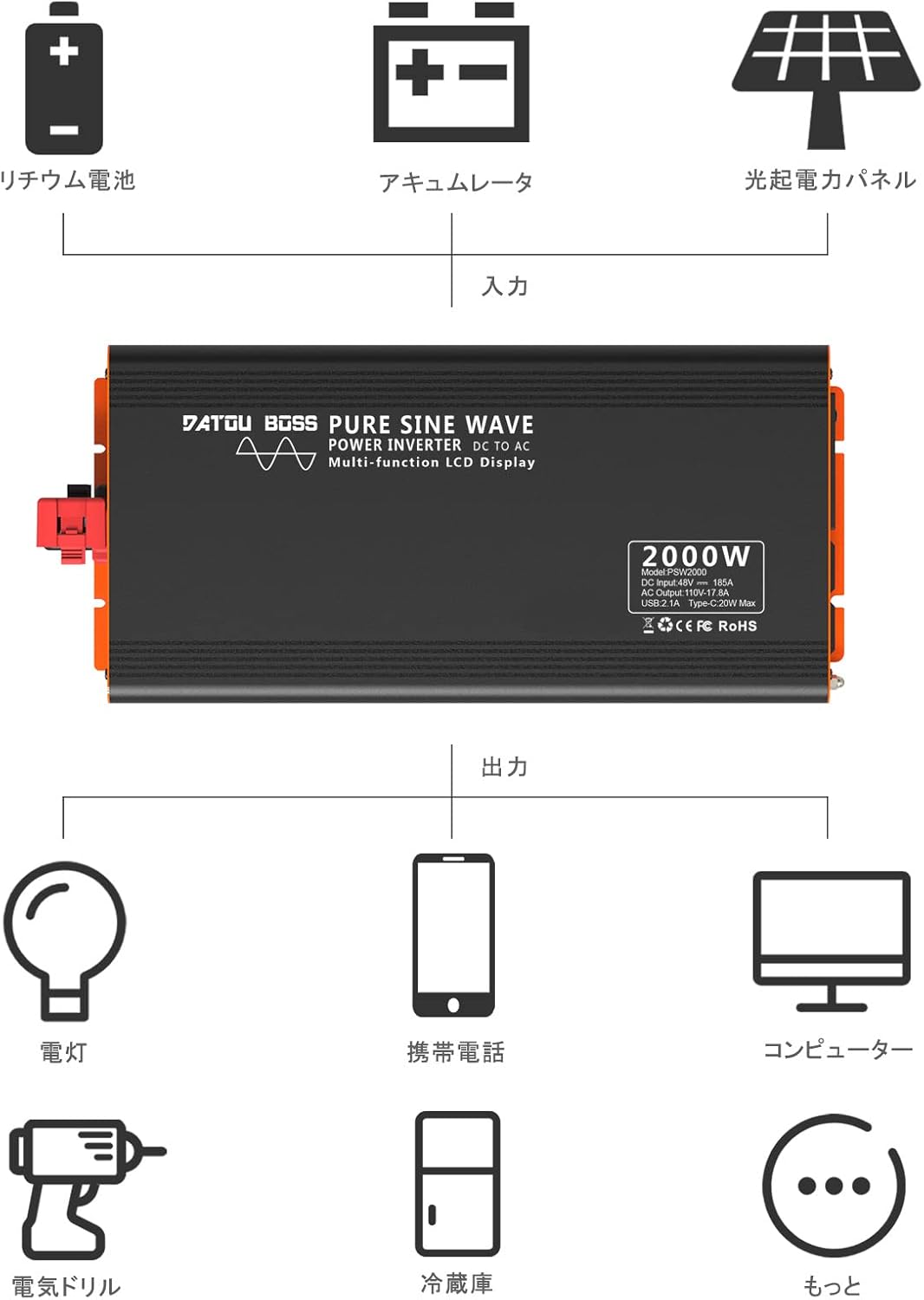
Image: A diagram indicating the location of the frequency switch inside the inverter, which can be set to 50Hz or 60Hz.
4.3 การจับคู่รีโมทคอนโทรล
If the remote control does not operate the inverter, it may need to be paired:
- Long-press the ON button on the inverter. A small red dot will flash on the inverter's display.
- Point the remote control towards the inverter and press the ON button on the remote.
- The inverter and remote control are now paired.
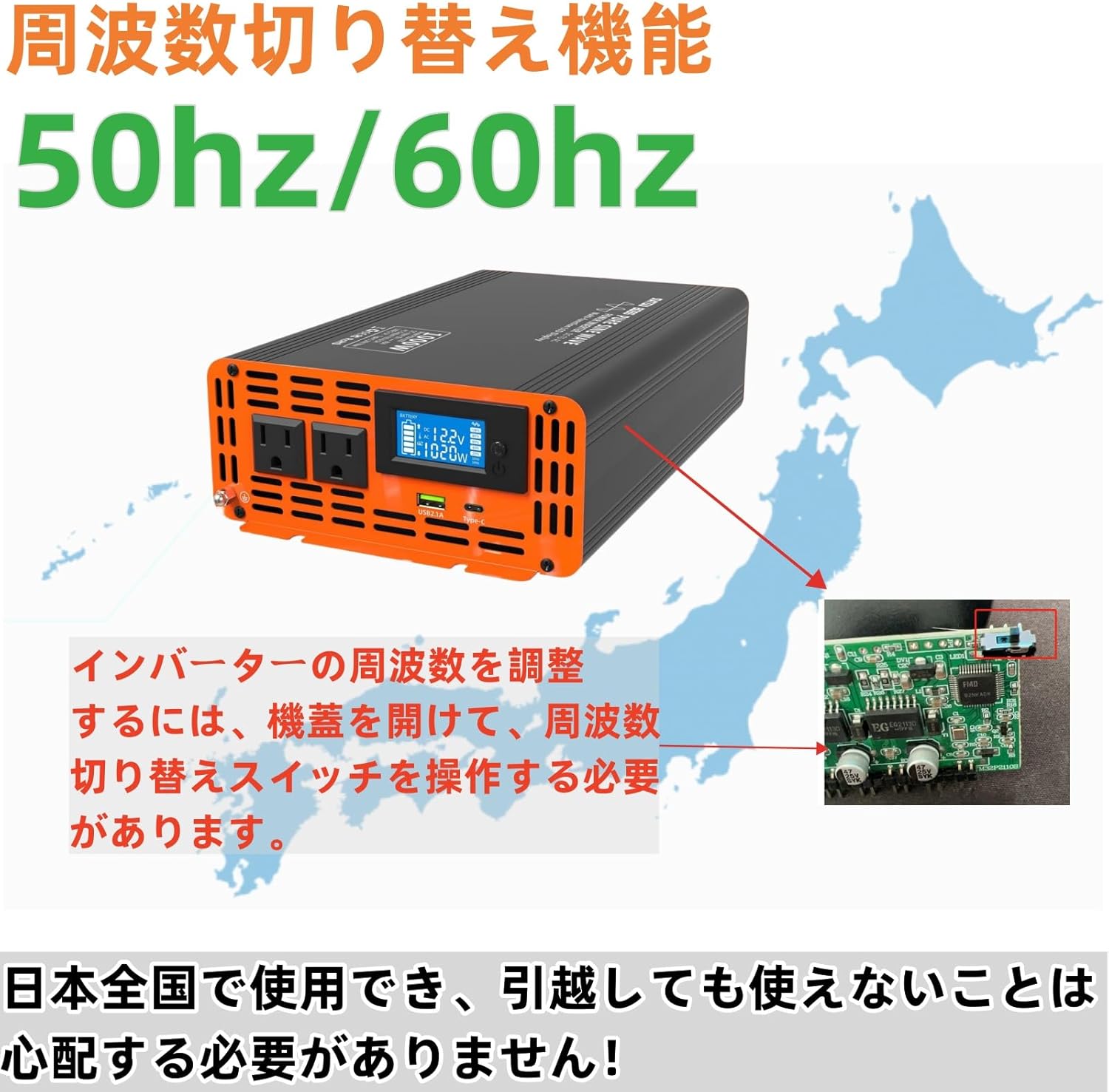
Image: Visual guide for pairing the remote control with the inverter, showing the steps to activate pairing mode and confirm connection.
5. คู่มือการใช้งาน
5.1 การเปิด/ปิดเครื่อง
- After connecting the battery cables, press the power button on the inverter to turn it on. The LCD display will illuminate.
- To turn off the inverter, press the power button again.
- Alternatively, use the remote control's ON/OFF buttons for convenience.
5.2 ทำความเข้าใจเกี่ยวกับจอแสดงผล LCD
The multi-functional LCD display provides critical information about the inverter's operation:
- อินพุต Voltage: แสดงค่าแรงดันไฟฟ้ากระแสตรง (DC vol)tage from your battery bank.
- ปริมาณการส่งออกtage: แสดงปริมาณไฟฟ้ากระแสสลับขาออกtagอี (เช่น 100V)
- จอแสดงผลพลังงาน: Indicates the current power consumption of connected appliances in Watts.
- พลังงานแบตเตอรี่: Visual representation of the battery charge level.
- การแสดงความถี่: Shows the output frequency (50Hz or 60Hz).
- การแสดงรูปคลื่น: Illustrates the pure sine wave output.
- แสดงอุณหภูมิ: Shows the internal temperature of the inverter.
- Overload Protection Indicator: Will display if an overload occurs.

ภาพ: รายละเอียด view of the LCD screen, displaying input voltage, output power, battery level, and other operational data.
5.3 การเชื่อมต่อเครื่องใช้ไฟฟ้าปรับอากาศ
- เสียบเครื่องใช้ไฟฟ้ากระแสสลับของคุณเข้ากับเต้ารับเอาต์พุตบนอินเวอร์เตอร์
- Ensure the total power consumption of all connected appliances does not exceed the inverter's rated power (2000W).
- For optimal performance and safety, avoid running appliances that draw close to the maximum power for extended periods.
Video: Demonstration of the inverter powering various household appliances, including a fan, TV, hair dryer, and blender, showcasing ความเก่งกาจของมัน
6. คุณสมบัติ
- High-Performance Pure Sine Wave Output: Provides stable and clean power suitable for a wide range of electrical products and precision instruments. Utilizes MCU microprocessor control with SPWM technology to deliver 100% pure sine wave power. Conversion efficiency exceeds 90%.
- Multiple Circuit Protection: Equipped with comprehensive safety features including input low voltage alarm, overvoltage protection, overload protection, low voltage protection, overheat protection, and short circuit protection. These safeguards ensure the complete protection of your connected circuits and devices. The waveform THD is ≤3%.
- จอแสดงผลคริสตัลเหลว LCD: Features a multi-functional LCD display that shows input voltage, temperature, battery power, frequency, output voltage, waveform, and power. It also indicates overload protection status. Includes remote control functionality for convenient operation.
- Ultra-Quiet & High Durability: Designed to minimize noise for a quiet operating environment while ensuring safety. The body is made of high-quality materials for durability. Two built-in cooling fans provide excellent heat dissipation. The fans activate automatically based on product temperature, extending the product's lifespan.
- การประยุกต์ใช้ที่กว้าง: Suitable for various applications including home appliances (e.g., vacuum cleaners), kitchen appliances (e.g., coffee makers), home entertainment electronics (e.g., audio systems), office equipment (e.g., computers), industrial equipment (e.g., cloud servers), and power tools (e.g., electric drills).

Image: A visual representation of the inverter's multi-protection system, including overvoltage, overload, overheat, and short circuit safeguards.
Image: An illustration demonstrating the wide range of applications for the inverter, from powering lights and phones to computers and electric drills, connected to a battery or solar panel setup.
7. การบำรุงรักษา
To ensure the longevity and optimal performance of your DATOUBOSS Pure Sine Wave Power Inverter, follow these maintenance guidelines:
- รักษาความสะอาด: Regularly clean the exterior of the inverter with a dry, soft cloth. Do not use liquid cleaners or solvents.
- ตรวจสอบการเชื่อมต่อ: Periodically inspect all electrical connections (battery cables, AC plugs) to ensure they are tight and free from corrosion. Loose connections can lead to overheating and power loss.
- การระบายอากาศ : Ensure the cooling fans and ventilation openings are free from dust and debris. Blocked vents can lead to overheating.
- พื้นที่จัดเก็บ: หากต้องเก็บรักษาอินเวอร์เตอร์เป็นเวลานาน ควรตัดการเชื่อมต่อจากแบตเตอรี่และเก็บไว้ในที่แห้งและเย็น
8 การแก้ไขปัญหา
หากคุณพบปัญหาเกี่ยวกับอินเวอร์เตอร์ โปรดดูปัญหาและวิธีแก้ไขทั่วไปต่อไปนี้:
| ปัญหา | สาเหตุที่เป็นไปได้ | สารละลาย |
|---|---|---|
| No AC Output / Inverter not turning on |
|
|
| สัญญาณเตือนความร้อนสูงเกินไป |
|
|
| รีโมตคอนโทรลไม่ทำงาน |
|
|
| สัญญาณรบกวนผิดปกติ |
|
|
9. ข้อมูลจำเพาะ
| คุณสมบัติ | ข้อมูลจำเพาะ |
|---|---|
| อินพุต Voltage | กระแสตรง 48 โวลต์ |
| ปริมาณการส่งออกtage | ไฟฟ้ากระแสสลับ 100 โวลต์ |
| กำลังไฟที่กำหนด | 2000วัตต์ |
| พลังสูงสุด | 4000วัตต์ |
| รูปคลื่นเอาท์พุต | เพียวไซน์เวฟ |
| ความถี่เอาต์พุต | 50Hz / 60Hz (สลับได้) |
| ระบบป้องกันความร้อนสูงเกินไป | 80℃ ± 5℃ |
| วิธีการทำความเย็น | Built-in Cooling Fans |
| Waveform THD | ≤3% |
| ประสิทธิภาพการแปลง | ≥90% |
| ขนาดสินค้า | 36 x 17.3 x 7.6 ซม. |
| น้ำหนักผลิตภัณฑ์ | 4.5 กก. |
| อุปกรณ์เสริมที่รวมอยู่ด้วย | Inverter, Remote Control |
10. การรับประกันและการสนับสนุน
DATOUBOSS products are designed and manufactured to the highest quality standards. For warranty information, technical support, or service inquiries, please contact the DATOUBOSS customer service team through your purchase platform or the official DATOUBOSS webเว็บไซต์.
โปรดเก็บหลักฐานการซื้อไว้เพื่อใช้ในกรณีเรียกร้องการรับประกัน