
การแนะนำ
Thank you for choosing the Ledwood Apollo S TWS Earphones. This manual provides detailed instructions on how to set up, operate, maintain, and troubleshoot your new wireless earbuds. Please read this manual carefully before use to ensure optimal performance and longevity of your device.
เนื้อหาแพ็คเกจ
- Ledwood Apollo S TWS Earphones (Left and Right)
- เคสชาร์จแบบไร้สาย
- สายชาร์จ USB
- คู่มือการใช้งาน
สินค้าเกินview
The Ledwood Apollo S TWS Earphones feature a sleek design and provide a seamless wireless audio experience. The compact charging case not only protects your earbuds but also provides additional battery life on the go. The case includes a digital screen to display the current battery level.
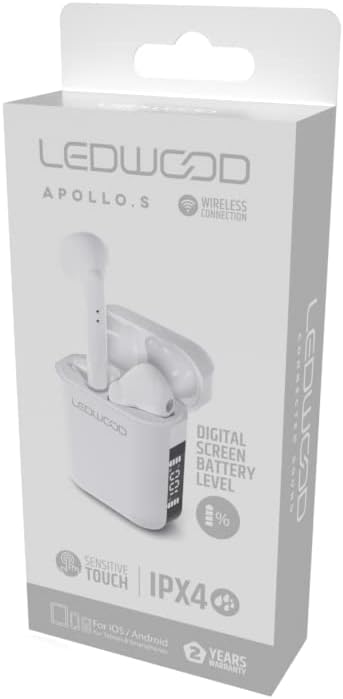
Image showing the Ledwood Apollo S TWS Earphones inside their charging case, highlighting the compact design and in-ear style.
การตั้งค่า
1. การชาร์จหูฟังและเคส
- ใส่หูฟังทั้งสองข้างลงในกล่องชาร์จ ตรวจสอบให้แน่ใจว่าใส่เข้าที่อย่างถูกต้องแล้ว
- เสียบสายชาร์จ USB เข้ากับพอร์ตชาร์จบนเคส และเสียบปลายอีกด้านหนึ่งเข้ากับอะแดปเตอร์แปลงไฟ USB (ไม่ได้รวมอยู่ในชุด) หรือพอร์ต USB ของคอมพิวเตอร์
- The digital screen on the charging case will display the current battery level during charging.
- Allow the earphones and case to fully charge before first use. The earphones will indicate full charge (e.g., LED indicator changes color or turns off).
2. การจับคู่กับอุปกรณ์ของคุณ
- ตรวจสอบให้แน่ใจว่าหูฟังได้รับการชาร์จและวางไว้ในกล่องชาร์จ
- Open the charging case. The earphones will automatically enter pairing mode (indicated by flashing LED lights on the earbuds).
- บนสมาร์ทโฟนหรืออุปกรณ์ที่รองรับ Bluetooth ของคุณ ให้ไปที่การตั้งค่า Bluetooth
- ค้นหา available devices and select "Ledwood Apollo S" from the list.
- Once connected, the earphones will provide an audio confirmation, and the LED indicators will stop flashing.
- If pairing fails, turn off Bluetooth on your device, place the earphones back in the case, close the case, then repeat the steps.
คำแนะนำการใช้งาน
The Ledwood Apollo S earphones feature sensitive touch controls for easy management of calls and music playback.
การควบคุมแบบสัมผัส
- เล่น/หยุดชั่วคราว: แตะที่หูฟังข้างใดข้างหนึ่งเพียงครั้งเดียว
- เพลงถัดไป: แตะสองครั้งที่หูฟังด้านขวา
- แทร็กก่อนหน้า: แตะสองครั้งที่หูฟังด้านซ้าย
- รับ/วางสาย: แตะเพียงครั้งเดียวที่หูฟังข้างใดข้างหนึ่งในระหว่างที่มีสายเรียกเข้าหรือสายสนทนาที่ใช้งานอยู่
- ปฏิเสธสาย: กดปุ่มหูฟังข้างใดข้างหนึ่งค้างไว้ 2 วินาทีในระหว่างที่มีสายเรียกเข้า
- เปิดใช้งาน Voice Assistant: แตะสามครั้งที่หูฟังข้างใดข้างหนึ่ง
- ปรับระดับเสียงขึ้น: กดและค้างที่หูฟังด้านขวา
- ลดเสียงลง: กดและค้างไว้ที่หูฟังด้านซ้าย
การซ่อมบำรุง
การทำความสะอาด
- ทำความสะอาดหูฟังและกล่องชาร์จเป็นประจำด้วยผ้าแห้งนุ่มที่ไม่เป็นขุย
- ห้ามใช้สารทำความสะอาดที่มีฤทธิ์กัดกร่อน แอลกอฮอล์ หรือตัวทำละลายเคมี
- Ensure charging contacts on both the earphones and the case are clean and free of debris to maintain proper charging.
พื้นที่จัดเก็บ
- เมื่อไม่ได้ใช้งาน ให้เก็บหูฟังไว้ในกล่องชาร์จเพื่อปกป้องหูฟังและชาร์จไฟอยู่เสมอ
- เก็บอุปกรณ์ไว้ในที่แห้งและเย็น หลีกเลี่ยงอุณหภูมิที่สูงและแสงแดดโดยตรง
การแก้ไขปัญหา
- หูฟังไม่จับคู่: Ensure both earphones are charged. Place them back in the case, close it, then reopen to re-enter pairing mode. Check your device's Bluetooth settings.
- ไม่มีเสียงจากหูฟังข้างหนึ่ง: Try resetting the earphones by placing them in the case, closing it, and then taking them out again. Re-pair with your device.
- ปัญหาการชาร์จ: Clean the charging contacts on both the earphones and the case. Ensure the charging cable is securely connected and the power source is functional.
- ปริมาณต่ำ: ปรับระดับเสียงได้ทั้งบนอุปกรณ์ที่เชื่อมต่อและโดยใช้ปุ่มควบคุมแบบสัมผัสบนหูฟัง
ข้อมูลจำเพาะ
| ชื่อรุ่น | อพอลโล เอส |
| หมายเลขรุ่น | LD-APOLLO-S-BLK |
| เทคโนโลยีการเชื่อมต่อ | ไร้สาย (Bluetooth) |
| วิธีการควบคุม | ระบบสัมผัส, การควบคุมระดับเสียง |
| สไตล์ | อินเอียร์ |
| ระดับความต้านทานต่อน้ำ | IPX4 (ป้องกันน้ำกระเซ็น) |
| คุณสมบัติพิเศษ | Fast Charging, Digital Screen Battery Level |
| วัสดุ | ไม้ |
| ผู้ผลิต | Ledwood |
การรับประกันและการสนับสนุน
The Ledwood Apollo S TWS Earphones come with a รับประกัน 2 ปี นับจากวันที่ซื้อ โดยครอบคลุมถึงข้อบกพร่องจากการผลิต โปรดเก็บหลักฐานการซื้อไว้เพื่อขอรับสิทธิ์การรับประกัน
For technical support, troubleshooting assistance, or warranty inquiries, please contact Ledwood customer service through their official webไซต์หรือผู้ค้าปลีกที่ซื้อผลิตภัณฑ์
For more information, visit the official Ledwood webเว็บไซต์: www.ledwood.com (หมายเหตุ: นี่คือตัวแทน URL เนื่องจากไม่มีการระบุลิงก์การสนับสนุนที่เฉพาะเจาะจง)