
การแนะนำ
Thank you for choosing the Ledwood Apollo S True Wireless Stereo (TWS) Earphones. This manual provides essential instructions for setting up, operating, and maintaining your earphones to ensure optimal performance and longevity. The Apollo S earphones feature a sleek design, sensitive touch controls, and a wireless charging case with a digital battery level display.
เนื้อหาแพ็คเกจ
- Ledwood Apollo S TWS Earphones (Left and Right)
- เคสชาร์จแบบไร้สาย
- สายชาร์จ USB
- คู่มือการใช้งาน
Note: Please check all items are present upon unboxing.
การตั้งค่า
1. การชาร์จหูฟังและเคส
Before first use, fully charge the earphones and the charging case. The charging case features a digital screen that displays the battery level percentage.
- การชาร์จเคส: Connect the provided USB charging cable to the charging port on the case and to a USB power adapter (not included). The digital display will show the charging progress.
- การชาร์จหูฟัง: Place the earphones into their respective slots in the charging case. Ensure they are correctly seated. The earphones will automatically begin charging. The case's digital display may indicate the charging status of the earphones.
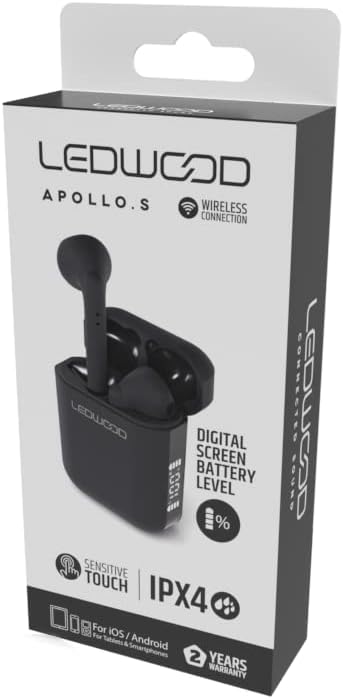
Image: Ledwood Apollo S TWS Earphones shown inside their open charging case. The earphones are black, and the case is also black with a sleek design. This image illustrates the product components.
2. การจับคู่กับอุปกรณ์บลูทูธ
- ขั้นตอนที่ 1: Ensure the earphones are charged. Open the charging case. The earphones will automatically enter pairing mode, indicated by a flashing LED light on one or both earphones.
- ขั้นตอนที่ 2: บนอุปกรณ์พกพาของคุณ (สมาร์ทโฟน แท็บเล็ต ฯลฯ) ไปที่การตั้งค่าบลูทูธ
- ขั้นตอนที่ 3: เปิดบลูทูธ ค้นหา อุปกรณ์ที่มีอยู่
- ขั้นตอนที่ 4: Select "Ledwood Apollo S" from the list of available devices.
- ขั้นตอนที่ 5: เมื่อเชื่อมต่อเสร็จแล้ว ไฟ LED บนหูฟังจะหยุดกะพริบ และคุณจะได้ยินเสียงยืนยัน
- หมายเหตุ: หูฟังจะเชื่อมต่อกับอุปกรณ์ที่จับคู่ไว้ครั้งล่าสุดโดยอัตโนมัติเมื่อนำออกจากเคส หากเปิดใช้งาน Bluetooth บนอุปกรณ์
คำแนะนำการใช้งาน
การสวมหูฟัง
Gently insert the earphones into your ears, ensuring a comfortable and secure fit. Adjust them slightly to achieve optimal sound quality and passive noise isolation.
การควบคุมแบบสัมผัส
The Ledwood Apollo S earphones feature sensitive touch controls on each earbud. The functions may vary slightly depending on your device and operating system.
- เล่น/หยุดชั่วคราว: แตะที่หูฟังข้างใดข้างหนึ่งเพียงครั้งเดียว
- เพลงถัดไป: แตะสองครั้งที่หูฟังด้านขวา
- แทร็กก่อนหน้า: แตะสองครั้งที่หูฟังด้านซ้าย
- รับ/วางสาย: แตะเพียงครั้งเดียวที่หูฟังข้างใดข้างหนึ่งในระหว่างที่มีสายเรียกเข้าหรือสายสนทนาที่ใช้งานอยู่
- ปฏิเสธสาย: กดปุ่มหูฟังข้างใดข้างหนึ่งค้างไว้ 2 วินาทีในระหว่างที่มีสายเรียกเข้า
- เปิดใช้งาน Voice Assistant: แตะสามครั้งที่หูฟังข้างใดข้างหนึ่ง (เช่น Siri หรือ Google Assistant)
- เปิด/ปิดเครื่อง: Earphones power on automatically when removed from the case and power off when placed back into the case. Manual power on/off may be available by pressing and holding the touch area for an extended period (refer to specific device behavior).
การซ่อมบำรุง
- การทำความสะอาด: ใช้ผ้านุ่ม แห้ง และไม่เป็นขุยทำความสะอาดหูฟังและกล่องชาร์จ ห้ามใช้น้ำยาทำความสะอาดหรือสารละลายที่มีฤทธิ์กัดกร่อน
- พื้นที่จัดเก็บ: เมื่อไม่ได้ใช้งาน ให้เก็บหูฟังไว้ในกล่องชาร์จเพื่อปกป้องหูฟังและชาร์จไฟอยู่เสมอ
- ความต้านทานน้ำ: The earphones are rated IPX4, meaning they are resistant to splashing water from any direction. They are not waterproof and should not be submerged in water. Avoid exposure to heavy rain or sweat for extended periods.
- อุณหภูมิ: หลีกเลี่ยงการให้หูฟังสัมผัสกับอุณหภูมิที่สูงหรือต่ำเกินไป (ร้อนหรือเย็นเกินไป) หรือความชื้นสูง
การแก้ไขปัญหา
- หูฟังไม่จับคู่:
- ตรวจสอบให้แน่ใจว่าหูฟังทั้งสองข้างได้รับการชาร์จแล้ว
- ปิดบลูทูธบนอุปกรณ์ของคุณและเปิดใหม่อีกครั้ง
- Forget "Ledwood Apollo S" from your device's Bluetooth list and try pairing again.
- Place earphones back in the case, close the lid, wait a few seconds, then open again to reset.
- ไม่มีเสียงจากหูฟังข้างหนึ่ง:
- ตรวจสอบให้แน่ใจว่าได้ชาร์จหูฟังเอียร์บัดทั้งสองข้างแล้ว
- ลองใส่หูฟังทั้งสองข้างกลับเข้าไปในเคส แล้วหยิบออกมาอีกครั้ง
- ตรวจสอบการตั้งค่าสมดุลเสียงของอุปกรณ์ของคุณ
- กล่องชาร์จไม่ชาร์จ:
- ตรวจสอบให้แน่ใจว่าสายชาร์จเชื่อมต่อกับเคสและแหล่งจ่ายไฟอย่างแน่นหนา
- ลองใช้สาย USB หรืออะแดปเตอร์จ่ายไฟอื่น
- การควบคุมแบบสัมผัสไม่ตอบสนอง:
- ให้แน่ใจว่านิ้วของคุณสะอาดและแห้ง
- รีสตาร์ทอุปกรณ์ของคุณและลองอีกครั้ง
ข้อมูลจำเพาะ
| ยี่ห้อ | Ledwood |
| ชื่อรุ่น | APOLLO S (LD-APOLLO-S-BLK) |
| ฟอร์มแฟกเตอร์ | ในหู |
| เทคโนโลยีการเชื่อมต่อ | ไร้สาย (Bluetooth) |
| วิธีการควบคุม | สัมผัส |
| ระดับการต้านทานน้ำ | IPX4 |
| สื่อในตัว | เคสชาร์จแบบไร้สาย |
| คุณสมบัติเพิ่มเติม | ชาร์จเร็ว |
| วัสดุ | พลาสติก |
| สี | สีดำ |
| ความเข้ากันได้ | For iOS / Android (Tablets & Smartphones) |
การรับประกันและการสนับสนุน
The Ledwood Apollo S TWS Earphones come with a รับประกัน 2 ปี นับจากวันที่ซื้อ การรับประกันนี้ครอบคลุมถึงข้อบกพร่องจากการผลิต โปรดเก็บหลักฐานการซื้อไว้เพื่อใช้ในการเรียกร้องการรับประกัน
For technical support or warranty inquiries, please contact your retailer or visit the official Ledwood website for customer service information. Ensure you have your model number (LD-APOLLO-S-BLK) and purchase details ready.