
สินค้าเกินview
The Yunbaoit VT03 60-Minute Visual Timer is a versatile time management tool designed to enhance concentration and productivity for both children and adults. Its intuitive visual countdown display helps users understand the passage of time without the need for constant clock-watching. Featuring silent operation, adjustable alarm modes, and a night light function, this timer is suitable for various settings including home, school, and work.

Image: A child is shown studying at a desk with the Yunbaoit Visual Timer placed beside her, illustrating its use in a learning environment.
การตั้งค่า
- การติดตั้งแบตเตอรี่: The Yunbaoit VT03 timer requires 2*AAA batteries (included in the package). Open the battery compartment located on the back of the device. Insert the batteries, ensuring correct polarity (+/-). Close the battery compartment securely.
- เปิดเครื่องครั้งแรก: Once batteries are installed, the timer is ready for use. There is no separate power button; the device activates upon battery insertion.

ภาพ: รายละเอียด view of the back of the Yunbaoit Visual Timer, highlighting the battery compartment and the switches for alarm volume and duration.
คำแนะนำการใช้งาน
- การตั้งเวลา: To set the countdown time, simply twist the central knob clockwise to your desired duration, up to 60 minutes. A colored disk will appear, visually representing the set time.
- เริ่มต้นการนับถอยหลัง: Once the knob is set, the timer automatically begins counting down. The colored disk will gradually disappear as time elapses.
- การหยุดการปลุก: When the set time is up, the timer will activate its alarm (audible or mute flash, depending on settings). To stop the alarm, press the top touch button once.
- Adjusting Alarm Mode: On the back of the timer, there are switches to select the alarm mode:
- Mute Flash: The timer will flash silently when time is up.
- สัญญาณเตือนต่ำ: A soft audible alarm will sound.
- สัญญาณเตือนดัง: A loud audible alarm will sound.
- ฟังก์ชั่นไฟกลางคืน: The timer includes a night light. Press the top touch button once to turn the light on. The light will automatically turn off after 15 seconds.

Image: A three-panel diagram illustrating the process of setting the timer, the colored disk receding as time passes, and the alarm ringing/flashing when time is up.

Image: Two scenarios showing the timer in use: one in a quiet library setting with mute flash, and another in a kitchen with an audible alarm.
Video: A user demonstrates the Yunbaoit Visual Timer, highlighting its compact size, ease of use, and the visual countdown feature. The video also shows the battery compartment and the volume/duration settings for the alarm.
คุณสมบัติ
- การนับถอยหลังด้วยภาพ: The 60-minute visual timer features a colored disk that recedes as time passes, providing a clear visual representation of remaining time. This is particularly beneficial for children and individuals who benefit from visual cues for time management.
- การทำงานเงียบ: The timer operates silently, ensuring no ticking sounds to distract users, making it ideal for quiet environments like classrooms, libraries, or study areas.
- Adjustable Audible Alert: Users can choose between three alarm modes: mute flash (silent), low volume, or loud volume. This flexibility allows the timer to be adapted to different situations and preferences.
- ฟังก์ชั่นไฟกลางคืน: A built-in night light provides subtle illumination, automatically turning off after 15 seconds to conserve battery life.
- การประยุกต์ใช้ที่กว้าง: This timer is suitable for various activities, including studying, cooking, exercise, classroom management, and managing screen time.

ภาพ: ภาพตัดปะแสดงasing the timer's versatility in various settings: learning, cooking, yoga, and classroom activities.
การซ่อมบำรุง
- การทำความสะอาด: เช็ดตัวจับเวลาด้วยผ้าแห้งเนื้อนุ่ม ห้ามใช้สารทำความสะอาดที่มีฤทธิ์กัดกร่อน หรือแช่อุปกรณ์ในน้ำ
- การเปลี่ยนแบตเตอรี่: Replace batteries when the timer's performance diminishes or if it stops functioning. Always use new AAA batteries and dispose of old batteries responsibly.
- พื้นที่จัดเก็บ: Store the timer in a cool, dry place away from direct sunlight and extreme temperatures. If not in use for a long period, remove the batteries to prevent leakage.
การแก้ไขปัญหา
| ปัญหา | สาเหตุที่เป็นไปได้ | สารละลาย |
|---|---|---|
| Timer not starting/functioning | แบตเตอรี่เหลือน้อยหรือหมด การติดตั้งแบตเตอรี่ไม่ถูกต้อง | Replace with new AAA batteries; ensure correct polarity. |
| Alarm is too quiet or too loud | Incorrect alarm volume setting. | Adjust the volume switch on the back of the timer to desired setting (low, loud, or mute flash). |
| Colored disk not moving smoothly | Internal mechanism obstruction or damage. | Ensure the knob is not forced past the 0 position. If the issue persists, contact customer support. |
ข้อมูลจำเพาะ
- แบบอย่าง: VT03
- ยี่ห้อ: หยุนเป่าอิต
- วัสดุ: พลาสติก
- สี: สีม่วง
- ขนาดสินค้า : ลึก 2 นิ้ว x กว้าง 3.5 นิ้ว x สูง 3.5 นิ้ว
- น้ำหนักสินค้า: 5.6 ออนซ์ (0.16 กิโลกรัม)
- แหล่งพลังงาน: แบตเตอรี่ AAA ขนาด 2 ก้อน
- Number of Settings (Alarm): 3 (Mute Flash, Low, Loud)
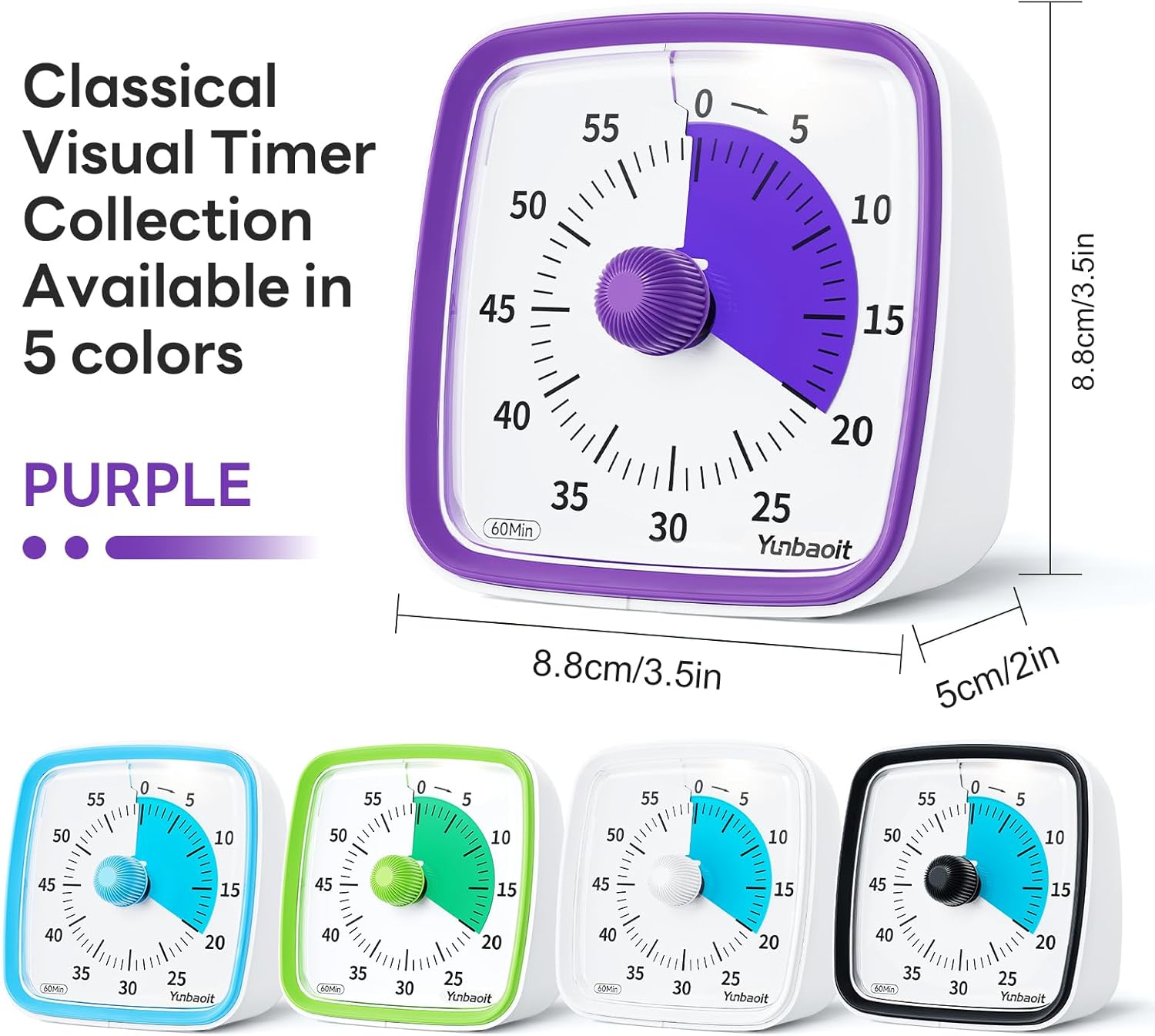
Image: The purple Yunbaoit Visual Timer displayed with its key dimensions (height, width, and depth) indicated.
การรับประกันและการสนับสนุน
For any problems or concerns regarding your Yunbaoit Visual Timer, please contact our seller directly via the Amazon Platform. We are committed to addressing your issues promptly and providing considerate service, even if the standard return window has closed.
ติดต่อฝ่ายสนับสนุน: Navigate to your Amazon order history, find your purchase of the Yunbaoit Visual Timer, and select the option to contact the seller. Provide a detailed description of your issue for efficient assistance.