
1. บทนำ
This manual provides detailed instructions for the setup, operation, and maintenance of your Graflsoa PG-9078 Bluetooth Wireless Gamepad. Please read this manual thoroughly before using the product to ensure proper functionality and to maximize your gaming experience. This gamepad is compatible with iOS, Android, Tablet, Phone, PC, Smart TV, and Set Top Box devices.
2. ข้อมูลด้านความปลอดภัย
- Do not expose the gamepad to extreme temperatures, humidity, or direct sunlight.
- หลีกเลี่ยงการทำเกมแพดตกหรือได้รับแรงกระแทกรุนแรง
- Do not attempt to disassemble or modify the gamepad. This will void the warranty.
- Keep the gamepad away from water and other liquids.
- ใช้เฉพาะสายชาร์จที่ให้มาหรือที่เทียบเท่าที่ได้รับการรับรองเท่านั้น
- Store the gamepad in a clean, dry place when not in use.
3. เนื้อหาบรรจุภัณฑ์
กรุณาตรวจสอบเนื้อหาแพ็คเกจเมื่อแกะกล่อง:
- Graflsoa PG-9078 Wireless Gamepad
- สายชาร์จ USB
- คู่มือการใช้งาน (เอกสารนี้)
4. สินค้าหมดview
Familiarize yourself with the components and features of your PG-9078 gamepad.
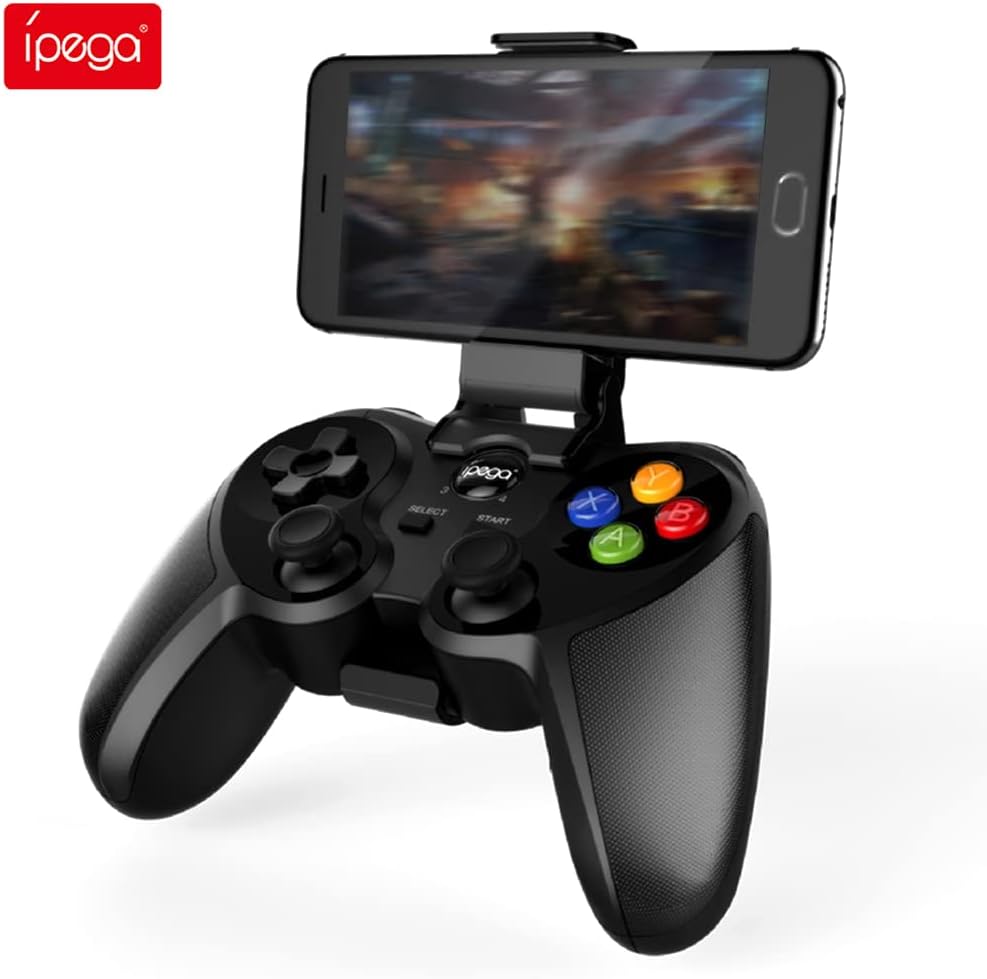
Figure 4.1: Graflsoa PG-9078 Wireless Gamepad with a smartphone mounted in the integrated holder.
The Graflsoa PG-9078 is a versatile Bluetooth gamepad designed for various gaming platforms. It features a comfortable ergonomic design, precise controls, and an integrated phone holder.
4.1 คุณสมบัติหลัก
- ที่วางโทรศัพท์แบบรวม: Supports smartphones from 4 to 5.5 inches, with an adjustable angle for optimal viewการไอเอ็นจี
- Hall Effect Sensor Switches: Provides durable and responsive trigger input.
- High Accuracy Joysticks: 360-degree precision joysticks with anti-slip texture to prevent operational errors.
- ปุ่มตอบสนอง: Fast response time for all face buttons and shoulder buttons.
- Analog L2/R2 Triggers: Offers precise control for racing and other games requiring nuanced input.
- การเชื่อมต่อบลูทูธ: Stable wireless connection with a transmission distance of up to 8 meters.

Figure 4.2: The adjustable phone holder, designed to securely hold smartphones between 4 and 5.5 inches. The angle can be freely adjusted for user comfort.

Figure 4.3: The high-accuracy joystick, featuring 360-degree movement and an anti-slip texture for enhanced control.

Figure 4.4: The highly sensitive and responsive face buttons and shoulder buttons, designed for quick input.
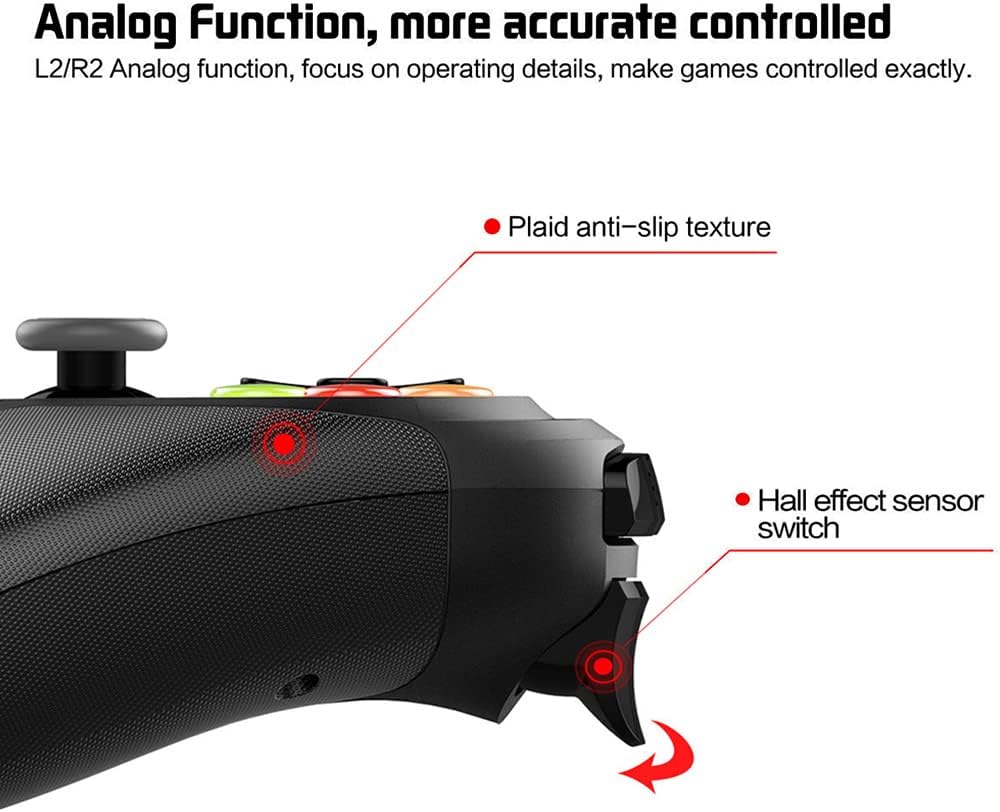
Figure 4.5: The L2/R2 analog triggers, providing accurate and detailed control for various in-game actions.

Figure 4.6: The gamepad utilizes Bluetooth technology for wireless connectivity, offering a stable connection up to 8 meters.
5. คำแนะนำในการตั้งค่า
5.1 การชาร์จเกมแพด
- เสียบปลายสายชาร์จ USB ด้านเล็กเข้ากับพอร์ตชาร์จบนจอยเกม
- ต่อปลายสายชาร์จ USB ด้านที่ใหญ่กว่าเข้ากับแหล่งจ่ายไฟ USB (เช่น พอร์ต USB ของคอมพิวเตอร์ อะแดปเตอร์ติดผนัง USB)
- The charging indicator light on the gamepad will illuminate during charging and turn off or change color when fully charged.
- โดยทั่วไปการชาร์จเต็มจะใช้เวลาประมาณ 2-3 ชั่วโมง
5.2 การติดตั้งที่วางโทรศัพท์
- Locate the phone holder attachment point on the top of the gamepad.
- Carefully slide the phone holder into the designated slot until it clicks securely into place.
- Adjust the angle of the holder to your preferred viewตำแหน่งการวางตำแหน่ง
- Gently place your smartphone (4-5.5 inches) into the holder, ensuring it is securely gripped.
5.3 การจับคู่บลูทูธ
The PG-9078 supports multiple connection modes. Select the appropriate mode for your device.
5.3.1 Android Standard Mode
- โปรดตรวจสอบให้แน่ใจว่าได้ปิดเครื่องเล่นเกมแล้ว
- กดปุ่มค้างไว้ "X" button + HOME button simultaneously until the indicator light flashes rapidly.
- On your Android device, enable Bluetooth and search for available devices.
- เลือก "PG-9078" จากรายการเพื่อจับคู่ ไฟแสดงสถานะจะติดสว่างเมื่อเชื่อมต่อแล้ว
5.3.2 iOS Standard Mode
- โปรดตรวจสอบให้แน่ใจว่าได้ปิดเครื่องเล่นเกมแล้ว
- กดปุ่มค้างไว้ "Y" button + HOME button simultaneously until the indicator light flashes rapidly.
- On your iOS device, enable Bluetooth and search for available devices.
- เลือก "PG-9078" จากรายการเพื่อจับคู่ ไฟแสดงสถานะจะติดสว่างเมื่อเชื่อมต่อแล้ว
5.3.3 PC/Smart TV Mode (Direct Play)
- โปรดตรวจสอบให้แน่ใจว่าได้ปิดเครื่องเล่นเกมแล้ว
- กดปุ่มค้างไว้ "A" button + HOME button simultaneously until the indicator light flashes rapidly.
- On your PC or Smart TV, enable Bluetooth and search for available devices.
- เลือก "PG-9078" จากรายการเพื่อจับคู่ ไฟแสดงสถานะจะติดสว่างเมื่อเชื่อมต่อแล้ว
Note: After successful pairing, the gamepad will automatically connect to the last paired device when powered on in the same mode.
6. คู่มือการใช้งาน
6.1 เปิด/ปิดเครื่อง
- เปิดเครื่อง: กดปุ่ม ปุ่ม HOME for 1 second. The indicator light will flash, then connect to the last paired device.
- หมดแรง: กดปุ่มค้างไว้ ปุ่ม HOME for 5 seconds until the indicator light turns off. The gamepad will also automatically power off after 5 minutes of inactivity.
6.2 Gamepad Modes
The PG-9078 supports different modes for optimal compatibility:
- Android Standard Mode (X + HOME): For most Android games and emulators.
- iOS Standard Mode (Y + HOME): For iOS games that support MFi controllers or specific gamepad protocols.
- PC/Smart TV Mode (A + HOME): For direct play on Windows PCs (requires Bluetooth adapter) and compatible Smart TVs.
Note: Game compatibility varies by platform and game title. Some games may require specific mapping or may not support external controllers.
6.3 การใช้การควบคุม
The gamepad features standard controls:
- แผงทิศทาง (D-Pad): เพื่อการป้อนทิศทางที่แม่นยำ
- แท่งอนาล็อกซ้าย/ขวา: สำหรับการเคลื่อนไหวแบบ 360 องศาและการควบคุมกล้อง
- ปุ่มหน้า (A, B, X, Y): สำหรับการกระทำในเกม
- กระดุมไหล่ (ซ้าย 1, ขวา 1): For quick actions.
- Analog Triggers (L2, R2): For pressure-sensitive input, ideal for acceleration/braking in racing games.
- ปุ่มเลือก/เริ่ม: For menu navigation and game functions.
- ปุ่มหน้าแรก: For power on/off and mode switching.

Figure 6.1: Proper grip and button access on the Graflsoa PG-9078 gamepad, highlighting its ergonomic design and Hall effect sensor switches.
7. การบำรุงรักษา
- การทำความสะอาด: Use a soft, dry cloth to wipe the surface of the gamepad. Do not use harsh chemicals or abrasive cleaners.
- พื้นที่จัดเก็บ: เก็บเกมแพดไว้ในที่แห้งและเย็น หลีกเลี่ยงแสงแดดโดยตรงและอุณหภูมิที่สูงหรือต่ำเกินไป
- การดูแลแบตเตอรี่ To prolong battery life, avoid fully discharging the gamepad frequently. Charge it regularly, even if not in constant use. If storing for an extended period, charge it to about 50% every few months.
8 การแก้ไขปัญหา
8.1 Gamepad Does Not Power On
- Ensure the gamepad is charged. Connect it to a power source using the USB cable and allow it to charge for at least 30 minutes before attempting to power on again.
- กดปุ่ม HOME ค้างไว้ 1 วินาทีเพื่อเปิดเครื่อง
8.2 ไม่สามารถจับคู่ผ่านบลูทูธได้
- Ensure the gamepad is in the correct pairing mode for your device (Android: X+HOME, iOS: Y+HOME, PC/Smart TV: A+HOME).
- ตรวจสอบให้แน่ใจว่าได้เปิดใช้งานบลูทูธบนอุปกรณ์ของคุณแล้วและสามารถค้นพบได้
- Move the gamepad closer to your device (within 8 meters).
- Forget/remove "PG-9078" from your device's Bluetooth list and attempt to pair again.
- Restart both your device and the gamepad.
8.3 ปุ่ม/จอยสติ๊กไม่ตอบสนอง
- Verify that the gamepad is successfully connected to your device.
- Check game settings to ensure controller support is enabled and controls are mapped correctly.
- Some games may not fully support external gamepads.
- Try restarting the gamepad and your device.
9. ข้อมูลจำเพาะ
| แบบอย่าง | พีจี-9078 |
| การเชื่อมต่อ | บลูทูธไร้สาย |
| ช่วงบลูทูธ | สูงสุด 8 เมตร |
| ความเข้ากันได้ | iOS, Android, Tablet, Phone, PC, Smart TV, Set Top Box |
| ที่วางโทรศัพท์ | สมาร์ทโฟนขนาด 4 - 5.5 นิ้ว |
| คุณสมบัติพิเศษ | Hall Effect Sensor Switches, 360-degree High Accuracy Joysticks, Analog L2/R2 Triggers |
| แหล่งพลังงาน | Rechargeable Battery (Internal) |
10. การรับประกันและการสนับสนุน
สำหรับข้อมูลการรับประกันและการสนับสนุนทางเทคนิค โปรดดูเอกสารประกอบที่ให้มาพร้อมกับสินค้าที่คุณซื้อ หรือติดต่อตัวแทนจำหน่าย โปรดเก็บหลักฐานการซื้อไว้เพื่อใช้ในกรณีที่ต้องการเคลมประกัน