
การแนะนำ
ขอบคุณสำหรับการซื้อasing the Proscan PSP333 Portable Bluetooth Speaker. This manual provides important safety instructions, operational guidelines, and maintenance tips to ensure optimal performance and longevity of your device. Please read this manual thoroughly before using the product and retain it for future reference.
ข้อมูลด้านความปลอดภัย
- อย่าวางเครื่องไว้ในที่ที่มีอุณหภูมิสูงหรือต่ำเกินไป แสงแดดโดยตรง หรือความชื้นสูง
- หลีกเลี่ยงการทำตกหรือให้ลำโพงได้รับแรงกระแทกรุนแรง
- ห้ามถอดประกอบหรือพยายามซ่อมแซมเครื่องด้วยตนเอง แนะนำให้ช่างผู้ชำนาญการเป็นผู้ดำเนินการซ่อมบำรุงทั้งหมด
- เก็บลำโพงให้ห่างจากน้ำและของเหลวอื่นๆ
- ใช้เฉพาะสายชาร์จที่ระบุไว้เท่านั้น
- ตรวจสอบให้แน่ใจว่ามีการระบายอากาศที่เหมาะสมเมื่อใช้งานลำโพง
เนื้อหาแพ็คเกจ
กรุณาตรวจสอบว่ารายการต่อไปนี้รวมอยู่ในแพ็คเกจของคุณ:
- Proscan PSP333 Portable Bluetooth Speaker
- สายชาร์จ USB
- คู่มือการใช้งาน (เอกสารนี้)
คุณสมบัติผลิตภัณฑ์
The Proscan PSP333 speaker offers a range of features for an enhanced audio experience:
- Wireless Bluetooth connectivity for streaming audio from compatible devices.
- Integrated LED lights for visual ambiance.
- Built-in FM radio for listening to local stations.
- Auxiliary (AUX) input for wired connection to non-Bluetooth devices.
- Adjustable Bass, Treble, and Volume controls.
- Rechargeable battery for portable use.
- Convenient carrying handles that also function as a built-in stand.
- Output Power: 2 x 3W (6-Watt-RMS total).
การควบคุมและการเชื่อมต่อ
Familiarize yourself with the control panel and connection ports of your speaker.

รูปที่ 1: ด้านหน้า view of the Proscan PSP333 speaker, highlighting the speaker grilles and the central control interface.
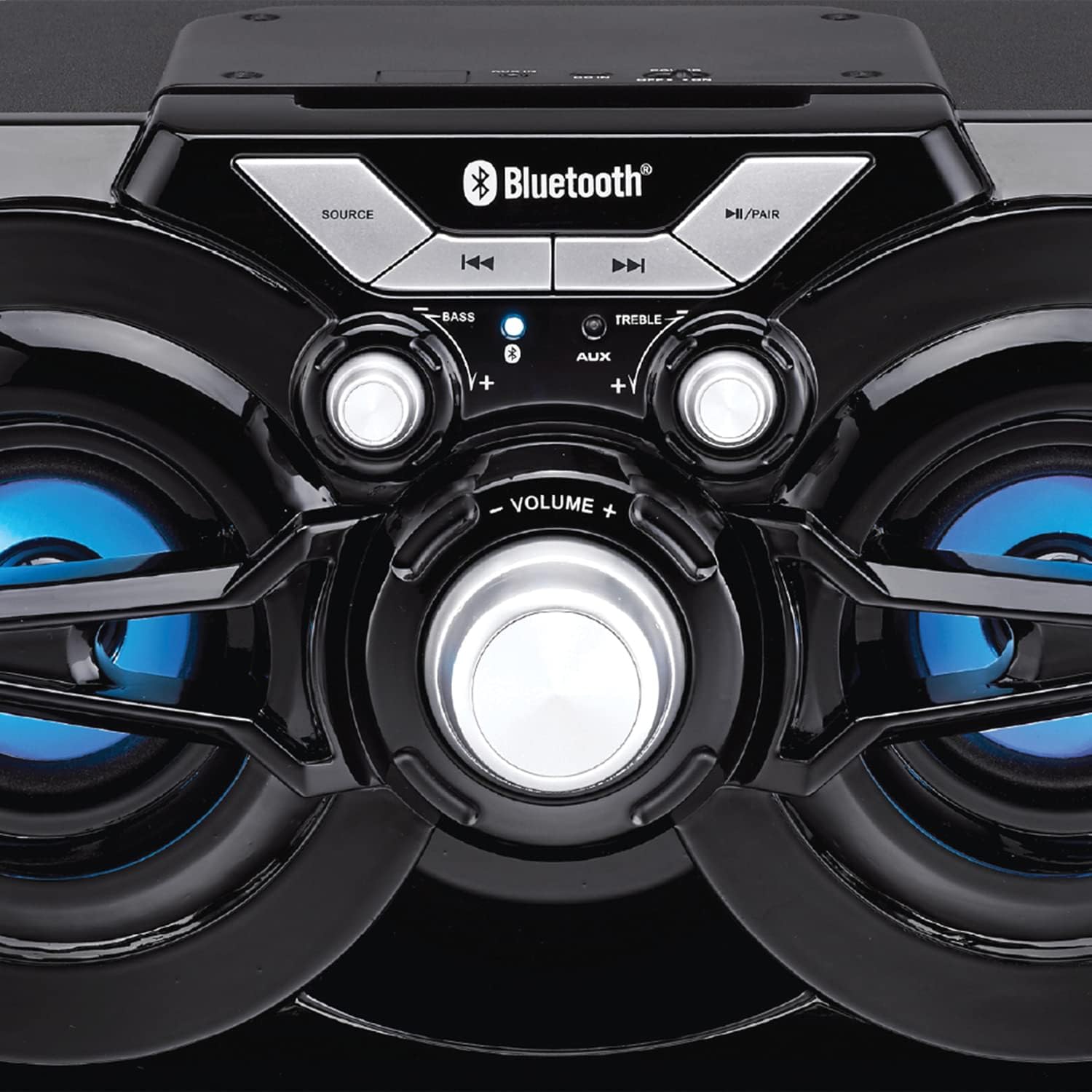
รูปที่ 2: รายละเอียด view of the speaker's control panel, illustrating the various buttons and adjustment knobs.
ฟังก์ชั่นแผงควบคุม:
- ปุ่มแหล่งที่มา: Press to switch between Bluetooth, FM Radio, and AUX input modes.
- ◀◀ (Previous Track/Tune Down) Button: In Bluetooth mode, press to go to the previous track. In FM mode, press to tune down the frequency.
- ▶▶ (Next Track/Tune Up) Button: In Bluetooth mode, press to go to the next track. In FM mode, press to tune up the frequency.
- ►/PAIR Button: Press to Play/Pause audio. Press and hold to initiate Bluetooth pairing mode. In FM mode, press and hold to auto-scan for stations.
- ลูกบิดเบส: หมุนเพื่อปรับระดับเสียงเบส
- ลูกบิดเสียงแหลม: หมุนเพื่อปรับระดับเสียงแหลม
- ปุ่มปรับระดับเสียง: Rotate to adjust the overall volume output.
- อินพุต AUX: 3.5mm jack for connecting external audio devices via an auxiliary cable (not included).
- พอร์ตชาร์จ: สำหรับเชื่อมต่อสายชาร์จ USB
การตั้งค่า
การชาร์จครั้งแรก:
- Before first use, fully charge the speaker. Connect the small end of the included USB charging cable to the charging port on the speaker.
- ต่อปลายสาย USB ด้านที่ใหญ่กว่าเข้ากับอะแดปเตอร์แปลงไฟ USB (ไม่ได้รวมอยู่ในชุด) หรือพอร์ต USB ของคอมพิวเตอร์
- The charging indicator light will illuminate. Once fully charged, the light may change color or turn off (refer to specific indicator behavior if detailed in product).
- การชาร์จเต็มโดยปกติจะใช้เวลาหลายชั่วโมง
การเปิด/ปิดเครื่อง:
- To power on the speaker, locate the power switch (usually on the back or side) and slide it to the 'ON' position.
- หากต้องการปิดเครื่อง ให้เลื่อนสวิตช์ไปที่ตำแหน่ง 'ปิด'
คำแนะนำการใช้งาน
โหมดบลูทู ธ :
- Power on the speaker. It will automatically enter Bluetooth pairing mode, indicated by a flashing LED light (e.g., blue LED).
- If the speaker is not in Bluetooth mode, press the แหล่งที่มา กดปุ่มจนกว่าไฟแสดงสถานะบลูทูธจะกะพริบ
- บนอุปกรณ์เคลื่อนที่ของคุณ (สมาร์ทโฟน แท็บเล็ต ฯลฯ) เปิดใช้งานบลูทูธและค้นหาอุปกรณ์ที่มีอยู่
- Select "PSP333" or "Proscan Speaker" from the list of devices.
- Once paired, the Bluetooth indicator light will stop flashing and remain solid. You can now play audio from your device through the speaker.
- Use the ◀◀, ▶▶, and ►/PAIR buttons on the speaker or your device to control playback.
โหมดอินพุตAUX:
- เปิดลำโพง
- เชื่อมต่อปลายด้านหนึ่งของสายสัญญาณเสียงขนาด 3.5 มม. (ไม่ได้รวมอยู่ในชุด) เข้ากับพอร์ตอินพุต AUX บนลำโพง
- ต่อปลายอีกด้านของสายสัญญาณเสียง 3.5 มม. เข้ากับแจ็คหูฟังหรือช่องสัญญาณเสียงออกของอุปกรณ์ภายนอกของคุณ (เช่น เครื่องเล่น MP3, คอมพิวเตอร์)
- กดปุ่ม แหล่งที่มา button until the speaker is in AUX mode.
- Play audio from your external device. Volume can be controlled via the speaker's VOLUME knob and your external device.
โหมดวิทยุ FM:
- เปิดลำโพง
- กดปุ่ม แหล่งที่มา button until the speaker is in FM Radio mode.
- To auto-scan and save available stations, press and hold the ►/PAIR button. The speaker will scan and store stations automatically.
- Once scanning is complete, use the ◀◀ and ▶▶ buttons to navigate between the saved stations.
- For manual tuning, short press the ◀◀ or ▶▶ buttons to adjust the frequency incrementally.
ไฟ LED:
The speaker features integrated LED lights that illuminate the speaker cones. These lights typically activate automatically when the speaker is powered on. There may be a dedicated button or a combination of button presses to cycle through light modes or turn them off/on. (Note: Specific control for LED lights is not detailed in product description, assume automatic or simple toggle if present.)
การชาร์จลำโพง
The Proscan PSP333 speaker is equipped with a built-in rechargeable Lithium Ion battery.
- When the battery is low, the speaker may emit an audible alert or an indicator light may flash.
- Connect the included USB charging cable to the speaker's charging port and to a suitable USB power source (e.g., 5V USB adapter, computer USB port).
- ไฟแสดงการชาร์จจะแสดงสถานะการชาร์จ
- Disconnect the charging cable once the battery is fully charged to preserve battery life.
การซ่อมบำรุง
- การทำความสะอาด: ใช้ผ้าแห้งนุ่มเช็ดทำความสะอาดภายนอกลำโพง ห้ามใช้น้ำยาทำความสะอาดหรือวัสดุที่มีฤทธิ์กัดกร่อน
- พื้นที่จัดเก็บ: เมื่อไม่ได้ใช้งานเป็นเวลานาน ควรเก็บลำโพงไว้ในที่แห้งและเย็น หลีกเลี่ยงแสงแดดโดยตรงและอุณหภูมิที่สูงหรือต่ำเกินไป
- การดูแลแบตเตอรี่ To maintain battery health, avoid fully discharging the battery frequently. Charge the speaker regularly, even if not in use, to prevent deep discharge.
การแก้ไขปัญหา
| ปัญหา | วิธีแก้ปัญหาที่เป็นไปได้ |
|---|---|
| ลำโพงไม่เปิดเครื่อง | Ensure the battery is charged. Connect the speaker to a power source using the USB cable. Check the power switch is in the 'ON' position. |
| ไม่มีเสียงจากลำโพง | Increase the volume on both the speaker and the connected device. Ensure the correct source mode (Bluetooth, AUX, FM) is selected. Check audio cable connection for AUX mode. |
| ไม่สามารถจับคู่ผ่านบลูทูธได้ | Ensure the speaker is in Bluetooth pairing mode (flashing LED). Make sure the speaker is within 30 ft (9 meters) of your device. Turn off and on Bluetooth on your device. Forget "PSP333" from your device's Bluetooth list and try pairing again. |
| การรับสัญญาณวิทยุ FM ไม่ดี | Relocate the speaker to an area with better signal. Ensure no large metallic objects are blocking the signal. |
| เสียงเพี้ยน | Reduce the volume on both the speaker and the connected device. Check Bass and Treble settings. Ensure the audio source is not distorted. |
ข้อมูลจำเพาะ

รูปที่ 3: Dimensions of the Proscan PSP333 speaker, showing its length, height, and depth.
| คุณสมบัติ | รายละเอียด |
|---|---|
| หมายเลขรุ่น | พีเอสพี333 |
| กำลังขับ | 2 x 3W (6-Watt-RMS) |
| การเชื่อมต่อ | บลูทูธ, ช่องเสียบ AUX (3.5 มม.) |
| ขนาดไดร์เวอร์ | 3 นิ้ว |
| ช่วงสาย | สูงถึง 30 ฟุต (9 เมตร) |
| แหล่งพลังงาน | แบตเตอรี่ลิเธียมไอออนแบบชาร์จไฟได้ |
| ขนาดสินค้า (กว้าง x ยาว x สูง) | 24.31 x 42.09 x 24.1 ซม. (ประมาณ 9.57 x 16.57 x 9.49 นิ้ว) |
| น้ำหนักสินค้า | 2.61 กก. (ประมาณ 5.75 ปอนด์) |
| สี | สีดำ |
การรับประกันและการสนับสนุน
This product is covered by a limited manufacturer's warranty. For specific warranty terms and conditions, please refer to the documentation provided at the time of purchase or contact the retailer. For technical support or service inquiries, please contact the customer service department of PROSCAN or your authorized dealer.
Manufacturer: Curtis International
Place of Business: Mississauga, ON L5S 2A4