
Platinum Karaoke DK-88
Platinum Karaoke DK-88 Duo Speaker System
คู่มือการใช้งาน
การแนะนำ
Thank you for choosing the Platinum Karaoke DK-88 Duo Speaker System. This manual provides essential information for the safe and efficient operation of your new device. Please read it thoroughly before use and retain it for future reference.
The DK-88 Duo is an all-in-one karaoke solution, featuring a built-in song library, wireless microphones, and various connectivity options. Its robust design and versatile features make it ideal for home parties, family gatherings, and outdoor events.
ข้อมูลด้านความปลอดภัย
- อย่าให้เครื่องโดนฝนหรือความชื้นเพื่อป้องกันไฟไหม้หรือไฟฟ้าช็อต
- อย่าเปิดcasinก. ส่งต่อการบริการทั้งหมดให้กับบุคลากรที่มีคุณสมบัติเหมาะสม
- ตรวจสอบให้แน่ใจว่ามีการระบายอากาศที่เหมาะสมรอบ ๆ เครื่อง อย่าปิดกั้นช่องระบายอากาศ
- ใช้เฉพาะอะแดปเตอร์ชาร์จที่ให้มาเท่านั้น
- ควรวางเครื่องให้ห่างจากแสงแดดโดยตรง แหล่งความร้อน และฝุ่นละอองมากเกินไป
- หลีกเลี่ยงการวางของหนักทับบนตัวเครื่อง
- เก็บให้พ้นจากมือเด็ก
เนื้อหาแพ็คเกจ
โปรดตรวจสอบว่ารายการทั้งหมดที่ระบุไว้ด้านล่างรวมอยู่ในแพ็คเกจของคุณหรือไม่:
- Main Unit (DK-88 Duo Speaker)
- อะแดปเตอร์ชาร์จไฟ
- 2 x ไมโครโฟนไร้สาย
- รีโมทคอนโทรล
- Batteries (for remote control and microphones)
- เคเบิ้ล AV
- คู่มือการใช้งาน
- บัตรรับประกัน

รูปที่ 1: อุปกรณ์และส่วนประกอบที่รวมอยู่ในชุด
สินค้าเกินview
ด้านหน้า View

รูปที่ 2 : ด้านหน้า View of the DK-88 Duo with LED Lighting
แผงควบคุมด้านบน

รูปที่ 3: แผงควบคุมด้านบนและอินพุต
แผงด้านหลัง

Figure 4: Rear Panel with Connectivity Ports
การตั้งค่า
1. การเปิดเครื่อง/การชาร์จ
- ไฟฟ้ากระแสสลับ: Connect the charging adapter to the 'DC IN 20V/4A' port on the top panel and plug it into a wall outlet. The unit can be used while charging.
- พลังงานแบตเตอรี่: The unit has a built-in rechargeable battery providing up to 6 hours of playback. Ensure the unit is charged before portable use. The battery indicator on the display will show the current charge level.
2. การตั้งค่าไมโครโฟน
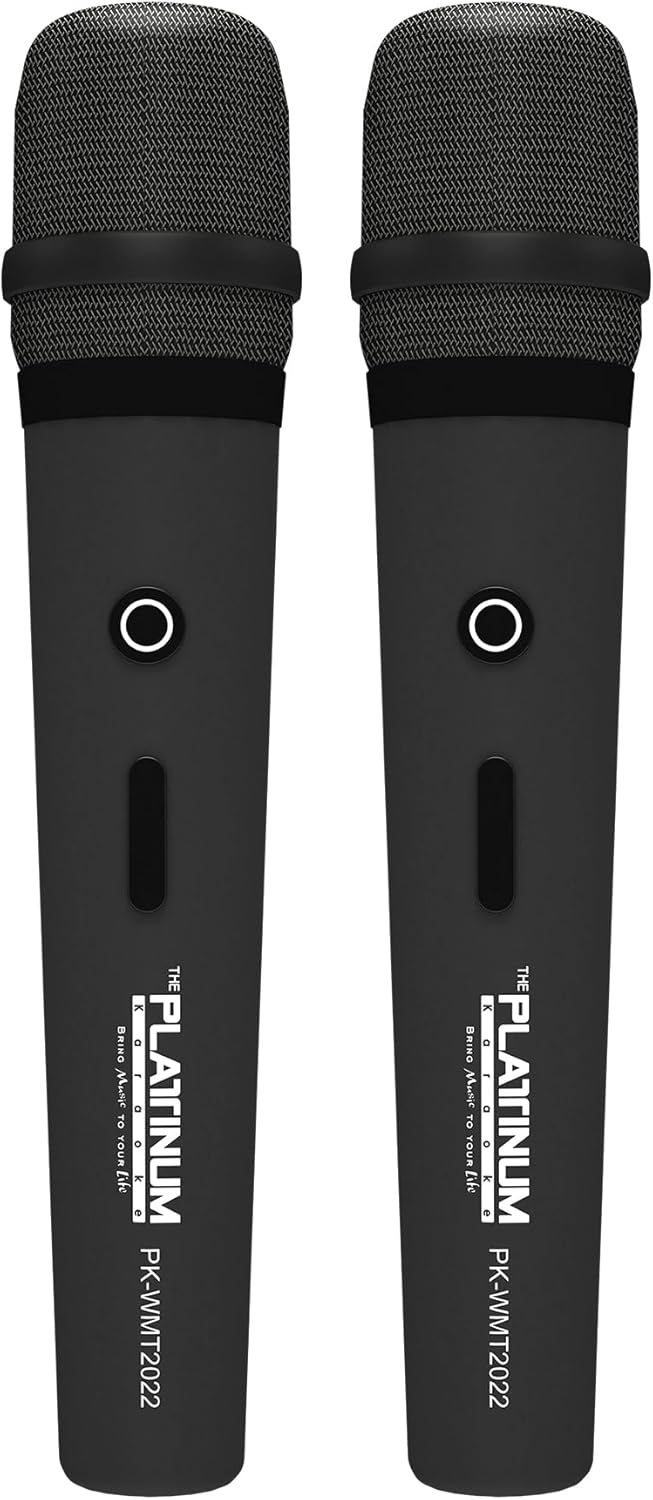
รูปที่ 5: ไมโครโฟนไร้สาย
- Insert the provided batteries into each wireless microphone.
- Turn on the microphones using their power switches. They will automatically connect to the DK-88 Duo unit.
- Adjust the 'MIC VOLUME' knob on the top panel to control the microphone output level.
3. การเชื่อมต่อแหล่งเสียง
- บลูทูธ: Turn on the unit. The Bluetooth indicator will flash. Enable Bluetooth on your mobile device and select 'DK-88 Duo' from the list of available devices to pair.
- ยูเอสบีไดรฟ์: ใส่แฟลชไดรฟ์ USB ที่มีเพลง MP3 files into the 'USB' port on the top panel. The system will automatically detect and play the files.
- การ์ด Micro SD: Insert a Micro SD card (up to 32GB, pre-loaded with songs) into the 'MICRO SD' slot on the top panel. The system will automatically detect and play the songs.
- อินพุต AUX: Use the provided AV cable to connect external audio devices (e.g., DVD player, TV) to the 'AUX' input on the top panel.
- อินพุตกีตาร์: Connect a guitar to the 'GUITAR IN' port on the top panel. Adjust the dedicated 'GUITAR' volume knob.
คำแนะนำการใช้งาน
1. การทำงานพื้นฐาน
- เปิด/ปิดเครื่อง: Use the 'POWER' switch on the top panel to turn the unit on or off.
- การควบคุมระดับเสียง: Rotate the 'VOLUME' knob to adjust the overall sound output.
- การเลือกโหมด: Press the 'MODE' button to switch between input sources (Bluetooth, USB, Micro SD, AUX).
2. คุณสมบัติคาราโอเกะ
- การเลือกเพลง: Use the 'SKIP' buttons (- / >>|) to navigate through songs.
- เอฟเฟกต์เสียงสะท้อน: Adjust the 'ECHO' knob to add or reduce echo to your vocals. This helps blend your voice with the music.
- การบันทึกเพลง: Press the 'REC' button to start recording your performance. The system will save the music and your vocals to the inserted Micro SD card or USB drive. To share, simply copy the recorded file ไปยังคอมพิวเตอร์
- Vocal Assist (Training Songs): For training songs, the main vocals will automatically fade out when you sing into the microphone and reappear when you stop.
3. การปรับแต่งเสียง
- การควบคุมเสียงแหลม: Use the 'TREBLE' knob to adjust the high-frequency sounds of the music.
- การควบคุมเสียงเบส: Use the 'BASS' knob to adjust the low-frequency sounds of the music.
4. เอฟเฟกต์แสง
- Press the 'LIGHT' button on the top panel to cycle through different colorful fire lighting modes. The lights glow and dance with the music, enhancing the party atmosphere.
5. Platinum Link App
- Download the 'Platinum Link' app from your mobile device's app store (available on Android and iOS).
- Connect your mobile phone to the DK-88 Duo via Bluetooth.
- Use the app to control song selection, browse the song library, reserve songs, and display karaoke lyrics directly on your phone screen.
- The app also features a karaoke recording function to measure your vocal performance and improve your singing skills.
การซ่อมบำรุง
- เช็ดทำความสะอาดเครื่องด้วยผ้าแห้งเนื้อนุ่ม ห้ามใช้น้ำยาทำความสะอาดหรือสเปรย์กระป๋อง
- เก็บเครื่องไว้ในที่เย็นและแห้งเมื่อไม่ใช้งาน
- Remove batteries from the remote control and microphones if storing for extended periods to prevent leakage.
การแก้ไขปัญหา
| ปัญหา | สาเหตุที่เป็นไปได้ | สารละลาย |
|---|---|---|
| ไม่มีไฟฟ้า | Unit is not charged or not connected to AC power. | Connect the charging adapter and ensure it's plugged into a working outlet. Check battery level. |
| ไม่มีเสียงจากไมโครโฟน | Microphones are off, batteries are low, or volume is too low. | Turn on microphones, replace batteries, increase 'MIC VOLUME' knob. |
| บลูทูธไม่เชื่อมต่อ | Bluetooth is not enabled on the unit or mobile device, or device is too far. | Ensure unit is in Bluetooth mode, enable Bluetooth on your device, move closer to the unit. |
| Cannot play songs from USB/SD | ไม่ถูกต้อง file รูปแบบเสียหาย files, or card/drive not inserted properly. | ทำให้มั่นใจ files are MP3 format. Reinsert the USB drive/SD card. Try a different drive/card. |
| ไฟไม่ทำงาน | Light feature is turned off. | Press the 'LIGHT' button to activate the lighting effects. |
ข้อมูลจำเพาะ
| คุณสมบัติ | รายละเอียด |
|---|---|
| หมายเลขรุ่น | ดีเค-88 |
| ขนาด (กว้าง x ยาว x สูง) | 35 x 38 x 78 ซม. |
| น้ำหนัก | 13 กก. |
| แหล่งพลังงาน | Battery Powered (1 x 12V battery included), AC Powered |
| เวลาเล่นแบตเตอรี่ | นานถึง 6 ชั่วโมง |
| เทคโนโลยีการเชื่อมต่อ | ยูเอสบี, บลูทูธ |
| พอร์ต USB | 1 |
| จำนวนของลำโพง | 2 |
| คุณสมบัติพิเศษ | Built-in Song Track |
| สี | สีดำ |
| การใช้ที่แนะนำ | Home parties, family gatherings, karaoke bars, outdoor events, musical performances |
การรับประกันและการสนับสนุน
Your Platinum Karaoke DK-88 Duo comes with a warranty. Please refer to the included Warranty Card for detailed terms and conditions, including warranty period and coverage.
For technical support, service, or inquiries not covered in this manual, please contact Platinum Karaoke customer service. Contact information can typically be found on the Warranty Card or the official Platinum Karaoke webเว็บไซต์.
Ask a question about this manual
Ask about setup, troubleshooting, compatibility, parts, safety, or missing instructions. Manuals+ will review the question and use this page’s manual context to help answer it.