
ALONEFIRE PL500
ALONEFIRE PL500 Clip-on Light Instruction Manual
Model: PL500 | Brand: ALONEFIRE
การแนะนำ
Thank you for choosing the ALONEFIRE PL500 Clip-on Light. This versatile and compact light is designed for convenience and hands-free illumination in various situations. With its strong magnetic attachment and multiple light modes, it's an essential accessory for professionals, outdoor enthusiasts, and anyone needing reliable portable lighting.

The ALONEFIRE PL500 Clip-on Light, showcasing การออกแบบที่กะทัดรัดและตามหลักสรีรศาสตร์
คุณสมบัติผลิตภัณฑ์
- Strong Magnetic Ends: Equipped with two powerful magnetic ends, the light securely attaches to metal surfaces or thin fabrics, ensuring it stays in place during use.
- โหมดแสงหลายโหมด: Easily switch between three distinct modes: warm light, red light, and flashing red light, to suit different needs and environments.
- ชาร์จไฟด้วย USB: Conveniently recharge the built-in battery using any standard USB port from a computer, power adapter, laptop, or car charger.
- ระดับความสว่างที่เหมาะสม: Provides 20 lumens of bright white light, suitable for dark environments without being overly intense.
- การใช้งานที่หลากหลาย: Ideal for use as nurse badge accessories, for night shifts, or clipped onto shirts, pants, caps, backpacks, dog collars, and more.
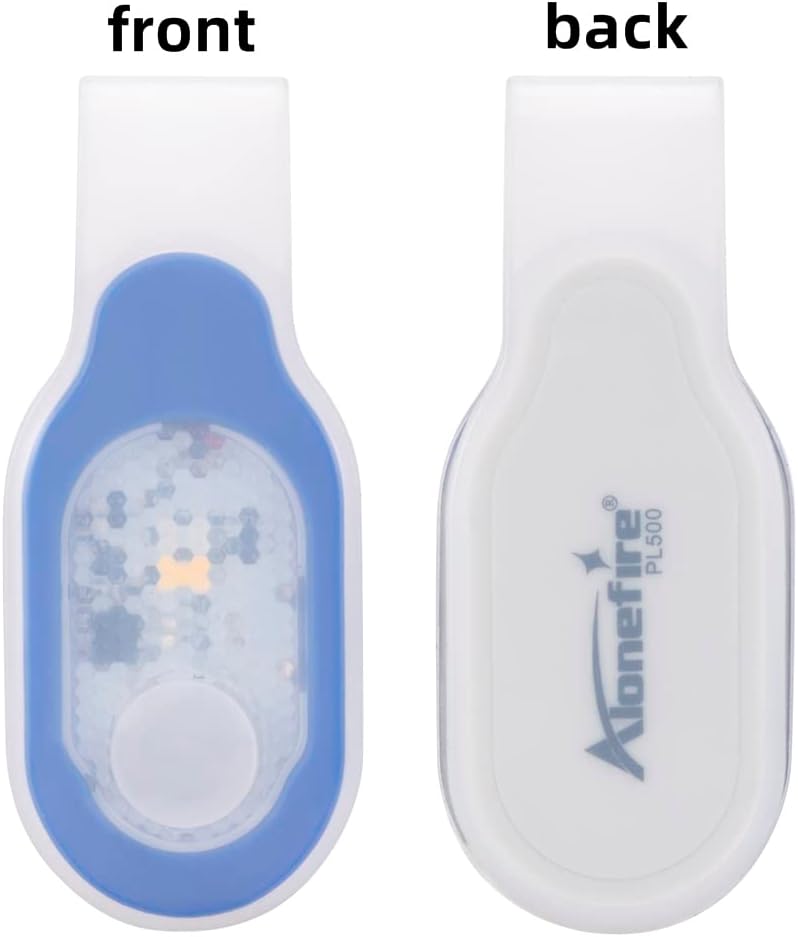
ด้านหน้าและด้านหลัง view of the ALONEFIRE PL500, highlighting the magnetic attachment point on the back.

The ALONEFIRE PL500 demonstrating its white and red light modes in different usage scenarios.

The ALONEFIRE PL500 securely clipped onto a denim jacket, demonstrating its hands-free utility.
มีอะไรอยู่ในกล่อง
Upon opening your ALONEFIRE PL500 package, you will find the following items:
- ALONEFIRE PL500 Clip-on Light
- สายชาร์จ USB
- Keychain Light (Bonus Item)

The complete contents of the ALONEFIRE PL500 package, including the light, charging cable, and bonus keychain light.
การตั้งค่า
Before first use, it is recommended to fully charge your ALONEFIRE PL500 Clip-on Light. To do this, you will need to remove the light unit from its silicone outer shell. This process is straightforward:
- Gently peel back the silicone shell from one end of the light unit.
- Slide the light unit completely out of the silicone casing.
- Locate the micro-USB charging port on the side of the light unit.
- Connect the provided USB charging cable to the light unit and a power source.
Once charged, reinsert the light unit into the silicone shell, ensuring it is properly seated and protected.
คำแนะนำการใช้งาน
The ALONEFIRE PL500 features a simple one-hand operation push button switch to control its functions.
- การเปิด/ปิด: Press the button once to turn the light on. Press and hold the button for a few seconds to turn the light off.
- การเปลี่ยนโหมด: While the light is on, press the button repeatedly to cycle through the three available modes: warm light, red light, and flashing red light.

A hand demonstrating how to press the button on the ALONEFIRE PL500 to cycle through light modes.

A visual comparison showing the difference between warm light and white light emitted by the ALONEFIRE PL500.
การชาร์จอุปกรณ์
The ALONEFIRE PL500 is equipped with a rechargeable battery for extended use. Follow these steps to charge your device:
- Remove the light unit from its silicone shell. This is crucial for accessing the charging port.
- Insert the micro-USB end of the provided charging cable into the charging port on the light unit.
- Connect the USB-A end of the cable to a compatible power source (e.g., computer USB port, wall adapter, power bank).
- The indicator light on the unit will turn red while charging and will turn off or change color (depending on the model) when fully charged.
- Once charging is complete, disconnect the cable and carefully reinsert the light unit into its silicone shell.

The ALONEFIRE PL500 light unit detached from its silicone casing, ready for USB charging.
Note: There are no official seller videos available for embedding that demonstrate the charging process. The instructions above provide a detailed guide.
การซ่อมบำรุง
To ensure the longevity and optimal performance of your ALONEFIRE PL500 Clip-on Light, follow these maintenance guidelines:
- การทำความสะอาด: Wipe the light and its silicone shell with a soft, damp ผ้า. หลีกเลี่ยงการใช้สารเคมีที่รุนแรงหรือวัสดุที่มีฤทธิ์กัดกร่อนซึ่งอาจทำลายพื้นผิวได้
- การดูแลแบตเตอรี่ To extend battery life, charge the light promptly when its brightness diminishes. Avoid completely draining the battery before recharging.
- พื้นที่จัดเก็บ: ควรเก็บไฟไว้ในที่แห้งและเย็น หลีกเลี่ยงแสงแดดโดยตรงและอุณหภูมิที่สูงหรือต่ำเกินไป เมื่อไม่ได้ใช้งานเป็นเวลานาน
การแก้ไขปัญหา
If you encounter any issues with your ALONEFIRE PL500, refer to the following common troubleshooting tips:
- ไฟไม่เปิด:
- Ensure the battery is charged. Connect it to a power source and check the charging indicator.
- กดปุ่มเปิด/ปิดค้างไว้สักสองสามวินาที เพื่อให้แน่ใจว่าไม่ใช่แค่กดแป๊บเดียว
- ไฟไม่ชาร์จ:
- Verify that the light unit is fully removed from the silicone shell before attempting to charge.
- Check the USB cable for any damage and ensure it's securely connected to both the light and the power source.
- ลองใช้พอร์ต USB หรืออะแดปเตอร์จ่ายไฟอื่น
- แสงสว่างริบหรี่:
- The battery level is likely low. Recharge the device fully.
ข้อมูลจำเพาะ
| คุณสมบัติ | รายละเอียด |
|---|---|
| หมายเลขรุ่น | PL500 |
| สี | Blue_White Light |
| แหล่งพลังงาน | ใช้พลังงานจากแบตเตอรี่ |
| ประเภทแหล่งกำเนิดแสง | นำ |
| วัสดุ | เอบีเอส |
| ความสว่างสีขาว | 20 ลูเมน |
| ส่วนประกอบของเซลล์แบตเตอรี่ | ลิเธียมไอออน |
| รันไทม์ | 5 ชั่วโมง |
| ขนาดสินค้า (กว้าง x ยาว x สูง) | 3.15" x 0.78" x 1.38" (79 มม. x 19 มม. x 34 มม.) |
| น้ำหนักสินค้า | 0.634 ออนซ์ (0.02 กิโลกรัม) |
| ระดับความต้านทานต่อน้ำ | ไม่ทนน้ำ |
| คุณสมบัติพิเศษ | Adjustable Light Modes, Durable, Lightweight, Magnetic, Rechargeable |

Detailed dimensions of the ALONEFIRE PL500 for reference.
การรับประกันและการสนับสนุน
The ALONEFIRE PL500 Clip-on Light comes with a Full Warranty, ensuring peace of mind regarding your purchase. For any questions, technical support, or warranty claims, please refer to the contact information provided with your product packaging or visit the official ALONEFIRE website. Keeping your purchase receipt is recommended for warranty purposes.
Ask a question about this manual
Ask about setup, troubleshooting, compatibility, parts, safety, or missing instructions. Manuals+ will review the question and use this page’s manual context to help answer it.