
VIVO V25 5G 8/128GB Surfing Blue-cr
คู่มือผู้ใช้สมาร์ทโฟน Vivo V25 5G
Model: V25 5G 8/128GB Surfing Blue-cr
1. Introduction to Vivo V25 5G
The Vivo V25 5G is an advanced smartphone designed to deliver a seamless and powerful mobile experience. Featuring a 6 nm CPU and dual-mode 5G capabilities, it ensures fluid performance and high-speed connectivity. This device is equipped with a superb 50 MP Eye AF camera for stunning photography and offers ample storage with up to 256 GB internal capacity, expandable up to 1 TB.

รูปที่ 1.1: ด้านหน้าและด้านหลัง view of the Vivo V25 5G in Surfing Blue.
2. การตั้งค่าเริ่มต้น
2.1. แกะกล่องและเปิดเครื่องครั้งแรก
Upon unboxing your Vivo V25 5G, ensure all components are present: the smartphone, Ejection Pin, Sim Ejector Tool, and Quick Start Guide. Press and hold the power button on the right side of the device until the Vivo logo appears to power it on for the first time.
2.2. การติดตั้งซิมการ์ดและการ์ดหน่วยความจำ
To install your SIM card(s) and/or memory card:
- ค้นหาถาดใส่การ์ด SIM ที่ด้านข้างของโทรศัพท์
- Insert the Sim Ejector Tool into the small hole next to the tray and press gently until the tray ejects.
- Place your Nano-SIM card(s) and/or microSD card (for memory expansion up to 1 TB) into the designated slots on the tray, ensuring correct orientation.
- ค่อยๆ ดันถาดกลับเข้าไปในโทรศัพท์จนกระทั่งล็อคเข้าที่
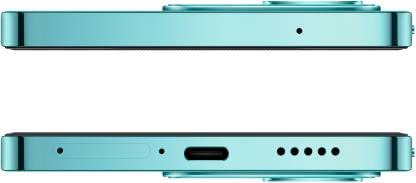
รูปที่ 2.1: ด้านบนและด้านล่าง view of the Vivo V25 5G, highlighting the SIM tray and USB-C port.
3. การทำงานพื้นฐาน
3.1. Power and Volume Controls
The power button and volume rocker are located on the right side of the device. Use them to:
- เปิด/ปิดเครื่อง: กดปุ่มเปิด/ปิดค้างไว้
- ล็อค/ปลดล็อคหน้าจอ: กดปุ่มเปิด/ปิดสั้นๆ
- การปรับระดับเสียง: ใช้ปุ่มเพิ่ม/ลดระดับเสียง
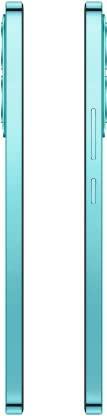
รูปที่ 3.1: ด้านข้าง view of the Vivo V25 5G, illustrating button placement.
3.2. การนำทาง
The Vivo V25 5G operates on Android 12.0, offering intuitive navigation through gestures or traditional on-screen buttons. Swipe up from the bottom for the app drawer, swipe down from the top for notifications and quick settings, and use multi-touch gestures for zooming and scrolling.
4. คุณสมบัติของกล้อง
The Vivo V25 5G is equipped with a versatile camera system to capture high-quality photos and videos.
- กล้องด้านหลังหลัก: 64 MP with Optical Image Stabilization (OIS) for clear and stable shots, even in low light.
- กล้องหน้า: 50 MP Eye AF camera, ideal for sharp selfies and video calls.
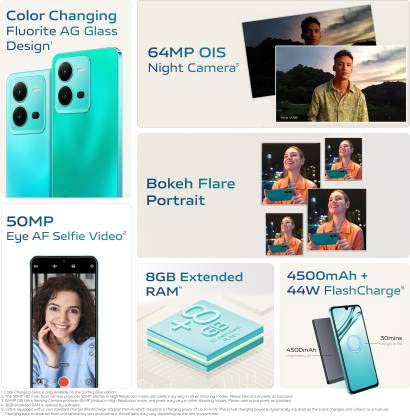
รูปที่ 4.1: เกินview of Vivo V25 5G camera capabilities.
4.1. วิดีโอผลิตภัณฑ์อย่างเป็นทางการ
วิดีโอ 4.1: วิดีโอแนะนำผลิตภัณฑ์อย่างเป็นทางการasing the features and design of the Vivo V25 5G smartphone.
5. คุณสมบัติการแสดงผล
The Vivo V25 5G features a vibrant AMOLED display, providing rich colors and deep blacks for an immersive viewing experience. The touchscreen form factor ensures responsive and intuitive interaction with the device.
- ประเภทจอภาพ: อโมเลด
- ฟอร์มแฟกเตอร์: หน้าจอสัมผัส
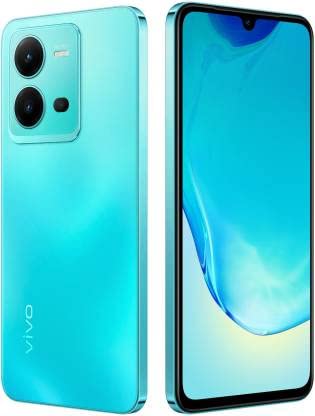
รูปที่ 5.1: มุม view ของ Vivo V25 5G ที่แสดงให้เห็น...asing its AMOLED display.
6. ข้อมูลจำเพาะทางเทคนิค
| คุณสมบัติ | ข้อมูลจำเพาะ |
|---|---|
| ระบบปฏิบัติการ | แอนดรอยด์ 12.0 |
| แรม | 8GB |
| การจัดเก็บข้อมูลภายใน | 128 GB (expandable up to 1 TB) |
| รุ่นซีพียู | Snapdragon (6 nm) |
| ความจุของแบตเตอรี่ | 4500 มิลลิวินาทีamp ชั่วโมง |
| กล้องหลังหลัก | 64 MP OIS |
| กล้องหน้า | 50 MP Eye AF |
| ประเภทจอภาพ | อโมเลด |
| การเชื่อมต่อ | 5G, บลูทูธ, Wi-Fi, USB |
| จีพีเอส | โกลนาส |
| สี | Surfing Blue |
| น้ำหนักสินค้า | 530 กรัม |
| ขนาดสินค้า | 12 x 12 x 12 ซม. |
7. การดูแลรักษา
To ensure the longevity and optimal performance of your Vivo V25 5G, follow these maintenance guidelines:
- การทำความสะอาด: ใช้ผ้านุ่มไม่เป็นขุยทำความสะอาดหน้าจอและตัวเครื่อง หลีกเลี่ยงวัสดุที่มีฤทธิ์กัดกร่อนหรือสารเคมีรุนแรง
- อุณหภูมิ: ควรใช้งานอุปกรณ์ภายในช่วงอุณหภูมิที่แนะนำ หลีกเลี่ยงความร้อนหรือความเย็นจัด
- ความต้านทานน้ำ: This device is not rated for water resistance. Keep it away from liquids.
- การอัปเดตซอฟต์แวร์: Regularly install system updates to benefit from performance improvements and security patches.
- การดูแลแบตเตอรี่ Avoid fully discharging the battery frequently. Charge with the original charger for optimal battery health.
8. การแก้ไขปัญหาทั่วไป
If you encounter issues with your Vivo V25 5G, consider these common solutions:
- อุปกรณ์ไม่ตอบสนอง: กดปุ่มเปิด/ปิดค้างไว้ประมาณ 10-15 วินาทีเพื่อบังคับให้รีสตาร์ท
- แบตเตอรี่หมดเร็ว: ตรวจสอบการใช้งานแอปพื้นหลัง ลดความสว่างหน้าจอ และปิดใช้งานฟีเจอร์ที่ไม่จำเป็น เช่น GPS หรือ Wi-Fi เมื่อไม่ได้ใช้งาน
- ปัญหาการเชื่อมต่อเครือข่าย: ตรวจสอบให้แน่ใจว่าใส่ซิมการ์ดถูกต้อง ลองเปิดและปิดโหมดเครื่องบิน หากปัญหายังคงอยู่ โปรดติดต่อผู้ให้บริการเครือข่ายของคุณ
- แอปขัดข้อง: ล้างแคชและข้อมูลของแอปใน การตั้งค่า > แอป หากปัญหายังคงอยู่ ให้ถอนการติดตั้งและติดตั้งแอปใหม่อีกครั้ง
- ความร้อนสูงเกินไป: หลีกเลี่ยงการใช้โทรศัพท์ขณะชาร์จหรือใช้งานหนักเป็นเวลานาน (เช่น เล่นเกม) ปิดแอปที่ทำงานอยู่เบื้องหลัง
9. ข้อมูลการรับประกัน
The Vivo V25 5G typically comes with a รับประกัน 6 เดือน. Please refer to your purchase documentation or contact the retailer for specific warranty terms and conditions. Keep your proof of purchase for any warranty claims.
10. การสนับสนุนและการติดต่อ
For further assistance, technical support, or service inquiries, please visit the official Vivo support website or contact their customer service. You can also refer to the Quick Start Guide included in the box for initial setup and troubleshooting tips.
For more product information, visit the product detail page on อเมซอน.อิน.
Ask a question about this manual
Ask about setup, troubleshooting, compatibility, parts, safety, or missing instructions. Manuals+ will review the question and use this page’s manual context to help answer it.