
1. การตั้งค่า
1.1 เนื้อหาบรรจุภัณฑ์
ก่อนที่จะเริ่มการติดตั้ง โปรดตรวจสอบว่าบรรจุภัณฑ์มีส่วนประกอบทั้งหมดอยู่:
- WiFi Camera (x1)
- 3M Power Adapter (x1)
- Waterproof Connector (x1)
- ชุดสกรู (x1)
- คู่มือผู้ใช้ (x1)
- แม่แบบการติดตั้ง (x1)
- สายรัด (x1)

Image: All components included in the Techage WiFi Security IP Camera package.
1.2 การติดตั้งทางกายภาพ
The camera supports both wall mounting and ceiling hanging for flexible placement.

Image: Illustration showing the camera mounted on a wall and hanging from a ceiling.
- เลือกสถานที่ติดตั้งที่เหมาะสม โดยตรวจสอบให้แน่ใจว่าสัญญาณ Wi-Fi มีความแรงเพียงพอ
- ใช้แม่แบบการติดตั้งที่ให้มาเพื่อทำเครื่องหมายตำแหน่งรูเจาะ
- เจาะรูและใส่พุกยึดผนังหากจำเป็น
- ยึดฐานกล้องให้แน่นโดยใช้สกรูที่ให้มา
- เชื่อมต่ออะแดปเตอร์แปลงไฟเข้ากับกล้องและเต้ารับไฟฟ้า
1.3 Network Connection & App Setup
The camera connects to 2.4GHz Wi-Fi networks. It does not support 5GHz networks.
- Download the ICSEE App from your device's app store (available on App Store and Google Play).
- Register or log in to your ICSEE account.
- Follow the in-app instructions to add your camera to the network. This typically involves scanning a QR code on the camera or manually entering device details.

Image: The VicoHome Security Camera App, used for camera control.
1.4 การผสานรวม Amazon Alexa
The camera can be integrated with Amazon Alexa for voice control and viewing on compatible devices like Amazon Echo Show.

Image: A user interacting with an Alexa device to view ฟีดกล้อง
Video: A detailed guide on how to connect the Techage WiFi Security IP Camera to Amazon Alexa and control it via voice commands.
- Ensure your camera is successfully added to the ICSEE App.
- Open the ICSEE App, navigate to the 'Me' section, and tap the 'Alexa' icon.
- Click 'Login to Amazon account' and input your Amazon username and password (the same account used for your Alexa device).
- Select the camera you wish to bind.
- Once successfully bound, you can control the camera using voice commands such as "Alexa, show me [camera name]" or "Alexa, rotate [camera name] to the left/right/up/down."
2. การใช้งานกล้อง
2.1 ฟังก์ชันแพนและเอียง
The camera offers a 355° pan and 90° tilt range, providing a 360° full view of the monitored area. Control is available remotely via the ICSEE mobile application.
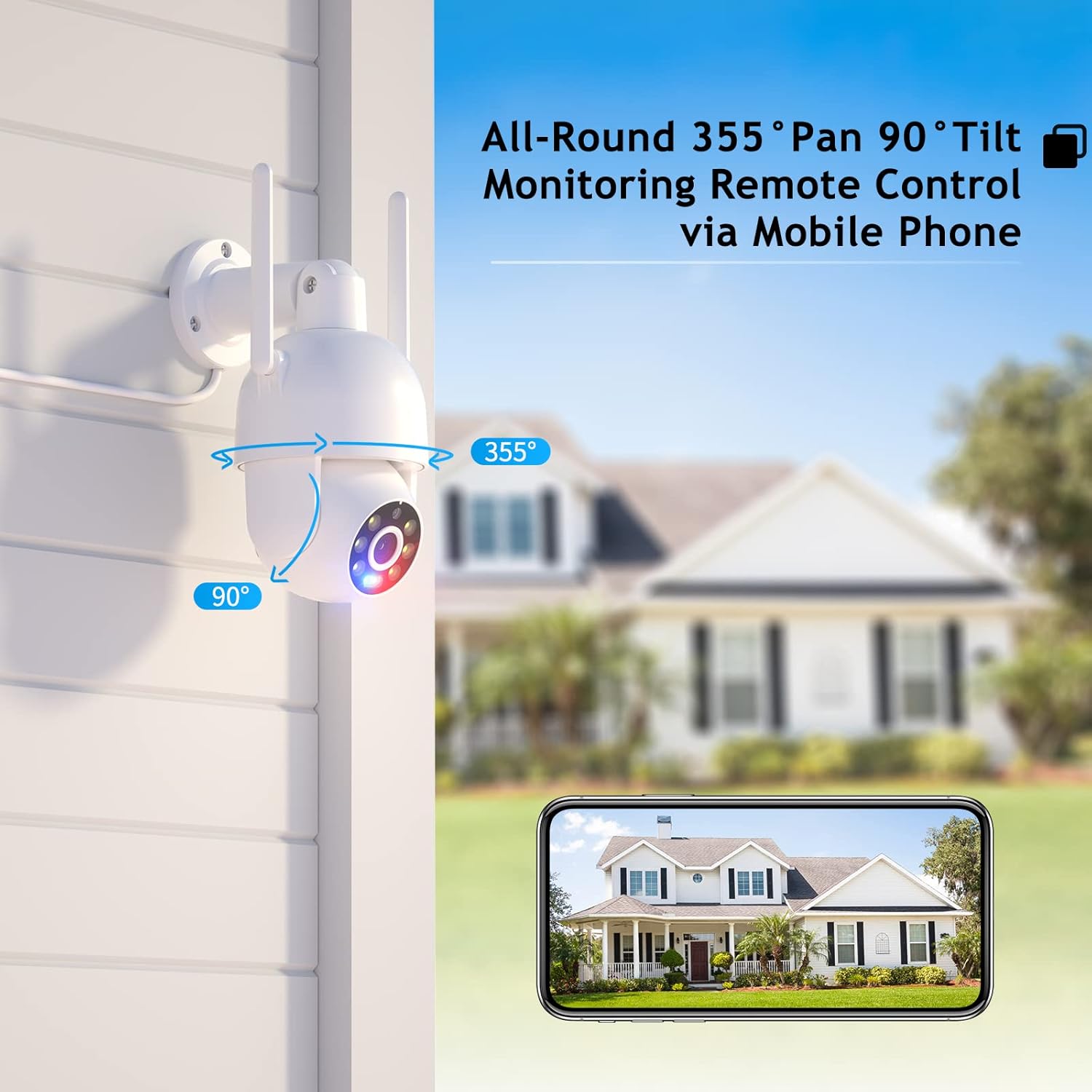
Image: Visual representation of the camera's pan (355°) and tilt (90°) capabilities.
2.2 High-Definition & Night Vision
Experience full HD 4MP picture quality throughout the day. The camera features built-in 6 white lights for color night vision and IR LEDs for traditional infrared night vision, ensuring clear visuals in various lighting conditions.

ภาพ: อดีตamples of day vision, color night vision, and IR night vision captured by the camera.
2.3 เสียงสองทาง
The integrated speaker and microphone enable real-time two-way audio communication, allowing you to listen and speak through the camera.

Image: Demonstrating the two-way audio feature for real-time communication.
2.4 Humanoid Motion Auto Tracking & Alerts
When the camera detects a moving person, it will automatically track the target until it is lost or the set tracking duration ends. The camera returns to its preset position after tracking. Motion detection triggers accurate real-time notifications to the ICSEE App, and recorded video is stored on a MicroSD card or Cloud.

Image: The camera's human detection and auto-tracking capabilities in action.
2.5 Smart Spotlight & Siren Alarm
Upon motion detection in the monitoring area, the camera automatically activates its spotlight and siren alarm to deter intruders. This feature enhances security by providing both visual and auditory warnings.
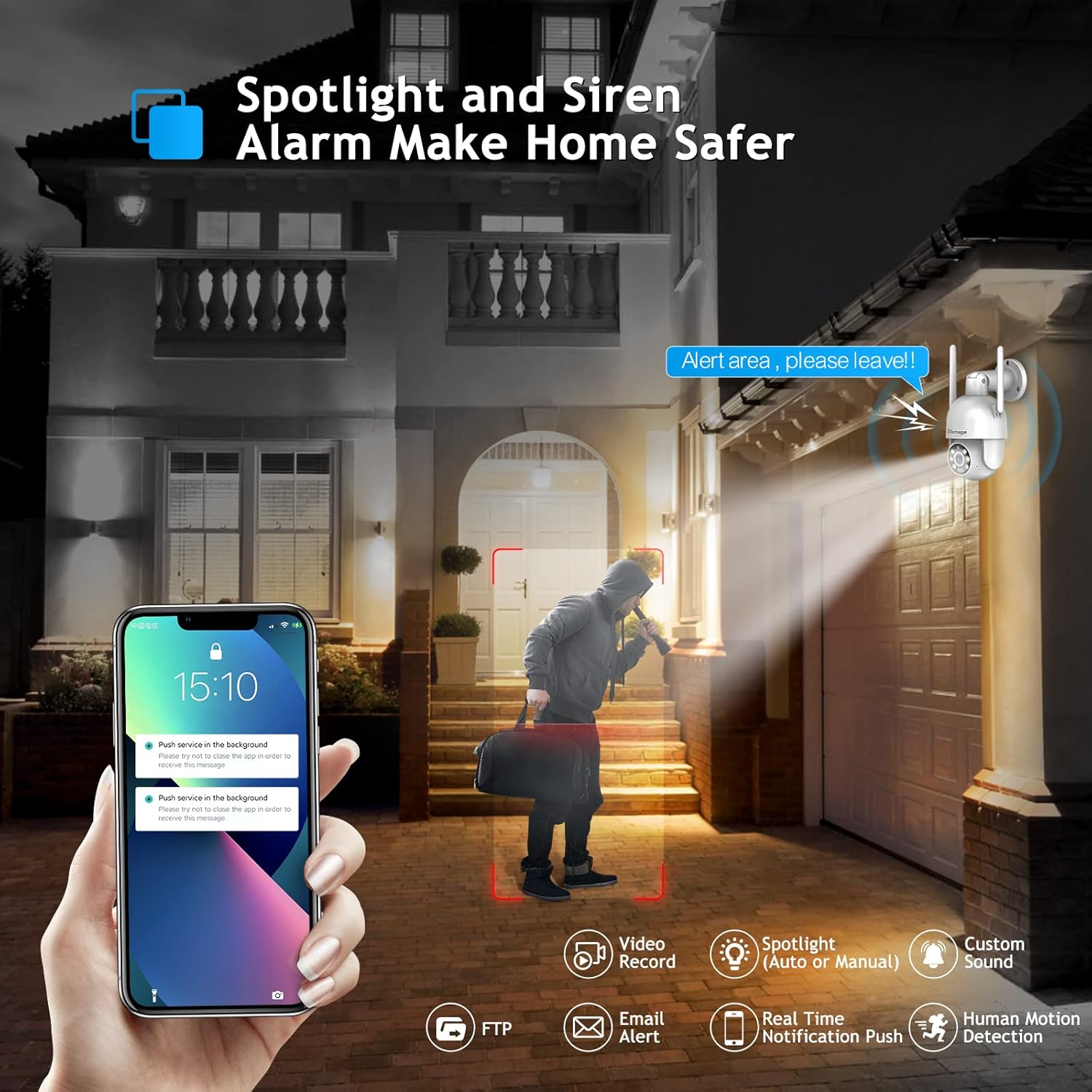
Image: The camera's spotlight and siren alarm activating upon detecting a person.
2.6 Automatic Cruise Function
The camera supports preset cruise points, allowing it to patrol specific areas automatically. You can define the path, time, and speed of the patrol within the app.

Image: The camera's smart cruise function, showing preset patrol points.
3. การบำรุงรักษา
3.1 การทำความสะอาดกล้อง
- ค่อยๆ เช็ดเลนส์และตัวกล้องด้วยผ้าแห้งเนื้อนุ่ม
- Avoid using harsh chemicals or abrasive cleaners that could damage the camera's surface or lens.
3.2 ตัวเลือกการจัดเก็บข้อมูล
The camera supports local storage via a MicroSD card (up to 128GB) and cloud storage for recorded video.

Image: Depiction of cloud storage and MicroSD card for video recording.
3.3 ความต้านทานต่อสภาพอากาศ
The camera is designed with IP66 weather resistance, offering protection against water, dust, lightning, and extreme temperatures. It operates effectively in environments from -10°C to 45°C with less than 80% RH (non-condensation).

Image: The camera's IP66 rating, showing its resilience to various weather conditions.
4 การแก้ไขปัญหา
4.1 คำถามที่พบบ่อย
- Q: Do I need to pay a monthly payment for this camera?
A: No, a subscription service is optional. Up to 3 days of cloud recording, intelligent notifications, and activity zones are available with a subscription, but the camera functions without one. - Q: How do I set it up with Alexa?
A: Link the camera to the Alexa app and control it via Amazon Echo Show for easy viewing. Refer to Section 1.4 for detailed steps. - Q: Can I use this with 5G Wi-Fi?
A: The camera connects to 2.4GHz Wi-Fi for better range and does not support 5GHz networks.
4.2 เคล็ดลับการแก้ไขปัญหาทั่วไป
- ปัญหาการเชื่อมต่อ: Ensure your Wi-Fi network is 2.4GHz and the camera is within range. Restart the camera and your router.
- คุณภาพของภาพต่ำ: Check the lens for dirt or obstructions. Ensure adequate lighting for optimal night vision performance.
- การตรวจจับความเคลื่อนไหวไม่ทำงาน: Verify motion detection settings in the ICSEE App. Adjust sensitivity levels and define activity zones as needed.

Image: Setting up motion detection zones within the camera's software.
4.3 Third-Party Software Compatibility
The camera supports RTSP, FTP, DHCP, NTP, and UPNP protocols. It is compatible with most NVR systems and third-party software such as Ispy, Blue Iris, and Tinycam.

Image: The camera's compatibility with popular third-party surveillance software.
5. ข้อมูลจำเพาะ
| คุณสมบัติ | รายละเอียด |
|---|---|
| หมายเลขรุ่น | XM-PT825-40W |
| ความละเอียดในการจับภาพวิดีโอ | 4MP |
| ช่วงแพน/เอียง | แพน 355°, เอียง 90° |
| โปรโตคอลการเชื่อมต่อ | Wi-Fi (2.4GHz เท่านั้น) |
| การใช้งานภายใน/ภายนอกอาคาร | ในร่ม, กลางแจ้ง |
| ระดับความต้านทานต่อน้ำ | กันน้ำระดับ IP66 |
| การมองเห็นตอนกลางคืน | Color Night Vision, IR Night Vision (30 Feet Range) |
| เสียง | ระบบเสียง 2 ทาง |
| การตรวจจับการเคลื่อนไหว | การตรวจจับการเคลื่อนไหวของมนุษย์, การติดตามอัตโนมัติ |
| ประเภทการแจ้งเตือน | Audio and Motion (Siren Alarm, Spotlight) |
| แหล่งพลังงาน | สายไฟ |
| วัสดุ | อะคริโลไนไตรล์ บิวทาไดอีน สไตรีน (ABS) |
| ขนาด | 8.1 x 6.5 x 5.5 นิ้ว |
| น้ำหนักสินค้า | 1.57 ปอนด์ |
6. การรับประกันและการสนับสนุน
Techage provides a รับประกัน 1 ปี for this product. For any questions or concerns, lifetime support is available via US local phone call or Amazon email service.
For technical assistance, please refer to the contact information provided with your product or visit the official Techage support channels.

Image: Techage offers free technical support for its products.