
Ajblg X15
User Manual for Ajblg X15 Wireless Headphones
แบบ: X15
การแนะนำ
Thank you for choosing the Ajblg X15 Wireless Headphones. These Bluetooth earbuds are designed to provide a superior audio experience with deep bass, extended play time, and a convenient digital display. They are also IPX7 waterproof, making them suitable for various activities.

Image: Ajblg X15 Wireless Headphones and their charging case, showcasing the pink color and digital display.
เนื้อหาแพ็คเกจ
ตรวจสอบให้แน่ใจว่ามีสินค้าทั้งหมดอยู่ในแพ็คเกจของคุณ:
- Ajblg X15 Wireless Earbuds (Left and Right)
- เคสชาร์จพร้อมจอแสดงผลแบบดิจิตอล
- สายชาร์จ USB-C
- คู่มือการใช้งาน
- Multiple sizes of Eartips for optimal fit

Image: A visual representation of all items included in the Ajblg X15 product package, including earbuds, charging case, USB-C cable, and eartips.
การตั้งค่า
การจับคู่เบื้องต้น
- Ensure earbuds are charged (refer to Charging section).
- เปิดฝาเคสชาร์จ หูฟังจะเข้าสู่โหมดจับคู่โดยอัตโนมัติ
- บนอุปกรณ์ของคุณ (สมาร์ทโฟน แท็บเล็ต ฯลฯ) ไปที่การตั้งค่าบลูทูธ
- ค้นหา "X15" in the list of available devices and select it to connect.
- Once connected, the earbuds will automatically reconnect to your device when you open the charging case lid after the first pairing.
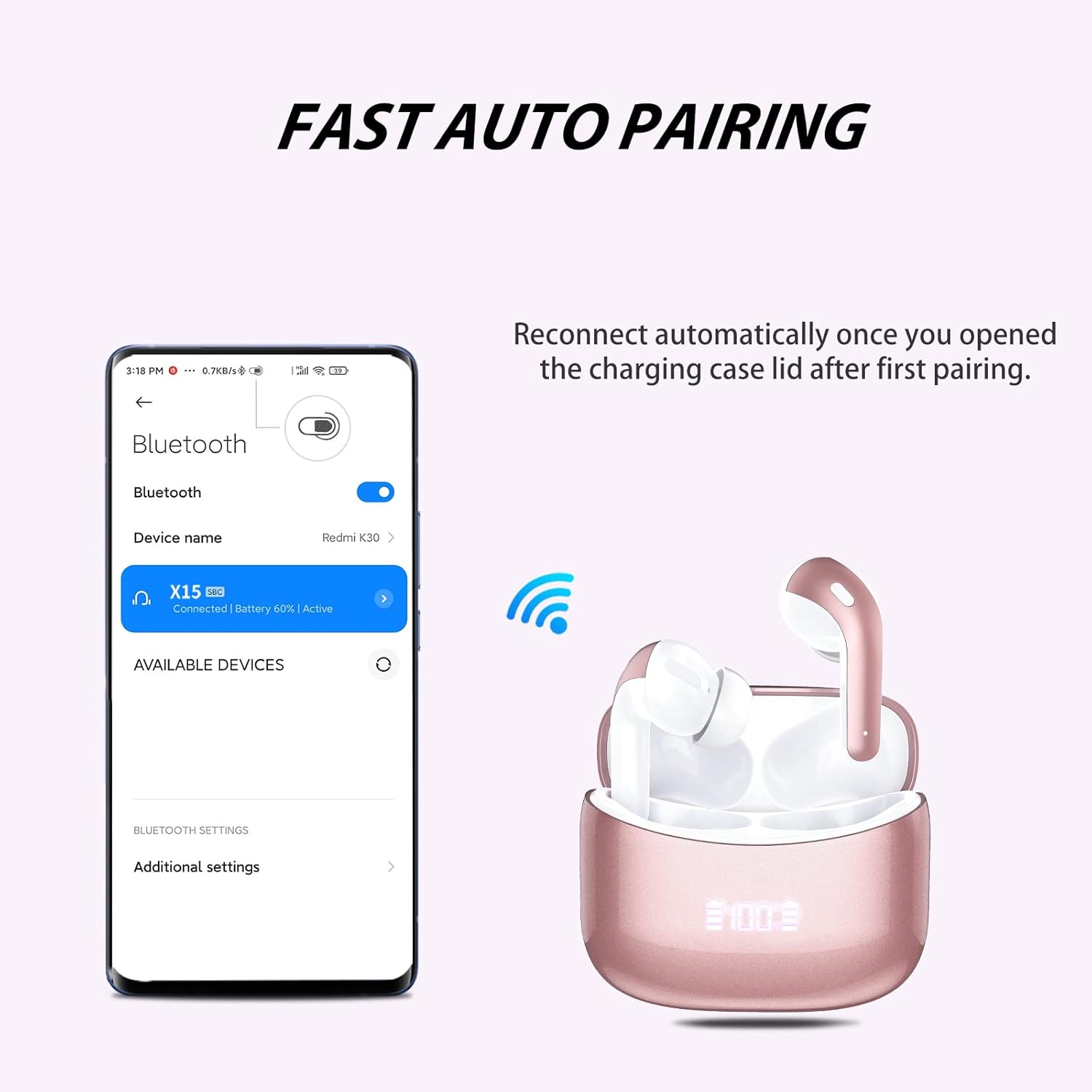
Image: Illustration demonstrating the fast auto-pairing process of the X15 earbuds with a mobile phone, showing the "X15 Connected" status.
เทคโนโลยีบลูทูธ 5.3
The X15 earbuds utilize advanced Bluetooth 5.3 technology, which offers improved transmission efficiency and a stable connection, reducing latency for a seamless audio experience.

Image: Diagram illustrating the upgrade to Bluetooth 5.2, highlighting improved transmission efficiency and reduced latency compared to Bluetooth 5.0.
คำแนะนำการใช้งาน
การสวมหูฟัง
The X15 earbuds are ergonomically designed to be small and ultra-light (4g per earbud) for comfortable and secure fit during extended use. Insert each earbud gently into your ear canal until it feels snug and stable.

Image: A person wearing the X15 earbuds, demonstrating their small, light, and ergonomic design for comfortable fit.
ระบบควบคุมแบบสัมผัสอัจฉริยะ
The X15 earbuds feature intuitive touch controls on the side of each earbud for easy management of music and calls:
- เล่น/หยุดชั่วคราว: Double-tap (x2) on either earbud.
- สลับเพลง (ถัดไป/ก่อนหน้า): Hold the touch sensor on the right earbud for next song, hold on the left earbud for previous song.
- ผู้ช่วยเสียง: Triple-tap (x3) on either earbud.
- สลับระดับเสียง: Single-tap (x1) on the right earbud to increase volume, single-tap on the left earbud to decrease volume.
- รับ/วางสาย: Double-tap (x2) on either earbud.
- ปฏิเสธสาย: Hold the touch sensor on either earbud.

Image: A detailed guide to the smart touch controls on the X15 earbuds, showing gestures for play/pause, song switching, voice assistant, volume control, and call management.
การชาร์จหูฟังเอียร์บัดและเคส
The charging case features an LED digital display that shows the battery percentage of the case and the charging status of each earbud. The earbuds offer up to 7 hours of play time on a single charge, with the charging case providing multiple additional charges for a total of 35 hours of play time.
- To charge the earbuds, place them back into their respective slots in the charging case. They are magnetized and will snap into place. The LED display will show their charging status.
- To charge the case, connect the provided USB-C charging cable to the USB-C port on the bottom of the case and plug the other end into a compatible USB power source. The LED display will show the case's battery percentage.
- Charging time for both earbuds and the carrying case is approximately 1.5 hours.
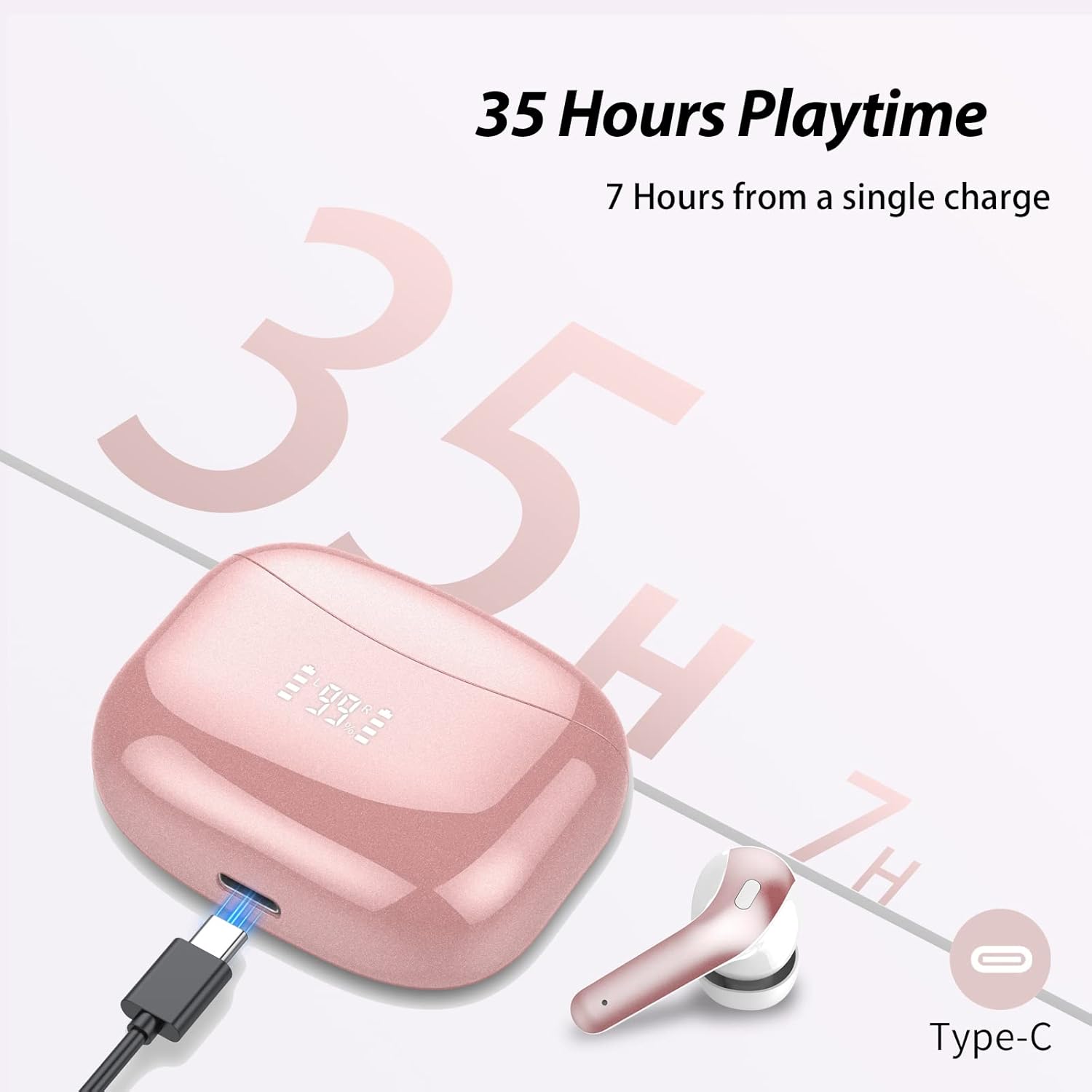
Image: An illustration highlighting the 35-hour total playtime and the USB-C charging port on the case, along with the digital battery display.
Video: Demonstrates the unboxing, charging, and wearing of the Ajblg X15 Wireless Headphones, showcasing the LED digital display and comfortable fit.
การซ่อมบำรุง
- การทำความสะอาด: ทำความสะอาดหูฟังและกล่องชาร์จเป็นประจำด้วยผ้านุ่ม แห้ง และไม่เป็นขุย หลีกเลี่ยงการใช้วัสดุที่มีฤทธิ์กัดกร่อนหรือสารเคมีรุนแรง
- การกันน้ำ (IPX7): หูฟังกันน้ำระดับ IPX7 หมายความว่าสามารถทนต่อการแช่น้ำได้ลึกถึง 1 เมตร นาน 30 นาที อย่างไรก็ตาม เคสชาร์จไม่กันน้ำ โปรดตรวจสอบให้แน่ใจว่าหูฟังแห้งสนิทก่อนใส่กลับเข้าไปในเคสชาร์จเพื่อป้องกันความเสียหาย
- พื้นที่จัดเก็บ: เมื่อไม่ใช้งาน ให้เก็บหูฟังไว้ในกล่องชาร์จเพื่อปกป้องหูฟังและรักษาระดับพลังงาน เก็บในที่แห้งและเย็น หลีกเลี่ยงอุณหภูมิที่สูงหรือต่ำเกินไป
- การดูแลแบตเตอรี่ To prolong battery life, avoid fully discharging the earbuds and case frequently. Charge them regularly, even if not used for a long period.

Image: Visual representation of the IPX7 waterproof rating, showing the earbuds submerged in water.
การแก้ไขปัญหา
| ปัญหา | สารละลาย |
|---|---|
| หูฟังเอียร์บัดไม่จับคู่ | ตรวจสอบให้แน่ใจว่าหูฟังชาร์จแบตเตอรี่เต็มแล้ว ปิดและเปิดบลูทูธบนอุปกรณ์ของคุณ ลบ "X15" ออกจากรายการบลูทูธของอุปกรณ์ของคุณ แล้วจับคู่ใหม่อีกครั้ง |
| เอียร์บัดตัวเดียวเท่านั้นที่ใช้งานได้ | ใส่หูฟังทั้งสองข้างกลับเข้าไปในกล่องชาร์จ ปิดฝา รอสักครู่ แล้วเปิดฝาและลองอีกครั้ง ตรวจสอบให้แน่ใจว่าหูฟังทั้งสองข้างชาร์จเต็มแล้ว |
| ไม่มีเสียงหรือเสียงเบา | Check device volume and earbud volume. Ensure earbuds are properly seated in your ears. Try different eartip sizes. |
| ปัญหาการชาร์จ | Ensure the USB-C cable is securely connected. Try a different charging cable or power adapter. Clean the charging contacts on the earbuds and inside the case. |
ข้อมูลจำเพาะ
- ชื่อรุ่น : เอ็กซ์15
- ยี่ห้อ: อัจบลจี
- เทคโนโลยีการเชื่อมต่อ: ไร้สาย (บลูทูธ 5.3)
- แจ็คหูฟัง: พอร์ต USB-C (สำหรับชาร์จเคส)
- เวลาเล่น: 7 ชั่วโมง (หูฟัง), 35 ชั่วโมง (เมื่อใช้ร่วมกับเคสชาร์จ)
- เวลาในการชาร์จ: 1.5 ชั่วโมง (หูฟังและเคส)
- ระดับการต้านทานน้ำ: กันน้ำระดับ IPX7 (เฉพาะหูฟัง)
- วิธีการควบคุม: สัมผัส เสียง
- ขนาดไดร์เวอร์เสียง: 13 มิลลิเมตร
- ช่วงบลูทู ธ : 10 เมตร
- น้ำหนักสินค้า: 3.52 ออนซ์
- ขนาดสินค้า : 2.44 x 1.97 x 1.04 นิ้ว
การรับประกันและการสนับสนุน
For warranty information and customer support, please refer to the contact details provided on the product packaging or visit the official Ajblg webไซต์นี้ โปรดเก็บใบเสร็จรับเงินที่ซื้อไว้เพื่อใช้เรียกร้องการรับประกัน
Ask a question about this manual
Ask about setup, troubleshooting, compatibility, parts, safety, or missing instructions. Manuals+ will review the question and use this page’s manual context to help answer it.