
การแนะนำ
This manual provides detailed instructions for the setup, operation, maintenance, and troubleshooting of your Varmilo VA Series V2 Warrior Soar TKL Mechanical Keyboard. This keyboard features a Tenkeyless (TKL) form factor, durable Dye Sub PBT keycaps, and genuine Cherry MX Blue mechanical switches.

Figure 1: Varmilo VA Series V2 Warrior Soar TKL Mechanical Keyboard (Cherry MX Blue).
การตั้งค่า
1. การเชื่อมต่อคีย์บอร์ด
- Locate the USB-C port on the back of your Varmilo VA Series V2 keyboard.
- เชื่อมต่อสาย USB-C ที่ให้มาเข้ากับพอร์ต USB-C ของแป้นพิมพ์
- Connect the other end of the USB-C cable to an available USB port on your computer (PC or Laptop).
- แป้นพิมพ์นี้เป็นแบบเสียบแล้วใช้งานได้ทันที และระบบปฏิบัติการของคุณจะรู้จักแป้นพิมพ์นี้โดยอัตโนมัติ
2. การจัดการสายเคเบิล
The VA Series V2 features cable grooves on the bottom case, allowing the USB-C cable to exit from the left, right, or middle of the keyboard. Route the cable through the desired groove to customize your desk setup.
3. การปรับขาตั้งรถ
The keyboard is equipped with double-section kickstands on the underside. Gently flip out the kickstands to adjust the typing angle to your preference. The double-section design offers multiple height options.

รูปที่ 2: ด้านล่าง view illustrating cable routing grooves and adjustable kickstands.
คำแนะนำการใช้งาน
1. Keyboard Layout and Functions
The Varmilo VA Series V2 Warrior Soar is a Tenkeyless (TKL) keyboard, meaning it omits the numeric keypad to save space while retaining all essential keys, including the function row (F1-F12), navigation cluster, and arrow keys.
2. Cherry MX Blue Switches
This keyboard is equipped with genuine Cherry MX Blue mechanical switches. These switches are characterized by:
- Operation Force: 50gf (gram-force)
- ประเภทสวิตช์: คลิกกี้
- ข้อเสนอแนะ: Tactile bump and audible click
- เสียง: Classic clicky sound

Figure 3: Cherry MX Blue Mechanical Switch characteristics and Force-Travel diagram.
3. ไฟแสดงสถานะ
Indicator lights for functions such as Caps Lock are located on the top right of the keyboard. These lights provide visual feedback on the status of specific keyboard functions.
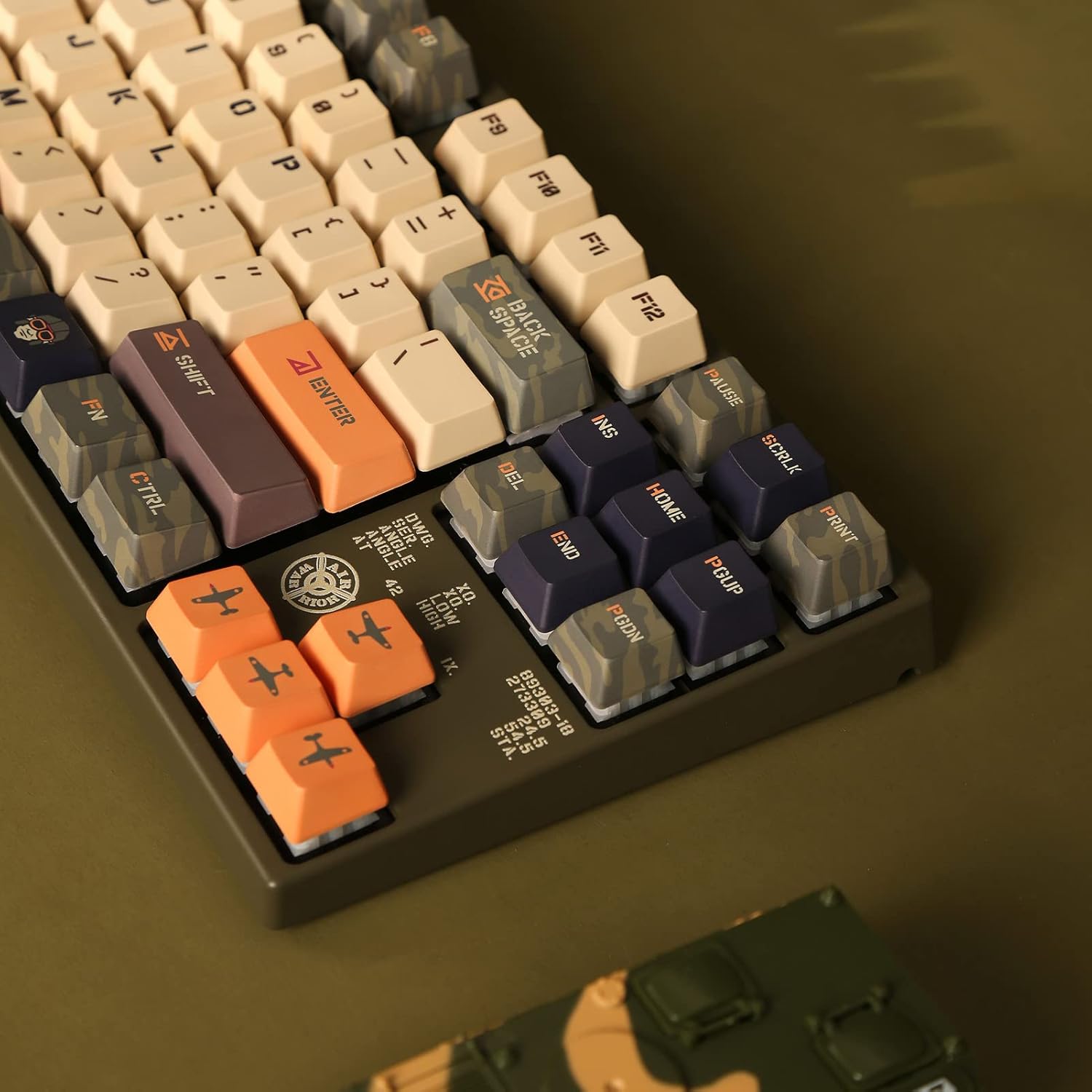
Figure 4: Close-up of indicator lights and keycap legends.
4. วัสดุของปุ่มกด
The keyboard features thick Dye Sub PBT keycaps. PBT (Polybutylene Terephthalate) is known for its durability, resistance to shine, and long-lasting legends due to the dye-sublimation process.
การซ่อมบำรุง
1. การทำความสะอาดทั่วไป
- ถอดแป้นพิมพ์ออกจากคอมพิวเตอร์ของคุณก่อนทำความสะอาด
- ใช้แปรงขนนุ่มหรือลมอัดเพื่อขจัดฝุ่นและเศษต่างๆ ออกจากระหว่างปุ่มต่างๆ
- For surface cleaning, lightly dampen a microfiber cloth with water or a mild, non-abrasive cleaner. Avoid excessive moisture.
- ห้ามฉีดน้ำยาทำความสะอาดลงบนแป้นพิมพ์โดยตรง
2. การดูแลรักษาคีย์แคป
The Dye Sub PBT keycaps are highly durable. To clean them, you may carefully remove them using a keycap puller (not included) and wash them with mild soap and water. Ensure they are completely dry before reattaching them to the switches.
3. Sound-Proofing
The keyboard incorporates sound-proof silicone pads between the PCB and the positioning plate. This design helps to minimize typing noise. Avoid disassembling the keyboard to maintain the integrity of these components.
การแก้ไขปัญหา
แป้นพิมพ์ไม่ตอบสนอง
- ตรวจสอบการเชื่อมต่อสายเคเบิล: Ensure the USB-C cable is securely connected to both the keyboard and the computer. Try reconnecting the cable.
- ลองใช้พอร์ต USB อื่น: เสียบแป้นพิมพ์เข้ากับพอร์ต USB อื่นบนคอมพิวเตอร์ของคุณ
- ทดสอบบนคอมพิวเตอร์เครื่องอื่น: If possible, test the keyboard on another computer to determine if the issue is with the keyboard or the original computer's setup.
- รีสตาร์ทคอมพิวเตอร์: A simple computer restart can often resolve connectivity issues.
กุญแจไม่สามารถลงทะเบียนได้
- ทำความสะอาดใต้ปุ่มคีย์แคป: Dust or debris under a keycap can prevent it from registering. Refer to the Maintenance section for cleaning instructions.
- สวิตช์ทำงานผิดปกติ: If a specific key consistently fails, the switch itself might be faulty. Contact Varmilo support for assistance.
ข้อมูลจำเพาะ
| ยี่ห้อ | วาร์มิโล |
| หมายเลขรุ่น | วีอีเอ87 |
| ประเภทแป้นพิมพ์ | เครื่องจักรกล |
| ฟอร์มแฟกเตอร์ | ไร้แป้นตัวเลข (TKL) |
| ประเภทสวิตซ์ | เชอร์รี่ MX บลู |
| วัสดุปุ่มกด | Dye Sub PBT (Polybutylene Terephthalate) |
| การเชื่อมต่อ | ยูเอสบี-ซี |
| อุปกรณ์ที่รองรับ | แล็ปท็อปพีซี |
| ส่วนประกอบที่รวมอยู่ | สาย USB |
ข้อมูลการรับประกัน
Specific warranty terms and conditions for your Varmilo VA Series V2 Warrior Soar TKL Mechanical Keyboard are typically provided with the product packaging or available on the official Varmilo website. Please refer to these resources for detailed warranty coverage and claim procedures.
สนับสนุน
For further assistance, technical support, or to inquire about replacement parts, please visit the official Varmilo website or contact their customer service department. You may find contact information and FAQs on their support pages.
วาร์มิโล อย่างเป็นทางการ Webเว็บไซต์: Visit Varmilo Store on Amazon

