
ScopeAround B0BG7WCKPB
คู่มือการใช้งานเครื่องตรวจหูไร้สาย ScopeAround
Model: B0BG7WCKPB
การแนะนำ
The ScopeAround Wireless Otoscope is a sophisticated ear examination tool designed for both personal and professional use. Featuring a 3.9mm ultra-tiny camera with 720p HD resolution and 6 LED lights, it provides clear, detailed views of the ear canal. Its wireless design allows for seamless connection to mobile devices, enabling real-time viewing, photo capture, and video recording. This manual provides essential information for safe and effective operation of your device.

Image: Banner highlighting the wireless ear wax removal otoscope with icons for photo, video, 3.9mm, gyroscope, WiFi, and 720p HD.
ข้อมูลด้านความปลอดภัย
For detailed safety guidelines and important warnings, please refer to the official Safety Information PDF document provided by the manufacturer. It is crucial to read and understand all safety instructions before using the device.
You can access the Safety Information document here: ข้อมูลด้านความปลอดภัย (PDF).
Always ensure the device is at a comfortable temperature before insertion. The otoscope is designed to operate at approximately 77°F (25°C) to prevent discomfort.

Image: Close-up of the otoscope with a temperature reading of 77°F, indicating safe operating temperature.
สินค้าเกินview
เนื้อหาแพ็คเกจ
เมื่อเปิดบรรจุภัณฑ์ ตรวจสอบว่ามีส่วนประกอบทั้งหมดอยู่ครบ:
- ScopeAround Wireless Otoscope
- Various Ear Specula (silicone ear picks)
- สายชาร์จไมโคร USB
- สำลีก้าน
- แผ่นเตรียมแอลกอฮอล์
- คู่มือการใช้งาน

ภาพ: เหนือศีรษะ view of the product packaging and its contents, including the otoscope, various ear specula, charging cable, cotton swabs, alcohol prep pads, and user manual.
ส่วนประกอบของอุปกรณ์
Familiarize yourself with the main parts of the otoscope:
- ตัวบ่งชี้ระดับแบตเตอรี่: Displays the remaining battery life. Recharge when the light drops to the first level.
- ปุ่มเปิด/ปิด: Long press to power the device on and off.
- Camera/LEDs: The camera light will be on by default upon power-on.
- พอร์ตชาร์จ Micro USB: For charging the device (use a 5V/1A or 5V/2A charger).

Image: A diagram illustrating the key components of the otoscope, including the battery level indicator, power button, camera/LEDs, and Micro USB charging port.
คุณสมบัติหลัก
- กล้องความละเอียดสูง: Equipped with a professional CMOS image sensor and 6 LED lights, providing 720p HD image quality for clear observation.
- การออกแบบบางเฉียบ: Features a 3.9mm ultra-tiny camera, allowing easy penetration into the ear canal for detailed examination.
- Built-in Smart Gyroscope: Enhances precision and stability during examinations, ensuring a steady view.
- การเชื่อมต่อไร้สาย: Connects instantly to mobile devices via Wi-Fi for real-time viewing, photo taking, and video recording.
- Removable Soft Silicone Ear Picks: Designed for comfort and safety, preventing scratches during operation.
- แบตเตอรี่ใช้งานได้ยาวนาน: Built-in 800mAh rechargeable battery provides extended usage time.
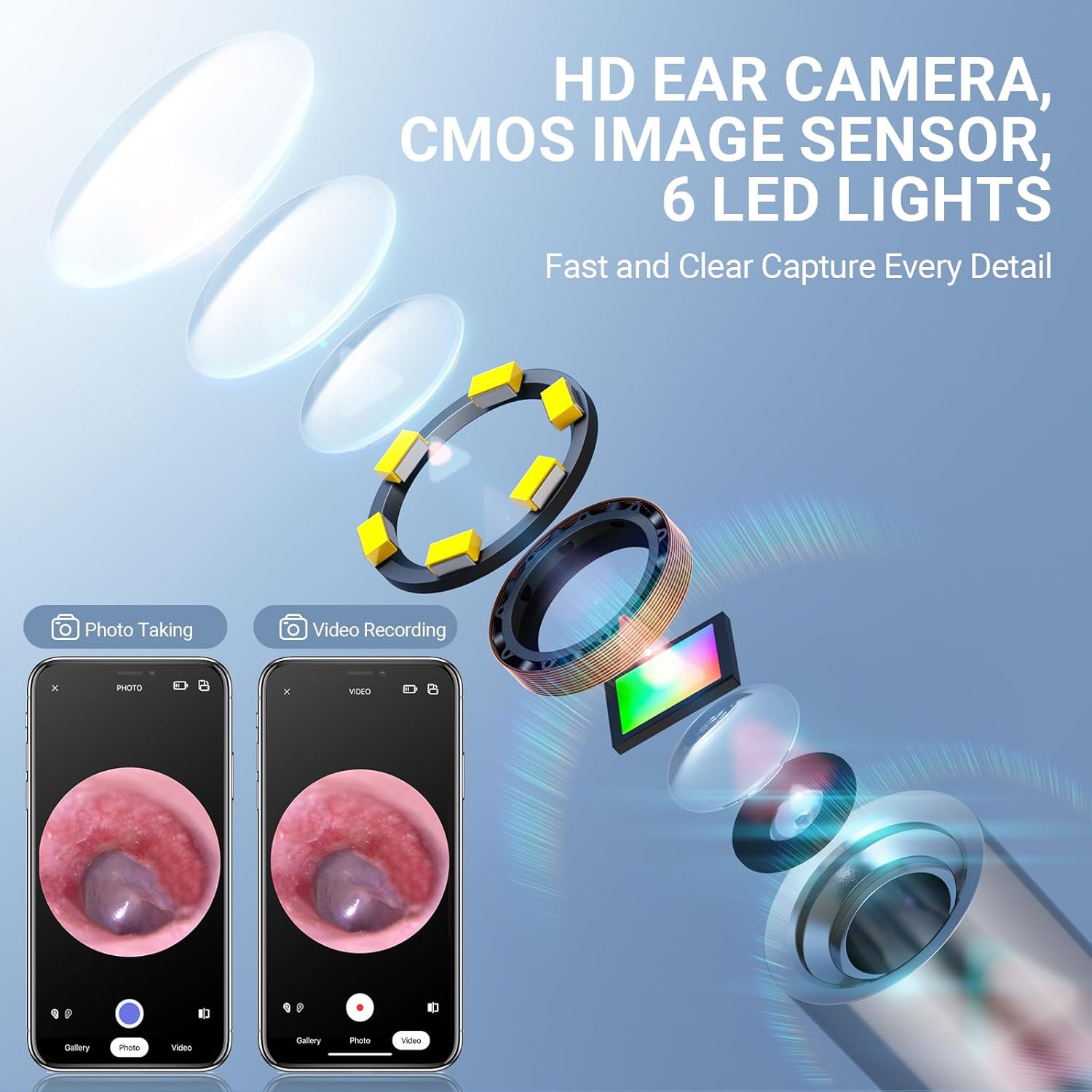
ภาพ: ระเบิด view showing the internal components of the HD ear camera, including the CMOS image sensor and 6 LED lights, emphasizing fast and clear detail capture.

Image: A banner highlighting the 3.9mm ultra-fine diameter HD technology, designed for clearer observation and problem identification.

Image: Illustration of the built-in smart gyroscope, showing how it enhances precision and stability during ear examinations at various angles.

Image: A close-up of the soft silicone ear pick, emphasizing its flexible and safe design for ear cleaning.
การตั้งค่า
Follow these steps to set up your ScopeAround Wireless Otoscope:
- ดาวน์โหลดแอป: Scan the QR code provided in the user manual or search for "Smart Endoscope" on your device's app store (App Store for iOS, Google Play Store for Android).
- เปิดเครื่อง: Long press the power button on the otoscope to turn it on.
- เชื่อมต่อกับ Wi-Fi: Go to your mobile device's Wi-Fi settings. Find and connect to the Wi-Fi network named "Smart Otoscope-XXX" (where XXX is a unique identifier). Note: The device connects via Wi-Fi, NOT Bluetooth.
- เปิดแอป: Open the "Smart Endoscope" app and begin using your otoscope.

Image: A four-panel graphic illustrating the easy setup process: scanning a QR code for app download, long-pressing the power button, connecting to the otoscope's Wi-Fi, and running the app.
The "Smart Endoscope" app can also be found at: https://gto.so/smart-endoscope
ความเข้ากันได้ของอุปกรณ์
The ScopeAround Wireless Otoscope is compatible with a wide range of mobile devices:
- iPhone & Android phones
- iPad & Android Tablets
Note: This device is NOT compatible with Macbook & Windows PC.

Image: A visual representation of the otoscope connecting wirelessly to various compatible devices, including iPhones, Android phones, iPads, and Android tablets.
คำแนะนำการใช้งาน
Using the Otoscope
Once connected, you can begin observing the ear canal. Gently insert the otoscope into the ear, ensuring the soft silicone ear pick is securely attached to prevent injury. Observe the live feed on your connected mobile device.
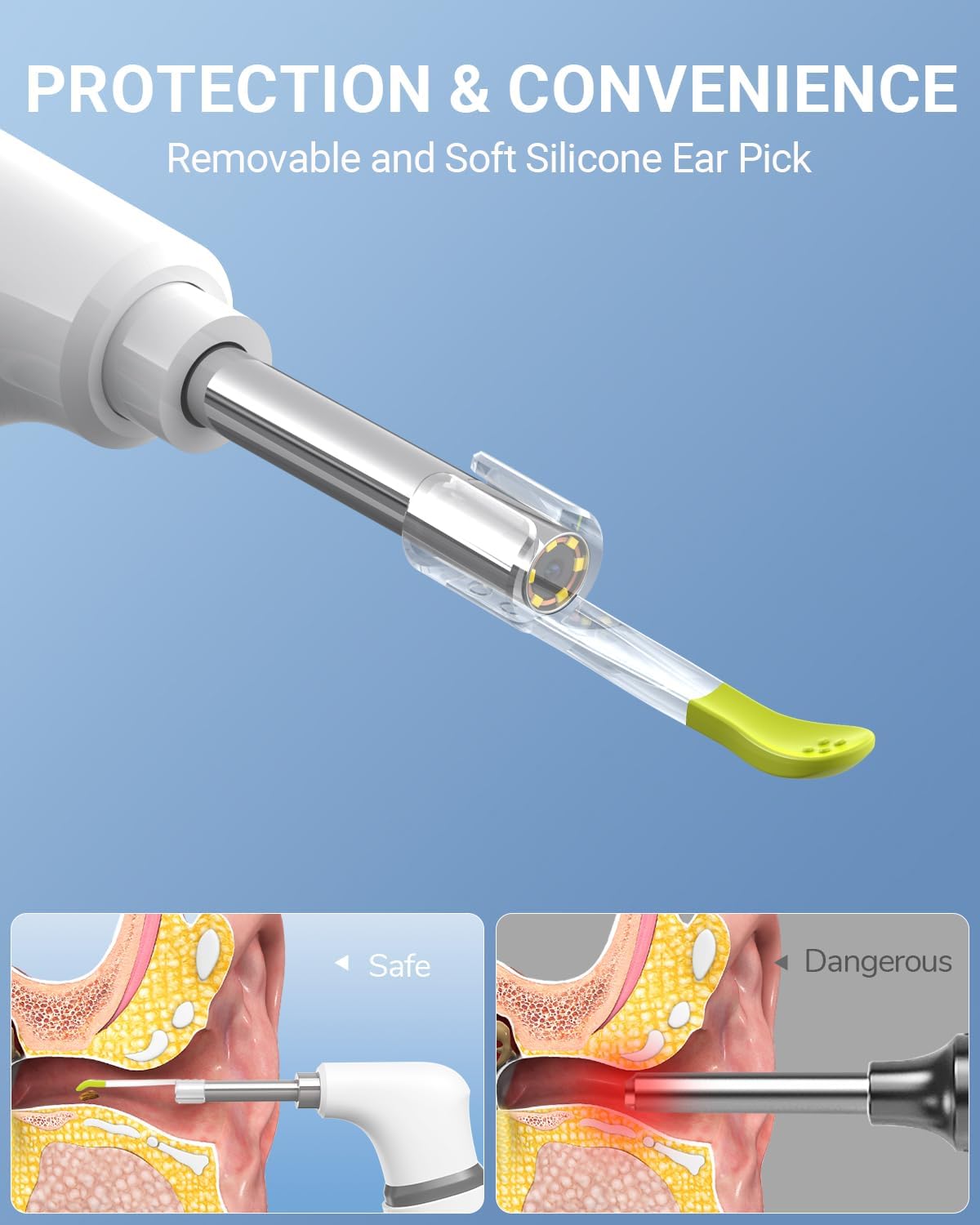
Image: A comparison showing safe use of the otoscope with a soft silicone ear pick versus a dangerous method that could cause injury to the eardrum.
Viewโหมด ing
The app offers two viewing modes to enhance your examination:
- โหมดเต็มจอ: Provides a real-time, full-screen view ของช่องหู
- โหมดแยกหน้าจอ: Allows you to compare the real-time image with previously captured photos, facilitating analysis and tracking changes over time.
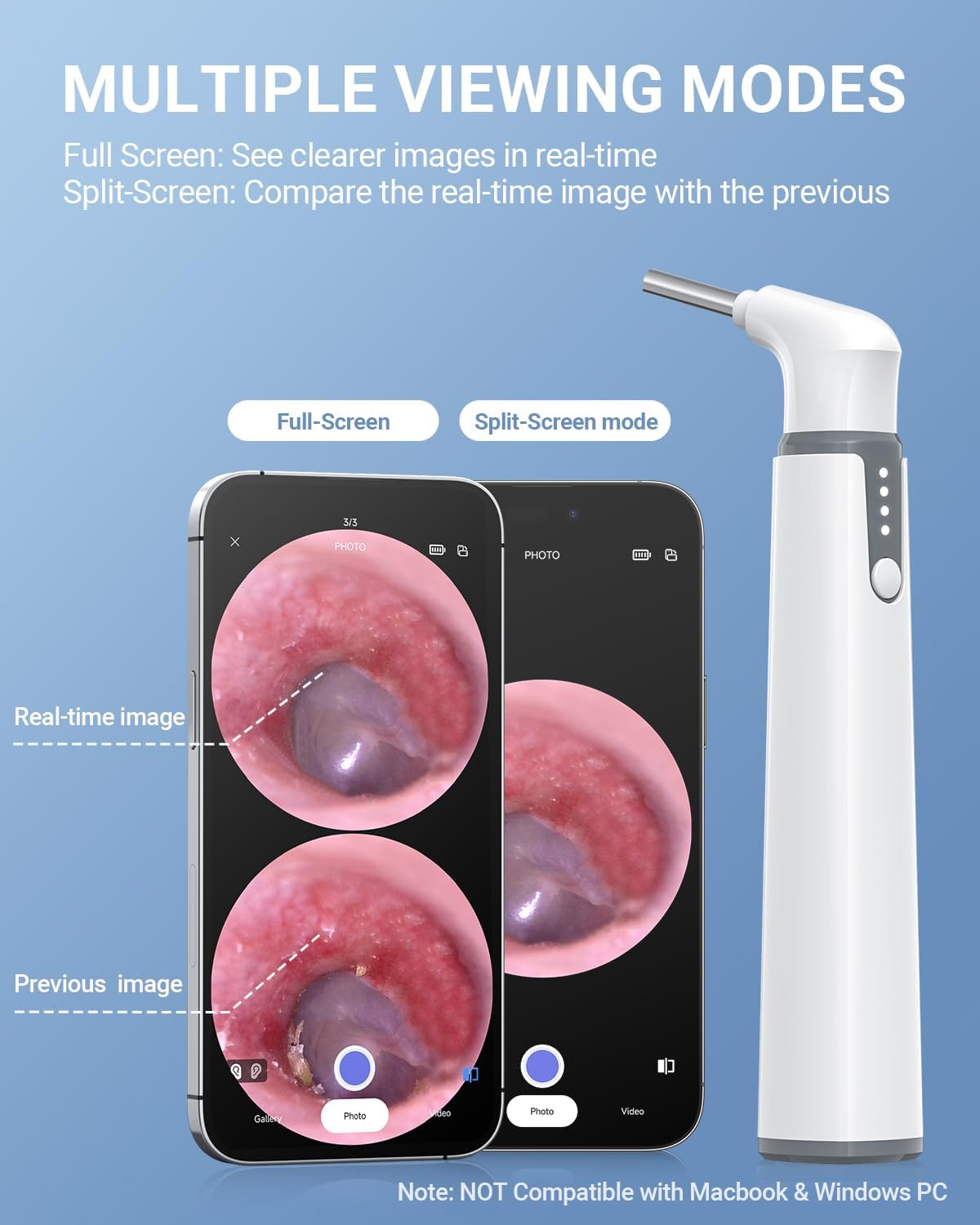
Image: A visual demonstration of the app's full-screen mode for real-time viewing and split-screen mode for comparing current and previous ear canal images.
การถ่ายภาพและวิดีโอ
The app allows you to capture still images and record videos of your ear canal. These features are useful for documenting observations, tracking progress, or sharing information with healthcare professionals for remote consultation.

Image: A graphic depicting a user sharing a captured image of their ear canal with a doctor via a messaging app, illustrating the ease of remote consultation.
วิดีโอสาธิตผลิตภัณฑ์
Watch this official product video for a visual guide on how to use the ScopeAround Digital Otoscope, including setup and practical application.
Video: A demonstration of the ScopeAround Digital Otoscope in use, showing how it connects to a smartphone and provides a clear view of the ear canal for examination.
การซ่อมบำรุง
Proper maintenance ensures the longevity and hygiene of your otoscope:
- การทำความสะอาดเลนส์: The otoscope features an IP67 waterproof lens, allowing direct cleaning of the camera tip. Use the provided cotton swabs or a soft, lint-free cloth with alcohol prep pads to gently wipe the lens after each use.
- การทำความสะอาดที่แคะหู: The removable silicone ear picks should be cleaned thoroughly with soap and water or an alcohol wipe after each use. Ensure they are completely dry before reattaching.

Image: A hand demonstrating how to clean the otoscope lens using a cotton swab, ensuring clear visibility for future use.

Image: A split image showing the otoscope lens and an ear canal "Before" and "After" cleaning, demonstrating the improvement in clarity.
การแก้ไขปัญหา
If you encounter issues with your ScopeAround Wireless Otoscope, refer to the following common problems and solutions:
| ปัญหา | สาเหตุที่เป็นไปได้ | สารละลาย |
|---|---|---|
| อุปกรณ์ไม่เปิดเครื่อง | แบตเตอรี่ต่ำหรือปุ่มเปิด/ปิดไม่ได้กดอย่างถูกต้อง | Charge the device using the provided USB cable. Ensure you long-press the power button. |
| ไม่สามารถเชื่อมต่อ Wi-Fi ได้ | Incorrect Wi-Fi network selected or Wi-Fi not enabled on otoscope. | Ensure the otoscope is powered on and broadcasting its Wi-Fi signal. Select the "Smart Otoscope-XXX" network. Confirm you are not trying to connect via Bluetooth. |
| ภาพไม่ชัดหรือมืดเกินไป | เลนส์กล้องสกปรกหรือแสงสว่างไม่เพียงพอ | Clean the camera lens as described in the Maintenance section. Ensure the LED lights are on. |
| แอปพลิเคชันขัดข้องหรือหยุดทำงาน | App software issue or device compatibility. | Restart the app and the otoscope. Ensure your mobile device's operating system is up to date. Reinstall the app if necessary. |
| อุปกรณ์จะร้อนขึ้นขณะใช้งาน | Normal operation, especially with prolonged use. | This is normal. If it becomes excessively hot or uncomfortable, discontinue use and allow it to cool down. |
ข้อมูลจำเพาะ
| คุณสมบัติ | รายละเอียด |
|---|---|
| ขนาดสินค้า | 6.26 x 3.11 x 0.39 นิ้ว |
| น้ำหนักสินค้า | 5.8 ออนซ์ |
| ASIN | B0BG7WCKPB |
| ผู้ผลิต | มหาวิทยาลัยเอสจียู |
| สี | สีขาว |
| ความละเอียดในการจับภาพวิดีโอ | 720p |
| เส้นผ่านศูนย์กลางเลนส์ | 3.9มม. |
| ความจุของแบตเตอรี่ | 800mAh (ชาร์จไฟได้) |
| ระดับการกันน้ำ | IP67 (lens) |
การรับประกันและการสนับสนุน
ScopeAround is committed to providing innovative solutions and excellent customer service. For any questions, technical support, or warranty inquiries, please contact the ScopeAround customer support team. Refer to the product packaging or the official ScopeAround webเว็บไซต์สำหรับรายละเอียดการติดต่อ
You can also visit the official ScopeAround Store on Amazon for more information and support: ScopeAround Store.
Ask a question about this manual
Ask about setup, troubleshooting, compatibility, parts, safety, or missing instructions. Manuals+ will review the question and use this page’s manual context to help answer it.