
การแนะนำ
This manual provides essential information for the proper setup, operation, and maintenance of your Defunc Home 40W Multiroom Smart Speaker. Please read these instructions carefully before using the product to ensure optimal performance and longevity.
สินค้าเกินview
รวมส่วนประกอบ
- Defunc Home 40W Speaker
- อะแดปเตอร์แปลงไฟ
- ฐานรอง
- คู่มือการใช้งาน (เอกสารนี้)
- บัตรรับประกัน
คุณสมบัติหลัก
- การเชื่อมต่อแบบไร้รอยต่อ: Connect and control up to 32 speakers using the Defunc HOME app. Stream the same audio everywhere or select different tracks for each room.
- Uninterrupted Playback: Enjoy continuous playback via Wi-Fi, ensuring phone calls do not interrupt your audio.
- ความเข้ากันได้ที่หลากหลาย: Supports Wi-Fi, Bluetooth 5.0, and AUX IN for flexible connection options.
- การออกแบบที่ปรับแต่งได้: Adapt the speaker's appearance with interchangeable front covers (available separately) or personalize with your own image.
- ฟังก์ชันขั้นสูงของแอป: The Defunc HOME app allows volume adjustment, equalizer configuration, speaker grouping/ungrouping, and easy switching between stereo/mono modes.
- การผสานรวมผู้ช่วยอัจฉริยะ: Compatible with Alexa and Airplay2.
การตั้งค่า
1. การแกะกล่องและการจัดวาง
Carefully remove all components from the packaging. Place the speaker on a stable, flat surface or mount it using a compatible wall or floor stand (sold separately). Ensure adequate ventilation around the speaker.
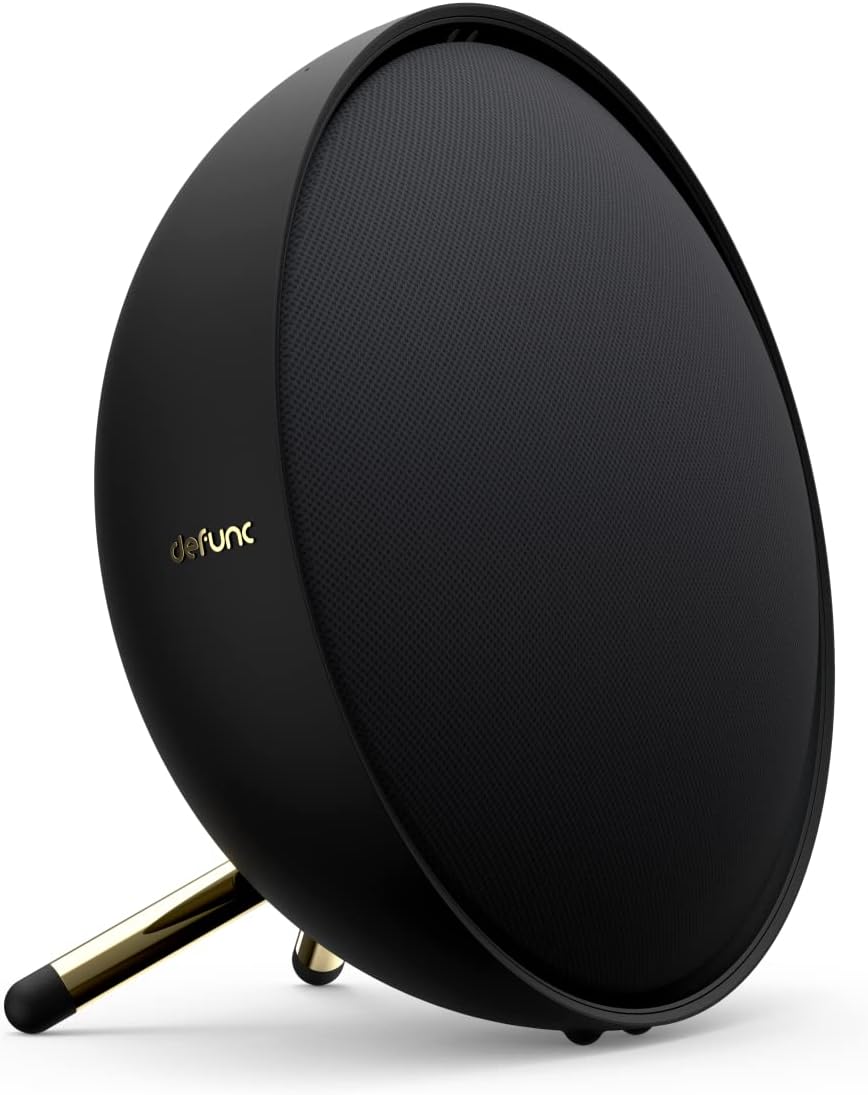
Image: Defunc Home speaker with its stand.
2. การเชื่อมต่อไฟฟ้า
- Connect the power adapter to the DC input port on the back of the speaker.
- Plug the power adapter into a wall outlet. The speaker will power on automatically or enter standby mode.

ภาพ: ด้านหลัง view of the Defunc Home speaker, highlighting connection ports.
3. Initial App Setup (Recommended)
- ดาวน์โหลด Defunc HOME แอปจากร้านแอปของอุปกรณ์ของคุณ
- Open the app and follow the on-screen instructions to connect your speaker to your Wi-Fi network. This step is crucial for multiroom functionality and smart assistant integration.
- During setup, you may be prompted to link your Alexa or Airplay2 accounts.
คำแนะนำการใช้งาน
เปิด/ปิดเครื่อง
The speaker powers on when connected to an electrical outlet. To put it into standby mode or fully power off, use the Defunc HOME app or refer to the specific power button instructions if available on your model.
การควบคุมระดับเสียง
- Via Defunc HOME App: Adjust the volume precisely within the application.
- Via Source Device: Control volume from your connected smartphone, tablet, or computer.
- On Speaker: Use the physical volume buttons located on the top of the speaker (if present).
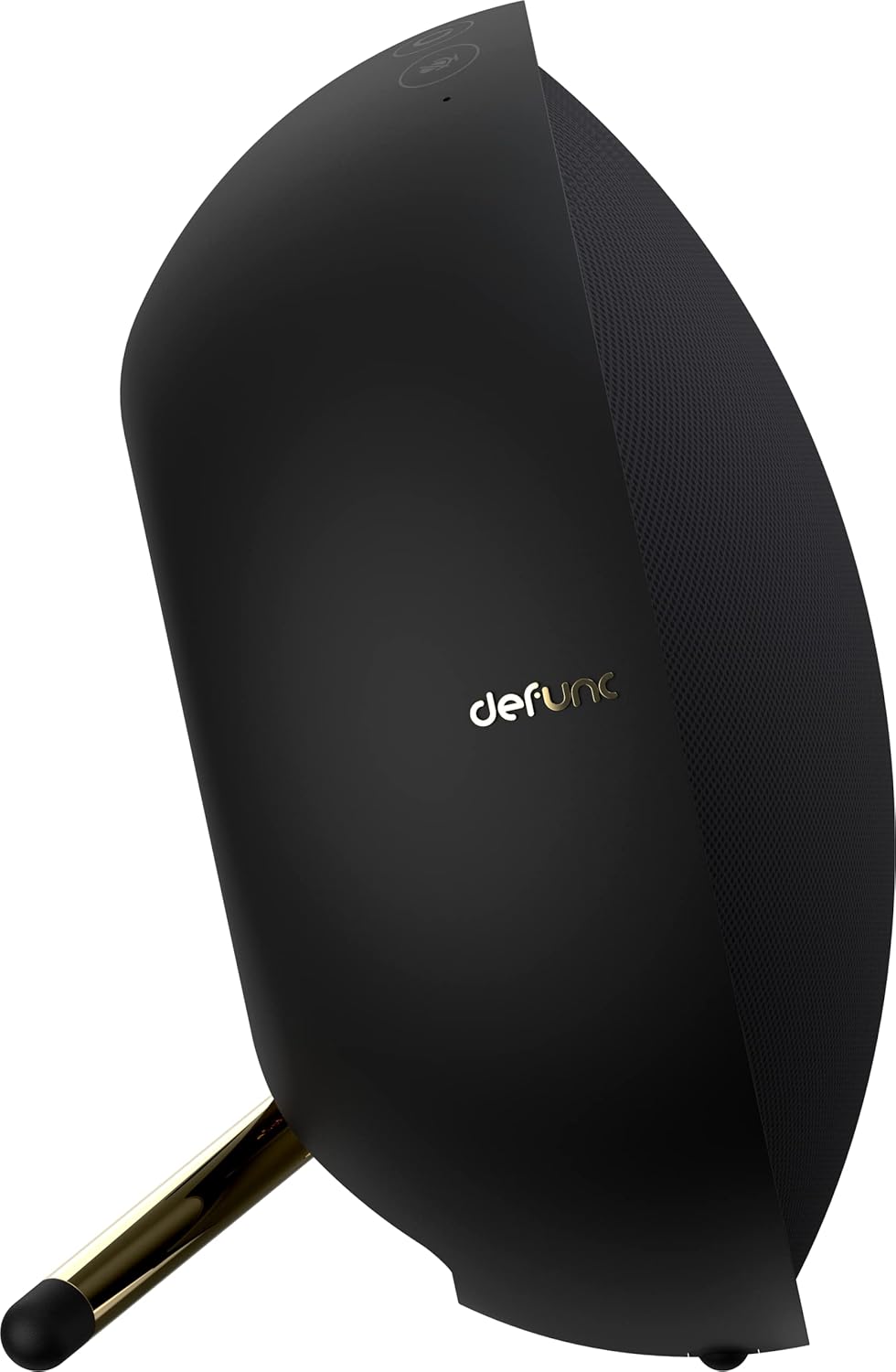
ภาพ: ด้านบน view of the Defunc Home speaker, displaying control buttons.
การควบคุมการเล่น
Playback (play, pause, skip tracks) can be controlled through the Defunc HOME app, your streaming application, or the physical controls on the speaker.
การเชื่อมต่อ
Wi-Fi Connection (Defunc HOME App)
For multiroom audio, Alexa, and Airplay2 functionality, connect your speaker to your home Wi-Fi network using the Defunc HOME app. This provides the most stable and feature-rich experience.
จับคู่บลูทู ธ
- ตรวจสอบให้แน่ใจว่าลำโพงเปิดอยู่
- Press and hold the Bluetooth pairing button on the speaker (refer to the diagram in the app or on the speaker for exact location) until the indicator light flashes, indicating pairing mode.
- On your device (smartphone, tablet), go to Bluetooth settings and select "Defunc Home" from the list of available devices.
- เมื่อจับคู่เสร็จแล้ว ไฟแสดงสถานะจะติดค้าง
การเชื่อมต่อ AUX IN
Connect an external audio source (e.g., MP3 player, CD player) to the AUX IN port on the speaker using a 3.5mm audio cable. The speaker will automatically switch to AUX mode or you may need to select it via the app or speaker controls.
Defunc HOME App Functionality
The Defunc HOME app is central to managing your speaker system. It allows you to:
- การควบคุมหลายห้อง: Group up to 32 speakers for synchronized audio or assign different audio to individual speakers.
- การตั้งค่าอีควอไลเซอร์: ปรับแต่งเสียงระดับมืออาชีพfileเพื่อให้เหมาะกับความชอบของคุณ
- โหมดสเตอริโอ/โมโน: Switch between stereo and mono playback for individual speakers or grouped pairs.
- การเลือกแหล่งที่มา: Easily switch between Wi-Fi, Bluetooth, and AUX input.
- อัพเดตเฟิร์มแวร์: Receive and install updates to enhance speaker performance and features.
- การผสานรวมผู้ช่วยอัจฉริยะ: Manage Alexa and Airplay2 settings.
การซ่อมบำรุง
การทำความสะอาด
Wipe the speaker's exterior with a soft, dry cloth. Do not use liquid cleaners or abrasive materials, as these can damage the finish. Ensure the speaker is unplugged before cleaning.
พื้นที่จัดเก็บ
เมื่อไม่ได้ใช้งานเป็นเวลานาน ควรเก็บลำโพงไว้ในที่แห้งและเย็น หลีกเลี่ยงแสงแดดโดยตรงและอุณหภูมิที่สูงหรือต่ำเกินไป
การแก้ไขปัญหา
| ปัญหา | สาเหตุที่เป็นไปได้ | สารละลาย |
|---|---|---|
| ไม่มีไฟฟ้า | ไม่ได้เสียบสายไฟ ปลั๊กไฟไม่ทำงาน | Ensure power cable is securely connected to speaker and a working electrical outlet. |
| ไม่มีเสียง | Volume too low; incorrect input source; device not paired/connected. | Increase volume. Check selected input source (Wi-Fi, Bluetooth, AUX). Re-pair Bluetooth device or check Wi-Fi connection in app. |
| การตัดการเชื่อมต่อบลูทู ธ | Device out of range; interference. | Move device closer to speaker. Avoid obstacles. Re-pair if necessary. |
| ปัญหาการเชื่อมต่อ Wi-Fi | Incorrect Wi-Fi password; router issues; speaker too far from router. | Verify Wi-Fi password in the Defunc HOME app. Restart your router. Move speaker closer to router. |
| Alexa/Airplay2 Not Responding | Not properly linked; network issues. | Check account linking in the Defunc HOME app. Ensure stable Wi-Fi connection. |
ข้อมูลจำเพาะ
| คุณสมบัติ | รายละเอียด |
|---|---|
| ยี่ห้อ | เลิกกิจการ |
| หมายเลขรุ่น | D2072 |
| ขนาดสินค้า | 8.5D x 20W x 20H cm |
| น้ำหนักสินค้า | 2 กิโลกรัม |
| สี | สีดำ |
| เทคโนโลยีการเชื่อมต่อ | บลูทู ธ Wi-Fi |
| เทคโนโลยีการสื่อสารไร้สาย | ไวไฟ |
| กำลังขับของลำโพง | 40 Watts (for this model) |
| การตอบสนองความถี่ | 20 กิกะเฮิรตซ์ |
| โหมดเอาต์พุตเสียง | สเตอริโอ |
| วิธีการควบคุม | แอปพลิเคชัน |
| อุปกรณ์ที่รองรับ | สมาร์ทโฟน |
| การใช้ที่แนะนำ | เครื่องเสียงภายในบ้าน |
| แหล่งพลังงาน | สายไฟ |
| วัสดุ | พลาสติก |
| คุณสมบัติพิเศษ | Bluetooth, Multi-room capability, Alexa, Airplay2 |
การรับประกันและการสนับสนุน
ข้อมูลการรับประกัน
Your Defunc Home speaker comes with a standard manufacturer's warranty. Please refer to the included Warranty Card for specific terms, conditions, and duration of coverage. Keep your proof of purchase for warranty claims.
การสนับสนุนลูกค้า
For technical assistance, troubleshooting beyond this manual, or warranty inquiries, please visit the official Defunc website or contact their customer support. Contact details can typically be found on the warranty card or the Defunc webเว็บไซต์.