
LiebeWH TOWSM1-100
LiebeWH WiFi Smart Circuit Breaker TOWSM1-100 16A User Manual
Model: TOWSM1-100 | Current Rating: 16A
1. บทนำ
This manual provides essential information for the safe and effective use of your LiebeWH WiFi Smart Circuit Breaker, model TOWSM1-100 16A. This device is designed to offer advanced electrical protection and smart control capabilities for various applications.
The smart circuit breaker integrates overload, short-circuit, over-voltage และต่ำกว่าปริมาตรtage protection. It supports remote control via a dedicated mobile application and voice control through compatible smart terminals, enhancing convenience and safety in your electrical system.
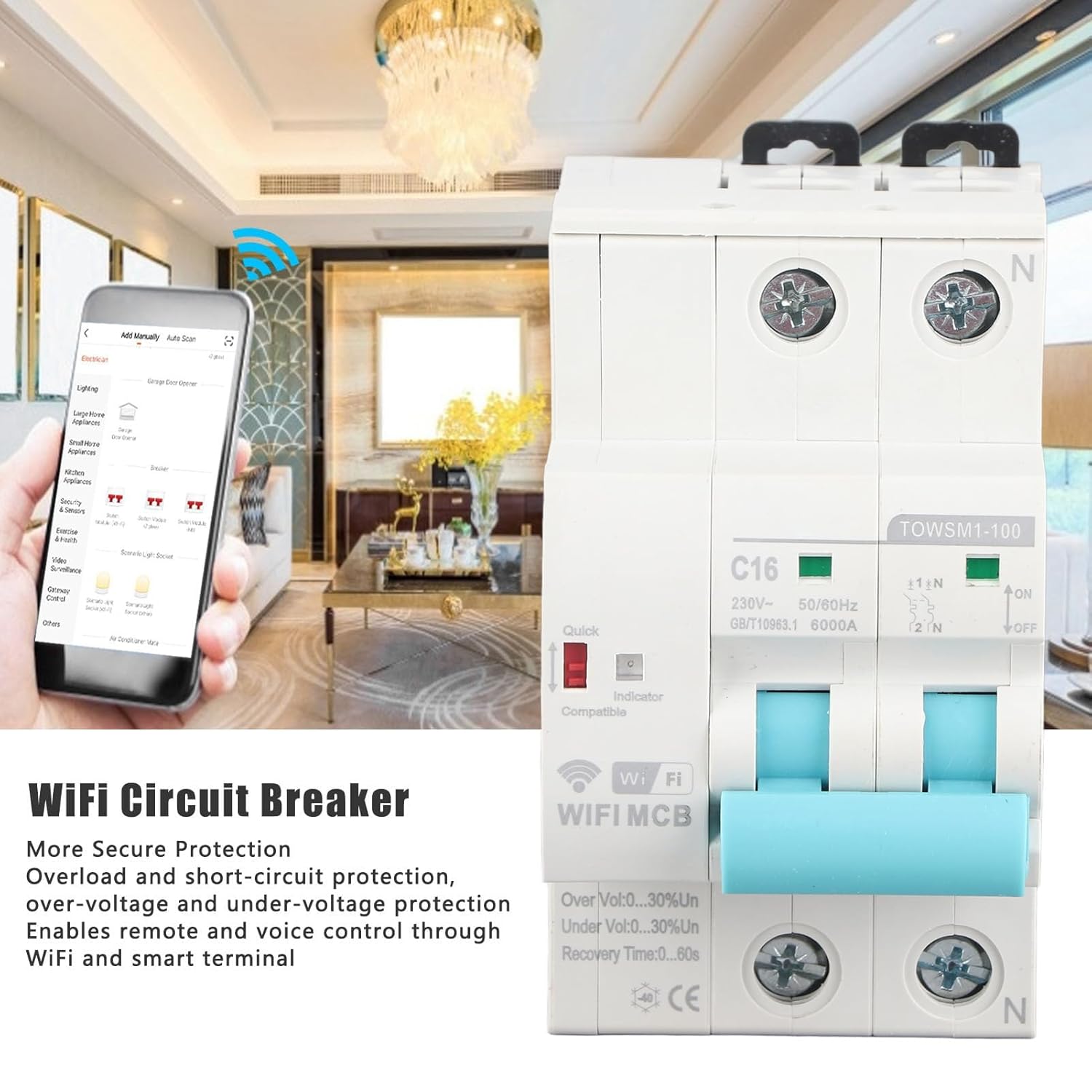
Image 1.1: LiebeWH WiFi Smart Circuit Breaker with remote control via smartphone app.
2. ข้อมูลด้านความปลอดภัย
คำเตือน: Electrical installation and maintenance should only be performed by qualified personnel in accordance with all local and national electrical codes and regulations. Failure to comply with these instructions can result in electric shock, fire, serious injury, or death.
- ควรตัดกระแสไฟที่แผงควบคุมหลักทุกครั้งก่อนติดตั้งหรือซ่อมบำรุงเบรกเกอร์วงจร
- ตรวจสอบให้แน่ใจว่าการต่อสายดินและการเดินสายไฟถูกต้อง
- ห้ามใช้งานอุปกรณ์หากพบว่าได้รับความเสียหาย
- อย่าให้เกินปริมาตรที่กำหนดtage and current specifications of the device.
- เก็บอุปกรณ์ให้ห่างจากน้ำและความชื้นที่มากเกินไป
3. สินค้าหมดview
The LiebeWH TOWSM1-100 16A is a 2-pole smart circuit breaker designed for DIN rail mounting. It features clear indicators for its status and protection mechanisms.

ภาพที่ 3.1: ด้านหน้า view ของเบรกเกอร์วงจร
ส่วนประกอบหลัก:
- สวิตช์หลัก: Lever for manual ON/OFF operation.
- ไฟแสดงสถานะพลังงาน: แสดงสถานะพลังงาน
- ตัวบ่งชี้ WiFi: Displays the WiFi connection status.
- Quick Indicator: Red indicator for quick trip status.
- ขั้ว: Input and output terminals for wiring connections.
- คลิปยึดราง DIN: สำหรับติดตั้งอย่างมั่นคงบนราง DIN มาตรฐาน

Image 3.2: Close-up of indicators and switch, showing 'ON' and 'OFF' positions, 'C16' rating, and 'TOWSM1-100' model.
4. การตั้งค่าและการติดตั้ง
Proper installation is crucial for the safe and reliable operation of the smart circuit breaker. Always ensure power is disconnected before beginning installation.
4.1 Mechanical Installation (DIN Rail Mounting)
- โปรดตรวจสอบให้แน่ใจว่าได้ปิดแหล่งจ่ายไฟหลักแล้ว
- Locate a suitable position on a standard DIN rail within your electrical panel.
- Engage the top clip of the circuit breaker onto the DIN rail.
- Press the bottom part of the circuit breaker firmly until the bottom clip snaps onto the DIN rail, securing the device in place.

Image 4.1: DIN rail mounting diagram, illustrating 'Tilt Out' and 'Pull Down' actions.
4.2 เดินสายไฟฟ้า
- With power still OFF, connect the incoming live (L) and neutral (N) wires to the upper terminals of the circuit breaker.
- Connect the outgoing load live (L) and neutral (N) wires to the lower terminals of the circuit breaker.
- Ensure all wire connections are tight and secure to prevent loose contacts and overheating.
- Verify that the wiring matches the circuit diagram and local electrical standards.

Image 4.2: Close-up of wiring terminals for secure connections.
4.3 App Pairing and Network Connection
- Download the compatible smart home application (e.g., Tuya Smart, Smart Life) from your smartphone's app store.
- ลงทะเบียนหรือเข้าสู่ระบบบัญชีของคุณ
- Power on the circuit breaker. The WiFi indicator should start blinking, indicating it's in pairing mode. If not, refer to the app's instructions for manual pairing mode activation.
- In the app, select "Add Device" or the '+' icon, then choose "Electrical" or "Circuit Breaker".
- Follow the on-screen instructions to connect the device to your 2.4GHz WiFi network.
- Once successfully paired, the WiFi indicator will become solid, and the device will appear in your app.
5. คู่มือการใช้งาน
5.1 การใช้งานแบบแมนนวล
- To turn the circuit breaker ON, push the lever upwards to the 'ON' position.
- To turn the circuit breaker OFF, push the lever downwards to the 'OFF' position.
5.2 การควบคุมระยะไกลผ่านแอปพลิเคชัน
- Open the smart home application on your smartphone.
- Select the LiebeWH WiFi Smart Circuit Breaker from your device list.
- Use the virtual switch or controls within the app to turn the circuit breaker ON or OFF remotely.
- The app also provides real-time monitoring of power status and protection events.
5.3 การควบคุมด้วยเสียง
If integrated with a compatible voice assistant (e.g., Amazon Alexa, Google Assistant), you can control the circuit breaker using voice commands. Refer to your voice assistant's setup guide for connecting smart home devices.
- Example commands: "Alexa, turn on the living room circuit breaker." or "Hey Google, turn off the water heater."
5.4 Automatic Reclosing and Protection Features
The circuit breaker is equipped with automatic reclosing functionality and various protection features:
- ระบบป้องกันการโอเวอร์โหลด: Automatically trips when the current exceeds the rated capacity (16A).
- การป้องกันการลัดวงจร: Trips instantly in case of a short circuit.
- เกินVoltagการป้องกันอี: Protects connected devices from excessive voltage.
- ต่ำกว่าเล่มtagการป้องกันอี: Protects connected devices from insufficient voltage.
- การปิดระบบอัตโนมัติ: After a trip event (e.g., temporary overload), the device can automatically attempt to reclose after a configurable recovery time (0-60 seconds), if the fault condition is no longer present. This feature helps maintain continuous power supply where appropriate.
6. การบำรุงรักษา
The LiebeWH WiFi Smart Circuit Breaker is designed for minimal maintenance. However, periodic checks are recommended to ensure optimal performance and safety.
- การตรวจสอบภาพ: ตรวจสอบเบรกเกอร์วงจรเป็นระยะๆ เพื่อดูว่ามีร่องรอยความเสียหายทางกายภาพ การเปลี่ยนสี หรือการเชื่อมต่อหลวมหรือไม่
- การทำความสะอาด: หากจำเป็น ให้เช็ดทำความสะอาดภายนอกของอุปกรณ์เบาๆ ด้วยผ้าแห้งเนื้อนุ่ม ห้ามใช้น้ำยาทำความสะอาดหรือสารละลายใดๆ
- การตรวจสอบการทำงาน: Test the manual ON/OFF switch periodically to ensure it operates smoothly.
- อัพเดตเฟิร์มแวร์: Check the smart home application for any available firmware updates for the device to ensure you have the latest features and security enhancements.
For any internal maintenance or repairs, contact a qualified electrician or the manufacturer's support.
7 การแก้ไขปัญหา
| ปัญหา | สาเหตุที่เป็นไปได้ | สารละลาย |
|---|---|---|
| อุปกรณ์ไม่เปิดเครื่อง | No power supply; incorrect wiring; device fault. | ตรวจสอบแหล่งจ่ายไฟหลัก ตรวจสอบการเชื่อมต่อสายไฟ หากปัญหายังคงอยู่ โปรดติดต่อฝ่ายสนับสนุน |
| WiFi indicator is off or blinking slowly. | No WiFi connection; incorrect network settings; device not in pairing mode. | Ensure 2.4GHz WiFi is active. Re-enter pairing mode (refer to app instructions). Check router distance. |
| เบรกเกอร์วงจรตัดบ่อยครั้ง | โอเวอร์โหลด; ไฟฟ้าลัดวงจร; แรงดันไฟฟ้าเกิน/ต่ำกว่าปกติtage; faulty appliance. | Reduce load on the circuit. Disconnect appliances to identify faulty ones. Consult an electrician to check for wiring issues. |
| รีโมทคอนโทรลไม่ทำงาน | No internet connection; app issue; device offline. | Check your smartphone's internet connection. Ensure the circuit breaker's WiFi indicator is solid. Restart the app. |
8. ข้อมูลจำเพาะ
| คุณสมบัติ | ข้อมูลจำเพาะ |
|---|---|
| แบบอย่าง | TOWSM1-100 |
| กระแสไฟฟ้าที่ได้รับการจัดอันดับ | 16เอ |
| จัดอันดับVoltage | ไฟฟ้ากระแสสลับ 230 โวลต์ |
| ความถี่ | 50/60เฮิรตซ์ |
| Ultimate Breaking Capacity (ICU) | 6000เอ |
| วิธีการติดตั้ง | ราง DIN |
| ระยะเวลาการฟื้นตัว | 0-60วินาที |
| วัสดุ | เอบีเอส |
| ขนาด (แพ็คเกจ) | 10.1 x 8.7 x 5.9 ซม. |
| น้ำหนัก (แพ็คเกจ) | 350 กรัม |
| ผู้ผลิต | ลีบีWH |
| หมายเลขชิ้นส่วนของผู้ผลิต | LiebeWHqg8v3fzo4p-11 |

Image 8.1: Wide application of the LiebeWH WiFi Smart Circuit Breaker.
9. ข้อมูลการรับประกัน
Specific warranty details for the LiebeWH TOWSM1-100 16A WiFi Smart Circuit Breaker are not provided in the product information. Please refer to the retailer's return policy or contact the manufacturer directly for warranty terms and conditions.
10. การสนับสนุน
For technical assistance, troubleshooting beyond this manual, or inquiries regarding your LiebeWH WiFi Smart Circuit Breaker, please contact your point of purchase or the manufacturer's customer support channels.
- ผู้ผลิต: ลีบีWH
- แหล่งข้อมูลออนไลน์: Check the LiebeWH official website or the smart home app's help section for FAQs and additional support.
Ask a question about this manual
Ask about setup, troubleshooting, compatibility, parts, safety, or missing instructions. Manuals+ will review the question and use this page’s manual context to help answer it.