
1. บทนำ
The VDIAGTOOL V200 Automotive Circuit Tester is a versatile diagnostic tool designed for electrical system testing in 12V-24V vehicles. It combines multiple functions to assist in identifying and troubleshooting electrical faults efficiently.

Figure 1: VDIAGTOOL V200 Automotive Circuit Tester and included accessories.
2. อะไรอยู่ในกล่อง
- เครื่องทดสอบวงจรโพรบ
- สายต่อพ่วง (20 ฟุต)
- อะแดปเตอร์จุดบุหรี่
- คู่มือการใช้งาน
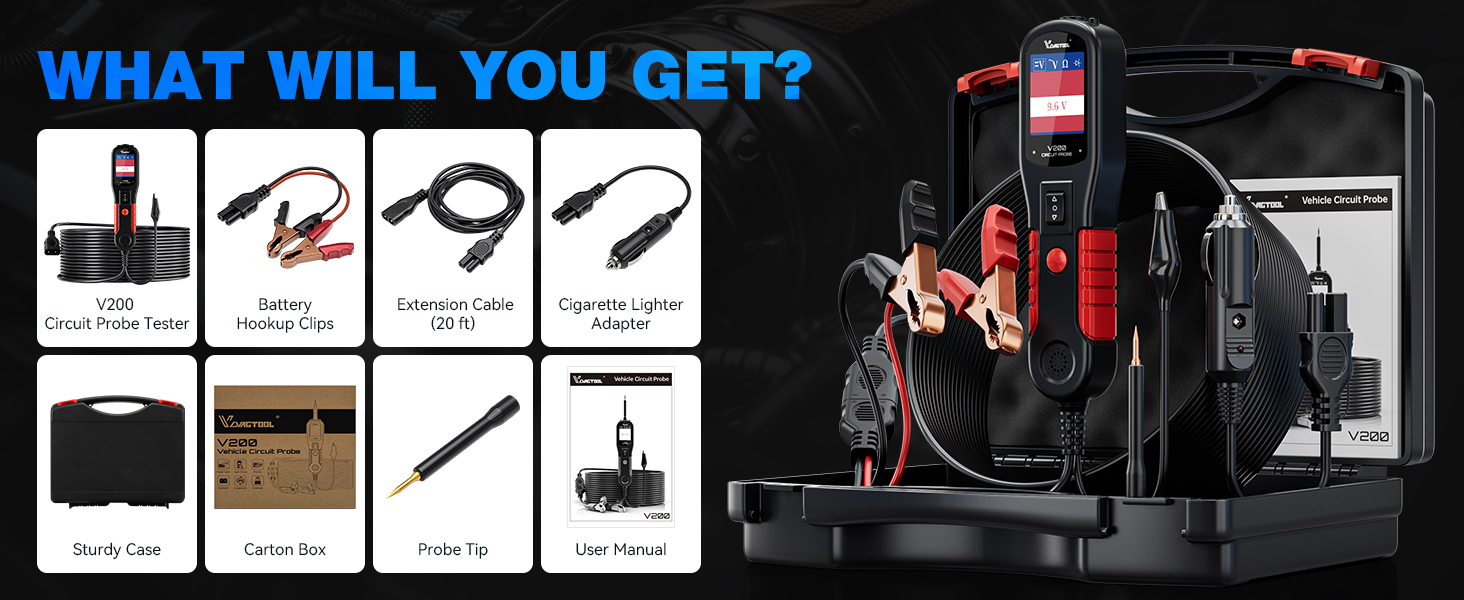
Figure 2: All components included in the VDIAGTOOL V200 kit.
3. การตั้งค่า
The V200 is powered by the vehicle's 12V-24V battery. Connect the red alligator clip to the positive (+) terminal and the black alligator clip to the negative (-) terminal of the vehicle battery. Alternatively, use the provided cigarette lighter adapter for power.
3.1 การเปิดเครื่องอุปกรณ์
- การเชื่อมต่อแบตเตอรี่: ติดซีแอลสีแดงamp เข้ากับขั้วบวกของแบตเตอรี่และก้อนสีดำamp กับขั้วแบตเตอรี่ลบ
- การเชื่อมต่อไฟแช็กบุหรี่: Insert the cigarette lighter adapter into the vehicle's 12V accessory socket.
Video 1: Demonstrates the unboxing and initial setup of the VDIAGTOOL V200, including connecting to a car battery.
4. โหมดการทำงาน
The V200 supports four primary working modes, easily switchable with a single button press.
- DC ฉบับที่tagอี ทดสอบ: Detects the DC voltage value of the circuit under test with 0.1V resolution.
- ฉบับ ACtagอี ทดสอบ: Detects Max/Min voltage, frequency, and duty cycle of the AC circuit.
- การทดสอบความต้านทาน: Measures resistance between the probe tip and the auxiliary ground lead.
- การทดสอบไดโอด: Determines the operation and conductivity of diode assemblies.

Figure 3: The V200 display interface illustrating the four main working modes.
5. ฟังก์ชั่นหลัก
5.1 Polarity Identification
The V200 automatically identifies circuit polarity. A red LED indicates a positive connection, while a green LED indicates a negative connection. No LED indicates an open circuit.

Figure 4: Visual representation of polarity identification using the V200's LED indicators.
5.2 การเปิดใช้งานส่วนประกอบ
This feature allows you to activate components (e.g., lights, motors, relays) by supplying power or ground directly from the probe, aiding in troubleshooting. Use caution to avoid damaging components by applying incorrect polarity or excessive current.

Figure 5: Illustration of component activation for testing a car bulb.
5.3 Continuity, Sensor/Signal Circuit Test
Perform continuity tests, check sensor states, and verify signal integrity within circuits. The tool can also help locate short circuits and bad grounds.
6. คุณสมบัติด้านความปลอดภัย
6.1 การป้องกันโอเวอร์โหลด
The V200 features a built-in 8-amp circuit breaker. In case of an overload, the device will automatically shut down to protect itself and the tested components. A beep warning will also occur.

Figure 6: Visual indicator of the overload protection feature.
7. ข้อมูลจำเพาะ
- ขนาดสินค้า : 1.85 x 1.1 x 7 นิ้ว
- น้ำหนักสินค้า: 1.17 กิโลกรัม (2.58 ปอนด์)
- แหล่งพลังงาน: Corded Electric (12V-24V vehicle battery or cigarette lighter)
- หมายเลขรุ่น: VDT-V200-P
- ความยาวสายไฟ: 20FT main cord + 20FT extension cord (Total 40FT)
- คุณสมบัติเพิ่มเติม: Built-in flashlight, Tone On/Off Design
8. การบำรุงรักษา
To ensure the longevity and optimal performance of your VDIAGTOOL V200, follow these general maintenance guidelines:
- Keep the device clean and free from dust, dirt, and moisture.
- Store the tester and its accessories in the provided sturdy case when not in use.
- Inspect cables and connectors regularly for any signs of wear or damage. Replace if necessary.
- หลีกเลี่ยงการวางอุปกรณ์ไว้ในอุณหภูมิที่สูงหรือต่ำเกินไปหรือถูกแสงแดดโดยตรงเป็นเวลานาน
9 การแก้ไขปัญหา
If you encounter issues with your VDIAGTOOL V200, consider the following:
- อุปกรณ์ไม่ได้เปิดเครื่อง: Ensure secure connections to the vehicle's battery or cigarette lighter. Verify the vehicle's power source is active.
- อ่านไม่ออก/อ่านผิด: Check that the probe tip is making good contact with the circuit. Ensure the correct operating mode is selected.
- การป้องกันไฟเกินทำงาน: If the device shuts down with a beep, it indicates an overload. Disconnect the probe, allow a few moments, and then reconnect. Reduce the load or verify the circuit's specifications before retesting.
- ปัญหาหน้าจอ: If the screen is blank or unresponsive, try disconnecting and reconnecting the power source.
10. การรับประกันและการสนับสนุน
VDIAGTOOL offers comprehensive support for the V200 Automotive Circuit Tester:
- การรับประกัน: 3 Years Warranty.
- ความช่วยเหลือด้านเทคนิค: Lifetime technical assistance.
- การส่งคืน: 60 Days No-Reason-asked Return for refund.
- การเปลี่ยนหัววัด: Free probe replacement.
- ติดต่อฝ่ายสนับสนุน: For any questions or assistance, kindly reach us via vdiagtool2@outlook.com.