
1. บทนำ
The eppfun AK3040Plus is a high-performance USB Bluetooth 5.2 audio transmitter designed to provide seamless wireless audio connectivity for various devices. Featuring Qualcomm APTX-Adaptive technology, it ensures low latency and high-fidelity sound, making it ideal for gaming, music, and voice chat. This manual provides detailed instructions for setting up, operating, and maintaining your AK3040Plus transmitter.

Figure 1: eppfun AK3040Plus USB Bluetooth 5.2 Transmitter
2. คุณสมบัติของผลิตภัณฑ์
- Qualcomm APTX-Adaptive: Utilizes the Qualcomm QCC3040 Chip with aptX-Adaptive for minimized audio delay (approx. 60ms), ensuring synchronized audio and video.
- บลูทูธขั้นสูง 5.2: Offers enhanced stability and reliability with four times the range and two times the speed compared to older Bluetooth versions.
- การสื่อสารแบบไร้สาย: Includes a mini analog microphone for seamless voice chat. Supports HFP mode for calls using your Bluetooth headset's built-in mic.
- เสียบและเล่นได้ง่าย: Simple setup by plugging into a USB 2.0/3.0 port. Automatic pairing mode for first-time use.
- Audio Decoding Support: Compatible with aptxX-LL, SBC, Aptx, Aptx adaptive, and Aptx-HD audio codecs. Note: Your headphones must also support the same standard for optimal performance.
- ความเข้ากันได้ของระบบปฏิบัติการที่กว้าง: Supports PS4/5, Windows 8/10/11, Nintendo Switch OS, Linux OS, and Mac OS.
- Enhanced Gaming Audio: Provides wireless audio for PS4/5 and Nintendo Switch, compatible with all Bluetooth headphones from version 2.1 onwards.
3. การตั้งค่าและการติดตั้ง
The eppfun AK3040Plus is designed for simple plug-and-play operation. Follow these steps to set up your device:
- เชื่อมต่อเครื่องส่งสัญญาณ: Plug the eppfun AK3040Plus into an available USB 2.0 or USB 3.0 port on your PS4, PS5, PC, Mac, or Nintendo Switch.
- โหมดการจับคู่เริ่มต้น: ในการใช้งานครั้งแรก ไฟ LED บนตัวส่งสัญญาณจะกะพริบเป็นสีแดงและสีน้ำเงินโดยอัตโนมัติ เพื่อแสดงว่าอยู่ในโหมดจับคู่
- เปิดใช้งานการจับคู่หูฟัง: Put your Bluetooth headphones or speaker into pairing mode. Refer to your audio device's manual for specific instructions on how to do this.
- ยืนยันการจับคู่: Once your audio device successfully pairs with the AK3040Plus, the LED indicator on the transmitter will stop flashing and remain steadily lit (color depends on the active codec).
- Audio Output Selection (PC/Mac): On PC or Mac, you may need to manually select the "eppfun AK3040Plus" as your audio output device in your system's sound settings.

Figure 2: Connecting the AK3040Plus to a PC

Figure 3: Using the AK3040Plus with a PS5 for shared audio
4. คู่มือการใช้งาน
4.1. Codec Switching
The AK3040Plus supports multiple audio codecs. The LED indicator on the transmitter changes color to show the currently active codec:
- สีฟ้า: aptX-Adaptive
- สีเขียว: aptX-HD ความละเอียดสูง
- เหลือง: aptX LL (Low Latency)
- สีม่วง: เอพเท็กเอ็กซ์
- สีแดง: เอสบีซี
To switch between supported codecs, press the button on the AK3040Plus transmitter. The transmitter will attempt to connect using the highest quality codec supported by both the transmitter and your connected audio device.

Figure 4: LED Indicator Colors for Audio Codecs
4.2. Microphone Usage (HFP Mode)
The AK3040Plus comes with a mini analog microphone for voice chat. If you wish to use your Bluetooth headset's built-in microphone, the transmitter can switch to HFP (Hands-Free Profile) mode. This allows for wireless calls and communication through your headset's integrated mic.
5. ความเข้ากันได้
The eppfun AK3040Plus is compatible with a wide range of devices and operating systems:
- คอนโซลเกม: PlayStation 4 (PS4), PlayStation 5 (PS5), Nintendo Switch
- คอมพิวเตอร์: Windows 8/10/11, Linux OS, Mac OS
- อุปกรณ์เสียง: All Bluetooth headphones and speakers from version 2.1 onwards.
บันทึก: The AK3040Plus is designed exclusively for audio transmission. It is not compatible with devices such as printers, game controllers (for input), cars, keyboards, mice, or guitars for data transfer or control.

Figure 5: Compatible Devices for AK3040Plus
6. ข้อมูลจำเพาะ
| คุณสมบัติ | รายละเอียด |
|---|---|
| หมายเลขรุ่น | AK3040Plus |
| เวอร์ชันบลูทูธ | 5.2 |
| ชิปเซ็ต | วอลคอมม์ QCC3040 |
| ตัวแปลงสัญญาณที่รองรับ | aptxX-LL, SBC, Aptx, Aptx adaptive, Aptx-HD |
| ประเภทขั้วต่อ | USB (2.0/3.0 compatible) |
| สี | สีดำ |
| น้ำหนักสินค้า | 3 กรัม (0.106 ออนซ์) |
| ขนาดแพ็คเกจ | 4.76 x 3.58 x 0.67 นิ้ว |
| อุปกรณ์ที่รองรับ | Nintendo Switch, Headphone, Speaker, PC, PS4, PS5 |
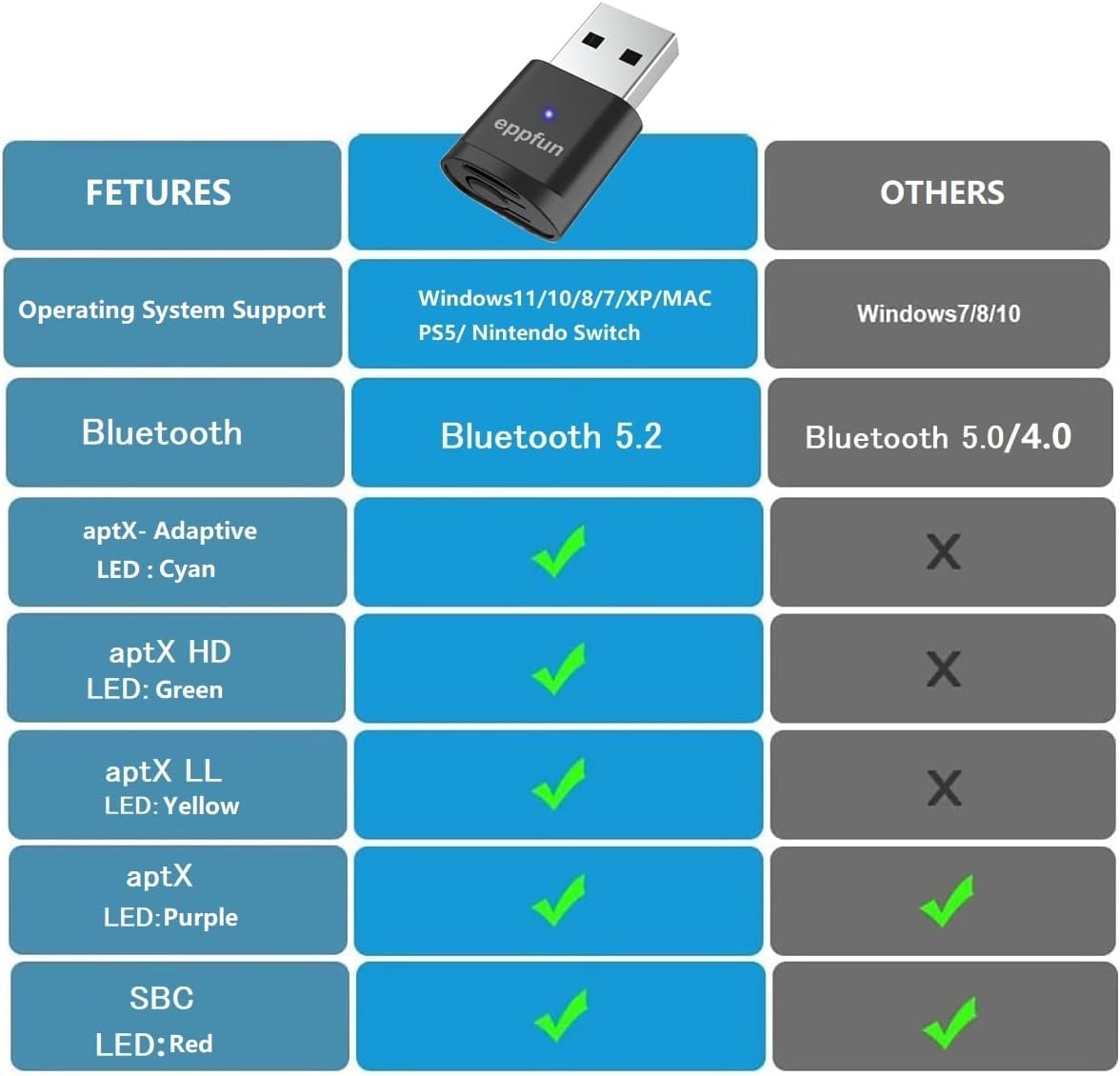
Figure 6: Feature Comparison Table
7 การแก้ไขปัญหา
If you encounter issues with your eppfun AK3040Plus, please refer to the following common problems and solutions:
- Problem: Difficulty Pairing / Multiple Pairing Attempts Required.
สารละลาย: Ensure both the AK3040Plus and your audio device are in pairing mode. Try restarting both devices. Move closer to the transmitter to reduce interference. Ensure no other Bluetooth devices are actively trying to connect or are already connected to your audio device. If the AK3040Plus was previously paired with another device, ensure that device's Bluetooth is off or out of range. - Problem: Unintended Connection to Another Device (e.g., Roommate's Soundbar).
สารละลาย: This can happen if the other device is also in pairing mode or has a strong, open Bluetooth signal. Ensure only the intended audio device is in pairing mode when you initiate connection. If the issue persists, temporarily disable Bluetooth on other nearby devices during the pairing process. - Problem: Codec Switching Does Not Seem to Work.
สารละลาย: The AK3040Plus will automatically select the best available codec supported by both the transmitter and your audio device. Pressing the button cycles through the available codecs. If a specific codec isn't activating, verify that your audio device (headphones/speaker) explicitly supports that codec (e.g., aptX HD, aptX LL). The LED indicator will confirm the active codec. - Problem: No Volume Control from Host Device (PC/Console).
สารละลาย: Some Bluetooth audio devices, especially when using certain codecs, may not allow volume control directly from the host (PC, console). In such cases, adjust the volume directly on your Bluetooth headphones or speaker. - Problem: No Sound or Poor Audio Quality.
สารละลาย: Check if the AK3040Plus is correctly paired and the LED is solid. Ensure the correct audio output device is selected on your PC/Mac. Verify that your audio device is charged and functioning correctly. Try re-pairing the devices. If using a specific codec, ensure your audio device supports it. - Problem: Not Compatible with My Bluetooth Headphones/Earbuds.
สารละลาย: While the AK3040Plus is broadly compatible, some specific Bluetooth headphone models or older Bluetooth Low Energy (LE) protocols might have compatibility issues. Ensure your headphones are updated to their latest firmware if applicable. If issues persist, contact eppfun support.
8. การบำรุงรักษา
To ensure the longevity and optimal performance of your eppfun AK3040Plus transmitter, follow these simple maintenance guidelines:
- การทำความสะอาด: Use a soft, dry cloth to clean the surface of the transmitter. Avoid using harsh chemicals or abrasive materials.
- พื้นที่จัดเก็บ: เก็บอุปกรณ์ไว้ในที่แห้งและเย็น หลีกเลี่ยงแสงแดดโดยตรงและอุณหภูมิที่สูงหรือต่ำเกินไป
- การจัดการ: Avoid dropping the device or subjecting it to strong impacts. Do not attempt to disassemble or modify the transmitter, as this will void the warranty.
9. การรับประกันและการสนับสนุน
eppfun values customer satisfaction and provides comprehensive support for its products.
9.1. ข้อมูลการรับประกัน
The eppfun AK3040Plus comes with a 1-year quality assurance warranty นับจากวันที่ซื้อ การรับประกันนี้ครอบคลุมถึงข้อบกพร่องจากการผลิตและรับรองว่าผลิตภัณฑ์มีประสิทธิภาพตามมาตรฐานที่ระบุไว้
9.2. นโยบายการคืนสินค้า
All eppfun products are eligible for a full, hassle-free refund within 60 days of purchase if you are dissatisfied or unable to resolve an issue through support.
9.3. การสนับสนุนลูกค้า
Your satisfaction matters to us. If you have any questions, experience problems, or need assistance with your eppfun AK3040Plus, please contact us through the official eppfun seller page on Amazon. We are committed to addressing your concerns promptly and providing solutions for any product issues.
For general inquiries or compatibility questions, feel free to leave a question on the product page in the customer questions & answers section. We aim to respond within one business day.


