
การแนะนำ
Thank you for choosing the Rfiver Artistic Easel TV Stand. This manual provides essential information for the safe and correct assembly, operation, and maintenance of your new TV stand. Please read all instructions carefully before assembly and retain this manual for future reference.
ข้อมูลด้านความปลอดภัย
WARNING: Failure to read and follow all instructions may result in personal injury or damage to the product.
- ตรวจสอบให้แน่ใจว่าชิ้นส่วนทั้งหมดครบถ้วนและไม่เสียหายก่อนประกอบ ห้ามใช้ชิ้นส่วนที่ชำรุด
- This TV stand is designed for TVs between 32 and 65 inches, weighing up to 77 lbs (35 kg). Do not exceed the maximum weight capacity.
- Always use the provided anti-tip safety kit to secure the TV stand to a wall, especially in households with children or pets.
- Assemble the product on a soft, non-abrasive surface to avoid scratches.
- Two people are recommended for safe assembly and TV mounting.
- ให้เด็กอยู่ห่างจากชิ้นส่วนเล็กๆ ระหว่างการประกอบ
เนื้อหาแพ็คเกจ
Please verify that all parts are included in your package. Refer to the assembly diagrams for visual identification of each component.

คำอธิบายภาพ: A four-panel diagram illustrating the easy installation steps. Panel 1 shows attaching the legs to the central base. Panel 2 shows securing the locking collar. Panel 3 shows attaching brackets to the TV. Panel 4 shows mounting and securing the TV to the stand. This image visually represents the main components and initial assembly process.
การติดตั้งและการประกอบ
Follow these steps carefully for proper assembly. An Allen wrench and various screws are provided.
- ประกอบฐานขาตั้งกล้อง: Attach the wooden legs to the central metal hub. Ensure all screws are tightened securely.
- Install the TV Mounting Brackets: Depending on your TV's VESA pattern, select the appropriate screws and spacers. Attach the vertical mounting brackets to the back of your TV.
- Mount the TV to the Stand: Carefully lift your TV (with assistance) and hook the mounted brackets onto the horizontal bars of the stand. Secure the TV using the provided locking mechanisms.
- Attach the Anti-Tip Kit: For enhanced safety, attach the anti-tip wire rope from the TV stand to a wall stud using the provided hardware.

คำอธิบายภาพ: A side-by-side comparison illustrating the 'Upgraded Artistic Easel TV Stand' by Rfiver against 'Others'. The Rfiver stand features a height-adjustable pole (27.2 inches), upgraded wider legs, and a more stable base. The 'Others' stand has a shorter pole (23.8 inches), normal narrower legs, and a smaller, less stable base. This highlights the stability and adjustability features of the Rfiver product.
วิดีโอแนะนำการประกอบ
คำอธิบายวิดีโอ: This video demonstrates the assembly process of a wooden easel TV floor stand, similar to the Rfiver model. It shows unboxing components, attaching legs, securing the central pole, and mounting a TV. The video also highlights features like the equipment shelf and cable management clips.
คำแนะนำการใช้งาน
- การปรับความสูง: The TV stand allows you to easily adjust the height of your TV along the central pole for optimal eye-level viewing. Loosen the locking collar, adjust to the desired height, and re-tighten.
- ฟังก์ชั่นหมุน: Your TV can smoothly swivel 50° left or right (100° total) to achieve the perfect viewing angle from anywhere in the room. Gently rotate the TV to your preferred position.
- การจัดการสายเคเบิล: Utilize the integrated cable management system to route and hide cables along the stand's legs for a clean and organized appearance.

คำอธิบายภาพ: A living room scene featuring a TV mounted on the easel stand. Arrows indicate a 50-degree swivel range to both the left and right, demonstrating the stand's flexibility for optimal viewมองจากหลายมุมในห้อง
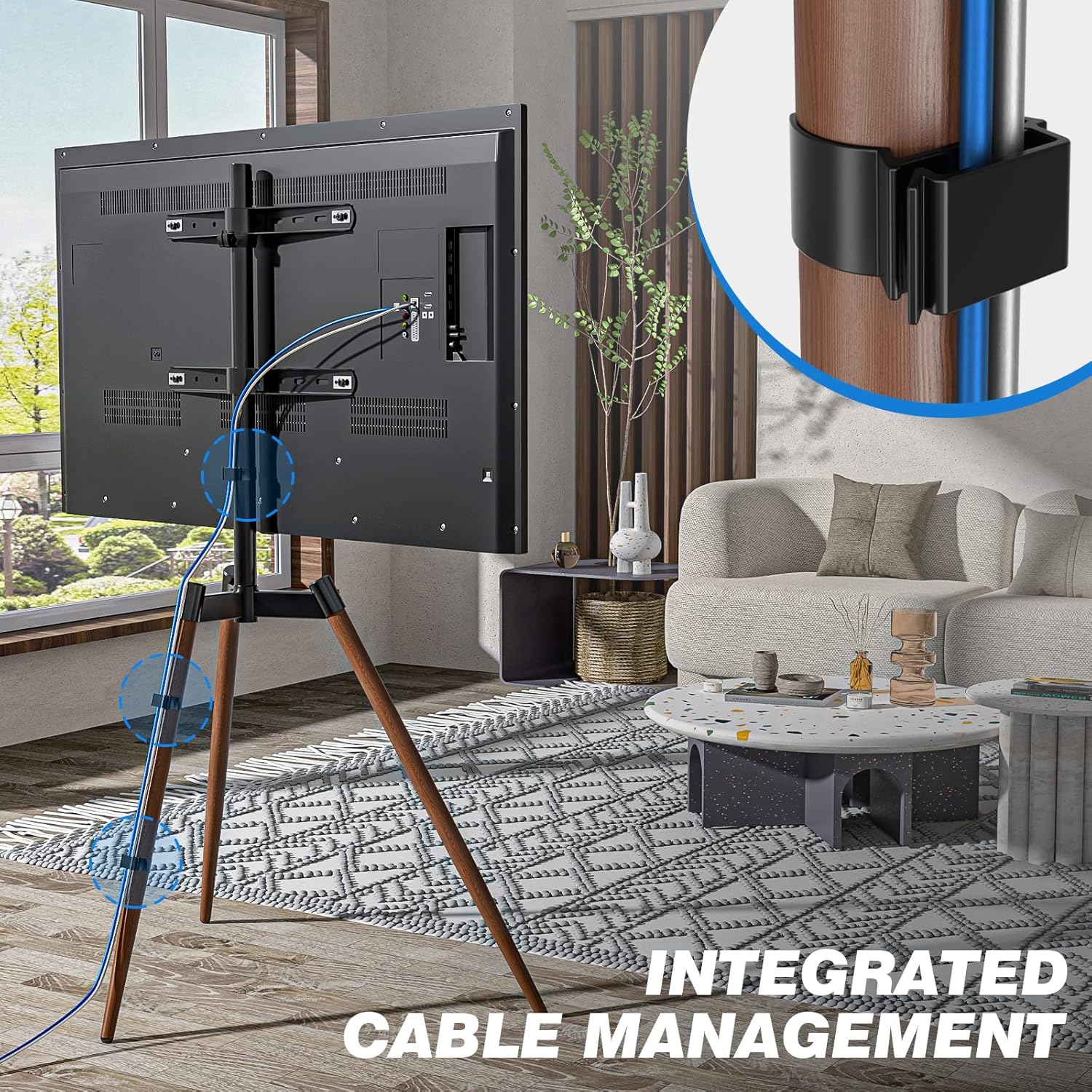
คำอธิบายภาพ: ด้านหลัง view of the TV stand in a living room setting, highlighting the integrated cable management. Blue lines illustrate how cables can be neatly routed and secured using clips along the central pole and legs, maintaining a tidy appearance.
การซ่อมบำรุง
To ensure the longevity and appearance of your Rfiver Artistic Easel TV Stand:
- Wipe surfaces with a soft, dry cloth. Avoid harsh chemicals or abrasive cleaners.
- ตรวจสอบสกรูและข้อต่อทั้งหมดเป็นระยะ เพื่อให้แน่ใจว่ายังแน่นอยู่ ขันให้แน่นอีกครั้งหากจำเป็น
- Keep the stand away from direct sunlight and extreme temperatures to prevent material degradation.
การแก้ไขปัญหา
- ทีวีไม่เสถียร: Ensure all leg screws and TV mounting bracket screws are fully tightened. Verify the anti-tip kit is correctly installed.
- Difficulty adjusting height/swivel: Loosen the relevant locking mechanisms before attempting to adjust. Do not force adjustments.
- สายไฟรกไปหมด: Re-route cables using the integrated cable management clips provided.
ข้อมูลจำเพาะ
| คุณสมบัติ | รายละเอียด |
|---|---|
| ยี่ห้อ | รีไฟเวอร์ |
| หมายเลขรุ่น | easel tv stand |
| ขนาดทีวีที่เข้ากันได้ | 32" ถึง 65" |
| ความจุน้ำหนักสูงสุด | 77 ปอนด์ (35 กก.) |
| ความเข้ากันได้ของ VESA | 100x100มม. ถึง 400x400มม. |
| มุมหมุน | 100 Degrees (50° left/right) |
| ประเภทการเคลื่อนไหว | หมุน |
| ประเภทการติดตั้ง | ชั้นเมา |
| วัสดุ | เหล็กอัลลอยด์ |
| สี | วอลนัท |
| ขนาดสินค้า | 33 x 21.6 x 54.9 นิ้ว |
| น้ำหนักสินค้า | 12.2 ปอนด์ |

คำอธิบายภาพ: A detailed diagram illustrating the TV compatibility of the easel stand. It shows the overall dimensions of the stand (54.9 inches height, 33.6 inches base width), supported TV sizes (32-65 inches), maximum mount capacity (77 lbs), and compatible VESA hole patterns ranging from 100x100mm to 400x400mm.
การรับประกันและการสนับสนุน
For warranty information or technical support, please refer to the product packaging or contact Rfiver customer service directly. Keep your purchase receipt for any warranty claims.
ข้อมูลติดต่อ: Please visit the official Rfiver webหากต้องการความช่วยเหลือ โปรดติดต่อเว็บไซต์หรือดูรายละเอียดการติดต่อที่ระบุไว้ในบรรจุภัณฑ์ของผลิตภัณฑ์