
PCsensor 3 Key Mini Keypad
คู่มือผู้ใช้แป้นพิมพ์ขนาดเล็ก 3 ปุ่ม PCsensor
Model: 3 Key Mini Keypad
แบรนด์: PCsensor
การแนะนำ
This manual provides detailed instructions for the setup, operation, and maintenance of your PCsensor 3-Key Mini Keypad. This wireless mechanical gaming keyboard is designed for customized hotkey programming, offering flexibility and enhanced control for various applications.

Image: The PCsensor 3-Key Mini Keypad in white, showcasing its three mechanical keys with red RGB backlighting. The compact design highlights its portability and functionality.
มีอะไรอยู่ในกล่อง
ตรวจสอบว่ามีรายการทั้งหมดอยู่ในแพ็คเกจ:
- PCsensor 3-Key Mini Keypad (White-Bluetooth model)
- USB Type-C to USB-A Charging Cable
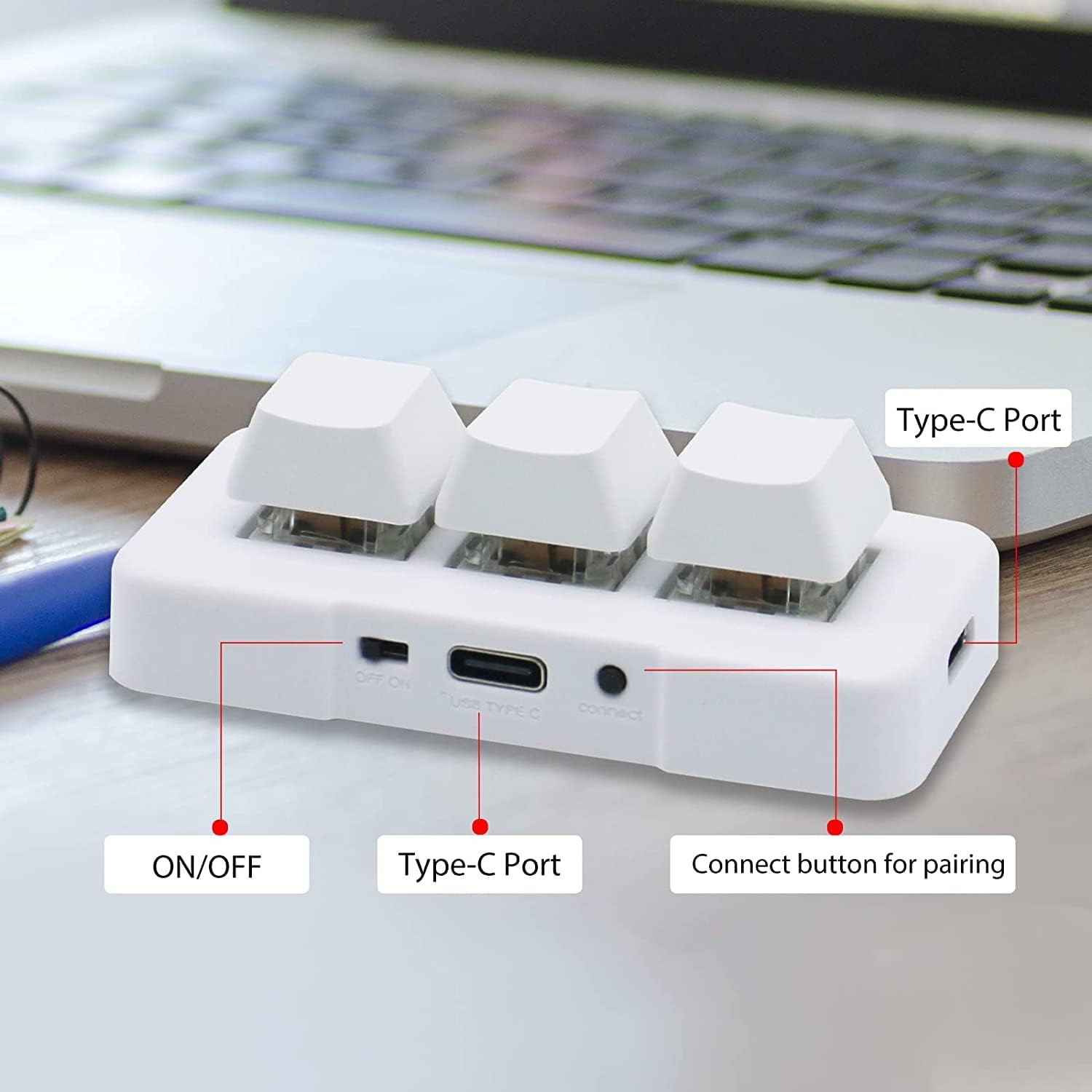
Image: A diagram illustrating the dimensions of the 3-Key Mini Keypad (approximately 3 inches long) and the included 59-inch (1500mm) USB Type-C charging cable.
สินค้าเกินview
Familiarize yourself with the components of your mini keypad:
- กุญแจเครื่องกล: Three programmable keys with durable mechanical switches.
- สวิตช์เปิด/ปิด: Located on the side for power control.
- พอร์ต USB Type-C: สำหรับการเชื่อมต่อแบบมีสายและการชาร์จ
- ปุ่มเชื่อมต่อ: ใช้สำหรับการจับคู่บลูทูธ
- ไฟแบ็คไลท์ LED RGB: Customizable lighting under each key.

ภาพ: ภาพระยะใกล้ view of the white 3-Key Mini Keypad, clearly labeling the ON/OFF switch, USB Type-C port, and the small connect button for pairing.
การตั้งค่า
การชาร์จแป้นพิมพ์
- Connect the provided USB Type-C cable to the keypad's Type-C port.
- เชื่อมต่อปลายสายอีกด้านหนึ่งเข้ากับแหล่งพลังงาน USB (เช่น พอร์ต USB ของคอมพิวเตอร์ อะแดปเตอร์ติดผนัง)
- The keypad's LED light will indicate charging status. A full charge typically takes 2 hours and can provide up to 3 months of use. The LED will flash every 3 seconds when the battery is low.
ตัวเลือกการเชื่อมต่อ
The keypad supports both wired (USB) and wireless (Bluetooth) connections.
Wired Connection (USB Mode)
- Ensure the keypad is turned ปิด โดยใช้สวิตช์เปิด/ปิด
- Connect the USB Type-C cable from the keypad to your computer's USB port.
- The keypad will automatically be recognized as a standard keyboard. In USB mode, the key backlighting will typically display a blue light.
Wireless Connection (Bluetooth Mode)
- Turn the keypad ON โดยใช้สวิตช์เปิด/ปิด
- Long press the "connect" button on the side of the keypad until the LED light starts flashing rapidly, indicating pairing mode.
- On your device (computer, smartphone, tablet), navigate to Bluetooth settings and search for new devices.
- Select "3 Key Mini Keypad" or a similar name from the list of available devices to pair.
- Once successfully paired, the LED light will stop flashing and remain solid, typically displaying a red light in wireless mode.

Image: The 3-Key Mini Keypad illustrating the different LED colors for connectivity modes: blue light indicates USB mode, and red light indicates wireless (Bluetooth) mode.
บันทึก: For initial setup and programming, it is recommended to connect the keypad to a Windows system first. Once programmed, it can be freely used with Windows, Linux, Mac OS, Android, and iOS systems.
คำแนะนำการใช้งาน
การเขียนโปรแกรมที่สำคัญ
The 3-Key Mini Keypad is fully programmable, allowing you to assign custom hotkeys, shortcuts, or macros to each of its three keys. Programming is done via dedicated software.
- Download the official programming software from the PCsensor website. (Refer to the product packaging or manufacturer's website for the download link).
- ติดตั้งซอฟต์แวร์บนคอมพิวเตอร์ Windows ของคุณ
- Connect the keypad to your computer via USB. Ensure the software recognizes the device.
- Within the software interface, select the key you wish to program.
- Assign the desired function (e.g., single key press, key combination, multimedia control, macro).
- Save the configuration to the keypad's onboard memory. The programmed functions will work across all compatible operating systems without needing the software running.

Image: A screenshot of the PCsensor programming software interface, showing options for customizing key functions and device settings. This software is essential for assigning specific commands to each key.

Image: A person interacting with the PCsensor programming software on a desktop computer, demonstrating the user interface for customizing the keypad's functions.
การควบคุม LED RGB
The keypad features RGB LED backlighting. The lighting can often be controlled through the programming software, allowing you to adjust colors, effects, or turn them off to conserve battery life.
การซ่อมบำรุง
To ensure the longevity and optimal performance of your keypad, follow these maintenance guidelines:
- การทำความสะอาด: ใช้ผ้าแห้งนุ่มเช็ดทำความสะอาดพื้นผิวแป้นพิมพ์ สำหรับคราบสกปรกฝังแน่น ให้ใช้ผ้าชุบน้ำหมาดๆ เช็ดเบาๆamp สามารถใช้ผ้าชุบสบู่เหลวอ่อนๆ เช็ดได้ โดยระวังอย่าให้ของเหลวเข้าไปในตัวเครื่อง
- พื้นที่จัดเก็บ: เก็บแผงปุ่มกดไว้ในที่แห้งและเย็น หลีกเลี่ยงแสงแดดโดยตรงและอุณหภูมิที่สูงหรือต่ำเกินไป
- การดูแลแบตเตอรี่ Avoid fully discharging the battery frequently. Charge the keypad regularly to maintain battery health.
- หลีกเลี่ยงของเหลว: อย่าให้แป้นพิมพ์โดนน้ำหรือของเหลวอื่นๆ
- จัดการด้วยความระมัดระวัง: ควรหลีกเลี่ยงการทำแป้นพิมพ์ตกหรือกระแทกอย่างแรง
การแก้ไขปัญหา
If you encounter issues with your PCsensor 3-Key Mini Keypad, refer to the following common problems and solutions:
| ปัญหา | สารละลาย |
|---|---|
| Keypad not responding (Wired) |
|
| Keypad not connecting (Bluetooth) |
|
| Keys not performing programmed functions |
|
| แบตเตอรี่หมดเร็ว |
|
ข้อมูลจำเพาะ
| คุณสมบัติ | รายละเอียด |
|---|---|
| หมายเลขรุ่น | 3 Key Mini Keypad |
| การเชื่อมต่อ | บลูทูธ, USB-C (แบบมีสาย) |
| จำนวนคีย์ | 3 |
| ประเภทกุญแจ | เครื่องจักรกล |
| การแบ็คไลท์ | ไฟ LED RGB |
| ระยะทางไร้สาย | สูงถึง 33 ฟุต (10 เมตร) |
| ประเภทแบตเตอรี่ | ลิเธียมไอออน 1 อัน (รวมอยู่ด้วย) |
| อายุการใช้งานแบตเตอรี่ | Up to 3 months on a 2-hour charge (usage dependent) |
| ความเข้ากันได้ | Windows, Linux, Mac OS, Android, iOS |
| ขนาด | 3.11 x 2.2 x 1.54 นิ้ว |
| น้ำหนักสินค้า | 2.82 ออนซ์ |
| ผู้ผลิต | พีซีเซ็นเซอร์ |
การรับประกันและการสนับสนุน
PCsensor products are designed for durability and performance. For specific warranty information, please refer to the product packaging or the official PCsensor webเว็บไซต์.
For technical support, troubleshooting assistance, or inquiries regarding your 3-Key Mini Keypad, please visit the PCsensor Store on Amazon or contact PCsensor customer service directly.
คู่มือผู้ใช้ในรูปแบบ PDF พร้อมให้ดาวน์โหลดได้: คู่มือการใช้งาน (PDF)
Ask a question about this manual
Ask about setup, troubleshooting, compatibility, parts, safety, or missing instructions. Manuals+ will review the question and use this page’s manual context to help answer it.