
1. สินค้าหมดview
The QIACHIP Ewelink WiFi Relay Module is a smart switch designed for remote control of appliances and devices. It operates via the eWelink application, supporting third-party voice control systems such as Amazon Alexa and Google Home. This module offers features like timed on/off, scene linking, and power settings, making it suitable for various automation projects.
The module features a USB 5V input and provides a clean contact (passive low voltage) output. By default, it operates in self-locking mode, but users can switch to inching mode via the eWelink app, allowing for adjustable timed operations (e.g., automatically turning off after 1 second).
หมายเหตุสำคัญ: This WiFi relay module supports only 2.4G WiFi networks and is not compatible with 5G WiFi networks.
2. ส่วนประกอบและขนาดของผลิตภัณฑ์
The QIACHIP Ewelink WiFi Relay Module is a compact device. Below are its key components and dimensions.
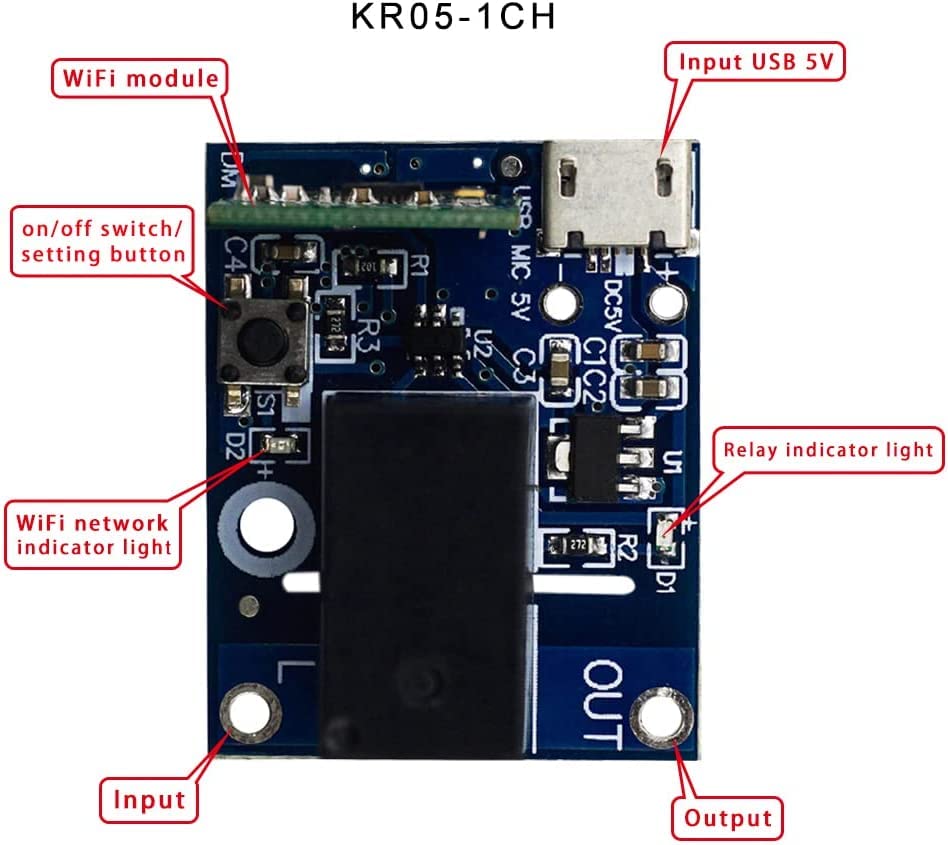
ภาพ: Labeled diagram of the QIACHIP WiFi Relay Module, indicating the WiFi module, on/off/setting button, WiFi network indicator light, relay indicator light, USB 5V input, and output terminals.

ภาพ: Dimensions of the QIACHIP WiFi Relay Module, measuring 32mm in length and 25mm in width.
The module is designed to be small for easy integration into various projects. Please note that newer models may feature a USB Type-C interface for power input.

ภาพ: The QIACHIP WiFi Relay Module with a USB Type-C power input, highlighting the interface upgrade.
3. คำแนะนำในการตั้งค่า
3.1 การจ่ายพลังงานให้กับโมดูล
The module requires a DC 5V power supply. Connect a standard USB power adapter (not included) to the module's USB port. Ensure the power supply provides a stable 5V output to prevent damage to the device.
3.2 Wiring the Relay Output
The module provides a clean contact (passive low voltage) output. This means the relay acts as a switch to complete or break a circuit for your connected device, rather than supplying power directly. Wiring typically involves soldering wires to the designated input and output pads on the module. Refer to the diagrams below for common wiring configurations:
- โหลด AC: Connect the AC power source and the AC appliance to the relay output terminals.
- Garage Door Opener: Integrate the relay into your garage door opener's control circuit.
- โหลด DC: Connect the DC power source and the DC appliance to the relay output terminals.
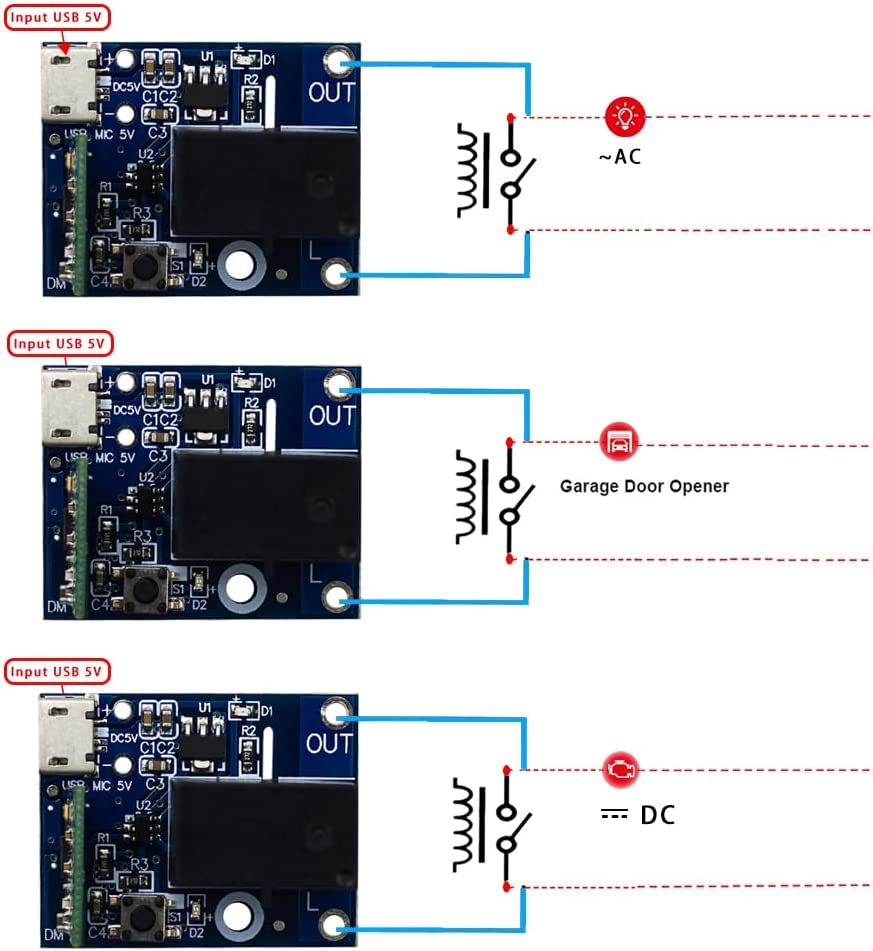
ภาพ: สายไฟอดีตamples for connecting the relay module to AC loads, a garage door opener, and DC loads.
บันทึก: Basic soldering skills are required for connecting wires to the module's output pads. If you are unsure about wiring, consult a qualified electrician.
3.3 Connecting to eWelink App
- Download the eWelink app from your smartphone's app store (available on Google Play Store and Apple App Store).
- Register an account or log in to your existing eWelink account.
- Power on the QIACHIP WiFi Relay Module.
- Press and hold the on/off/setting button on the module for approximately 5 seconds until the blue WiFi network indicator light starts blinking rapidly. This indicates the module is in pairing mode.
- In the eWelink app, tap the "+" icon to add a new device. Follow the on-screen instructions to complete the pairing process. Ensure your smartphone is connected to a 2.4G WiFi network during setup.
4. คู่มือการใช้งาน
การควบคุมแอพ 4.1 ตัว
Once connected to the eWelink app, you can control the relay module remotely:
- เปิด/ปิด: Toggle the connected device on or off directly from the app interface.
- Timed Functions: Set schedules, countdown timers, or loop timers for automated operation.
- Scene Linking: สร้างฉากอัจฉริยะเพื่อตั้งค่าการทำงานอัตโนมัติโดยอิงจากเงื่อนไขเฉพาะหรืออุปกรณ์อัจฉริยะอื่นๆ

ภาพ: eWelink app interface demonstrating scheduling and timer functions for smart home control.
4.2 โหมดการทำงาน
The module supports two operating modes, configurable within the eWelink app:
- Self-locking Mode (Default): The relay remains in its last state (on or off) until manually changed.
- โหมดการค่อยๆ เพิ่มขึ้น: The relay turns on for a set duration (e.g., 1 second) and then automatically turns off. The duration can be adjusted in the app's advanced settings. This mode is ideal for momentary actions like opening a garage door.
4.3 การบูรณาการการควบคุมด้วยเสียง
The QIACHIP Ewelink WiFi Relay Module is compatible with Amazon Alexa and Google Assistant. To enable voice control:
- Link your eWelink account within the Amazon Alexa or Google Home app.
- Discover devices in the Alexa or Google Home app.
- You can then use voice commands such as "Alexa, open the garage door" or "OK Google, close the garage door" (if configured for a garage door opener).

ภาพ: Voice control integration with Amazon Alexa and Google Assistant for device operation.
4.4 2.4G Smart Light Remote Control
The module supports adding a 2.4G smart light remote control (remote not included). This allows for simultaneous control of multiple devices. The remote control distance can be up to 30 meters.
5. การบำรุงรักษา
To ensure optimal performance and longevity of your QIACHIP Ewelink WiFi Relay Module, follow these maintenance guidelines:
- ให้แห้ง: ควรหลีกเลี่ยงการวางโมดูลไว้ในที่ชื้นหรือของเหลว
- แหล่งจ่ายไฟที่เสถียร: Always use a stable DC 5V power source. Over-voltagอาจทำให้โมดูลเสียหายได้
- อัพเดตเฟิร์มแวร์: Periodically check the eWelink app for available firmware updates to ensure the module has the latest features and security enhancements.
- การทำความสะอาด: If necessary, gently clean the module with a dry, soft cloth. Do not use harsh chemicals or abrasive materials.
6 การแก้ไขปัญหา
- โมดูลไม่เปิดใช้งาน:
Ensure the USB 5V power supply is correctly connected and functional. Check the power cable for damage. - Unable to connect to eWelink app:
Verify your smartphone is connected to a 2.4G WiFi network. The module does not support 5G WiFi. Ensure the module is in pairing mode (blue LED blinking rapidly). Try restarting the module and your router. - อุปกรณ์ไม่ตอบสนองต่อคำสั่ง:
Check the WiFi connection status in the eWelink app. Ensure the module is within range of your WiFi router. Verify the wiring to the connected appliance is secure and correct. - Inching mode not working as expected:
Adjust the inching duration in the eWelink app's advanced settings. Ensure the duration is set appropriately for your application. - High battery drain (if using battery power):
The module consumes power continuously. If powered by a battery, it may drain quickly. Consider a continuous power source for long-term use.
7. ข้อมูลจำเพาะ
| ยี่ห้อ | เฉียชิป |
| แบบอย่าง | CK-BL602-4SW-HS |
| หมายเลขชิ้นส่วน | KR05-1CHKG-W-EW |
| ยูพีซี | 787996396422 |
| อินพุต Voltage | 5 โวลต์ (DC) ผ่านทาง USB |
| กระแสไฟฟ้าที่ได้รับการจัดอันดับ | 10 Ampที่นั่น |
| วัดtage | 50 วัตต์ |
| ประเภทการติดต่อ | Normally Open (Clean Contact / Passive Low Voltage) |
| ปริมาณการสลับขั้นต่ำtage | 5 โวลต์ (กระแสตรง) |
| จำนวนขั้ว | 2 |
| วัสดุ | ทองแดง |
| ประเภทการติดตั้ง | การติดตั้งบนพื้นผิว |
| โหมดการทำงาน | Automatic (Configurable to Self-locking or Inching via App) |
| การเชื่อมต่อแบบไร้สาย | WiFi 2.4G (IEEE 802.11 b/g/n) |
| การรับรอง | ซีอี, เอฟซีซี |
| รวมส่วนประกอบ | 1x WiFi Relay Module |
8. การรับประกันและการสนับสนุน
8.1 ข้อมูลการรับประกัน
Specific warranty details for this product are not provided in the available information. Please refer to the retailer or manufacturer's official webโปรดตรวจสอบข้อกำหนดและเงื่อนไขการรับประกันปัจจุบันได้ที่เว็บไซต์
8.2 การสนับสนุนลูกค้า
For technical assistance, troubleshooting, or further inquiries, please contact QIACHIP customer support through their official website or the eWelink application support channels. You may also visit the QIACHIP Store on Amazon สำหรับข้อมูลผลิตภัณฑ์และทรัพยากรเพิ่มเติม

