การแนะนำ
The IMICE T97 RGB Honeycomb Gaming Mouse is designed to provide a precise and comfortable experience for gaming and general computer use. It features a high-precision 4800 DPI sensor, a durable and ergonomic design, and is compatible with various operating systems. This manual will guide you through the setup, operation, and maintenance of your new gaming mouse.
- ยี่ห้อ: IMICE
- พิมพ์: หนู
- ความเข้ากันได้: คอมพิวเตอร์และแล็ปท็อป
- คุณสมบัติหลัก: High precision 4800 DPI, comfortable and durable design, anti-sweat design, precise positioning.
- สี: สีดำ
คำแนะนำการตั้งค่า
1. การเชื่อมต่อเมาส์
The IMICE T97 mouse uses a standard USB connection for plug-and-play functionality. No additional drivers are typically required for basic operation on supported operating systems.
- ค้นหาพอร์ต USB ที่มีอยู่ในคอมพิวเตอร์หรือแล็ปท็อปของคุณ
- Insert the USB connector of the IMICE T97 mouse firmly into the USB port.
- ระบบปฏิบัติการของคุณควรตรวจจับและติดตั้งไดรเวอร์ที่จำเป็นโดยอัตโนมัติ กระบวนการนี้อาจใช้เวลาสักครู่
- เมื่อติดตั้งเสร็จแล้ว เมาส์ก็จะพร้อมใช้งานได้ทันที
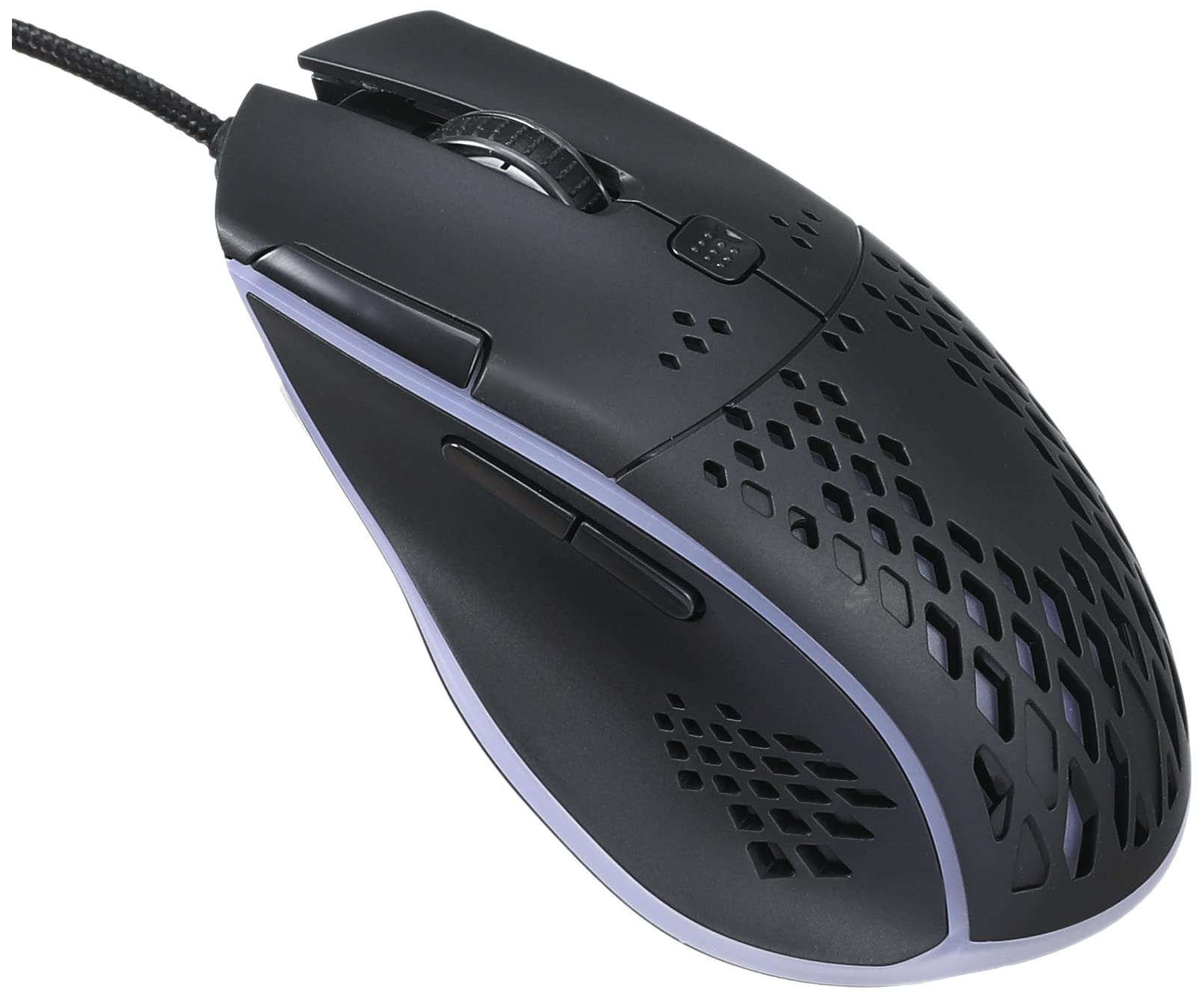
ภาพ: มุมมองด้านบน view of the IMICE T97 RGB Honeycomb Gaming Mouse, showing its ergonomic shape and honeycomb shell design.
การใช้งานเมาส์
ฟังก์ชั่นพื้นฐาน
- คลิกซ้าย: Primary action, selection, activation.
- คลิกขวา: เมนูบริบท การดำเนินการรอง
- ล้อเลื่อน: เลื่อนขึ้น/ลงในเอกสารและ web หน้าต่างๆ สามารถคลิกเพื่อใช้งานฟังก์ชันคลิกกลางได้เช่นกัน
- ปุ่มด้านข้าง: (If present, typically for forward/back navigation in browsers or custom functions in games). The T97 model typically includes two side buttons.
การปรับ DPI
The IMICE T97 mouse features adjustable DPI (Dots Per Inch) settings, allowing you to change the cursor sensitivity. This mouse supports up to 4800 DPI. There is usually a dedicated button, often located behind the scroll wheel, to cycle through different DPI levels. Press this button to switch between sensitivity settings to find your preferred speed.
ไฟ RGB
The mouse features RGB lighting, which typically cycles through various colors automatically. There may not be user-configurable software for lighting control, and it operates as a default aesthetic feature.

ภาพ: ด้านล่าง view of the IMICE T97 RGB Honeycomb Gaming Mouse, showing the optical sensor, product label with model T97, and regulatory marks.
การซ่อมบำรุง
การทำความสะอาด
- ถอดเมาส์ออกจากคอมพิวเตอร์ของคุณก่อนทำความสะอาด
- ใช้ผ้าแห้งนุ่มและไม่เป็นขุยเช็ดพื้นผิวของเมาส์
- สำหรับสิ่งสกปรกฝังแน่น ให้เช็ดออกเล็กน้อยampชุบผ้าด้วยน้ำหรือน้ำยาทำความสะอาดอ่อนๆ (หลีกเลี่ยงสารเคมีรุนแรง)
- ใช้สำลีหรือลมเป่าทำความสะอาดบริเวณรอบปุ่มและวงล้อเลื่อน
- ตรวจสอบให้แน่ใจว่าไม่มีของเหลวเข้าไปในส่วนประกอบภายในของเมาส์
พื้นที่จัดเก็บ
ควรเก็บเมาส์ไว้ในที่แห้งและเย็น หลีกเลี่ยงแสงแดดโดยตรงและอุณหภูมิที่สูงหรือต่ำเกินไป เมื่อไม่ได้ใช้งานเป็นเวลานาน
การแก้ไขปัญหา
| ปัญหา | สารละลาย |
|---|---|
| เมาส์ไม่ตอบสนอง |
|
| การเคลื่อนไหวของเคอร์เซอร์ไม่แน่นอนหรือกระตุก |
|
| ปุ่มหรือลูกล้อเลื่อนไม่ทำงาน |
|
| Cannot find software for customization. | The IMICE T97 mouse is primarily designed for plug-and-play operation. Dedicated software for advanced customization (like button remapping or detailed RGB control) may not be available or easily accessible for this model. Most functions are hardware-controlled. |
ข้อมูลจำเพาะ
| ยี่ห้อ | IMICE |
| แบบอย่าง | T97 |
| สี | สีดำ |
| เทคโนโลยีการเชื่อมต่อ | ยูเอสบี |
| DPI (สูงสุด) | 4800 จุดต่อนิ้ว |
| คุณสมบัติพิเศษ | Comfortable design, RGB lighting, honeycomb shell |
| การวางแนวมือ | ถนัดทั้งสองมือ |
| การใช้ที่แนะนำ | การเล่นเกม |
| อุปกรณ์ที่รองรับ | คอมพิวเตอร์ส่วนบุคคล, แล็ปท็อป |
| ความเข้ากันได้ของระบบปฏิบัติการ | Linux, Windows XP (and newer versions) |
| น้ำหนักสินค้า | 120 กรัม |
| ขนาดการจัดส่ง | 15 x 11 x 5 ซม. |
| รวมแบตเตอรี่ | No (Wired USB mouse) |
| ASIN | B0BD2DDWNQ |
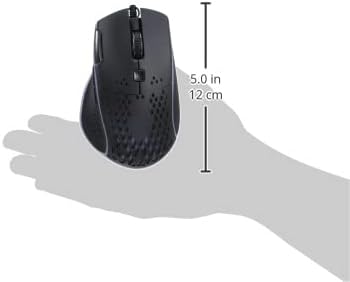
ภาพ: ด้านข้าง view of the IMICE T97 RGB Honeycomb Gaming Mouse held in a hand, illustrating its compact size (approximately 5.0 inches or 12 cm in length).
ข้อมูลการรับประกัน
Please refer to the retailer or your purchase documentation for specific warranty terms and conditions. IMICE products typically come with a limited warranty against manufacturing defects. Keep your proof of purchase for warranty claims.
การสนับสนุนลูกค้า
For technical assistance or further inquiries, please contact your retailer or visit the official IMICE website for support resources. Ensure you have your product model (T97) and purchase details ready when contacting support.