
การแนะนำ
This manual provides comprehensive instructions for the setup, operation, and maintenance of your Yealink W78P DECT IP Phone System. Please read this manual thoroughly before using the device to ensure proper functionality and to prevent damage. Keep this manual for future reference.
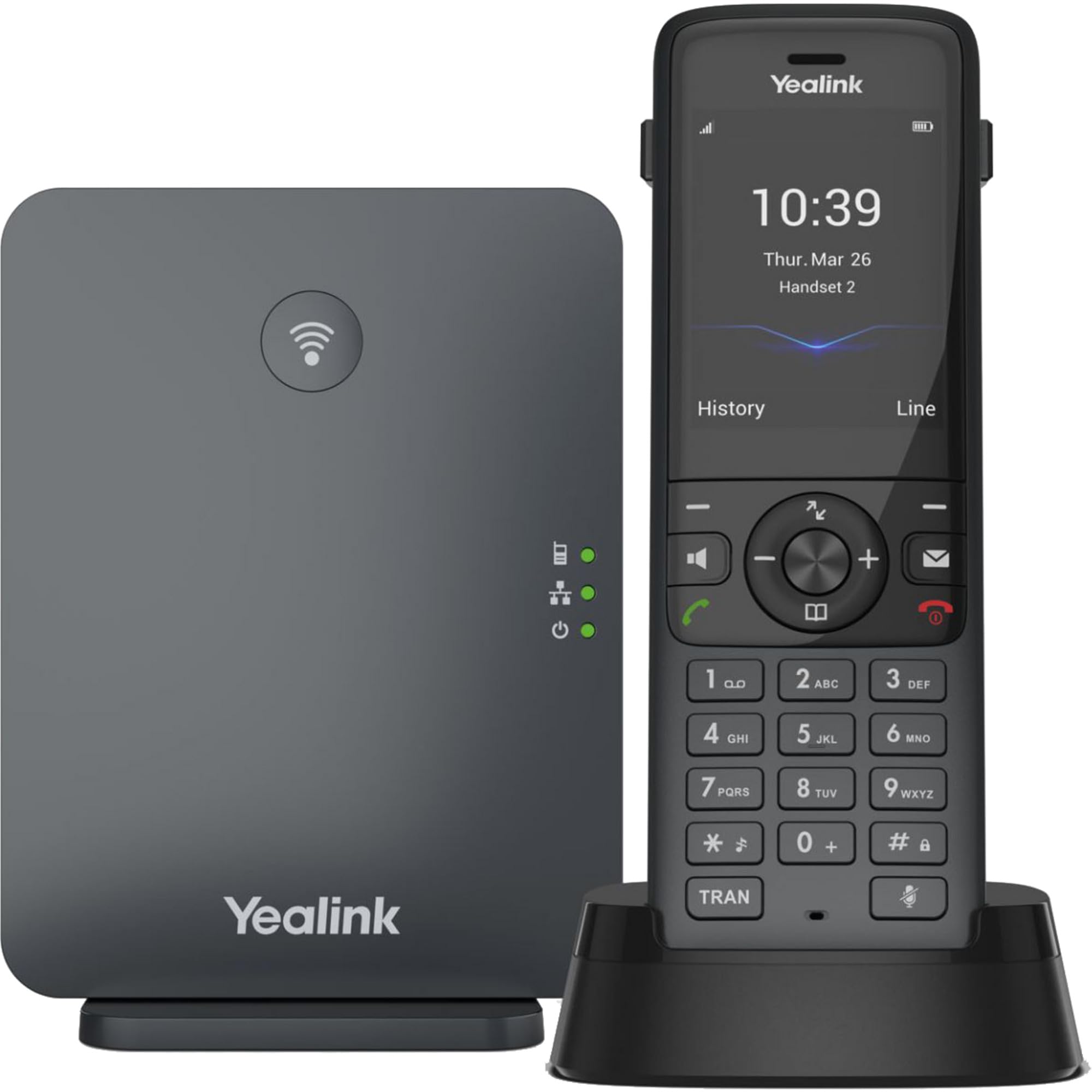
Image: The Yealink W78P system, featuring the W70B base station and the W78H cordless handset in its charging cradle.
มีอะไรอยู่ในกล่อง
ตรวจสอบว่ามีรายการทั้งหมดอยู่ในแพ็คเกจของคุณ:
- เครื่อง W78H
- สถานีฐาน W70B
- Handset Charging Cradle
- Power Adapter for Handset Charging Cradle and Base Station
- สายเคเบิลเครือข่าย
คู่มือการติดตั้ง
1. Connecting the Base Station (W70B)
- การเชื่อมต่อไฟฟ้า: Connect the power adapter to the W70B base station and plug it into a power outlet. Alternatively, if your network supports Power over Ethernet (PoE), connect the base station to a PoE-enabled network switch using the provided network cable.
- การเชื่อมต่อเครือข่าย: Connect one end of the network cable to the LAN port on the W70B base station and the other end to your router or network switch.
- Wait for the base station to power on and obtain an IP address. The network indicator LED on the base station will illuminate steadily when connected.
2. Charging the Handset (W78H)
- Connect the power adapter to the handset charging cradle and plug it into a power outlet.
- Place the W78H handset into the charging cradle. The battery icon on the handset display will indicate charging status. Allow the handset to charge fully before initial use.
3. Initial Handset Registration
The W78H handset typically comes pre-registered to the W70B base station in a W78P package. If registration is required or if you are adding a new handset:
- On the W70B base station, press and hold the registration button until the registration LED flashes.
- บนโทรศัพท์รุ่น W78H ให้ไปที่ เมนู > การตั้งค่า > การลงทะเบียน > ลงทะเบียนโทรศัพท์มือถือ.
- Select the desired base station (if multiple are detected) and enter the base station PIN (default is 0000).
- The handset will display "Handset Subscribed" upon successful registration.
คำแนะนำการใช้งาน
การโทรออกและรับสาย
- ในการโทรออก: กดหมายเลขแล้วกด เรียก key (green phone icon).
- เพื่อรับสาย: กดปุ่ม เรียก คีย์หรือ ลำโพงโทรศัพท์ สำคัญ.
- วิธีวางสาย: กดปุ่ม วางสาย key (red phone icon).
- โทรซ้ำ: กดปุ่ม เรียก key to access the call history and select a number to redial.
คุณสมบัติการโทรขั้นสูง
- ถือ: ระหว่างการโทร ให้กด ถือ ปุ่มสัมผัส กดอีกครั้งเพื่อเริ่มการโทรใหม่
- โอน: ระหว่างการโทร ให้กด โอนย้าย กดปุ่มซอฟต์คีย์ กดหมายเลขใหม่ แล้วกด โอนย้าย อีกครั้ง.
- การประชุม: ระหว่างการโทร ให้กด การประชุม กดปุ่มซอฟต์คีย์ กดหมายเลขของคู่สนทนา และเมื่อเชื่อมต่อแล้ว ให้กด การประชุม กลับมาร่วมทุกฝ่ายอีกครั้ง
การเชื่อมต่อชุดหูฟัง
- หูฟังบลูทู ธ: The W78H handset supports Bluetooth connectivity. Navigate to Menu > Settings > Bluetooth to enable Bluetooth and pair with your headset.
- 3.5mm Jack Headset: Connect a compatible 3.5mm headset to the headset jack on the side of the W78H handset.
DECT Radio Coverage
The W78P system offers a radio coverage of up to 50 meters indoors and up to 300 meters outdoors, under ideal conditions. Environmental factors may affect actual range.
การซ่อมบำรุง
การทำความสะอาด
- เช็ดทำความสะอาดโทรศัพท์มือถือและฐานวางด้วยผ้าเนื้อนุ่มและแห้งamp ผ้า.
- ห้ามใช้น้ำยาทำความสะอาดที่มีฤทธิ์กัดกร่อนหรือตัวทำละลาย
- ตรวจสอบให้แน่ใจว่าอุปกรณ์ปิดอยู่และถอดปลั๊กออกก่อนทำความสะอาด
การดูแลแบตเตอรี่
- The W78H handset provides up to 21 hours of talk time and 166 hours of standby time under ideal conditions.
- เพื่ออายุการใช้งานแบตเตอรี่ที่ดีที่สุด ควรหลีกเลี่ยงอุณหภูมิที่สูงหรือต่ำเกินไป
- Charge the handset regularly. A 10-minute charge provides approximately 2 hours of talk time.
การแก้ไขปัญหา
If you encounter issues with your Yealink W78P system, refer to the table below for common problems and solutions.
| ปัญหา | สาเหตุที่เป็นไปได้ | สารละลาย |
|---|---|---|
| ไม่มีเสียงสัญญาณโทรศัพท์ | Base station not powered or not connected to network. | Check power and network cable connections to the W70B base station. Ensure network indicator LED is steady. |
| โทรศัพท์แสดงข้อความ "ไม่ได้ลงทะเบียน" | Handset lost registration with base station. | Re-register the handset to the base station following the steps in the "Initial Handset Registration" section. |
| คุณภาพเสียงไม่ดี | Out of DECT range, interference, or network issues. | Move closer to the base station. Check for sources of interference (e.g., Wi-Fi routers, microwaves). Verify network stability. |
| โทรศัพท์ไม่ชาร์จ | Charging cradle not powered or handset not seated correctly. | Ensure the charging cradle's power adapter is connected. Re-seat the handset firmly in the cradle. |
ข้อมูลจำเพาะทางเทคนิค
| คุณสมบัติ | รายละเอียด |
|---|---|
| ยี่ห้อ | Yealink |
| หมายเลขรุ่น | W78P |
| สี | สีดำ |
| วัสดุ | อะคริโลไนไตรล์ บิวทาไดอีน สไตรีน (ABS) |
| ขนาดรายการ (ยาว x กว้าง x สูง) | 24 x 51 x 157 มิลลิเมตร |
| น้ำหนักสินค้า | 500 กรัม |
| แหล่งพลังงาน | ใช้พลังงานจากแบตเตอรี่ |
| จำนวนแบตเตอรี่ | ลิเธียมไอออน 1 |
| เวลาสนทนาทางโทรศัพท์ | 21 ชั่วโมง |
| เวลาสแตนด์บายของโทรศัพท์ | 166 ชั่วโมง |
| อุปกรณ์ที่รองรับ | Yealink W56H, Yealink W57R, Yealink W59R, Yealink W73H, Yealink W78H |
| การระบุหมายเลขผู้โทร | ใช่ |
| การทำงานแบบหลายบรรทัด | ใช่ |
| ประเทศต้นกำเนิด | สหรัฐอเมริกา |
| ยูพีซี | 841885125675, 841885109125 |
ข้อมูลการรับประกัน
The Yealink W78P DECT IP Phone System comes with a การรับประกันจากผู้ผลิต 2 ปี. Please retain your proof of purchase for warranty claims. For detailed terms and conditions, refer to the warranty documentation included with your product or visit the official Yealink webเว็บไซต์.
การสนับสนุนลูกค้า
For technical assistance, troubleshooting beyond this manual, or service inquiries, please contact Yealink customer support. You can find contact information on the official Yealink webเว็บไซต์หรือผ่านผู้จำหน่ายผลิตภัณฑ์ของคุณ