
Techage CG6X
Techage CG6X Wireless Outdoor Solar Security Camera
คู่มือการใช้งาน
1. บทนำ
The Techage CG6X Wireless Outdoor Solar Security Camera is designed to provide comprehensive home security with advanced features. This manual will guide you through the setup, operation, and maintenance of your new security camera, ensuring optimal performance and peace of mind.
คุณสมบัติหลัก:
- Smart AI Object Analysis for precise detection.
- 1080P Full Color Night Vision for clear images in low light.
- Real-time Alarm & 2-Way Audio for immediate communication and alerts.
- 100% Wire-free & Easy Installation with solar power.
- Optional Cloud/SD Storage & IP66 Weatherproof design.
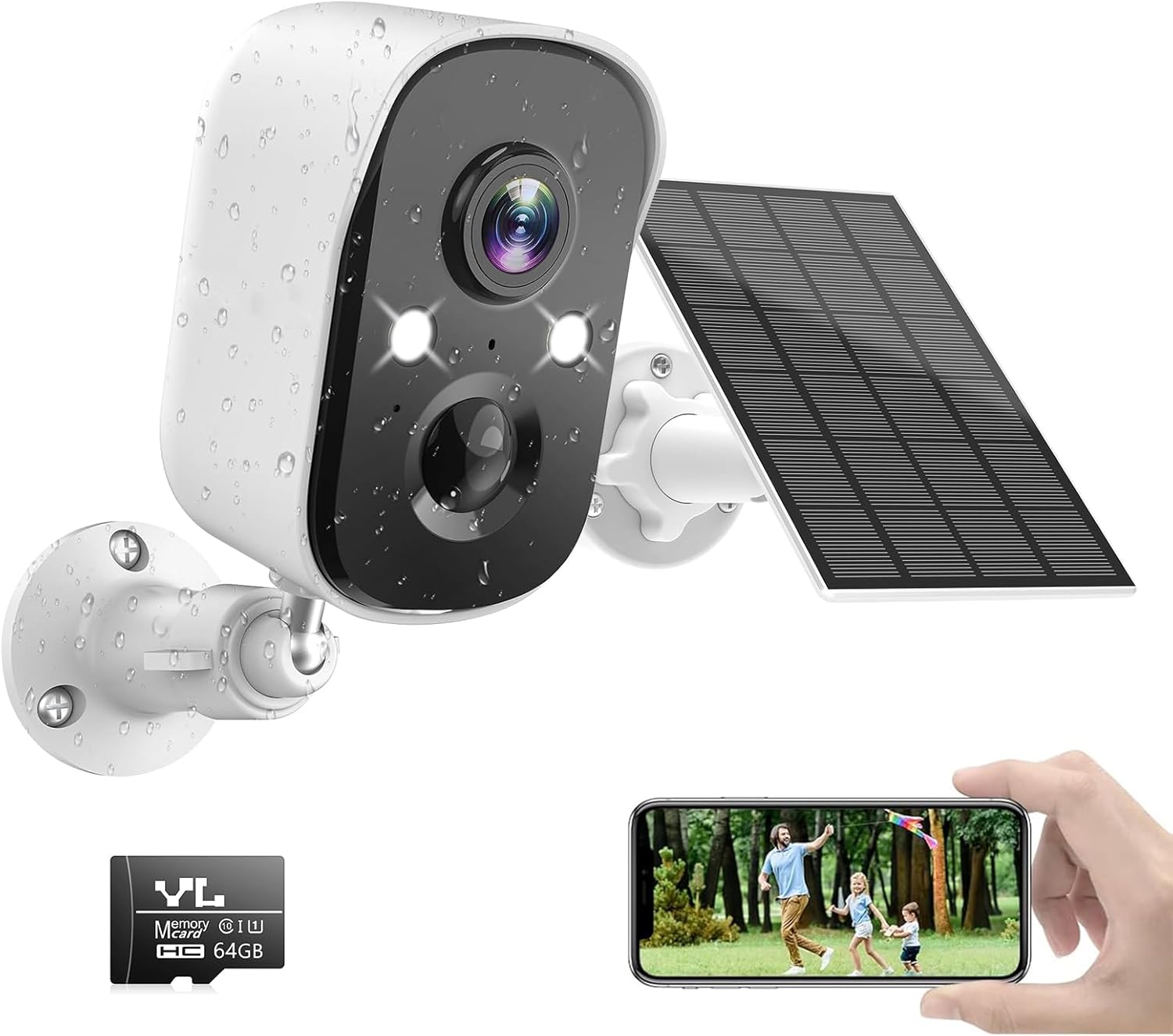
Image 1.1: Techage CG6X Camera with Solar Panel and Smartphone Live View.
2. อะไรอยู่ในกล่อง
โปรดตรวจสอบว่าส่วนประกอบทั้งหมดอยู่ครบและอยู่ในสภาพดีเมื่อเปิดบรรจุภัณฑ์:
- 1 x Techage CG6X WiFi Camera
- 1 x แผงโซลาร์เซลล์
- การ์ด TF ขนาด 64GB จำนวน 1 ใบ (ติดตั้งมาแล้ว หรือซื้อแยกต่างหาก)
- 1 x คู่มือผู้ใช้
- สาย USB 1 เส้น
- 1 x แม่แบบการติดตั้ง
- 1 x Guide Mounting Template
- 1 x Pack of Screws and Wall Plugs

Image 2.1: Package Contents and Camera Component Diagram.
The diagram highlights the HD Lens, Infrared Light, White Light, Status Indicator, Human Body Infrared Sensor, Speaker, Microphone, Reset Button, Power Button, TF Card Slot, and Micro-USB Port.
3. คู่มือการติดตั้ง
3.1 การชาร์จเริ่มต้น
Before first use, fully charge the camera's built-in 5000mAh lithium battery using the provided USB cable and a 5V USB power adapter (not included). A full charge ensures optimal battery life and performance.
3.2 ดาวน์โหลดและติดตั้งแอพ
ดาวน์โหลด วีโคโฮม security camera app from the App Store (for iOS devices) or Google Play (for Android devices). ค้นหา "VicoHome" and install the application.

Image 3.1: VicoHome App Availability.
3.3 การจับคู่กล้อง
- Open the VicoHome app and create an account or log in.
- แตะไอคอน "+" เพื่อเพิ่มอุปกรณ์ใหม่
- Follow the on-screen instructions to connect the camera to your 2.4GHz Wi-Fi network. (Note: The camera does not support 5GHz Wi-Fi networks).
- Ensure your camera is close to your Wi-Fi router during the pairing process for a stable connection.
3.4 การติดตั้งทางกายภาพ
The camera and solar panel are designed for easy, wire-free installation. Choose a location that provides optimal sunlight exposure for the solar panel and a clear view เพื่อกล้องถ่ายรูป
- Use the provided mounting template to mark drill holes on your desired wall or surface.
- เจาะรูและเสียบปลั๊กผนัง
- Secure the camera and solar panel mounts using the screws.
- Adjust the angle of the camera and solar panel for best coverage and sunlight absorption.

Image 3.2: Easy Installation with Solar Power.
4. คู่มือการใช้งาน
4.1 สด View และการบันทึก
Access the live feed of your camera anytime through the VicoHome app. The camera records in 1080P resolution, providing clear video footage.

Image 4.1: Multi-Camera Live View in VicoHome App.
4.2 การตรวจจับการเคลื่อนไหวด้วย AI
The camera features advanced AI motion detection capable of distinguishing between different objects such as people, vehicles, pets, and packages. This reduces false alarms and provides more relevant notifications.

Image 4.2: Smart AI Recognition with Behavior Analysis.
You can also define specific motion detection zones within the app to focus on critical areas and ignore irrelevant movements.

Image 4.3: Customizable Motion Detection Zones.
4.3 การมองเห็นกลางคืนแบบสี
The camera provides full-color night vision, offering clearer and more detailed images than traditional black-and-white infrared night vision. It has a visible range of up to 33 feet.
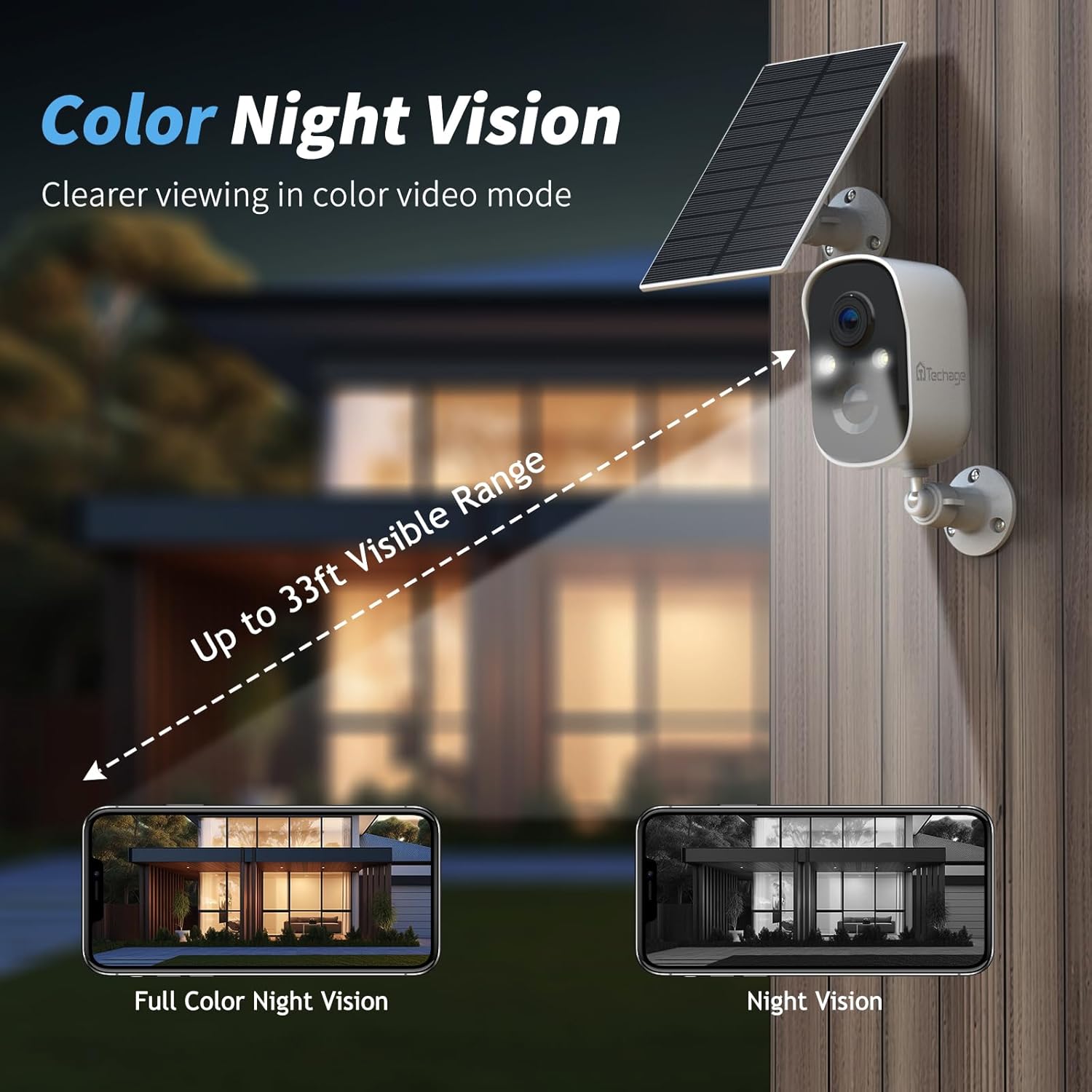
Image 4.4: Color Night Vision Capability.
4.4 เสียงสองทาง
Communicate with visitors or deter intruders using the built-in microphone and speaker. This feature allows for real-time two-way conversations through the VicoHome app.

Image 4.5: Two-Way Talk and Alexa Integration.
4.5 Spotlight and Siren Alarm
When motion is detected, the camera can activate a bright spotlight and a loud siren to deter unwanted visitors. These features can be configured within the app.

Image 4.6: Spotlight and Siren Alarm in Action.
4.6 ตัวเลือกการจัดเก็บข้อมูล
The camera supports both cloud storage and local storage via a Micro SD card (32GB-128GB). A 64GB SD card is included with your purchase. Free 3-day 500MB video loop cloud storage is also provided for two years.

Image 4.7: Cloud and SD Card Storage Options.
4.7 การเข้าถึงระยะไกลแบบหลายผู้ใช้
Share access to your camera's live feed and recordings with family and friends through the VicoHome app. You can connect unlimited users, allowing everyone to stay informed about what's happening around your property.

Image 4.8: Multi-User Remote Access.
4.8 การรวม Alexa
The Techage CG6X camera is compatible with Amazon Alexa. You can link your camera to the Alexa app and control it via Amazon Echo Show devices for easy viewing of your camera feed.
5. การบำรุงรักษา
5.1 การจัดการแบตเตอรี่
The camera is powered by a 5000mAh rechargeable lithium battery, continuously charged by the solar panel. Battery life varies depending on the frequency of motion triggers and environmental conditions.

Image 5.1: Battery Specifications and Estimated Battery Life.
The table indicates: 25 trigger times/day ≈ 6 months battery life (Yard); 40 trigger times/day ≈ 4 months battery life (Porch); 80 trigger times/day ≈ 2 months battery life (Indoor house).
To extend battery life, you can set an alarm time plan for motion detection through the VicoHome app, which helps save power and avoid unnecessary alarms.
5.2 การทำความสะอาด
ควรทำความสะอาดเลนส์กล้องและแผงโซลาร์เซลล์เป็นระยะด้วยผ้าเนื้อนุ่มและแห้งamp ใช้ผ้าเพื่อช่วยให้ภาพคมชัดและชาร์จพลังงานแสงอาทิตย์ได้อย่างมีประสิทธิภาพ หลีกเลี่ยงการใช้สารเคมีรุนแรงหรือวัสดุที่มีฤทธิ์กัดกร่อน
5.3 ความต้านทานต่อสภาพอากาศ
The camera has an IP66 weatherproof rating, meaning it is protected against dust and powerful water jets. It is designed to withstand heavy rain and other harsh weather conditions, including extreme temperatures.


Image 5.2: IP66 Weatherproof Rating in Rain and Snow.
6 การแก้ไขปัญหา
6.1 ปัญหาทั่วไปและแนวทางแก้ไข
- Q: Do I need to pay a monthly subscription for this solar camera?
A: No, a subscription is not required for basic functionality. The camera offers up to 3 days of cloud recording, intelligent notifications, and activity zones without a subscription. Not subscribing does not affect your ability to use the camera. - Q: How do I set it up with Alexa?
A: To set up with Alexa, link your camera to the Alexa app. You can then control it and view the feed via Amazon Echo Show devices for convenient monitoring. - Q: Can I use this with 5G Wi-Fi?
A: No, the camera connects to 2.4GHz Wi-Fi networks only. This frequency provides better range and penetration through walls, which is ideal for outdoor security cameras. It does not support 5GHz networks. - Q: The battery is not charging via solar panel.
A: Ensure the solar panel is placed in an area that receives direct sunlight for several hours a day. Check the connection cable between the solar panel and the camera. Clean the solar panel surface to remove any dirt or debris that might obstruct sunlight. - Q: Camera frequently disconnects from Wi-Fi.
A: Ensure the camera is within range of your 2.4GHz Wi-Fi router. Obstacles like thick walls or other electronic devices can interfere with the signal. Consider relocating the camera or using a Wi-Fi extender.
7. ข้อมูลจำเพาะ
| คุณสมบัติ | ข้อมูลจำเพาะ |
|---|---|
| ชื่อรุ่น | ซีจี6เอ็กซ์ |
| การใช้งานภายใน/ภายนอกอาคาร | กลางแจ้ง |
| แหล่งพลังงาน | ใช้พลังงานจากแบตเตอรี่ (ลิเธียมโพลิเมอร์ 5000 mAh) |
| เทคโนโลยีการเชื่อมต่อ | แบบไร้สาย (Wi-Fi, 2.4GHz เท่านั้น) |
| ความละเอียดในการจับภาพวิดีโอ | 1080p (Effective 1080 Pixels) |
| Viewอิงแองเกิล | 110 องศา |
| ที่ดินของ View | 130 องศา |
| การมองเห็นตอนกลางคืน | Color Night Vision (Low light technology: Night Color) |
| ระบบเสียงสองทาง | ใช่ |
| การตรวจจับการเคลื่อนไหว | Smart AI Object Analysis (Person, Vehicle, Pet, Package) |
| พื้นที่จัดเก็บ | Cloud Storage, Micro SD Card (32-128GB supported, 64GB included) |
| คะแนนสภาพอากาศ | IP66 |
| ขนาด (กว้าง x ยาว x สูง) | 8 x 4 x 4 นิ้ว |
| น้ำหนักสินค้า | 1.21 ปอนด์ |
| วัสดุ | พลาสติก |
| อุปกรณ์ที่รองรับ | สมาร์ทโฟน, อเมซอน อเล็กซา |
8. ข้อมูลการรับประกัน
Techage products are manufactured to high quality standards. For specific warranty details regarding your Techage CG6X Wireless Outdoor Solar Security Camera, please refer to the warranty card included in your product packaging or visit the official Techage webไซต์ โปรดเก็บหลักฐานการซื้อไว้เพื่อใช้ในกรณีเรียกร้องการรับประกันใดๆ
9. การสนับสนุนลูกค้า
For any technical assistance, questions, or concerns regarding your Techage CG6X camera, please contact Techage customer support. Techage is committed to providing high-quality security products and offers free technical support to ensure your satisfaction.

Image 9.1: Free Technical Support.
Please visit the official Techage website or refer to the contact information provided in your product packaging for the most up-to-date support channels.
Ask a question about this manual
Ask about setup, troubleshooting, compatibility, parts, safety, or missing instructions. Manuals+ will review the question and use this page’s manual context to help answer it.