
1. สินค้าหมดview
The BOYA BY-XM6 K1 is a compact 2.4GHz wireless microphone system designed for high-quality audio capture. It features advanced Adaptive Frequency Hopping (AFH) technology for stable signal transmission up to 100 meters (328 feet) without obstacles. This system is ideal for vlogging, YouTube videos, live streaming, interviews, and general recording, providing clear, low-noise audio.

Image: The BOYA BY-XM6 K1 Wireless Lavalier Microphone System, showcasing การออกแบบที่กะทัดรัด
คุณสมบัติหลัก:
- Digital 2.4GHz wireless signal transmission with Adaptive Frequency Hopping (AFH).
- Operating range of up to 100m (328ft) in obstacle-free environments.
- High-quality capsule and signal processing circuit for clear audio with >84dB S/N ratio and <0.1% distortion.
- Includes one transmitter (TX) and one receiver (RX) with a portable charging case.
- 7 hours of battery life per unit on a full charge, with the charging case providing up to 14 total hours of operation.
- Wide compatibility with DSLR/mirrorless cameras, smartphones, and computers via included 3.5mm TRS-TRS and TRS-TRRS audio cables.
- MONO/STEREO switch and two audio input modes (built-in omnidirectional microphone or external lavalier microphone).
- OLED display on transmitter and receiver for precise signal adjustment and real-time monitoring via a 3.5mm TRS headphone jack on the receiver.
2. เนื้อหาบรรจุภัณฑ์
Before setup, please ensure all components are present in the package:
- 1x เครื่องส่งสัญญาณ BY-XM6 TX
- 1x BY-XM6 RX ตัวรับ
- 1x BY-XM6-K1 BOX Charging Case
- สายชาร์จ USB-C 1x
- ไมโครโฟน 1x ป๋า
- คลิปไมค์ 1x สำหรับไมโครโฟนแบบหนีบเสื้อ
- 1x โฟมกระจกบังลมสำหรับไมโครโฟนแบบหนีบปก
- 1x Fur Windshield สำหรับไมโครโฟนในตัว
- 1x 3.5 มม. TRS ถึง TRS เอาต์พุตสำหรับกล้อง
- 1x 3.5 มม. TRS ถึง TRRS สายเคเบิลเอาต์พุตสำหรับสมาร์ทโฟน

Image: All components of the BOYA BY-XM6 K1 system, including the transmitter, receiver, charging case, and various cables and accessories.
3. คู่มือการติดตั้ง
3.1 การชาร์จระบบ
The BY-XM6 K1 system includes a portable charging case. Before first use, fully charge the charging case and the transmitter/receiver units.
- Connect the supplied USB-C charging cable to the charging port on the case and to a USB power source.
- Place the transmitter (TX) and receiver (RX) units into their respective slots in the charging case. The power indicator on the charging case will show the battery capacity and charging status.
- Each unit provides up to 7 hours of operation on a full charge. The charging case can provide additional charges for a total of up to 14 hours of operating time for one transmitter and one receiver.

Image: The BOYA BY-XM6 K1 charging case with the transmitter and receiver units inside, indicating charging status.

Image: Graphic illustrating the 7-hour battery life of individual units and the extended operating time provided by the charging case.
3.2 การเชื่อมต่อกับอุปกรณ์ของคุณ
The BY-XM6 K1 offers wide compatibility with various recording devices.
- สำหรับกล้องถ่ายรูป (DSLR/Mirrorless): Use the 3.5mm TRS to TRS output cable. Connect one end to the receiver's output jack and the other end to your camera's microphone input.
- สำหรับสมาร์ทโฟน/แท็บเล็ต: Use the 3.5mm TRS to TRRS output cable. Connect one end to the receiver's output jack and the other end to your smartphone or tablet's 3.5mm audio jack.
- สำหรับคอมพิวเตอร์: Depending on your computer's audio input, you may use either the TRS-TRS or TRS-TRRS cable. Ensure your computer's audio settings are configured to use the external microphone.

Image: Diagram showing the universal compatibility of the BOYA BY-XM6 K1 with various devices like smartphones, laptops, cameras, and camcorders, highlighting the different cable types.
4. คู่มือการใช้งาน
4.1 การเปิด/ปิดเครื่องและการจับคู่
The system is designed for quick and easy use.
- เปิดเครื่อง: Press and hold the power button on both the transmitter (TX) and receiver (RX) units until their OLED displays light up.
- การจับคู่: The units are typically pre-paired from the factory. If re-pairing is needed, long press the Pair button (often indicated by "+" and "-" buttons pressed simultaneously) for 3 seconds to enter pairing mode. The units should automatically connect.
- การยืนยันการเชื่อมต่อ: Once paired, the OLED display on both units will show a stable connection indicator.

Image: Illustration of the plug-and-play operation, showing the receiver connected to a camera and the transmitter clipped to clothing, with instructions for powering on and pairing.
4.2 Audio Input Modes and Monitoring
The transmitter offers flexibility in audio input, and the receiver allows for real-time monitoring.
- ไมโครโฟนในตัว: The transmitter features a built-in omnidirectional microphone. You can clip the transmitter directly onto your collar to capture sound.
- ไมโครโฟนแบบหนีบปกเสื้อภายนอก: For discreet placement or specific audio needs, plug the included lavalier microphone into the transmitter's MIC IN jack.
- สวิตช์โมโน/สเตอริโอ: The BY-XM6 K1 lavalier mic provides a mono/stereo switch. Please note that some smartphones may not output stereo audio. Adjust this setting on the receiver as needed.
- การตรวจสอบแบบเรียลไทม์: The receiver has a 3.5mm TRS headphone jack. Connect headphones to this jack to monitor the recording effect in real-time during a shoot.
- จอแสดงผล OLED: The vivid OLED display on both the transmitter and receiver allows users to adjust signal transmission settings and monitor levels precisely.
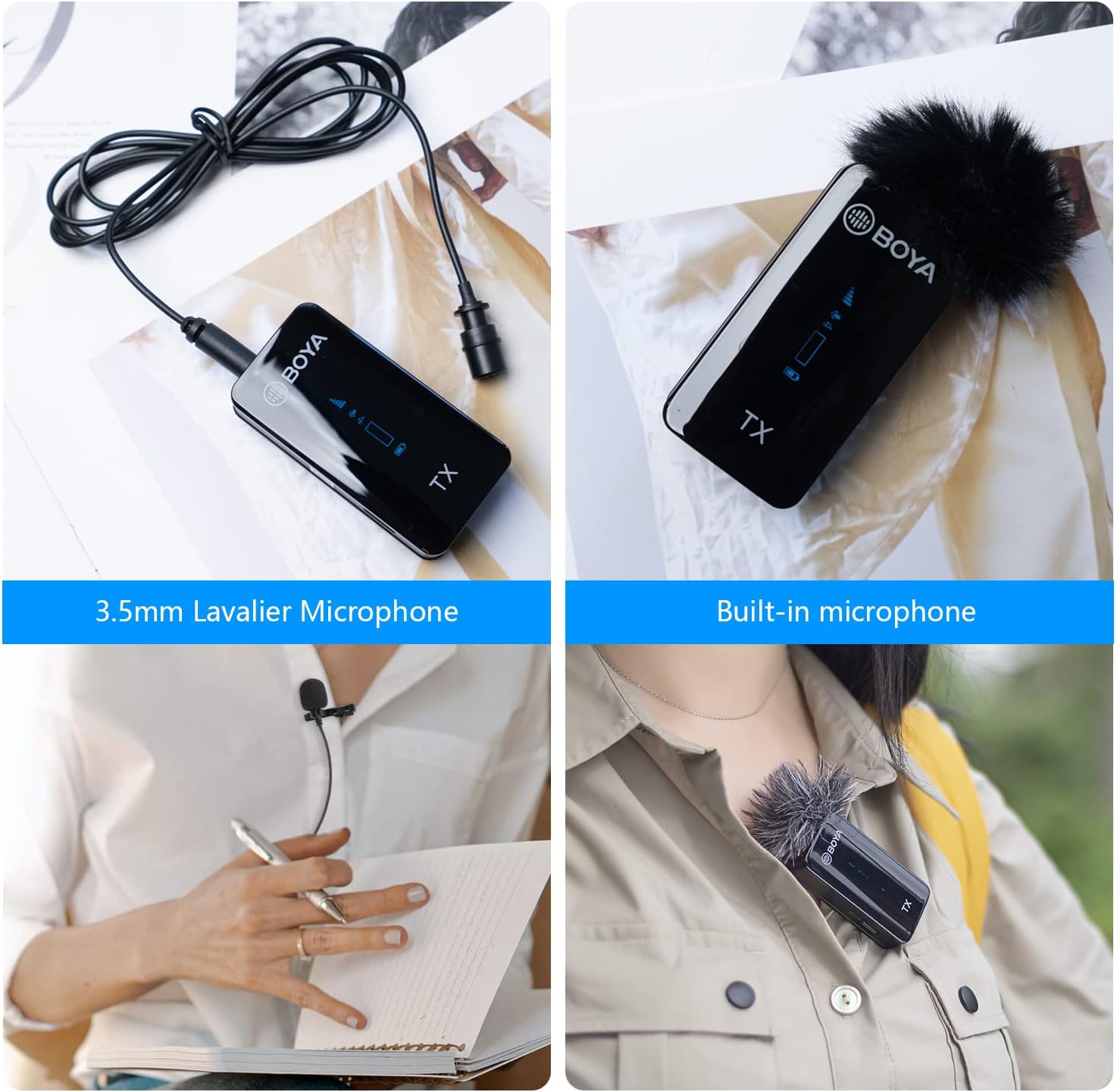
Image: Comparison of using the 3.5mm lavalier microphone and the built-in microphone on the BOYA BY-XM6 K1 transmitter.
5. การบำรุงรักษา
To ensure the longevity and optimal performance of your BOYA BY-XM6 K1 system, follow these maintenance guidelines:
- การทำความสะอาด: ใช้ผ้าแห้งนุ่มเช็ดทำความสะอาดตัวเครื่องและกล่องชาร์จ หลีกเลี่ยงการใช้สารเคมีรุนแรงหรือวัสดุที่มีฤทธิ์กัดกร่อน
- พื้นที่จัดเก็บ: ควรเก็บอุปกรณ์ไว้ในกล่องชาร์จเมื่อไม่ใช้งาน เพื่อป้องกันฝุ่นละอองและความเสียหายทางกายภาพ ควรเก็บไว้ในที่แห้งและเย็น หลีกเลี่ยงแสงแดดโดยตรงและอุณหภูมิที่สูงหรือต่ำเกินไป
- การดูแลแบตเตอรี่ For long-term storage, ensure the charging case and units are charged to approximately 50-70% to preserve battery health. Recharge periodically if stored for extended periods.
- การดูแลสายเคเบิล: Handle cables gently to prevent kinks or damage to connectors.
6 การแก้ไขปัญหา
If you encounter issues with your BY-XM6 K1 system, refer to the following common troubleshooting steps:
- ไม่มีเสียง/เสียงเบา:
- Ensure both transmitter and receiver are powered on and paired.
- Check cable connections (TRS-TRS for cameras, TRS-TRRS for smartphones).
- Verify the volume levels on both the microphone system and your recording device.
- Confirm the correct audio input is selected on your recording device.
- สัญญาณรบกวน/สัญญาณไม่ดี:
- Ensure you are within the 100m (328ft) operating range and there are no significant obstacles between the transmitter and receiver.
- Avoid environments with high Wi-Fi or other 2.4GHz wireless device activity.
- The Adaptive Frequency Hopping (AFH) technology should automatically mitigate interference, but severe environments may still pose challenges.
- หน่วยที่ไม่ชาร์จ:
- ตรวจสอบสาย USB-C และอะแดปเตอร์ไฟฟ้าว่าได้รับความเสียหายหรือไม่
- Ensure the units are correctly seated in the charging case.
- Verify the charging case itself has power (check its indicator lights).
- Lavalier Mic Not Working:
- Ensure the lavalier microphone is securely plugged into the transmitter's MIC IN jack.
- Check if the transmitter's input mode is correctly set to external microphone if applicable.
7. ข้อมูลจำเพาะ
| คุณสมบัติ | ข้อมูลจำเพาะ |
|---|---|
| การใช้งานที่แนะนำสำหรับผลิตภัณฑ์ | สตรีมมิ่ง |
| ยี่ห้อ | บอย่า |
| เทคโนโลยีการเชื่อมต่อ | ตัวช่วย |
| ประเภทขั้วต่อ | แจ็ค 3.5 มม. |
| คุณสมบัติพิเศษ | 1-Touch Recording, Battery Indicator Light, Clip, Mute Function, Volume Control |
| อุปกรณ์ที่รองรับ | กล้องวิดีโอ, กล้องถ่ายรูป, แล็ปท็อป, สมาร์ทโฟน, แท็บเล็ต |
| สี | K1 |
| รูปแบบขั้ว | รอบทิศทาง |
| ความไวเสียง | 39 เดซิเบล |
8. การรับประกันและการสนับสนุน
BOYA provides a Two-year warranty service for this product. For any support inquiries or warranty claims, please contact the post-service team at amazon-us@jiayz.com.
This product is sold by BOYA DIRECT and fulfilled by Amazon.
9. สถานการณ์การใช้งาน
The versatility of the BOYA BY-XM6 K1 makes it suitable for a variety of applications:
- สตรีมสด: Capture clear audio for your live broadcasts.
- การสร้างเนื้อหา: Enhance the audio quality of your YouTube videos, podcasts, and other digital content.
- วารสารศาสตร์บนมือถือ: Lightweight and portable for on-the-go interviewและการรายงาน
- การบันทึกวิดีโอ: Professional audio for all your video projects.

Image: Collage showing various usage scenarios for the BOYA BY-XM6 K1, including live streaming, content creation, mobile journalism, and video recording.