
Fastsun AP-8
Fastsun Car Head Up Display User Manual
รุ่น : AP-8
1. บทนำ
The Fastsun AP-8 Car Head Up Display is a versatile smart gauge designed to enhance your driving experience by projecting essential vehicle information directly into your line of sight. It integrates three primary modes: OBD2, GPS, and Inclinometer, offering comprehensive data for various driving conditions and vehicle types. This manual provides detailed instructions for setup, operation, and troubleshooting to ensure optimal performance of your device.

Image: The Fastsun AP-8 Car Head Up Display, highlighting its multi-functionality including OBD2, GPS, and Slope Meter capabilities.
2. คุณสมบัติหลัก
- Three Modes in One: Seamlessly switch between OBD2, GPS, and Inclinometer modes.
- โหมด OBD2: Displays Speed, Voltage, Water Temperature, Engine RPM, Fuel Consumption, Single Driving Time/Distance, Total Driving Mileage, Intake Air Temperature, Oil Temperature, Oil Pressure, Turbo Pressure, PID List. Includes Overspeed, Speed, Low Voltage, and Water Temperature alarms. Capable of reading and clearing engine trouble codes.
- โหมด GPS: Shows GPS Speed, Compass, Latitude and Longitude, Altitude, GPS time, Number of Satellites, Location, and Voltage. Includes Overspeed and Low Voltage สัญญาณเตือน
- เครื่องวัดความเอียง: Features a G-Sensor electronic slope sensor for real-time monitoring of vehicle's left/right inclination, climbing, and descending angles. Includes a one-key reset function.
- Automatic Time Zone Location: In GPS mode, automatically locates the time zone and displays local time after satellite acquisition.
- Adjustable Stand & Installation: Offers two installation methods: square dashboard placement or front windshield adhesion.
- แสงแวดล้อม RGB: Features RGB ambient lighting on two sides, which can change color based on RPM or be set to a solid red, or turned off.
- จอแสดงผลความละเอียดสูง: Provides 11 different display interfaces for customized information viewการไอเอ็นจี
3. เนื้อหาบรรจุภัณฑ์
โปรดตรวจสอบว่ารายการทั้งหมดที่ระบุไว้ด้านล่างมีอยู่ในแพ็คเกจของคุณหรือไม่:
- Car HUD (Head Up Display) Unit
- สาย OBD2
- คู่มือการใช้งาน
- สติ๊กเกอร์ตีนตุ๊กแก
- ประแจหกเหลี่ยม

Image: All accessories included with the Fastsun AP-8 Car HUD.
4. การตั้งค่าและการติดตั้ง
4.1 การเลือกวิธีการติดตั้ง
The Fastsun AP-8 offers two primary installation methods:
- ตำแหน่งการวางบนแดชบอร์ด: Place the HUD unit directly on your vehicle's dashboard. Use the provided velcro sticker to secure it in place and prevent movement during driving.
- Front Windshield Adhesion: Attach the HUD unit to your front windshield. Ensure the chosen spot does not obstruct your view ของถนน

Image: Visual representation of the two installation options for the HUD unit.
4.2 การเชื่อมต่ออุปกรณ์
For OBD2 mode functionality, connect the provided OBD2 cable to your vehicle's OBD2 port. This port is typically located under the dashboard on the driver's side. Once connected, the device will power on automatically when the vehicle is started.
For GPS mode, the device will automatically search for satellites upon power-on. Ensure the device has a clear view ของท้องฟ้าเพื่อการรับสัญญาณดาวเทียมที่เหมาะสมที่สุด
5. โหมดการทำงาน
5.1 OBD2 Mode
OBD2 mode is available for vehicles equipped with an OBD2 interface. This mode provides real-time data directly from your vehicle's onboard diagnostic system.
- ข้อมูลการแสดงผล: Speed, coolant temperature, voltage, fuel consumption, RPM, single mileage, total cumulative mileage, travel time, altitude, system time, intake pressure, oil temperature, air-fuel ratio, turbine pressure, acceleration test, brake test, compass, and data stream reading.
- สัญญาณเตือนภัย: Overspeed alarm, RPM alarm, high water temperature alarm, low voltage alarm, engine fault alarm.
- การวินิจฉัย: Can read specific fault codes and clear engine trouble codes.

ภาพ: อดีตample of the OBD2 display interface showing multiple vehicle parameters.
5.2 โหมด GPS
GPS mode is universal and works for all cars, buses, and trucks. It relies on satellite signals for data acquisition.
- ข้อมูลการแสดงผล: GPS speed, travel time, satellite time, altitude, number of satellites, driving direction, single mileage, voltage, acceleration test, brake test.
- สัญญาณเตือนภัย: Overspeed alarm, voltagอีปลุก
- Automatic Time: After finding satellites, the device automatically locates the time zone and displays the local time without manual adjustment.

Image: The GPS display interface, showing automatic time positioning and other GPS-derived data.
5.3 อินคลิโนมิเตอร์
The built-in G-Sensor electronic slope sensor provides real-time monitoring of your vehicle's orientation, particularly useful for off-road enthusiasts.
- ข้อมูลการแสดงผล: Roll angle (left and right inclination), pitch angle (climbing and descending angles).
- ฟังก์ชันการทำงาน: Features a one-key reset function for convenience.

Image: The inclinometer display, showing real-time roll and pitch angles of the vehicle.
6. Display Interfaces and RGB Ambient Light
6.1 Multiple Display Interfaces
The Fastsun AP-8 offers 11 different display interfaces, allowing you to customize the information layout to your preference. You can cycle through these interfaces using the control buttons on the device.
ภาพ: อดีตample of one of the 11 available display interfaces on the HUD.
6.2 แสงไฟ RGB โดยรอบ
The device features dynamic RGB ambient lighting on both sides, enhancing the visual appeal and providing additional feedback.
- The side RGB ambient lights can change to multi-color based on engine RPM.
- When RPM exceeds 5000, the side RGB ambient lights will change to solid red.
- The RGB ambient lights can be turned off via the device settings.
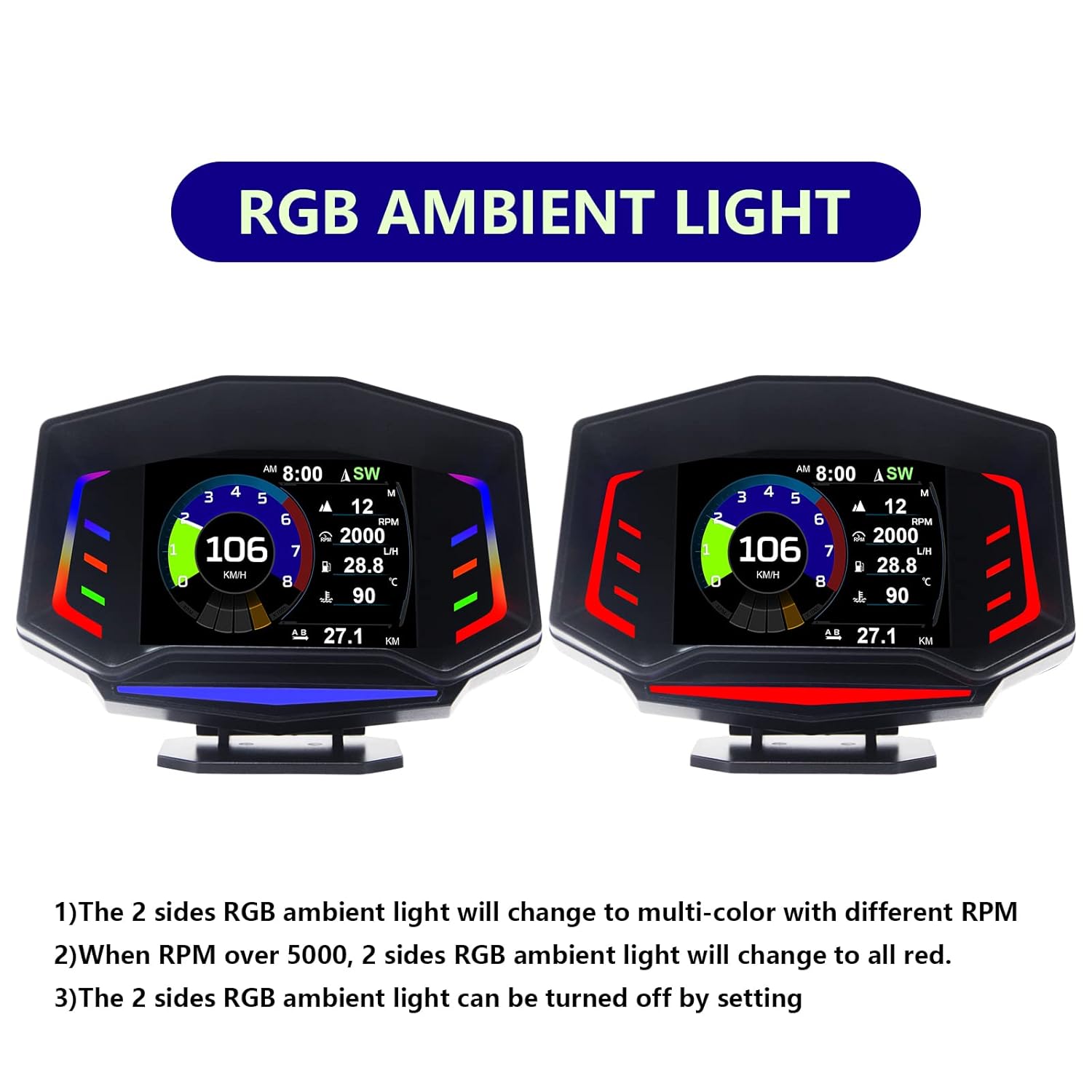
Image: The RGB ambient lights on the Fastsun AP-8, demonstrating color changes.
7 การแก้ไขปัญหา
If you encounter issues with your Fastsun Car Head Up Display, please refer to the following common problems and solutions:
| ปัญหา | สาเหตุที่เป็นไปได้ | สารละลาย |
|---|---|---|
| อุปกรณ์ไม่เปิดเครื่อง | No power from OBD2 port; loose cable connection. | Ensure the OBD2 cable is securely connected to both the device and the vehicle's OBD2 port. Check vehicle's ignition status. |
| No RPM display in OBD2 mode. | Vehicle may not transmit RPM data via OBD2, or specific protocol not supported. | Verify if your vehicle's factory system includes an RPM gauge. Some older or specific vehicle models may not provide this data through the standard OBD2 protocol. |
| Speed display error / Inaccurate speed. | Calibration needed; GPS signal interference; vehicle speed sensor discrepancy. | In GPS mode, ensure a clear view of the sky. In OBD2 mode, check if there's a calibration setting in the device menu (refer to the full user manual for specific menu navigation). Compare with vehicle's speedometer. |
| Device turns off during driving (especially over bumps). | Loose power connection; internal component issue. | Ensure the OBD2 cable is firmly seated. If the issue persists, it may indicate a faulty cable or internal connection. Contact customer support. |
| ไม่พบสัญญาณ GPS | ถูกขัดขวาง view of sky; device not in open area. | เคลื่อนย้ายรถไปยังพื้นที่โล่งที่มีทัศนวิสัยชัดเจน view of the sky. Wait a few minutes for satellite acquisition. |
8. ข้อมูลจำเพาะ
| คุณลักษณะ | รายละเอียด |
|---|---|
| ยี่ห้อ | ฟาสซัน |
| แบบอย่าง | เอพี-8 |
| วัสดุ | อะคริโลไนไตรล์ บิวทาไดอีน สไตรีน (ABS) |
| ขนาดแพ็คเกจ | 6.22 x 4.37 x 3.11 นิ้ว |
| น้ำหนักสินค้า | 12.31 ออนซ์ |
| ผู้ผลิต | f1 |
| ASIN | B0BC41FHR3 |
| ยูพีซี | 724873556241, 724873560729 |
| ประเทศต้นกำเนิด | จีน |
9. วิดีโอผลิตภัณฑ์อย่างเป็นทางการ
Video: A demonstration of the Fastsun AP-8 Car Head Up Display in operation, showcasing its various display modes and features in a real-world driving scenario.
10. การรับประกันและการสนับสนุน
Specific warranty details for the Fastsun AP-8 Car Head Up Display are not provided in this manual. For warranty claims, technical support, or further assistance, please contact the seller or manufacturer directly through the platform where the product was purchased.
โปรดเก็บหลักฐานการซื้อของคุณไว้ในกรณีที่มีคำถามเกี่ยวกับการรับประกัน
Ask a question about this manual
Ask about setup, troubleshooting, compatibility, parts, safety, or missing instructions. Manuals+ will review the question and use this page’s manual context to help answer it.