
1005003178286970
P9 Car HUD Head Up Display User Manual
รุ่น : 1005003178286970
1. บทนำ
The P9 Car HUD (Head Up Display) is an intelligent digital meter designed to project essential driving information directly onto your car's windshield, allowing you to monitor vehicle data without diverting your eyes from the road. This device connects to your car's OBD2 or EUOBD port to display real-time data such as speed, RPM, water temperature, voltage, fuel consumption, and more. It features automatic backlight adjustment, easy installation, and multiple display modes to enhance your driving experience.

The P9 HUD displaying vehicle speed and RPM during operation.
2. ข้อมูลด้านความปลอดภัย
- Always prioritize road safety. Do not attempt to adjust settings or operate the device in a way that distracts you from driving.
- Ensure the HUD is securely placed and does not obstruct your view ของถนนหรือระบบควบคุมยานพาหนะที่สำคัญใดๆ
- ควรเก็บอุปกรณ์ให้ห่างจากอุณหภูมิที่สูงจัด แสงแดดโดยตรงเป็นเวลานาน และความชื้น
- ห้ามถอดประกอบหรือดัดแปลงอุปกรณ์ แนะนำให้ช่างผู้ชำนาญเข้ารับบริการทั้งหมด
3. เนื้อหาบรรจุภัณฑ์
กรุณาตรวจสอบสิ่งของภายในบรรจุภัณฑ์เมื่อแกะกล่องเพื่อให้แน่ใจว่ามีสินค้าครบทั้งหมด:
- 1 x P9 Head Up Display Unit
- 1 x OBD Cable
- แผ่นรองกันลื่น 1 ชิ้น
- 1 x คู่มือผู้ใช้ภาษาอังกฤษ

All components included in the P9 Car HUD package.
4. สินค้าหมดview
The P9 HUD is designed for ease of use and clear data presentation. Key features include:
- แสงพื้นหลังอัตโนมัติ: Adjusts display brightness based on ambient light conditions.
- No Reflection Film Needed: Designed to project clearly without additional film on the windshield.
- ปลั๊กแอนด์เพลย์: Simple connection to the OBD2 port for immediate use.
- Multi-functions Display: Shows various data points simultaneously.

Key features and benefits of the P9 HUD.
องค์ประกอบการแสดงผล

Breakdown of the information displayed on the P9 HUD screen.
- Unit Symbol: Indicates units for various measurements (e.g., L/100KM, V, ℃, M, KM, RPM).
- RPM Icon Display: Visual representation of engine revolutions per minute.
- ความเร็ว: ความเร็วปัจจุบันของรถ
- หน่วยความเร็ว: Displays either MPH (miles per hour) or KM/H (kilometers per hour).
5. ความเข้ากันได้
The P9 HUD is designed for vehicles equipped with an OBD II or EU OBD connector. Before installation, please verify your car's compatibility:
- Locate the OBD II connector, typically found under the dashboard on the driver's side.
- Check for a sticker or nameplate under the hood stating "OBD II compliant" or "OBD II Certified."
Note: Some vehicles may have special interfaces that are not compatible with this product.
6. การตั้งค่า
Follow these steps to set up your P9 Car HUD:
- การจัดวาง: Choose a suitable location on your dashboard where the HUD will not obstruct your view of the road or interfere with airbags. The non-slip mat can be used to secure the device.
- เชื่อมต่อสาย OBD: Plug one end of the provided OBD cable into the P9 HUD unit.
- เชื่อมต่อกับรถยนต์: Locate your car's OBD II port and firmly plug the other end of the OBD cable into it.
- เปิดเครื่อง: Start your car's engine. The HUD should power on automatically and begin displaying data.
- ปรับตำแหน่ง: Adjust the angle and position of the HUD unit to ensure the projected display is clear and visible on your windshield.
7. คู่มือการใช้งาน
The P9 HUD provides various data displays and smart functions:
ข้อมูลที่แสดง:
- ความเร็วรถ
- อุณหภูมิของน้ำ
- อุณหภูมิของน้ำมัน
- เล่มที่tage
- อัตราการสิ้นเปลืองน้ำมันเชื้อเพลิง
- RPM (รอบต่อนาที)
- ไมล์เดียว
- Total Cumulative Mileage
- เวลาขับรถ
- เวลาของระบบ
- แรงดันไอดี
- Air-Fuel Ratio
- Pressure (if car engine has turbo function)
- Speed Up Test
- ทดสอบเบรค
- Engine Faulty Number (read data stream)
ฟังก์ชั่นปลุก:
- ปลุกความเร็วเกินกำหนด
- ระบบแจ้งเตือนอุณหภูมิน้ำสูง
- ปริมาณต่ำtagอี ปลุก
- Engine Fault Alarm
ฟังก์ชั่นอัจฉริยะ:
- ล้างรหัสความผิดปกติ
- Switching between Kilometers and Miles
- การสลับระหว่างเซลเซียสและฟาเรนไฮต์
การสลับโหมดการแสดงผล:
The P9 HUD allows you to easily switch between different display combinations to suit your preference. Refer to the physical buttons on the device and the included user manual for specific navigation instructions.

Examples of various multi-function display modes available on the P9 HUD.
8. คุณสมบัติการแสดงผล
The P9 HUD is designed to provide clear visibility in various lighting conditions:
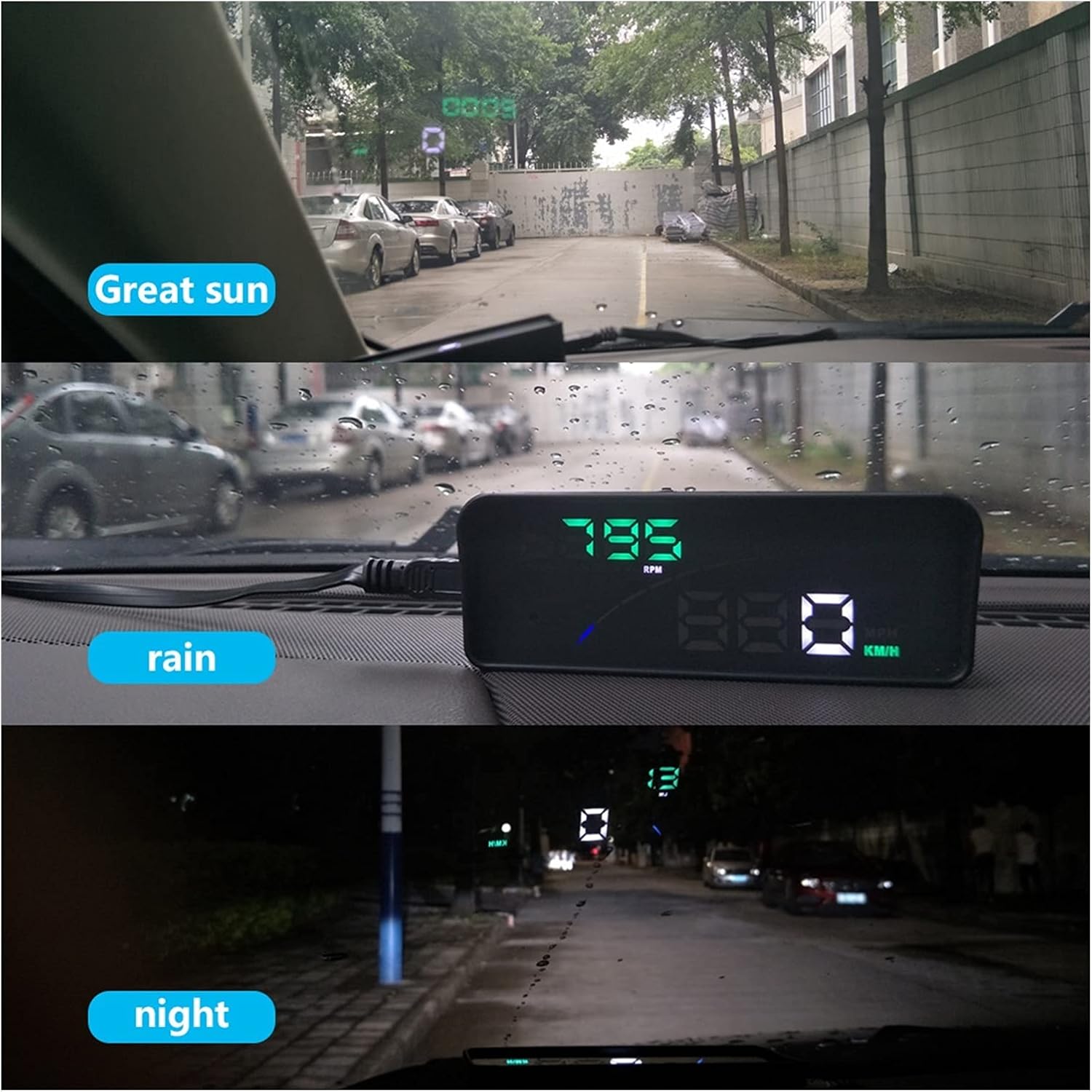
The P9 HUD maintains clear visibility in bright sunlight, rain, and at night.
- Great Sun: The display remains bright and legible even under strong sunlight.
- ฝน: Performance is maintained during rainy conditions, ensuring data is still clear.
- กลางคืน: The automatic backlight adjusts to provide a comfortable and non-distracting display in low-light environments.
9. การบำรุงรักษา
To ensure the longevity and optimal performance of your P9 Car HUD, follow these simple maintenance guidelines:
- การทำความสะอาด: Use a soft, dry cloth to wipe the display and casing. Avoid using abrasive cleaners or solvents that could damage the surface.
- พื้นที่จัดเก็บ: If storing the device for an extended period, disconnect it from the OBD port and store it in a cool, dry place away from direct sunlight.
- การดูแลสายเคเบิล: Do not bend or crimp the OBD cable excessively. Ensure it is not pinched by car doors or seats.
10 การแก้ไขปัญหา
If you encounter issues with your P9 Car HUD, refer to the following common problems and solutions:
| ปัญหา | สาเหตุที่เป็นไปได้ | สารละลาย |
|---|---|---|
| ไม่มีหน้าจอแสดงผล/ไม่มีไฟเลี้ยง | OBD cable not connected properly; Car's OBD port issue; Device fault. | Ensure OBD cable is firmly connected to both the HUD and the car's OBD port. Check if the car's OBD port is functional (e.g., by connecting another OBD device). Try restarting the car. |
| Inaccurate speed/data | Incorrect unit setting (KM/H vs MPH); Calibration needed; Vehicle compatibility issue. | Check and adjust the unit settings (KM/H or MPH) on the HUD. Refer to the user manual for calibration steps if available. Confirm your vehicle is fully OBD2/EUOBD compliant. |
| Alarms constantly trigger | Alarm thresholds set too low; Actual vehicle condition. | Adjust the alarm thresholds (e.g., overspeed, high water temperature) to appropriate levels via the device settings. If alarms persist, check your vehicle's actual condition (e.g., engine temperature, voltagจ). |
| Engine fault light on HUD | Actual engine fault detected by OBD system. | Use the HUD's "Clear fault code" function. If the fault light reappears, consult a mechanic to diagnose the underlying engine issue. |
11. ข้อมูลจำเพาะ
| คุณสมบัติ | รายละเอียด |
|---|---|
| หมายเลขรุ่น | 1005003178286970 |
| ยี่ห้อ | ทั่วไป |
| น้ำหนักสินค้า | 2.2 ปอนด์ (ประมาณ 1000 กรัม) |
| ประเทศต้นกำเนิด | จีน |
| การเชื่อมต่อ | OBD2 / EUOBD |
| ประเภทจอภาพ | Digital Projector Display |
| ผู้ผลิต | Lifyn2 |
12. การรับประกันและการสนับสนุน
For warranty information or technical support, please refer to the contact details provided by your retailer or the manufacturer. Keep your purchase receipt as proof of purchase for any warranty claims.
Ask a question about this manual
Ask about setup, troubleshooting, compatibility, parts, safety, or missing instructions. Manuals+ will review the question and use this page’s manual context to help answer it.