
FIFINE H6 Gaming Headset User Manual
รุ่น : H6
1. บทนำ
Thank you for choosing the FIFINE H6 Gaming Headset. This headset is designed to provide an immersive audio experience for gaming on PC, PS4, and PS5. It features virtual 7.1 surround sound, a detachable microphone for clear communication, three EQ modes, and comfortable ear cushions for extended use.
Please read this manual carefully before using the product to ensure proper operation and to maximize your gaming experience.
2. เนื้อหาบรรจุภัณฑ์
- FIFINE H6 Gaming Headset
- ไมโครโฟนแบบถอดออกได้
- คู่มือการใช้งาน
3. สินค้าหมดview
3.1 ส่วนประกอบของชุดหูฟัง
The FIFINE H6 headset is designed for comfort and durability, featuring soft ear cushions and an adjustable headband.

ภาพที่ 3.1: The headset features breathable ear cushions, a soft headband, and an adjustable metal frame for a comfortable fit. It weighs approximately 330g.
3.2 การควบคุมแบบอินไลน์
The headset includes an inline control unit for easy access to audio settings.
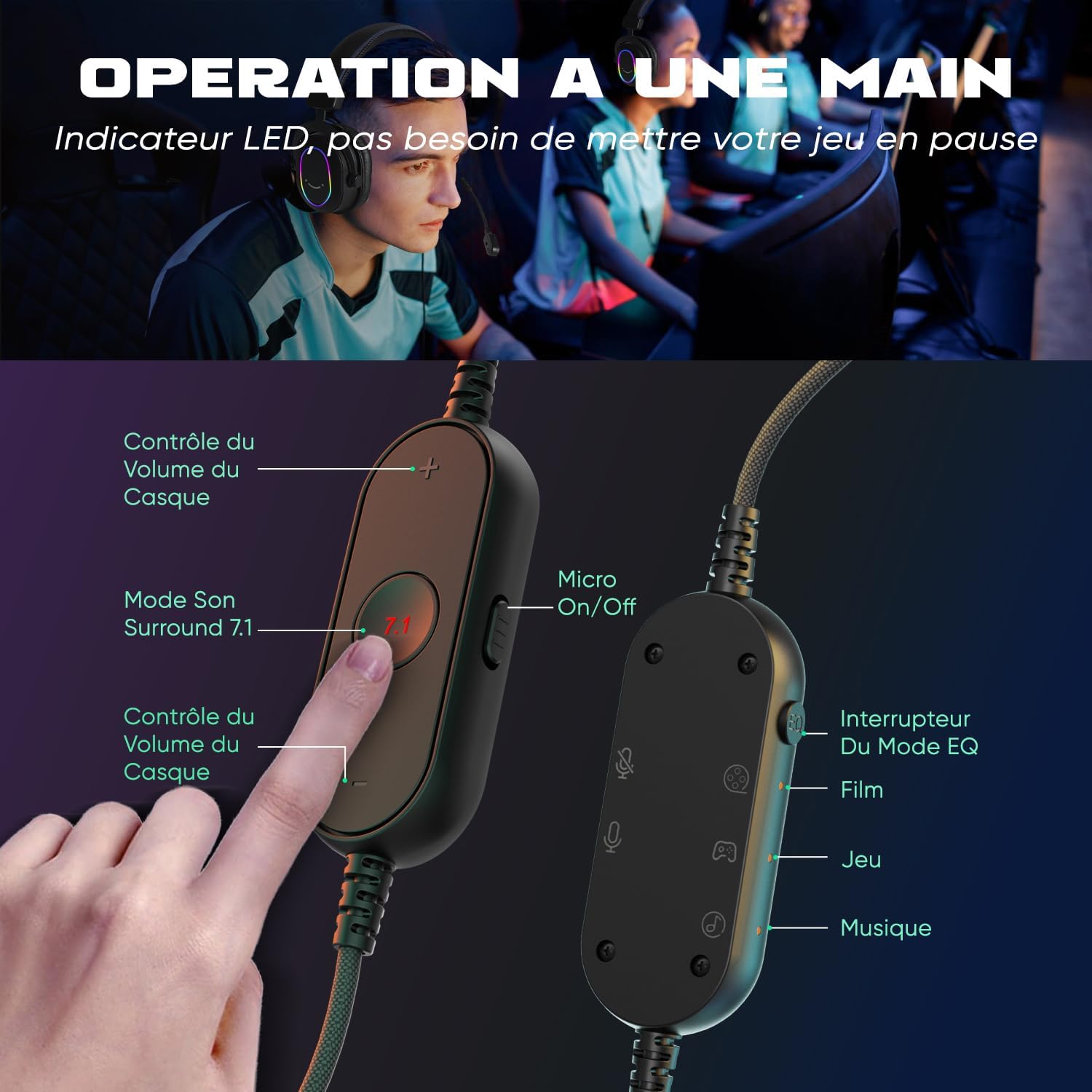
ภาพที่ 3.2: The inline controller allows for quick adjustments. It includes headset volume control, a 7.1 surround sound activation button, a microphone on/off switch, and an EQ mode selector for Film, Game, and Music modes.
3.3 เทคโนโลยีเสียง
Equipped with 50mm drivers, the H6 headset delivers enhanced sound quality for an immersive experience.

ภาพที่ 3.3: The headset features 50mm drivers designed to improve overall sound quality and enhance your audio experience.
4. การตั้งค่า
The FIFINE H6 headset offers plug-and-play functionality, making setup quick and easy.
4.1 การเชื่อมต่อชุดหูฟัง
- Connect the USB-A cable of the headset to an available USB port on your PC, PS4, or PS5.
- The headset is automatically recognized by your device. No additional drivers are typically required.
- Ensure the headset is selected as the default audio input and output device in your system's sound settings.

ภาพที่ 4.1: The headset connects via USB and is compatible with Windows, PS4/PS5, and Mac OS devices, offering simple plug-and-play installation.
4.2 การติดตั้งไมโครโฟน
- Insert the detachable microphone into the designated port on the left earcup until it clicks into place.
- Adjust the flexible microphone boom to position it optimally for your voice.
- To remove, gently pull the microphone out of its port.

ภาพที่ 4.2: The headset features a detachable and 360-degree flexible microphone. A red light on the inline control indicates when the microphone is muted.
5. คู่มือการใช้งาน
ระบบเสียงเซอร์ราวด์เสมือน 5.1 7.1
Activate the virtual 7.1 surround sound for an immersive gaming experience, allowing you to pinpoint audio cues like footsteps and gunfire.
- กดปุ่ม 7.1 button on the inline control unit to toggle virtual 7.1 surround sound on or off.
- An LED indicator on the control unit will confirm the status.

ภาพที่ 5.1: Virtual 7.1 surround sound provides an immersive gaming experience, allowing precise localization of in-game sounds such as explosions, gunshots, footsteps, aircraft, and vehicles.
โหมดอีควอไลเซอร์ 5.2 โหมด
The headset offers three equalization (EQ) modes optimized for different audio scenarios.
- กดปุ่ม สวิตช์โหมด EQ button on the inline control unit to cycle through the modes:
- โหมดฟิล์ม: Optimized for movie watching.
- โหมดเกม: Enhanced audio for gaming, highlighting in-game sounds.
- โหมดเพลง: Balanced audio for listening to music.
- An LED indicator will show the currently active EQ mode.
5.3 การควบคุมระดับเสียง
- ใช้ เพิ่มระดับเสียง (+) และ ลดเสียงลง (-) buttons on the inline control unit to adjust the headset's audio output level.
5.4 ปิดเสียงไมโครโฟน
- เลื่อน Micro On/Off switch on the inline control unit to mute or unmute the microphone.
- A red LED light on the control unit indicates when the microphone is muted.
6. การบำรุงรักษา
- การทำความสะอาด: ใช้ผ้านุ่มและแห้งเช็ดทำความสะอาดชุดหูฟัง ห้ามใช้สารเคมีรุนแรงหรือวัสดุที่มีฤทธิ์กัดกร่อน
- พื้นที่จัดเก็บ: เก็บหูฟังไว้ในที่แห้งและเย็น หลีกเลี่ยงแสงแดดโดยตรงและอุณหภูมิที่สูงหรือต่ำเกินไป
- การดูแลสายเคเบิล: Avoid bending or twisting the cable excessively to prevent damage. The braided cable material is designed for durability.
- ไมโครโฟน: When not in use, you can detach the microphone to prevent accidental damage.
7 การแก้ไขปัญหา
| ปัญหา | สารละลาย |
|---|---|
| ไม่มีเสียงจากหูฟัง |
|
| ไมโครโฟนไม่ทำงาน |
|
| ปัญหาคุณภาพเสียง (เช่น สัญญาณรบกวน เสียงเพี้ยน) |
|
8. ข้อมูลจำเพาะ
| คุณสมบัติ | รายละเอียด |
|---|---|
| ยี่ห้อ | ฟิไฟน์ |
| ชื่อรุ่น | H6 (also referred to as MI4 in some documentation) |
| สี | สีดำ |
| เทคโนโลยีการเชื่อมต่อ | แบบมีสาย (USB-A) |
| การวางตำแหน่งหู | หูฟังแบบครอบหู (Circum-Aural) |
| ประเภทไดรเวอร์ | พลวัต |
| ขนาดไดร์เวอร์ | 50 มม. |
| ช่วงความถี่ | 20 เฮิรตซ์ - 20,000 เฮิรตซ์ |
| คุณสมบัติพิเศษ | Virtual 7.1 Surround Sound, Detachable Microphone, 3 EQ Modes (Film, Game, Music), RGB Lighting, Inline Controls |
| อุปกรณ์ที่รองรับ | Desktop Computers, Gaming Consoles (PS4, PS5) |
| คุณสมบัติของสายเคเบิล | Braided, Durable, Sufficient Length |
| วัสดุ | โลหะ, พลาสติก |
| ระดับความต้านทานต่อน้ำ | ไม่กันน้ำ |
9. การรับประกันและการสนับสนุน
9.1 ข้อมูลการรับประกัน
FIFINE products typically come with a standard manufacturer's warranty. Please refer to your purchase documentation or the official FIFINE webไซต์สำหรับข้อกำหนดและเงื่อนไขการรับประกันเฉพาะที่ใช้บังคับกับภูมิภาคของคุณ
9.2 การสนับสนุนลูกค้า
For technical assistance, troubleshooting, or any questions regarding your FIFINE H6 Gaming Headset, please contact FIFINE customer support through their official webไซต์หรือร้านค้าปลีกที่คุณซื้อผลิตภัณฑ์
You can often find support contact information on the FIFINE brand store page or by visiting www.fifinemic.com.


