
1. บทนำ
This manual provides detailed instructions for the installation, operation, and maintenance of your SOGTICPS BL912-40A-WIFI MPPT Solar Charge Controller. This advanced charge controller is designed for off-grid solar applications, compatible with 12V/24V battery systems, including Gel, Flooded, and Lithium types. It features efficient MPPT tracking, an LCD display, dual USB outputs, and WiFi connectivity for remote monitoring.
คุณสมบัติหลัก:
- Innovative MPPT (Maximum Power Point Tracking) technology for up to 99% tracking efficiency.
- ระบบปรับระดับเสียงอัตโนมัติ 12V/24Vtagการตรวจจับอี
- Integrated LCD display for real-time monitoring of temperature, charge current, discharge current, and power generation.
- Comprehensive system protection: over-temperature, over-current, short-circuit, open-circuit, and reverse polarity.
- Compatibility with Gel, Flooded, and Lithium battery types.
- Dual 5V 2A USB outputs for charging mobile devices.
- WiFi communication for remote parameter adjustment and monitoring via a dedicated application.
- Industrial-grade main control chip with 16AD sampความแม่นยำหลิง
- Two-way MOS tube anti-reverse circuit for high-power charging and low heat generation.
2. คำแนะนำด้านความปลอดภัย
Please read all instructions carefully before installation and operation. Failure to follow these instructions may result in damage to the unit, personal injury, or property damage.
- Ensure all connections are tight and correct to avoid excessive voltage drop and potential hazards.
- Install the controller indoors, away from direct sunlight, high temperatures, and moisture.
- ตัวควบคุมจะสร้างความร้อนขณะทำงาน โปรดตรวจสอบให้แน่ใจว่ามีการระบายอากาศที่เพียงพอ
- Connect the battery first, then the solar panel, and finally the load. Disconnect in the reverse order: load, solar panel, then battery.
- Do not connect any inverter directly to the load terminals of the controller.
- Ensure the solar panel's open-circuit voltage (Voc) does not exceed the controller's maximum input voltage.
- Use appropriate circuit breakers or fuses for the battery and solar panel circuits.
- Keep children away from the solar power system.
- อย่าพยายามถอดประกอบหรือซ่อมแซมตัวควบคุมด้วยตนเอง โปรดติดต่อช่างผู้ชำนาญการเพื่อขอรับบริการ
3. สินค้าหมดview
The SOGTICPS BL912-40A-WIFI solar charge controller features a robust design with an intuitive LCD display and multiple connection points.

ภาพ: ด้านหน้า view of the SOGTICPS BL912-40A-WIFI Solar Charge Controller, highlighting its security protection features such as short-circuit, overload, overcharge, under-voltage และปริมาตรเกินtagการป้องกันอี
ส่วนประกอบ:
- จอแสดงผล LCD: Shows real-time system status and parameters.
- ปุ่มควบคุม: For navigating menus and setting parameters.
- Solar Panel Input Terminals: เชื่อมต่อกับแผงโซลาร์เซลล์
- ขั้วแบตเตอรี่: เชื่อมต่อกับแบตเตอรี่สำรอง
- โหลดขั้วเอาท์พุท: เชื่อมต่อกับโหลด DC
- Dual USB Ports (5V 2A): สำหรับชาร์จอุปกรณ์ภายนอก
- เสาอากาศ WiFi: สำหรับการสื่อสารไร้สาย
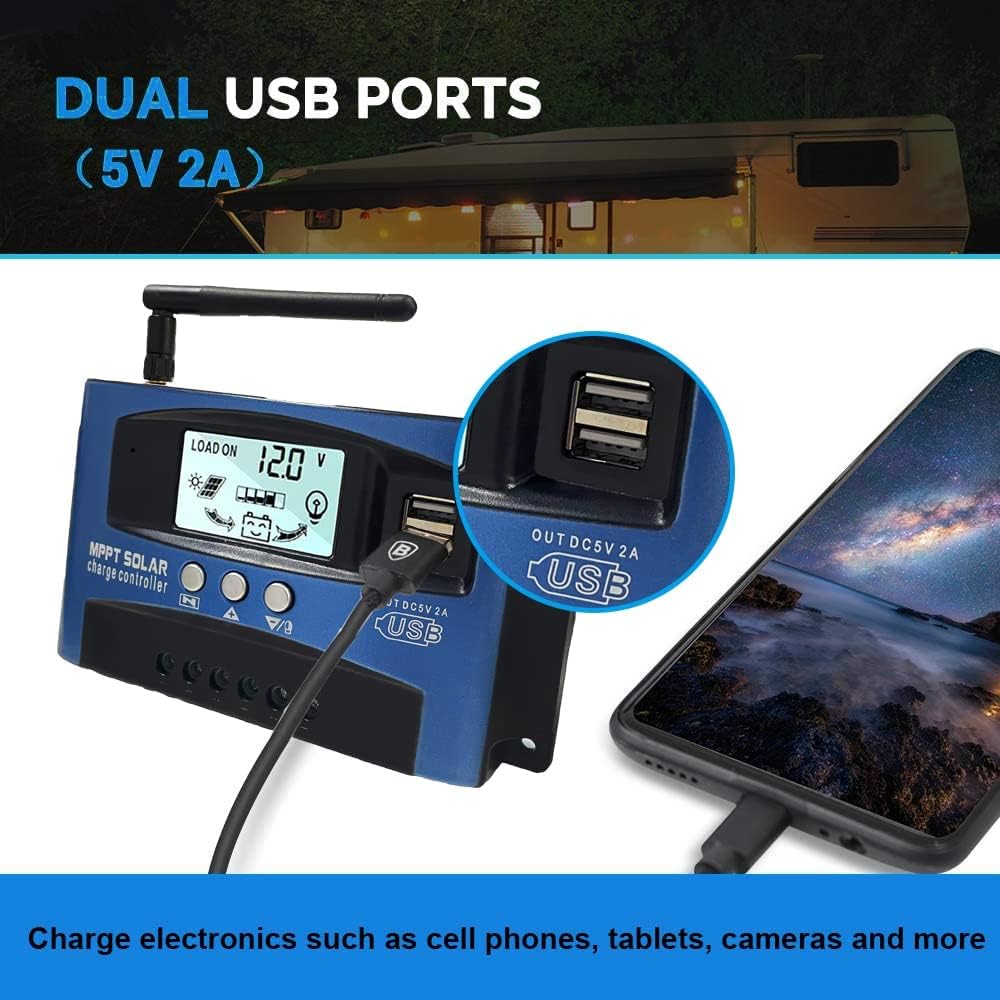
ภาพ: ภาพระยะใกล้ view of the SOGTICPS BL912-40A-WIFI Solar Charge Controller, showing the dual 5V 2A USB ports in use, charging a smartphone.
4. การตั้งค่าและการติดตั้ง
Proper installation is critical for the safe and efficient operation of your solar charge controller. Follow the connection order precisely.
ลำดับการเชื่อมต่อ:
- เชื่อมต่อแบตเตอรี่ก่อน: Connect the battery to the charge controller's battery terminals. Ensure correct polarity (+ to + and - to -). The controller will automatically detect 12V or 24V system voltage.
- เชื่อมต่อแผงโซล่าเซลล์: Connect the solar panels to the charge controller's solar input terminals. Again, observe correct polarity.
- เชื่อมต่อโหลด DC (ไม่จำเป็น): Connect your DC loads to the load output terminals.
สำคัญ: When disconnecting, reverse the order: first disconnect the load, then the solar panels, and finally the battery. Failure to follow this order may damage the controller or other components.
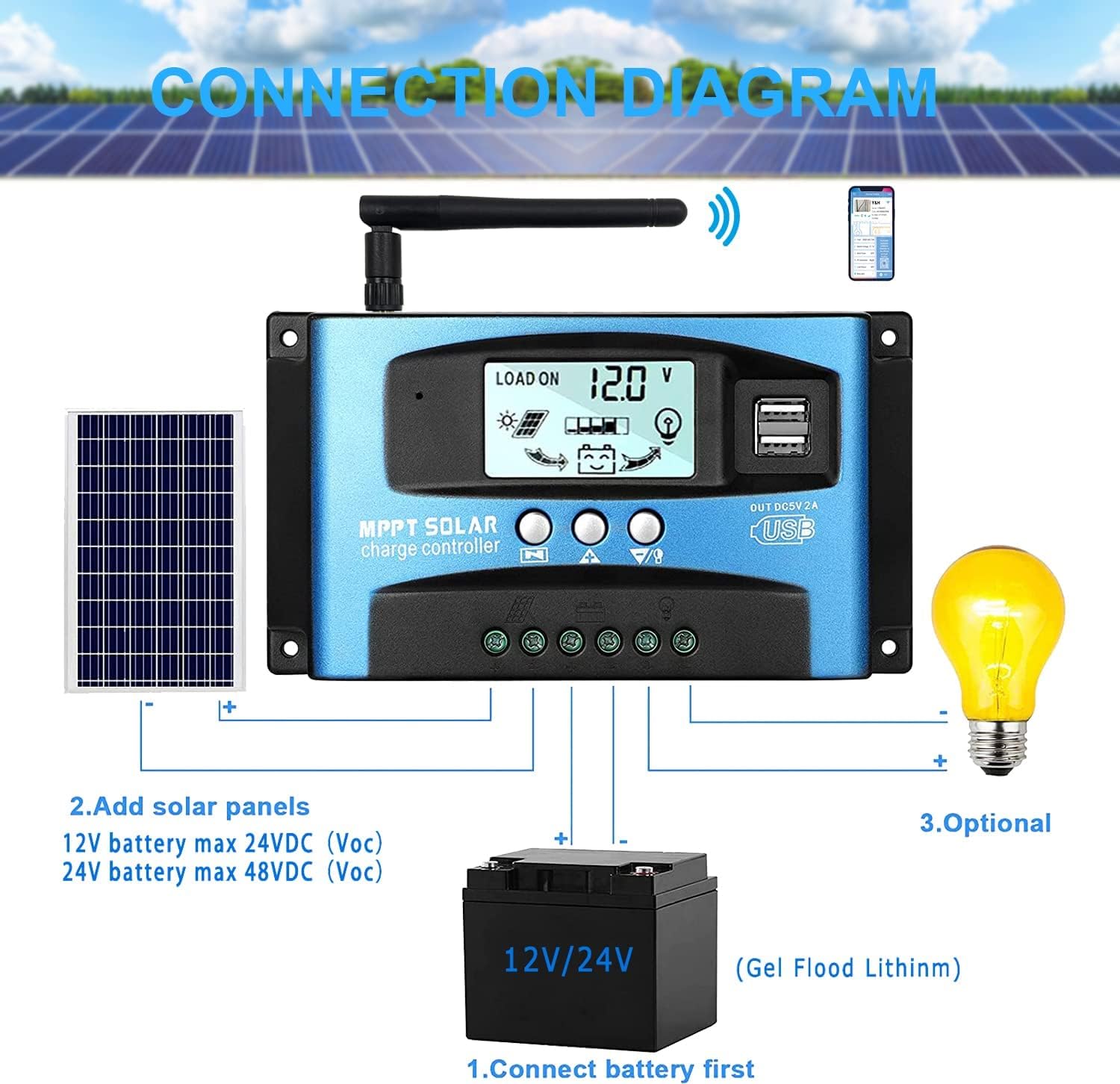
ภาพ: A clear connection diagram illustrating the proper wiring sequence for the solar charge controller, connecting to a battery, solar panels, and an optional DC load. It emphasizes connecting the battery first.
ความเข้ากันได้ของแบตเตอรี่:
The controller is compatible with various battery types, including Gel, Flooded (Lead-Acid), and Lithium batteries. Ensure the correct battery type is selected in the controller settings for optimal charging.

ภาพ: Visual representation showing the SOGTICPS BL912-40A-WIFI Solar Charge Controller's compatibility with Gel, Flooded, and Lithium battery types, indicated by arrows pointing between battery icons and the controller.
5. คู่มือการใช้งาน
LCD Display and Navigation:
The LCD provides real-time information about your solar system. Use the control buttons to navigate through the display interfaces and adjust parameters.

ภาพ: A series of LCD screen captures demonstrating the browsing interface and parameter setting process for the SOGTICPS BL912-40A-WIFI Solar Charge Controller. It shows main display, float voltage, discharge reconnect, discharge stop, load work mode, battery type, and work parameter display.
- Browsing Interface: กดปุ่ม เมนู button to cycle through different display interfaces, showing information such as main display, float voltage, discharge reconnect voltage, discharge stop voltage, load work mode, battery type, and other work parameters.
- การตั้งค่าพารามิเตอร์: In interfaces 2-8, press the เมนู button to enter the setting mode. Use the UP และ ลง buttons to adjust the values. Press เมนู อีกครั้งเพื่อยืนยันและออกจากโหมดการตั้งค่า
การตรวจสอบผ่าน WiFi:
The controller supports WiFi connectivity, allowing you to monitor and control your solar system remotely via a smartphone application.

ภาพ: The SOGTICPS BL912-40A-WIFI Solar Charge Controller shown alongside a smartphone displaying its monitoring application interface. This illustrates the wireless monitoring capability of the PV system.
- การติดตั้งแอป: Download the dedicated application for your smartphone (Android). Refer to the QR code or instructions provided with the product for app download.
- การเชื่อมต่อ: Follow the in-app instructions to connect your controller to your local WiFi network.
- การตรวจสอบระยะไกล: เมื่อเชื่อมต่อแล้ว คุณสามารถ view real-time data such as temperature, charge current, discharge current, accumulated power generation, battery voltage, and adjust charging modes from anywhere.
6. การบำรุงรักษา
การบำรุงรักษาอย่างสม่ำเสมอจะช่วยให้ตัวควบคุมการชาร์จพลังงานแสงอาทิตย์ของคุณมีอายุการใช้งานยาวนานและทำงานได้อย่างมีประสิทธิภาพสูงสุด
- ตรวจสอบการเชื่อมต่อ: ตรวจสอบการเชื่อมต่อสายไฟทั้งหมดเป็นระยะๆ เพื่อให้แน่ใจว่าแน่นหนาและไม่มีการกัดกร่อน
- ตัวควบคุมที่สะอาด: รักษาตัวควบคุมให้สะอาด ปราศจากฝุ่นและเศษขยะ ใช้ผ้าแห้งเช็ดทำความสะอาด
- การระบายอากาศ : Ensure the installation area has adequate ventilation to prevent overheating.
- การตรวจสอบแบตเตอรี่: Regularly check battery terminals for corrosion and ensure battery fluid levels (for flooded batteries) are correct.
- การตรวจสอบระบบ: Use the LCD display or the WiFi app to monitor system performance and identify any anomalies early.
7 การแก้ไขปัญหา
หากคุณพบปัญหาเกี่ยวกับตัวควบคุมการชาร์จพลังงานแสงอาทิตย์ โปรดดูปัญหาทั่วไปและวิธีแก้ไขต่อไปนี้:
| ปัญหา | สาเหตุที่เป็นไปได้ | สารละลาย |
|---|---|---|
| ไม่มีการแสดงผลบนจอ LCD | แบตเตอรี่ไม่ได้เชื่อมต่อหรือระดับเสียงต่ำtage; ขั้วกลับด้าน | ตรวจสอบการเชื่อมต่อแบตเตอรี่และปริมาตรtage. ตรวจสอบให้แน่ใจว่าขั้วถูกต้อง |
| แบตเตอรี่ไม่ชาร์จ | Solar panels not connected; insufficient sunlight; faulty solar panel; incorrect battery type setting. | Check solar panel connections and ensure adequate sunlight. Verify solar panel functionality. Confirm battery type setting. |
| โหลดไม่ทำงาน | Load disconnected; battery low voltage protection; overload protection. | Check load connections. Charge battery. Reduce load or check for short circuits. |
| WiFi app issues (connection/language) | Incorrect WiFi setup; app region/language settings; firmware issues. | Ensure correct WiFi network and password. Check app settings for language. Contact support if issues persist. |
8. ข้อมูลจำเพาะ
| พารามิเตอร์ | ค่า |
|---|---|
| แบบอย่าง | BL912-40A-WIFI |
| กระแสไฟชาร์จที่กำหนด | 40 ก |
| เล่มระบบtage | 12V/24V Auto-detection |
| กำลังไฟฟ้าขาเข้าสูงสุดจากแผงโซลาร์เซลล์ (12V) | 480 วัตต์ |
| กำลังไฟฟ้าขาเข้าสูงสุดจากแผงโซลาร์เซลล์ (24V) | 960 วัตต์ |
| แผงโซล่าเซลล์ที่แนะนำtage | 18V for 12V battery; 36V for 24V battery |
| การบริโภคเพื่อตนเอง | <10มิลลิแอมป์ |
| อุณหภูมิในการทำงาน | -14 °F ถึง 140 °F (-10 °C ถึง 60 °C) |
| ประเภทจอภาพ | จอแอลซีดี |
| เอาท์พุต USB | Dual 5V 2A |
| การสื่อสาร | ไวไฟ |
| ขนาด (แพ็คเกจ) | 18 x 11 x 5 ซม. |
| น้ำหนัก (แพ็คเกจ) | 330 กรัม |
| การอ้างอิงผู้ผลิต | 2-BL912-40A-WIFI-DE |
| ยูพีซี | 732246237116 |
9. การรับประกันและการสนับสนุน
For warranty information and technical support, please refer to the documentation included with your purchase or contact SOGTICPS customer service. Keep your purchase receipt as proof of purchase.