
1. สินค้าหมดview
The Hikity 9 Inch Quad Split Screen Backup Camera Monitor is designed to provide enhanced visibility for various vehicles, including cars, SUVs, vans, trucks, and pickups. This monitor features a 9-inch TFT LCD display with 4-channel video input, allowing for multiple viewing modes. It supports a wide power input range of 9-36V, making it versatile for different vehicle types. The monitor can display up to four camera feeds simultaneously, aiding in driving and parking maneuvers.

Image 1.1: The Hikity 9 Inch Quad Split Screen Backup Camera Monitor.
วิดีโอ 1.1: จบแล้วview of the Hikity 9-inch 4-channel backup camera monitor, highlighting its features and capabilities.
2. เนื้อหาบรรจุภัณฑ์
ตรวจสอบว่าสินค้าทั้งหมดที่ระบุไว้ด้านล่างนี้รวมอยู่ในแพ็คเกจของคุณแล้ว หากมีสินค้าใดสูญหายหรือเสียหาย โปรดติดต่อฝ่ายสนับสนุนลูกค้า
- 1 x 9-inch Quad Split Monitor
- 1 x Headrest Shell
- 1 x Bracket Mount
- 1 x IR รีโมทคอนโทรล
- 1 x Video & Power Cable

Image 2.1: All components included in the Hikity 9 Inch Backup Camera Monitor package.
Video 2.1: A detailed unboxing and display of the Hikity 9 Inch Backup Camera Monitor package contents.
3. ข้อมูลจำเพาะ
| ขนาดหน้าจอ | 9 นิ้ว |
| ปณิธาน | HD (800x480 native) |
| อัตราส่วนภาพ | 16:9 น. |
| ประเภทจอภาพ | ทีเอฟทีแอลซีดี |
| Viewอิงแองเกิล | 170 องศา |
| เล่มที่tage อินพุต | 9-36 โวลต์ |
| การเชื่อมต่อ | RCA (4 Channels) |
| คุณสมบัติเพิ่มเติม | Anti-Glare Screen, Quad Split Screen Display |
| อุปกรณ์ที่รองรับ | CCTV Camera, Car Camera, DVD/VCD, TV BOX |
4. การตั้งค่าและการติดตั้ง
The monitor offers two primary installation methods: stereoscopic (dashboard mount) and embedded (headrest shell). Choose the method that best suits your vehicle and preferences.
4.1 วิธีการติดตั้ง

Image 4.1: Visual representation of stereoscopic (dashboard) and embedded (headrest) installation options.
4.2 แผนผังการเดินสายไฟ
Connect the power and video cables as shown in the diagram. Ensure correct polarity for power connections (+12-24V and GND). The camera control lines (Brown, Blue, Green, Gray) should be connected to the positive of the reverse gear or other trigger sources for automatic switching.
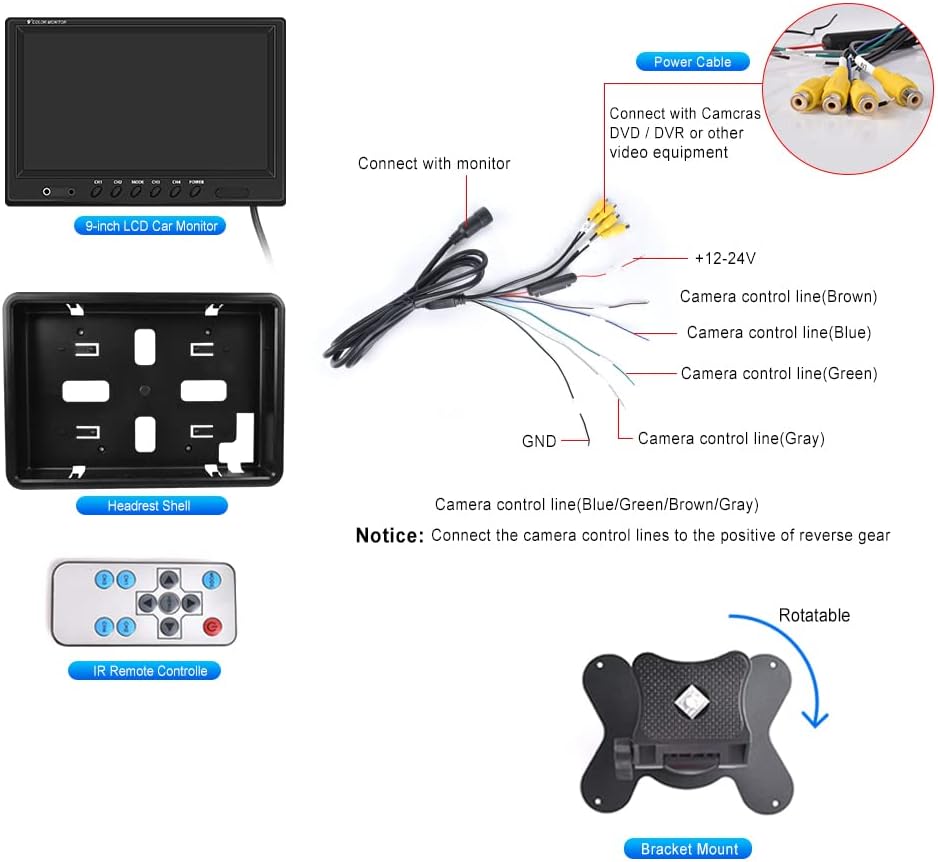
Image 4.2: Detailed wiring connections for the monitor, including power and four RCA video inputs.
วิดีโอ 4.1: บทนำสั้น ๆview demonstrating an installation method for the monitor, focusing on placement and initial setup.
5. คู่มือการใช้งาน
The Hikity monitor offers various viewing modes and adjustable settings for optimal use.
5.1 Viewโหมด ing
The monitor supports 6 selectable viewing modes: Single Full View, Split Dual Video View, Split Tri Video View, and Quad Four View. These modes allow you to customize how camera feeds are displayed on the screen.

Image 5.1: Illustration of the quad split screen functionality, showing four camera feeds simultaneously.
5.2 การปรับเปลี่ยน
Use the included IR remote controller or the buttons on the monitor to adjust settings such as brightness, contrast, and color. The monitor also supports rotating or mirroring the screen display for each channel.
5.3 Driving Assistance
Each of the four video input channels (CH1/CH2/CH3/CH4) has a dedicated signal wire for backup or turning triggers. Connecting these wires allows the monitor to automatically switch to the corresponding camera view when a trigger is activated (e.g., shifting into reverse).

Image 5.2: The 9-inch monitor displaying a quad-split view, showing multiple perspectives for driving assistance.
6. การบำรุงรักษา
To ensure the longevity and optimal performance of your Hikity monitor, follow these maintenance guidelines:
- การทำความสะอาด: ใช้ผ้าแห้งนุ่มๆ เช็ดทำความสะอาดหน้าจอมอนิเตอร์และasing. For stubborn smudges, lightly dampชุบผ้าด้วยน้ำหรือน้ำยาทำความสะอาดที่ปลอดภัยต่อหน้าจอ หลีกเลี่ยงวัสดุที่มีฤทธิ์กัดกร่อนหรือสารเคมีรุนแรง
- สภาพแวดล้อม : Avoid exposing the monitor to extreme temperatures, direct sunlight for prolonged periods, or excessive moisture.
- การจัดการสายเคเบิล: Ensure all cables are securely connected and not pinched or strained, which can lead to damage or intermittent signal loss.
- พื้นที่จัดเก็บ: หากจะเก็บจอภาพไว้เป็นเวลานาน ควรถอดปลั๊กออกและเก็บไว้ในที่แห้งและเย็น
7 การแก้ไขปัญหา
If you encounter issues with your Hikity monitor, refer to the following common problems and solutions:
- ไม่มีไฟฟ้า:
- ตรวจสอบการเชื่อมต่อสายไฟทั้งหมดเพื่อให้แน่ใจว่าแน่นหนาดีแล้ว
- Verify that the power source (9-36V) is functioning correctly.
- ตรวจสอบสายไฟเพื่อดูว่ามีรอยเสียหายที่มองเห็นได้หรือไม่
- ไม่มีสัญญาณวิดีโอ:
- Ensure all RCA video cables are firmly connected to both the cameras and the monitor.
- Confirm that the cameras are powered on and functioning.
- Check the selected input channel on the monitor matches the connected camera.
- If using trigger wires, ensure they are correctly connected and receiving a signal.
- คุณภาพของภาพต่ำ:
- Adjust the brightness, contrast, and color settings using the remote control or monitor buttons.
- Ensure camera lenses are clean and free from obstructions.
- Verify that the video cables are not damaged or experiencing interference.
- รีโมทคอนโทรลไม่ทำงาน:
- ตรวจสอบและเปลี่ยนแบตเตอรี่ในรีโมทคอนโทรล
- Ensure there are no obstructions between the remote and the monitor's IR receiver.
หากขั้นตอนเหล่านี้ไม่สามารถแก้ไขปัญหาได้ โปรดติดต่อฝ่ายสนับสนุนลูกค้าของ Hikity เพื่อขอความช่วยเหลือเพิ่มเติม
8. การรับประกันและการสนับสนุน
Hikity ให้การสนับสนุนผลิตภัณฑ์อย่างครอบคลุม:
- การรับประกันคืนเงิน: รับประกันคืนเงินภายใน 30 วัน
- การรับประกันการเปลี่ยน: รับประกันเปลี่ยนสินค้า 2 ปี
- การสนับสนุนด้านเทคนิค: มีบริการสนับสนุนด้านเทคนิคตลอดอายุการใช้งาน
For installation or usage issues, please contact Hikity Flagship Store via the product page on Amazon. Support inquiries are typically responded to within 24 hours.