
Shot Navi Crest
คู่มือผู้ใช้ นาฬิกา GPS สำหรับเล่นกอล์ฟ Shot Navi Crest
Model: Crest
1. บทนำ
This manual provides detailed instructions for the setup, operation, and maintenance of your Shot Navi Crest Golf GPS Watch. Please read this manual thoroughly before using the device to ensure proper functionality and to maximize your golfing experience.

Image 1.1: The Shot Navi Crest Golf GPS Watch, showing a golf course layout with distances to the green and hazards.
The Shot Navi Crest is a wristwatch-type GPS golf navigation device designed to assist golfers with accurate distance measurements and comprehensive course information. It features a durable plastic construction and a clear 1.2-inch display.
2. เนื้อหาบรรจุภัณฑ์
ตรวจสอบว่ามีรายการทั้งหมดอยู่ในแพ็คเกจ:
- Shot Navi Crest Main Unit
- สายชาร์จ
- Instruction Manual (this document) and Warranty Card
3. การตั้งค่า
3.1 การชาร์จเริ่มต้น
Before first use, fully charge the device. Connect the charging cable to the Shot Navi Crest and a USB power source. The device has a built-in battery with an approximate life of 8 hours during active use.
3.2 เปิด/ปิดเครื่อง
To power on, press and hold the main button (typically the central button on the right side) until the screen illuminates. To power off, press and hold the same button until a power-off prompt appears, then confirm.
3.3 Course Data Download (for Overseas Courses)
The device supports 59,315 courses across 122 countries and regions. Domestic course layouts are typically pre-loaded. For overseas courses, data download and updates may be required. Refer to the Shot Navi official website for instructions on downloading and updating course data via Bluetooth connectivity.
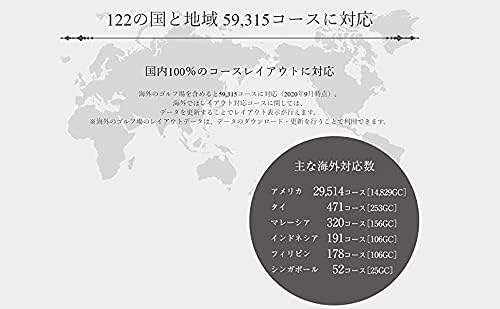
Image 3.1: Illustration of Shot Navi's extensive course coverage across various countries and regions.
Major overseas course support includes:
- America: 29,514 courses
- Thailand: 471 courses
- Malaysia: 320 courses
- Indonesia: 191 courses
- Philippines: 178 courses
- Singapore: 52 courses
4. คู่มือการใช้งาน
4.1 Quick Start Golf Navigation
From the watch screen, press and hold the main button (right-center button) to automatically search for golf courses and initiate golf navigation. This allows for one-button navigation startup.

Image 4.1: Demonstrates pressing the right-center button to quickly start golf navigation.
If you need to select a specific mode or perform a manual search, use the button operations as prompted on the screen.
4.2 Auto Measure Function
The Shot Navi Crest features an "Auto Measure" function that automatically detects your swing and measures shot distances. This function automatically records the distance of your shots.
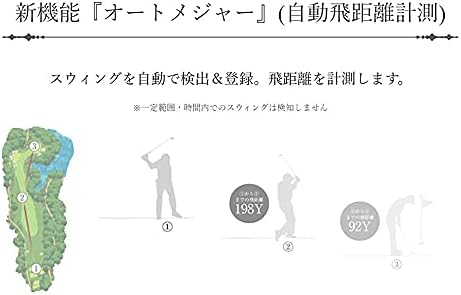
Image 4.2: Visual representation of the Auto Measure function, showing automatic detection of swing and calculation of shot distance.
Note: Swings within a certain range or time period may not be detected.
4.3 Displaying Elevation Difference Maps
On the FW (Fairway) navigation screen or during play information flyover, you can view elevation difference maps. These maps show the elevation from your current position to the green and to the center of the fairway, as well as from the fairway center to the green.

ภาพที่ 4.3: อดีตamples of elevation difference maps, showing current position to green and fairway center to green views.
4.4 Screen Visibility in Sunlight
The Shot Navi Crest utilizes an MIP (Memory-in-Pixel) color reflective LCD, which provides high visibility outdoors, even in direct sunlight. Unlike backlit or organic EL displays, it reflects ambient light to produce a clear and vibrant display.

Image 4.4: The Shot Navi Crest displaying clear course information under bright sunlight conditions.
5. การบำรุงรักษา
- การทำความสะอาด: เช็ดอุปกรณ์ด้วยผ้าแห้งนุ่มๆ สำหรับคราบสกปรกฝังแน่น ให้ใช้ผ้าที่ชื้นเล็กน้อยเช็ดamp ใช้ผ้าเช็ดทำความสะอาด แล้วเช็ดให้แห้งสนิท หลีกเลี่ยงการใช้สารทำความสะอาดที่มีฤทธิ์กัดกร่อนหรือตัวทำละลาย
- ความต้านทานน้ำ: The device is waterproof. However, avoid prolonged submersion or exposure to high-pressure water jets. Ensure the charging port is dry before charging.
- พื้นที่จัดเก็บ: เก็บอุปกรณ์ไว้ในที่แห้งและเย็น หลีกเลี่ยงแสงแดดโดยตรงและอุณหภูมิที่สูงหรือต่ำเกินไป
- การดูแลแบตเตอรี่ เพื่อยืดอายุการใช้งานแบตเตอรี่ ควรหลีกเลี่ยงการคายประจุแบตเตอรี่จนหมดบ่อยๆ ควรชาร์จอุปกรณ์เป็นประจำ แม้ว่าจะไม่ได้ใช้งานเป็นเวลานานก็ตาม
6 การแก้ไขปัญหา
| ปัญหา | สาเหตุที่เป็นไปได้ | สารละลาย |
|---|---|---|
| อุปกรณ์ไม่เปิดเครื่อง | แบตเตอรี่อ่อน | ชาร์จอุปกรณ์ให้เต็ม |
| ไม่ได้รับสัญญาณ GPS | ถูกขัดขวาง view ของท้องฟ้า; อุปกรณ์ภายในอาคาร | ย้ายไปยังพื้นที่กลางแจ้งที่เปิดโล่งและมีอากาศถ่ายเทได้สะดวก view ของท้องฟ้า รอสักครู่เพื่อให้รับสัญญาณได้ |
| Incorrect distances displayed. | Outdated course data; GPS inaccuracy. | Ensure course data is updated. Allow the device to acquire a strong GPS signal. |
| Auto Measure not detecting swings. | Swing too short or within a short time frame; sensor obstruction. | Ensure full swings are made. Check for any obstructions around the device. |
| Screen difficult to read in bright conditions. | Not applicable for MIP display, but ensure screen is clean. | The MIP display is designed for high visibility in sunlight. Ensure the screen is clean and free from smudges. |
7. ข้อมูลจำเพาะ
| ชื่อรุ่น : | ยอด |
| ประเภทสินค้า : | Wristwatch-type GPS Golf Navigation Device |
| วัสดุ: | พลาสติก |
| สี: | Black x Silver |
| ขนาดหน้าจอ: | 1.2 นิ้ว |
| ประเภทจอภาพ: | MIP Color Reflective LCD |
| การเชื่อมต่อ: | บลูทูธ |
| ความต้านทานน้ำ: | ใช่ |
| Battery Life (GPS mode): | ประมาณ 8 ชั่วโมง |
| ขนาด : | 11.9 x 9.1 x 8.2 cm (package); 64 g (device weight) |
| Course Coverage: | 59,315 courses in 122 countries/regions (as of Sept 2020) |
| ส่วนประกอบที่รวมอยู่: | Main unit, charging cable, instruction manual/warranty card |
8. การรับประกันและการสนับสนุน
This product comes with a manufacturer's warranty. Please refer to the included warranty card for details regarding warranty period, terms, and conditions. Keep your proof of purchase for warranty claims.
For technical support, product inquiries, or service requests, please contact Shot Navi customer service. Contact information can be found on the official Shot Navi webเว็บไซต์หรือบนบัตรรับประกัน
สำคัญ: The charging cable is a critical component. Handle it with care to prevent damage, as issues with the charging cable have been noted in user feedback. Replacement charging cables may be available for purchase from authorized retailers or the Shot Navi webเว็บไซต์.
Ask a question about this manual
Ask about setup, troubleshooting, compatibility, parts, safety, or missing instructions. Manuals+ will review the question and use this page’s manual context to help answer it.