
1. บทนำ
This manual provides detailed instructions for the installation, operation, and maintenance of your Voktta 100A DC Power Meter. This device is designed to accurately measure DC voltage, current, power, and energy consumption in various applications, including RVs, solar systems, and battery monitoring. Please read this manual thoroughly before use to ensure proper function and safety.
2. ข้อมูลด้านความปลอดภัย
- โปรดตรวจสอบให้แน่ใจว่าได้ตัดกระแสไฟทั้งหมดแล้วก่อนทำการติดตั้งหรือเดินสายไฟ เพื่อป้องกันไฟฟ้าช็อต
- This device is intended for DC circuits only. Do not connect to AC power.
- Observe correct polarity (+/-) during wiring to avoid damage to the meter and connected equipment.
- Use appropriate wire gauges (30-12 AWG copper wires recommended) for connections to handle the expected current.
- ไม่เกินปริมาตรสูงสุดtage (100V DC) or current (100A) ratings.
- ควรเก็บอุปกรณ์ให้ห่างจากความชื้น ฝุ่น และอุณหภูมิที่สูงหรือต่ำเกินไป
- Do not attempt to disassemble or modify the meter. Refer all servicing to qualified personnel.
3. สินค้าหมดview
3.1 คุณสมบัติหลัก
- ช่วงการวัดกว้าง: กระแสตรง voltage 6.5-100V, current 0-100A, power 0-10kW, energy 0-9999kWh.
- จอแสดงผล LCD: แสดงปริมาตรพร้อมกันtage. กระแสไฟฟ้า กำลังไฟฟ้า และพลังงาน
- การจัดเก็บข้อมูลขณะปิดเครื่อง: All parameters are automatically saved when power is lost.
- Energy Reset Function: Accumulated energy data can be manually reset.
- Over-threshold Alarm: Backlight and power display flash if active power exceeds a set threshold.
- Manual Backlight Control: Backlight can be manually turned on or off.
3.2 ขนาดสินค้า

รูปที่ 1: Voktta 100A DC Power Meter with labeled dimensions (89.6mm x 44.6mm x 24.4mm).
3.3 ฟังก์ชั่นการแสดงผล
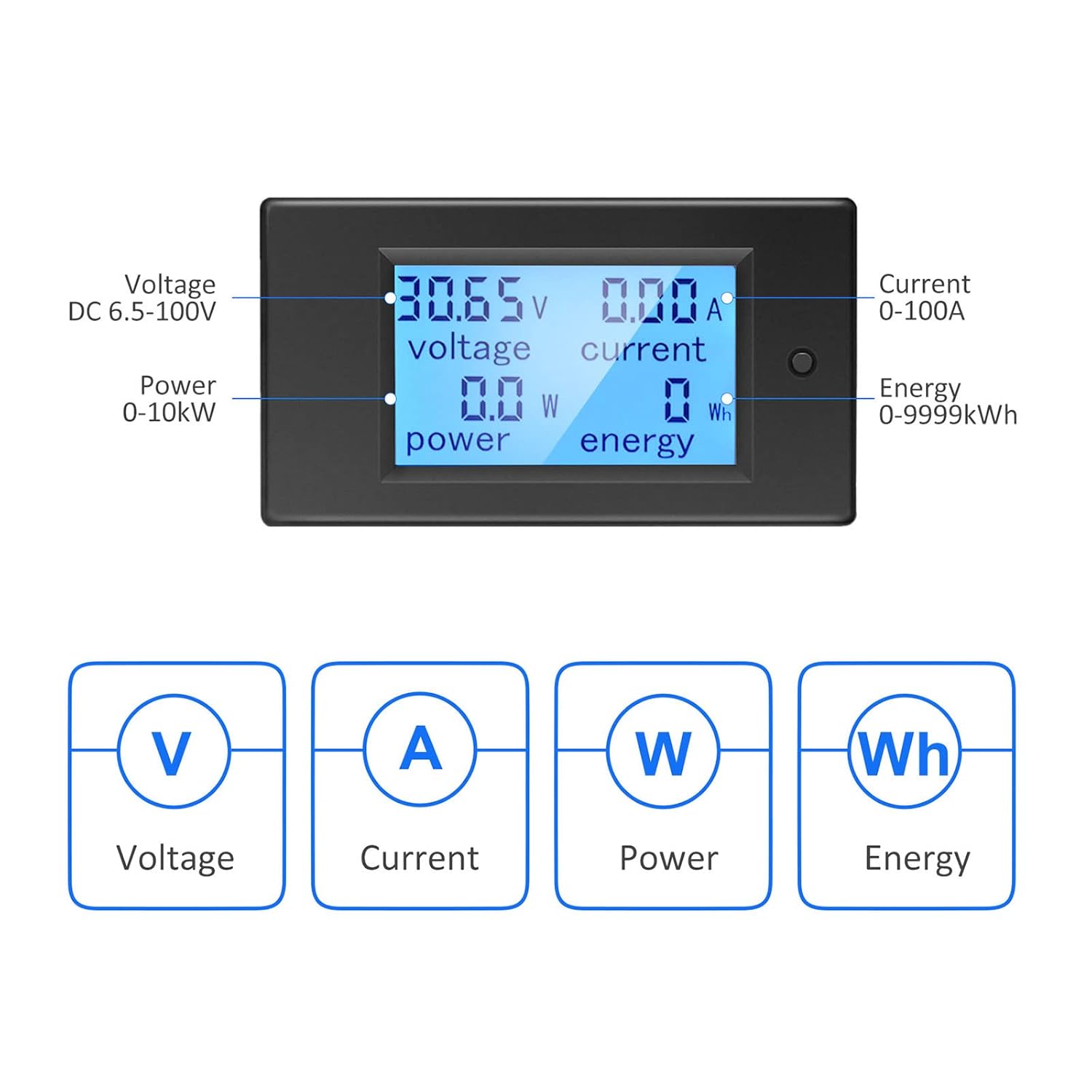
รูปที่ 2: LCD display showing Voltage (V), Current (A), Power (W), and Energy (Wh) measurements.
4. ข้อมูลจำเพาะ
| พารามิเตอร์ | ค่า |
|---|---|
| หมายเลขรุ่น | B0B87458J7 |
| ปฏิบัติการฉบับที่tagอี เรนจ์ | แรงดันไฟฟ้ากระแสตรง 6.5V - 100V |
| ช่วงการวัดปัจจุบัน | 0 - 100เอ |
| ช่วงการวัดกำลังไฟฟ้า | 0 - 10 กิโลวัตต์ |
| ช่วงการวัดพลังงาน | 0 - 9999kWh |
| ประเภทการวัด | Voltmeter, Ammeter, Wattmeter, Energy Meter |
| ประเภทจอภาพ | LCD พร้อม Backlight |
| ส่วนประกอบที่รวมอยู่ | 1*Digital Voltmeter Ammeter DC 100A, 1*100A/75mV Shunt |
| ข้อมูลจำเพาะที่สอดคล้อง | มอก.61010-1 |
| ขนาดสินค้า (กว้าง x ยาว x สูง) | 10 x 10 x 10 millimeters (approximate) |
| น้ำหนัก | 220 กรัม (โดยประมาณ) |
| ประเทศต้นกำเนิด | จีน |
5. การตั้งค่าและการติดตั้ง
5.1 Basic Wiring Instruction
The meter requires a 100A/75mV shunt for current measurement. The shunt must be installed in series with the load. The meter itself connects with four wires (not included) to the shunt and the power source.
- ขั้นตอนที่ 1: Install the 100A/75mV shunt in series with the DC circuit, between the power source (e.g., battery) and the load. Ensure correct polarity.
- ขั้นตอนที่ 2: Connect the meter to the shunt and the power source using four wires. The meter's small wires are for its own power supply and voltage measurement, while the shunt handles the main current. Recommended wire gauge for connections to the meter is 30-12 AWG copper wires.

รูปที่ 3: Basic wiring diagram for the Voktta DC Power Meter with shunt.
5.2 Solar System Wiring Instruction
This diagram illustrates wiring for a solar system where an inverter connects directly to the battery. The meter's four wires do not carry large current; they are for measurement and power. Any copper wire from 30 AWG to 12 AWG can be used for these connections.

รูปที่ 4: Solar system wiring diagram with the Voktta DC Power Meter.
You do not need to wire both meters if monitoring a solar system; just connect the voltmeter(s) to monitor the specific parameters you require.
6. คู่มือการใช้งาน
- เปิดเครื่อง: Once correctly wired, the meter will power on and display real-time voltage, current, power, and accumulated energy.
- การควบคุมแบ็คไลท์: The backlight can be manually toggled on or off using the button on the front panel.
- Over-threshold Indication: If the active power exceeds a predefined threshold, the backlight and power display will flash to alert the user.
- รีเซ็ตข้อมูลพลังงาน: To reset the accumulated energy (kWh) data, press and hold the button on the front panel for approximately 5 seconds until the energy reading resets to zero.
- หน่วยความจำปิดเครื่อง: The meter automatically saves all settings and accumulated energy data when power is disconnected. This data will be restored upon power-up.
7. การบำรุงรักษา
- ทำความสะอาดหน้าจอและ casinเช็ดด้วยผ้านุ่มและแห้ง ห้ามใช้น้ำยาทำความสะอาดที่มีฤทธิ์กัดกร่อนหรือตัวทำละลาย
- ตรวจสอบการเชื่อมต่อสายไฟทั้งหมดอย่างสม่ำเสมอ เพื่อให้แน่ใจว่าแน่นหนาและปราศจากสนิม
- ตรวจสอบให้แน่ใจว่าสภาพแวดล้อมในการทำงานอยู่ในช่วงอุณหภูมิและความชื้นที่กำหนดไว้
8 การแก้ไขปัญหา
- ไม่มีจอแสดงผล:
- Check if the power supply to the meter is connected correctly and within the 6.5-100V DC range.
- ตรวจสอบว่าการเชื่อมต่อสายไฟทั้งหมดมีความปลอดภัย
- การอ่านไม่ถูกต้อง:
- Ensure the shunt is correctly installed in series with the load and its connections are tight.
- Check for correct polarity of all connections.
- Verify that the current does not exceed the 100A rating of the shunt and meter.
- Backlight Flashing:
- This indicates that the active power has exceeded the set threshold. This is a normal warning function.
- Energy Data Not Resetting:
- Ensure you are pressing and holding the reset button for at least 5 seconds.
9. การสนับสนุน
If you encounter any issues or have questions not covered in this manual, please do not hesitate to contact Voktta customer support. We are committed to providing assistance and will do our best to help you resolve any problems.