
การแนะนำ
Thank you for choosing the Glorious Gaming Model O Wireless Mouse. This manual provides essential information for setting up, operating, maintaining, and troubleshooting your new gaming mouse. Designed for competitive gaming, the Model O Wireless combines a superlight honeycomb design with lag-free 2.4GHz wireless technology and customizable RGB lighting to enhance your gaming experience.
คุณสมบัติผลิตภัณฑ์
- Superlight Design: Weighing only 69 grams, the honeycomb shell reduces weight while maintaining structural integrity and improving airflow.
- Lag-Free 2.4GHz Wireless: Experience ultra-low wireless latency for responsive and crisp clicks, ensuring no unexpected double-clicking.
- อายุการใช้งานแบตเตอรี่ที่ยาวนานขึ้น: Up to 71 hours of playtime with RGB lighting off, allowing for prolonged gaming sessions without frequent recharging.
- Wired & Wireless Modes: Includes a flexible USB-C Ascended charging cable for continuous performance even while charging.
- Ambidextrous Shape: ออกแบบตามหลักสรีรศาสตร์เพื่อให้ใช้งานได้อย่างสะดวกสบายทั้งผู้ใช้ถนัดซ้ายและถนัดขวา
- ไฟ RGB ที่ปรับแต่งได้: Personalize your mouse with various lighting effects and colors via the Glorious CORE software.
- เซ็นเซอร์ออปติคัลความแม่นยำสูง: Equipped with a Glorious BAMF sensor, offering up to 19,000 DPI and 400 IPS tracking speed for pinpoint accuracy.
- สวิตช์ที่ทนทาน: Features switches rated for 80 million clicks, ensuring long-lasting performance.
- G-Skates Premium PTFE Mouse Feet: Provides smooth gliding across any surface with minimal friction.

ภาพ: จากบนลงล่าง view of the Glorious Model O Wireless Gaming Mouse, showcasing its honeycomb shell and vibrant RGB lighting.
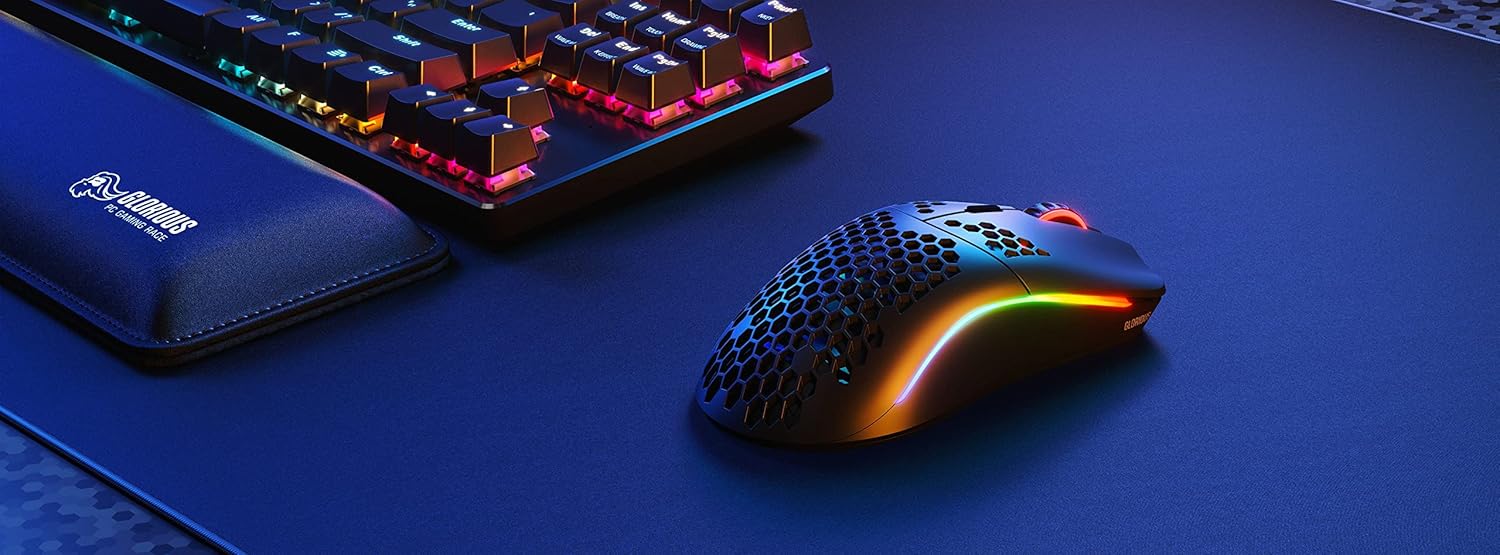
Image: Technical diagram illustrating the dimensions and key specifications of the Glorious Model O Wireless Gaming Mouse.
การตั้งค่า
- แกะกล่อง: Carefully remove the mouse, USB-C Ascended charging cable, and wireless dongle from the packaging.
- Connect Wireless Dongle: Plug the 2.4GHz wireless USB dongle into an available USB port on your computer.
- เมาส์เปิดเครื่อง: Locate the power switch on the underside of the mouse and slide it to the 'ON' position. The mouse should automatically connect to the dongle.
- ค่าธรรมเนียมเริ่มต้น (ไม่บังคับ): For optimal performance, it is recommended to fully charge the mouse before first use. Connect the USB-C Ascended cable to the front of the mouse and the other end to a USB port on your computer or a USB charger.
- Install Glorious CORE Software: Download and install the Glorious CORE software from the official Glorious webงาน (www.gloriousgaming.com/pages/glorious-core) to customize settings, RGB lighting, and button assignments.
Video: A seller demonstrates the unboxing and initial setup of the Glorious Model O Wireless mouse, highlighting its lightweight design and flexible cable.
คำแนะนำการใช้งาน
The Glorious Model O Wireless mouse features 6 programmable buttons for versatile control during gaming and general use.
- คลิกซ้าย (ปุ่ม 1): ปุ่มการดำเนินการหลัก
- คลิกขวา (ปุ่ม 2): ปุ่มการดำเนินการรอง
- Scroll Wheel Click (Button 3): Often used for middle-click functions or opening new tabs.
- DPI Button (Button 4): Cycles through preset DPI settings. Default settings can be customized via Glorious CORE.
- Side Buttons (Buttons 5 & 6): Typically used for forward/backward navigation in browsers or assigned to in-game actions. These are fully programmable.
For advanced customization of button functions, macros, and DPI levels, refer to the Glorious CORE software.
การปรับแต่ง
The Glorious Model O Wireless offers extensive customization options through the Glorious CORE software:
- แสงไฟ RGB: Choose from various effects (e.g., Seamless Breathing, Glorious Mode, Single Color) and adjust brightness and speed. You can set different lighting for wired and wireless modes.
- การตั้งค่า DPI: สร้างและบันทึก DPI หลายรายการfiles, allowing you to switch sensitivity on the fly using the dedicated DPI button.
- การกำหนดปุ่ม: Remap any of the 6 buttons to perform mouse functions, keyboard commands, custom macros, or multimedia controls.
- อัตราการสำรวจความคิดเห็น: Adjust the polling rate (up to 1000 Hz) for optimal responsiveness.
- ระยะยกตัว (LOD): Fine-tune the distance at which the sensor stops tracking when the mouse is lifted.

Image: Screenshot of the Glorious CORE software, displaying options for customizing RGB lighting effects and colors for the mouse.
การซ่อมบำรุง
- การทำความสะอาด: Use a soft, dry cloth to wipe down the mouse. For the honeycomb shell, a can of compressed air can help remove dust and debris. Avoid using harsh chemicals or abrasive materials.
- การดูแลสายเคเบิล: Handle the Ascended cable gently to prevent fraying or damage. Avoid sharp bends or excessive pulling.
- พื้นที่จัดเก็บ: เมื่อไม่ได้ใช้งาน ให้เก็บเมาส์ไว้ในสภาพแวดล้อมที่สะอาดและแห้ง ห่างจากอุณหภูมิที่สูงหรือต่ำเกินไป
การแก้ไขปัญหา
| ปัญหา | วิธีแก้ปัญหาที่เป็นไปได้ |
|---|---|
| เมาส์ไม่ตอบสนอง (ไร้สาย) | Ensure the mouse is powered on and the wireless dongle is securely plugged into a USB port. Try a different USB port. Re-pair the mouse if necessary (refer to Glorious CORE software for pairing instructions). |
| เมาส์ไม่ตอบสนอง (แบบมีสาย) | ตรวจสอบให้แน่ใจว่าสาย USB-C เชื่อมต่อกับเมาส์และคอมพิวเตอร์อย่างแน่นหนาแล้ว ลองเสียบเข้ากับพอร์ต USB อื่นดู |
| อาการหน่วงหรือกระตุก | Ensure the mouse is fully charged. Reduce wireless interference by moving the dongle closer to the mouse or away from other wireless devices. Update mouse firmware via Glorious CORE. |
| ไฟ RGB ไม่ทำงาน | Check RGB settings in Glorious CORE. Ensure brightness is not set to 0. Update mouse firmware. |
| ปุ่มไม่ทำงานอย่างถูกต้อง | Verify button assignments in Glorious CORE. Reset to default settings if needed. Update mouse firmware. |
ข้อมูลจำเพาะ
| คุณสมบัติ | รายละเอียด |
|---|---|
| ยี่ห้อ | รุ่งโรจน์ |
| แบบอย่าง | รุ่น O ไร้สาย |
| สี | สีดำด้าน |
| การเชื่อมต่อ | ไร้สาย 2.4GHz, USB-C แบบมีสาย |
| เซ็นเซอร์ | Glorious BAMF Optical Sensor |
| ดีพีไอ | สูงถึง 19,000 |
| ความเร็วในการติดตาม (IPS) | 400 |
| อัตราการสำรวจความคิดเห็น | 1000 Hz (Dual Wired/Wireless) |
| ความหน่วงในการคลิก | 2.08ms (Internal Testing) |
| น้ำหนัก | 69 grams (+/- 1.5g) |
| อายุการใช้งานแบตเตอรี่ | Up to 71 Hours (RGB off) |
| ปุ่ม | 6 (ตั้งโปรแกรมได้) |
| การวางแนวมือ | ถนัดทั้งสองมือ |
| เม้าส์ | G-Skates Premium PTFE |
| อุปกรณ์ที่รองรับ | วินโดวส์, แมค, ลินุกซ์ |
การรับประกันและการสนับสนุน
The Glorious Gaming Model O Wireless Mouse comes with a รับประกันจำกัด 90 วัน. For warranty claims or technical support, please visit the official Glorious Gaming webหรือติดต่อฝ่ายบริการลูกค้า โปรดเก็บหลักฐานการซื้อไว้เพื่อใช้ยืนยันการรับประกัน
Video: A seller provides a quick overview of the Glorious Model O Wireless mouse, highlighting its features and suitability for gaming.