
1. บทนำ
Thank you for choosing the BTMETER Thermal Imaging Camera Gun. This device is designed for precise temperature measurement and thermal imaging, offering a wide range of applications from industrial inspections to home diagnostics. This manual provides essential information for the safe and effective use of your thermal imager.
The BTMETER Thermal Imaging Camera Gun captures temperature images and marks maximum, minimum, and center temperature points. It features a 220 x 160 IR resolution, 0.07℃ thermal sensitivity, and a temperature range of -4°F to 626°F (-20°C to 330°C). With 6GB of internal storage and adjustable emissivity, it is a versatile tool for various thermal analysis needs.

Figure 1.1: BTMETER Thermal Imaging Camera Gun and accessories.
2. ข้อมูลด้านความปลอดภัย
โปรดอ่านคำเตือนและคำแนะนำด้านความปลอดภัยทั้งหมดอย่างละเอียดก่อนใช้ผลิตภัณฑ์นี้ การไม่ปฏิบัติตามคำแนะนำเหล่านี้อาจทำให้เกิดไฟฟ้าช็อต ไฟไหม้ หรือการบาดเจ็บร้ายแรงได้
- Do not point the thermal imager directly at strong energy sources, such as the sun or high-power lasers, as this may damage the detector.
- ห้ามจุ่มอุปกรณ์ลงในน้ำหรือสัมผัสกับความชื้นมากเกินไป
- ใช้เฉพาะสายชาร์จและอะแดปเตอร์ที่ระบุไว้เท่านั้น
- Keep the device away from extreme temperatures and corrosive environments.
- อย่าพยายามถอดประกอบหรือดัดแปลงอุปกรณ์ แนะนำให้ส่งช่างผู้ชำนาญเข้ารับบริการทั้งหมด
- Ensure the lens cap is in place when not in use to protect the lens from damage.
3. สินค้าหมดview
3.1 ส่วนประกอบและคุณสมบัติ

Figure 3.1: Key components of the BTMETER Thermal Imaging Camera Gun.
The thermal imager features a robust design with key components for optimal performance:
- ฝาครอบเลนส์: Protects the infrared lens from dust and damage.
- HD Sensor (0.3 Megapixel): Captures high-quality visual data.
- Infrared Camera (220 x 160 Resolution): Detects thermal radiation and forms the thermal image.
- สิ่งกระตุ้น: Used to capture and save thermal images.
- 3.5-inch Color LED Display: Shows real-time thermal images and data.
- ปุ่มนำทาง: สำหรับการนำทางเมนูและการปรับการตั้งค่า
3.2 คุณสมบัติหลัก
- Temperature Measurement Range: -4°F ~ 626°F (-20°C ~ 330°C)
- Infrared Resolution: 220 x 160 pixels
- Thermal Sensitivity: 0.07℃
- Display: 3.5-inch large color LED
- Storage: 6GB built-in memory for image storage
- การแผ่รังสี: ปรับได้ตั้งแต่ 0.01 ถึง 1.0
- Color Palettes: Rainbow, Iron Red, White Heat, Black Heat
- Temperature Display: Max/Min/Center temperature points
- Power: USB rechargeable battery (4-6 hours standby)
4. การตั้งค่า
4.1 การแกะกล่องและการตรวจสอบเบื้องต้น
Carefully remove the thermal imager and all accessories from the packaging. Inspect the device for any signs of damage. If any damage is found, do not use the device and contact customer support.
4.2 การชาร์จแบตเตอรี่
The device comes with a built-in rechargeable battery. Before first use, fully charge the battery. Connect the included Type-C USB cable to the charging port on the device and plug the other end into a standard USB power adapter (not included) or a computer USB port.

Figure 4.1: Charging the thermal imager via USB.
The charging indicator on the display will show the charging status. A full charge typically takes several hours. The device supports auto turn-off and adjustable LED display brightness to conserve battery life.
4.3 การเปิด/ปิดเครื่อง
To power on the device, press and hold the power button located on the side or top of the unit until the display illuminates. To power off, press and hold the power button again until the display turns off.
5. คู่มือการใช้งาน
5.1 Basic Temperature Measurement and Imaging
Point the thermal imager at the target object. The display will show a real-time thermal image. Press the trigger button to capture and save the thermal image. The device will automatically mark the maximum, minimum, and center temperature points on the captured image.
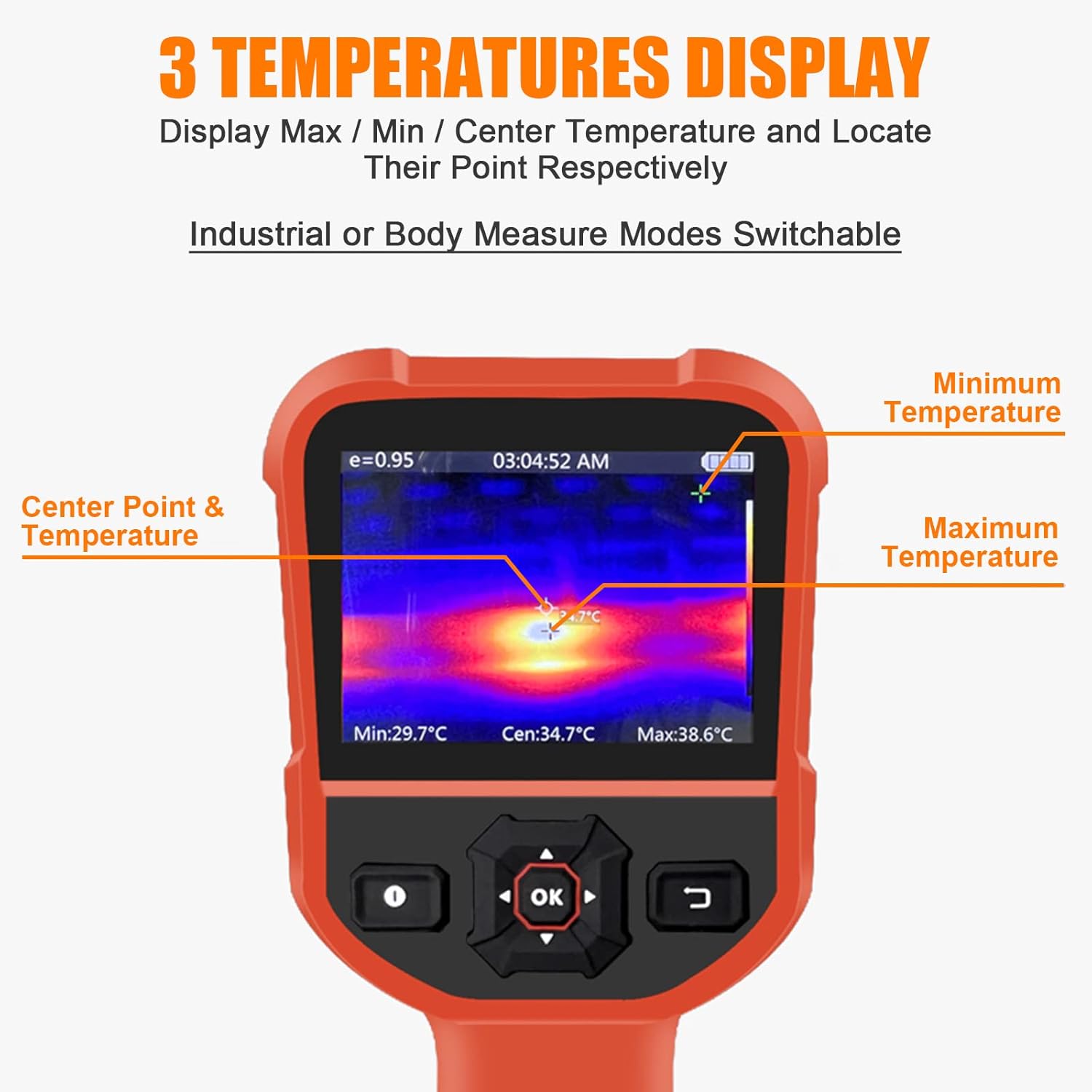
Figure 5.1: Display showing Max/Min/Center temperature points.
5.2 การปรับค่าการแผ่รังสี
Emissivity is a measure of an object's ability to emit infrared energy. Different materials have different emissivity values. For accurate temperature readings, adjust the emissivity setting to match the material being measured. The emissivity can be adjusted from 0.01 to 1.0 in the device settings.

Figure 5.2: Adjustable Emissivity Setting for wide applications.
5.3 จานสี
The thermal imager offers four color palettes to visualize temperature differences:
- รุ้ง: Displays a full spectrum of colors, often used for general thermal analysis.
- เหล็กแดง: เน้นจุดที่มีความร้อนสูงด้วยโทนสีแดงและเหลือง
- ความร้อนสีขาว: บริเวณที่ร้อนจะปรากฏเป็นสีขาว บริเวณที่เย็นกว่าจะปรากฏเป็นสีดำ
- ความร้อนสีดำ: บริเวณที่ร้อนจะปรากฏเป็นสีดำ บริเวณที่เย็นกว่าจะปรากฏเป็นสีขาว
Select the palette that best suits your application and visual preference through the device's menu settings.
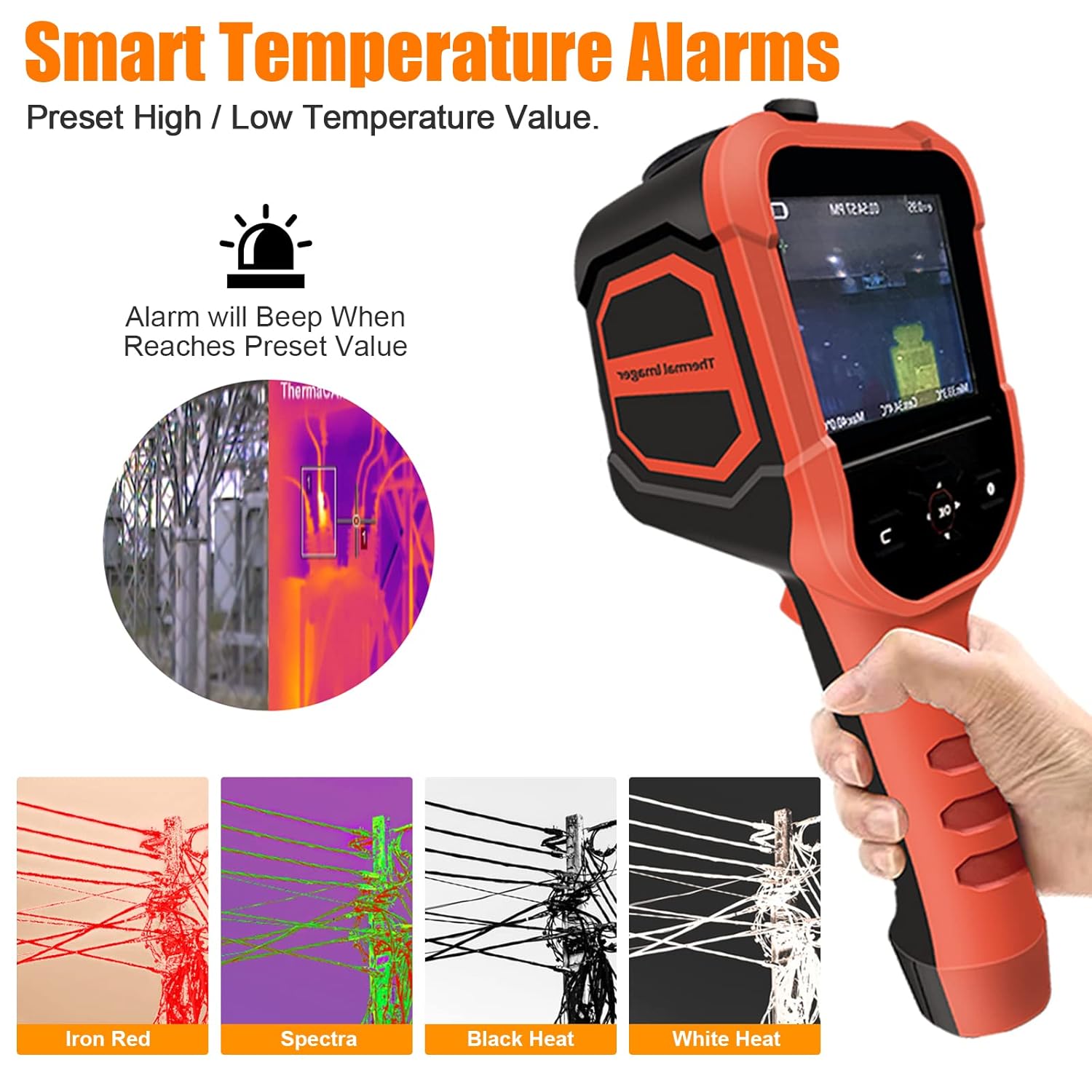
Figure 5.3: Available color palettes for thermal imaging.
5.4 Smart Temperature Alarms
The device allows you to preset high and low temperature alarm values. When the measured temperature reaches or exceeds these preset values, the device will emit an audible beep to alert the user.

Figure 5.4: Alarm settings interface.
5.5 การจัดเก็บและส่งออกข้อมูล
The thermal imager has 6GB of built-in memory to store captured thermal images. To view or export these images, connect the device to a computer using the provided USB cable. The device will appear as a removable storage device, allowing you to access and transfer the image files.

รูปที่ 5.5: การเชื่อมต่ออุปกรณ์กับคอมพิวเตอร์เพื่อส่งออกข้อมูล
6. การบำรุงรักษา
6.1 การทำความสะอาด
To clean the device, wipe it with a clean, dry cloth. For stubborn dirt, a slightly damp cloth can be used, followed by a dry cloth. Do not use abrasive cleaners, solvents, or harsh chemicals, as these can damage the device's surface or lens.
6.2 พื้นที่จัดเก็บ
When not in use, store the thermal imager in a cool, dry place, away from direct sunlight and extreme temperatures. Ensure the lens cap is securely in place to protect the infrared lens.
6.3 การดูแลแบตเตอรี่
To prolong battery life, avoid fully discharging the battery frequently. If storing the device for an extended period, charge the battery to approximately 50% capacity every few months.
7 การแก้ไขปัญหา
| ปัญหา | สาเหตุที่เป็นไปได้ | สารละลาย |
|---|---|---|
| อุปกรณ์ไม่เปิดเครื่อง | แบตเตอรี่หมด | ชาร์จอุปกรณ์โดยใช้สาย USB |
| ภาพความร้อนมีความพร่ามัวหรือไม่ชัดเจน | เลนส์สกปรกหรือชำรุด | Clean the lens with a soft, dry cloth. Ensure the lens cap is removed. |
| การอ่านอุณหภูมิไม่ถูกต้อง | การตั้งค่าค่าการแผ่รังสีไม่ถูกต้อง | ปรับค่าการแผ่รังสีให้ตรงกับวัสดุที่กำลังวัด |
| ไม่สามารถเชื่อมต่อกับคอมพิวเตอร์ | สาย USB หรือพอร์ตชำรุด | ลองใช้สาย USB เส้นอื่น หรือเสียบเข้ากับพอร์ต USB อื่นบนคอมพิวเตอร์ของคุณ ตรวจสอบให้แน่ใจว่าอุปกรณ์เปิดใช้งานอยู่ |
| อุปกรณ์หยุดทำงานหรือไม่ตอบสนอง | ซอฟต์แวร์มีปัญหา | ดำเนินการรีเซ็ตแบบซอฟต์แวร์โดยกดปุ่มเปิด/ปิดค้างไว้จนกว่าอุปกรณ์จะปิด จากนั้นจึงรีสตาร์ทเครื่อง |
8. ข้อมูลจำเพาะ
| พารามิเตอร์ | ค่า |
|---|---|
| หมายเลขรุ่น | HP-M2-XB-62-B |
| ช่วงอุณหภูมิ | -4 ° F ~ 626 ° F (-20 ° C ~ 330 ° C) |
| ความแม่นยำ | ±2°C หรือ ±2% |
| ความละเอียดอินฟราเรด | 220 x 160 พิกเซล |
| ความไวต่อความร้อน | 0.07℃ |
| อัตราเฟรม | 9เฮิรตซ์ |
| ทุ่งแห่ง View (เอฟโอวี) | 27° x 35° |
| ประเภทจอภาพ | 3.5-inch Digital LED |
| emissivity | Adjustable 0.01 ~ 1.0 |
| พื้นที่จัดเก็บ | หน่วยความจำภายใน 6GB |
| การเชื่อมต่อ | ยูเอสบี (Type C) |
| อายุการใช้งานแบตเตอรี่ (สแตนด์บาย) | 4-6 ชั่วโมง |
| วัสดุ | เหล็ก |
| ระดับการป้องกันน้ำและฝุ่น (IP) | IP54 |
| กันกระแทก | 2m drop resistance |

Figure 8.1: Detailed specifications and component overview.
9. การรับประกันและการสนับสนุน
The BTMETER Thermal Imaging Camera Gun comes with a รับประกัน 365 วัน นับจากวันที่ซื้อ การรับประกันนี้ครอบคลุมถึงข้อบกพร่องจากการผลิตและการทำงานผิดปกติภายใต้การใช้งานปกติ
For technical support, warranty claims, or any questions regarding the product, please contact BTMETER customer service. Lifetime technical support is provided for this product.
Please refer to the contact information provided on the product packaging or the official BTMETER webเว็บไซต์สำหรับรายละเอียดการสนับสนุนล่าสุด