
1. บทนำ
ขอบคุณสำหรับการซื้อasing the Lenco SCD-341 Portable CD-Radio. This device combines a CD player, DAB+ and FM radio, and Bluetooth connectivity in a compact design. This manual provides essential information for safe and efficient use of your new audio system. Please read it thoroughly before operation and retain it for future reference.
2. ข้อมูลด้านความปลอดภัย
- อย่าให้เครื่องโดนฝนหรือความชื้นเพื่อป้องกันไฟไหม้หรือไฟฟ้าช็อต
- ตรวจสอบให้แน่ใจว่ามีการระบายอากาศที่เหมาะสม อย่าปิดกั้นช่องระบายอากาศ
- ใช้เฉพาะอะแดปเตอร์ไฟฟ้าที่มาพร้อมกับเครื่องเท่านั้น
- อย่าเปิดcasinก. ส่งต่อการบริการทั้งหมดให้กับบุคลากรที่มีคุณสมบัติเหมาะสม
- หลีกเลี่ยงการวางเครื่องไว้ใกล้แหล่งความร้อนหรือโดนแสงแดดโดยตรง
- เก็บเครื่องให้ห่างจากสนามแม่เหล็กแรงสูง
3. เนื้อหาบรรจุภัณฑ์
โปรดตรวจสอบว่าสินค้าทั้งหมดมีอยู่และอยู่ในสภาพดี:
- Lenco SCD-341 Portable CD-Radio Unit
- อะแดปเตอร์แปลงไฟ
- คู่มือการใช้งาน (เอกสารนี้)
- คู่มือเริ่มต้นอย่างรวดเร็ว
4. สินค้าหมดview
The Lenco SCD-341 features a user-friendly interface with clearly labeled buttons and an LCD display.

รูปที่ 1 : ด้านหน้า view of the Lenco SCD-341, showing the main controls, LCD display, and stereo speakers.

Figure 2: Lenco SCD-341 with its integrated handle and telescopic antenna extended for radio reception.
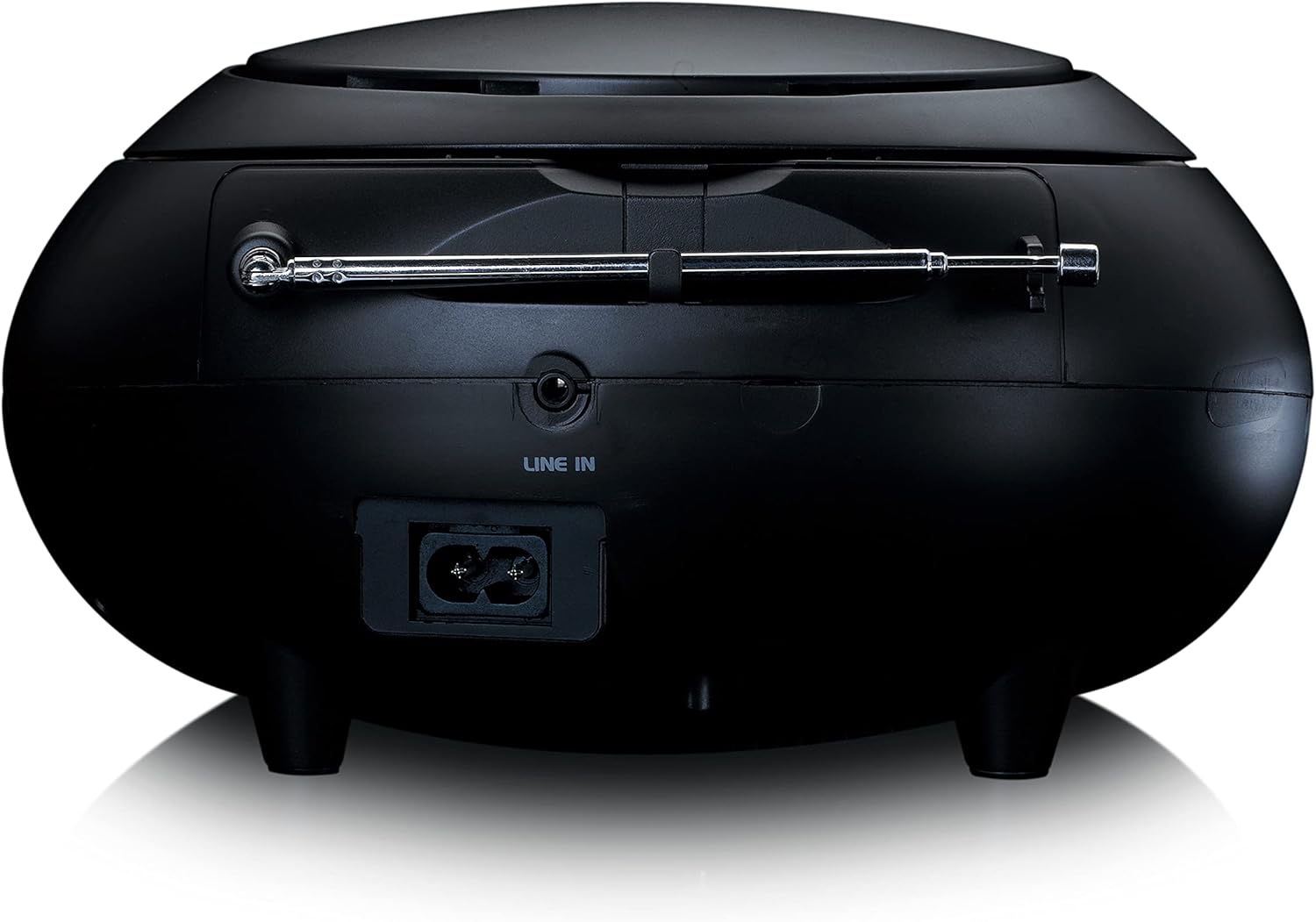
รูปที่ 3: ด้านหลัง view of the Lenco SCD-341, highlighting the power input and LINE IN audio port.
5. การตั้งค่า
5.1 การเชื่อมต่อสายไฟ
The Lenco SCD-341 can be powered by the included AC adapter or by batteries.
- ไฟฟ้ากระแสสลับ: Connect the supplied power adapter to the AC IN socket on the rear of the unit (refer to Figure 3) and plug the other end into a standard wall outlet.
- พลังงานแบตเตอรี่: Open the battery compartment on the bottom of the unit. Insert the required number of C-type batteries (not included), ensuring correct polarity. Close the compartment securely.
5.2 การตั้งค่าเสาอากาศ
For optimal DAB+ and FM radio reception, fully extend the telescopic antenna located on the rear of the unit. Adjust its position for the best signal.
6. คู่มือการใช้งาน
6.1 เปิด/ปิดเครื่อง
กดปุ่ม พลัง ปุ่มเพื่อเปิดหรือปิดเครื่อง
6.2 การเล่นแผ่นซีดี
- กดปุ่ม แหล่งที่มา button repeatedly until "CD" is displayed on the LCD screen.
- Open the CD compartment lid by gently lifting it.
- วางแผ่นซีดีโดยให้ด้านที่มีฉลากหงายขึ้นบนแกนหมุน
- Close the CD compartment lid. The unit will begin reading the CD.
- ใช้ เล่น/หยุดชั่วคราว, หยุด, ข้ามไปข้างหน้า, และ ข้ามย้อนกลับ ปุ่มเพื่อควบคุมการเล่น

รูปที่ 4: ด้านบน view of the Lenco SCD-341 with the CD compartment open, showing a CD being inserted.
6.3 การใช้งานวิทยุ DAB+
- กดปุ่ม แหล่งที่มา button repeatedly until "DAB" is displayed.
- The unit will automatically scan for available DAB+ stations. This may take a few moments.
- เมื่อการสแกนเสร็จสิ้น ให้ใช้ ปรับ +/- ปุ่มต่างๆ สำหรับเลือกสถานีที่มีอยู่
- หากต้องการบันทึกสถานีเป็นสถานีโปรด ให้กดปุ่มค้างไว้ พรีเซ็ต จากนั้นจึงใช้งาน ปรับ +/- to select a preset number and press พรีเซ็ต เพื่อยืนยันอีกครั้ง
การใช้งานวิทยุ FM 6.4
- กดปุ่ม แหล่งที่มา button repeatedly until "FM" is displayed.
- กดปุ่มค้างไว้ ปรับ +/- กดปุ่มเพื่อสแกนหาสถานีที่ว่างอยู่ถัดไปโดยอัตโนมัติ กดสั้นๆ เพื่อปรับคลื่นด้วยตนเอง
- หากต้องการบันทึกสถานีเป็นสถานีโปรด ให้กดปุ่มค้างไว้ พรีเซ็ต จากนั้นจึงใช้งาน ปรับ +/- to select a preset number and press พรีเซ็ต เพื่อยืนยันอีกครั้ง
6.5 การจับคู่บลูทูธ
- กดปุ่ม แหล่งที่มา button repeatedly until "Bluetooth" is displayed. The unit will enter pairing mode, indicated by a flashing Bluetooth icon on the display.
- On your external device (smartphone, tablet), enable Bluetooth and search for available devices.
- Select "Lenco SCD-341" from the list of found devices.
- Once paired, the Bluetooth icon on the unit's display will stop flashing and remain solid. You can now play audio from your device through the Lenco SCD-341.
6.6 การควบคุมระดับเสียง
ใช้ ปริมาณ +/- ปุ่มสำหรับปรับระดับเสียงออก
7. การบำรุงรักษา
- การทำความสะอาด: ใช้ผ้านุ่มและแห้งเช็ดทำความสะอาดภายนอกตัวเครื่อง ห้ามใช้น้ำยาทำความสะอาดที่มีฤทธิ์กัดกร่อนหรือตัวทำละลาย
- การดูแลเลนส์ซีดี: หากเกิดปัญหาในการเล่นซีดี ให้ใช้แผ่นทำความสะอาดเลนส์ซีดีที่มีจำหน่ายทั่วไป
- พื้นที่จัดเก็บ: When not in use for extended periods, disconnect the power adapter and remove batteries. Store the unit in a cool, dry place.
8 การแก้ไขปัญหา
| ปัญหา | สาเหตุที่เป็นไปได้ | สารละลาย |
|---|---|---|
| ไม่มีไฟฟ้า | Power adapter not connected; batteries depleted or incorrectly inserted. | Check power adapter connection; replace batteries or ensure correct polarity. |
| ไม่มีเสียง | Volume too low; incorrect source selected; headphones connected. | Increase volume; select correct source (CD, DAB, FM, Bluetooth); disconnect headphones. |
| ซีดีไม่เล่น | CD inserted incorrectly; CD dirty or scratched; CD format not supported. | Reinsert CD correctly; clean or replace CD; ensure CD is a standard audio CD. |
| การรับสัญญาณวิทยุไม่ดี | Antenna not extended or positioned poorly; strong interference. | Fully extend and adjust antenna; move unit away from other electronic devices. |
| การจับคู่บลูทูธล้มเหลว | Bluetooth not enabled on external device; device too far; unit not in pairing mode. | Ensure Bluetooth is on and discoverable; move device closer; select Bluetooth source on unit. |
9. ข้อมูลจำเพาะ
| หมายเลขรุ่น | เอสซีดี-341 |
| ยี่ห้อ | เลนโก้ |
| ขนาด (กว้าง x ยาว x สูง) | 21.5 x 21 x 11.5 ซม. |
| น้ำหนัก | 1.09 กก. |
| แหล่งพลังงาน | AC (adapter included) / Battery-Powered |
| เทคโนโลยีจูนเนอร์ | ตบเบา ๆ +, เอฟเอ็ม |
| การเชื่อมต่อ | บลูทูธ |
| โหมดเอาต์พุตเสียง | สเตอริโอ |
| ประเภทจอภาพ | จอแอลซีดี |
| กำลังขับ | 3 วัตต์ RMS |

Figure 5: Dimensions of the Lenco SCD-341 unit.
10. การรับประกันและการสนับสนุน
For warranty information and technical support, please refer to the warranty card included in your package or visit the official Lenco webเว็บไซต์.
ผู้ผลิต: บริษัท เลนโค จำกัด
ประเทศต้นกำเนิด: ฮ่องกง
11. วิดีโอผลิตภัณฑ์อย่างเป็นทางการ
Watch this official video for a visual guide to the Lenco SCD-341.
Video 1: A 360-degree product view of the Lenco SCD-341, showcasinพิจารณาดีไซน์และคุณสมบัติของมันจากทุกมุมมอง