
1. บทนำ
This manual provides instructions for the installation, operation, and maintenance of your 10.4 Inch Embedded Resistive Touch Industrial All-in-one Computer. This device features resistive touchscreen technology, offering single-touch, pressure-sensing control with a theoretical lifespan of over 50 million clicks. It is equipped with Mohs grade 7 explosion-proof glass and is designed to operate within a temperature range of -20°C to 60°C.
The computer's display offers a brightness of 250-350 cd/m² and a contrast ratio of 1000:1. It comes with a power adapter (Input: 100-250VAC, Output: DC 12V 5A) and supports various plug types (AU, EU, USA, UK). The default operating system is Windows 10 Pro, with Windows 7 or Linux available as optional installations.

รูปที่ 1 : ด้านหน้า view of the computer showcasing its slim design and embedded installation capability, with Windows 10 operating system.
2. อะไรอยู่ในกล่อง
เมื่อแกะกล่อง โปรดตรวจสอบว่าชิ้นส่วนทั้งหมดครบถ้วนและไม่เสียหาย กล่องควรประกอบด้วย:
- 1 x 10.4 Inch Embedded Resistive Touch Industrial All-in-one Computer
- 1 x Power Adapter (with appropriate regional plug)
- Mounting hardware (for embedded or wall mount installation)
3. การตั้งค่า
Follow these steps to set up your industrial all-in-one computer:
- การแกะกล่อง: Carefully remove the computer and all accessories from the packaging. Retain packaging for future transport or storage.
- การติดตั้ง: Determine your preferred installation method. The unit supports embedded and wall-mount installations. Use the provided mounting hardware to secure the computer in place. Ensure the mounting surface is stable and can support the device's weight.

Figure 2: Reference for installation methods, demonstrating how the unit can be embedded or secured with screws.
- การเชื่อมต่ออุปกรณ์ต่อพ่วง: Connect necessary peripherals such as a keyboard, mouse, or external display to the available ports. The unit features multiple interfaces including HDMI, USB (USB1, USB2), VGA, LAN, and Audio ports.

รูปที่ 3: เกินview of the multiple interfaces available on the rear panel for various connectivity requirements.
- การเชื่อมต่อไฟฟ้า: Connect the provided DC 12V 5A power adapter to the DC12V input port on the computer, then plug the adapter into a suitable power outlet.
4. คู่มือการใช้งาน
This section outlines the basic operation of your industrial all-in-one computer.
- เปิด/ปิดเครื่อง: Locate the power button, typically on the side or rear panel. Press it once to power on the device. To power off, use the operating system's shutdown function. For a forced shutdown, press and hold the power button for several seconds.
- การทำงานของหน้าจอสัมผัส: The resistive touchscreen supports single-point touch input. Apply gentle pressure with your finger or a stylus to interact with the display.

Figure 4: User interacting with the resistive touchscreen display.
- ระบบปฏิบัติการ: The computer comes pre-installed with Windows 10 Pro. Familiarize yourself with the operating system's interface and functions.
5. การบำรุงรักษา
Proper maintenance ensures the longevity and optimal performance of your industrial computer.
- การทำความสะอาด: ใช้แบบนุ่มๆamp cloth to clean the screen and exterior surfaces. Avoid abrasive cleaners or solvents that could damage the display or finish. Ensure the device is powered off and unplugged before cleaning.
- การระบายอากาศ : The unit is designed with ventilation to dissipate heat. Ensure that the ventilation openings on the back panel are not obstructed to prevent overheating.

Figure 5: Rear panel with ventilation design for efficient heat management.
- สภาพแวดล้อม : Operate the computer within the specified temperature range of -20°C to 60°C. Avoid exposing the device to extreme humidity or direct sunlight.
6 การแก้ไขปัญหา
If you encounter issues with your industrial computer, refer to the following common troubleshooting steps:
- ไม่มีไฟฟ้า:
- Check if the power adapter is securely connected to both the computer and the power outlet.
- ตรวจสอบว่าเต้ารับไฟฟ้าใช้งานได้โดยเสียบอุปกรณ์อื่น
- ไม่มีจอแสดงผล:
- ตรวจสอบให้แน่ใจว่าคอมพิวเตอร์เปิดอยู่
- If an external monitor is connected, check its power and cable connections.
- หน้าจอสัมผัสไม่ตอบสนอง:
- รีสตาร์ทเครื่องคอมพิวเตอร์
- ตรวจสอบให้แน่ใจว่าหน้าจอสะอาดและไม่มีเศษขยะ
- ระบบช้าลง:
- ปิดแอพพลิเคชันที่ไม่จำเป็น
- ตรวจสอบพื้นที่ว่างบน SSD ให้เพียงพอ
7. ข้อมูลจำเพาะ
Detailed technical specifications for the 10.4 Inch Embedded Resistive Touch Industrial All-in-one Computer (Model YTKK104DZ).
| คุณสมบัติ | ข้อมูลจำเพาะ |
|---|---|
| ยี่ห้อ | ทั่วไป |
| หมายเลขรุ่น | YTKK104DZ |
| ระบบปฏิบัติการ | Windows 10 Pro (Win7/Linux optional) |
| รุ่นซีพียู | คอร์ i7-7500U |
| ความเร็วซีพียู | 2.7 กิกะเฮิรตซ์ |
| ติดตั้งหน่วยความจำ RAM แล้ว | แรม 4GB DDR3 |
| ความจุของหน่วยความจำ | SSD ความจุ 64GB |
| ขนาดหน้าจอ | 10.4 นิ้ว |
| ปณิธาน | 1024 x 768 |
| ประเภทจอภาพ | จอแอลซีดี |
| อัตราส่วนภาพ | 4:3 น. |
| อินพุตอินเทอร์เฟซของมนุษย์ | Touchscreen (Resistive) |
| ความสว่าง | 250-350 ซีดี/ตร.ม |
| อัตราส่วนคอนทราสต์ | 1000:1 น. |
| Explosion-Proof Glass | Mohs grade 7 |
| อุณหภูมิในการทำงาน | -20°C ถึง 60°C |
| ฮาร์ดแวร์อินเตอร์เฟซ | Ethernet, USB (4 Total), HDMI (1 Total) |
| เทคโนโลยีไร้สาย | ไวไฟ |
| ขนาดรายการ | 10.67 x 2.28 x 8.58 นิ้ว |
| น้ำหนักสินค้า | 4 กิโลกรัม |
| ประเภทปลั๊กไฟ | ชนิด A - 2 ขา (แบบอเมริกาเหนือ) |
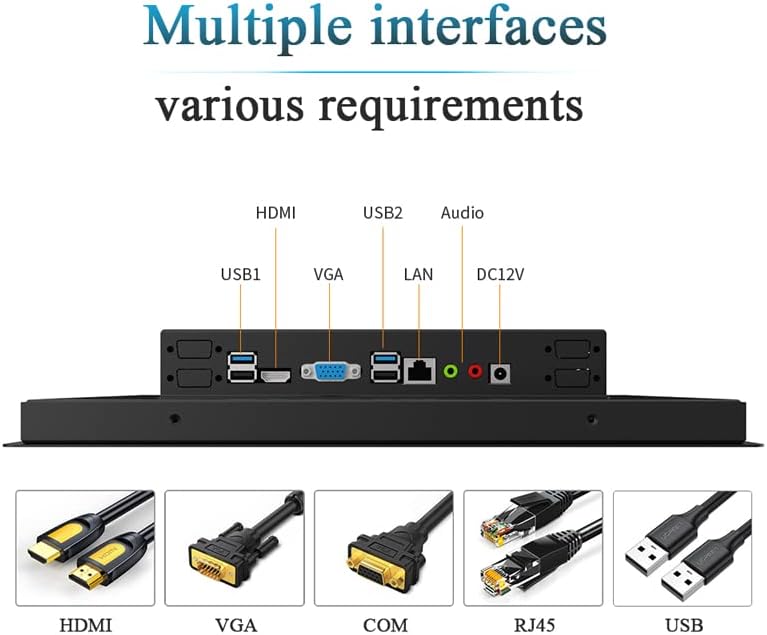
Figure 6: Detailed dimensional drawing of the 10.4-inch industrial computer.
8. การรับประกันและการสนับสนุน
การรับประกัน: ผลิตภัณฑ์นี้มาพร้อมกับ รับประกัน 1 ปี นับจากวันที่ซื้อ โปรดเก็บหลักฐานการซื้อไว้เพื่อใช้ในการเคลมประกัน
สนับสนุน: For technical assistance, troubleshooting, or inquiries regarding customization options (such as screen size, interface type, power supply, or installation methods), please contact the manufacturer. Customization inquiries can be sent via email to: Slubee-zzl@outlook.com.