
การแนะนำ
This manual provides comprehensive instructions for the Allimity BN59-01199F replacement remote control. It is designed to be compatible with various Samsung LED LCD Smart TVs, offering a direct replacement for several original Samsung remote models. This guide covers initial setup, basic operation, maintenance, and troubleshooting to ensure optimal performance.
การตั้งค่า
การติดตั้งแบตเตอรี่
The Allimity BN59-01199F remote control requires two (2) AAA alkaline batteries for operation. No programming is required; simply insert the batteries, and the remote will be ready to use with your compatible Samsung TV.
- ค้นหาช่องใส่แบตเตอรี่ที่ด้านหลังของรีโมทคอนโทรล
- เลื่อนฝาปิดช่องใส่แบตเตอรี่ลงด้านล่าง หรือกดสลักแล้วยกขึ้นเพื่อเปิด
- ใส่แบตเตอรี่อัลคาไลน์ AAA ใหม่สอง (2) ก้อน โดยตรวจสอบให้แน่ใจว่าขั้วบวก (+) และขั้วลบ (-) ตรงกับแผนภาพภายในช่องใส่แบตเตอรี่
- ปิดฝาช่องใส่แบตเตอรี่ โดยเลื่อนกลับเข้าที่จนกระทั่งได้ยินเสียงคลิกและแน่นสนิท
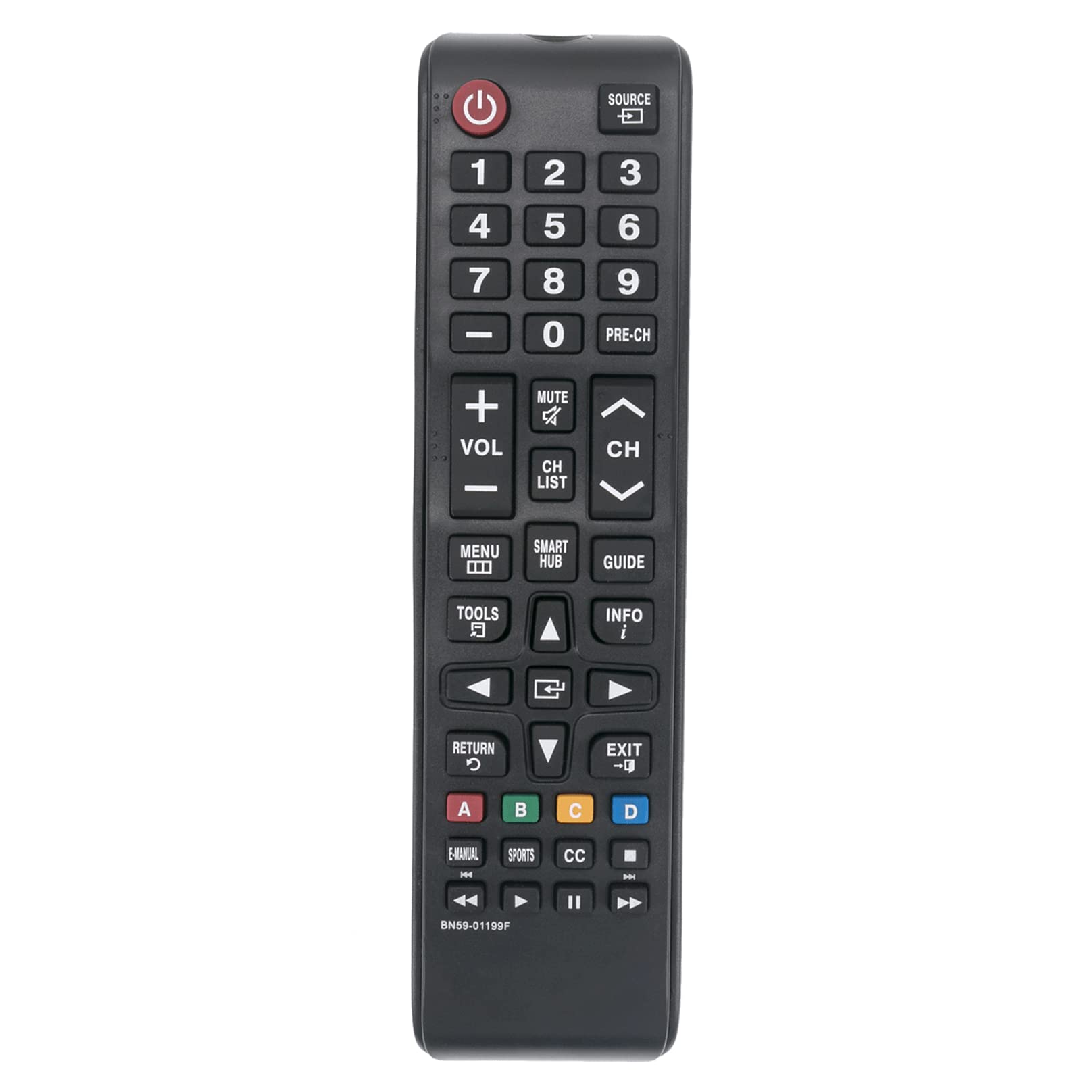
รูปที่ 1 : ด้านหน้า view of the Allimity BN59-01199F remote control. The battery compartment is located on the back.
คำแนะนำการใช้งาน
This remote control is designed for intuitive use with compatible Samsung LED LCD Smart TVs. Below are the functions of the primary buttons.

Figure 2: Detailed layout of the Allimity BN59-01199F remote control buttons.
ปุ่มฟังก์ชั่น
- พลัง (⏻):เปิดหรือปิดทีวี
- แหล่งที่มา: Selects the input source (e.g., HDMI 1, AV, TV).
- ปุ่มตัวเลข (0-9): Directly selects TV channels or enters numerical input.
- พรี-ช: กลับสู่ช่องก่อนหน้า
- ปริมาณ (+/-): Adjusts the TV volume up or down.
- ปิดเสียง:ปิดเสียงหรือเปิดเสียงทีวี
- Channel (CH ▲/▼): Changes TV channels up or down.
- รายการ CH: แสดงรายการช่อง
- เมนู: เปิดเมนูหลักของทีวี
- สมาร์ทฮับ: Accesses the Samsung Smart Hub for apps and streaming services.
- แนะนำ: แสดงคู่มือรายการอิเล็กทรอนิกส์
- เครื่องมือ: Accesses quick settings or context-sensitive options.
- ข้อมูล: แสดงข้อมูลเกี่ยวกับโปรแกรมหรือข้อมูลป้อนเข้าปัจจุบัน
- ปุ่มควบคุมทิศทาง (▲◀▼▶) & Enter: นำทางเมนูและยืนยันการเลือก
- กลับ (↺): กลับไปยังหน้าจอหรือเมนูที่แล้ว
- EXIT: ออกจากเมนูหรือแอพพลิเคชั่นปัจจุบัน
- ปุ่มสี (A, B, C, D)ฟังก์ชันต่างๆ จะแตกต่างกันไปตามเมนูทีวีหรือแอปพลิเคชัน
- คู่มืออิเล็กทรอนิกส์: เข้าถึงคู่มืออิเล็กทรอนิกส์ของทีวี
- กีฬา: Dedicated button for sports mode or content.
- CC: Activates or deactivates closed captions.
- Media Control Buttons (⏮, ▶, ⏸, ⏭): Control media playback (rewind, play, pause, fast forward).
การซ่อมบำรุง
การทำความสะอาด
To maintain the remote control's appearance and functionality, clean it regularly. Use a soft, dry cloth to wipe the surface. For stubborn dirt, slightly dampชุบผ้าด้วยน้ำหรือน้ำยาทำความสะอาดอ่อนๆ ที่ไม่ทำให้เกิดรอยขีดข่วน หลีกเลี่ยงการใช้สารเคมีรุนแรง ตัวทำละลาย หรือวัสดุที่มีฤทธิ์กัดกร่อน เพราะอาจทำให้พื้นผิวหรือส่วนประกอบภายในของรีโมทเสียหายได้
การเปลี่ยนแบตเตอรี่
Replace batteries when the remote control's response becomes sluggish or stops working. Always replace both batteries at the same time with new AAA alkaline batteries. Do not mix old and new batteries, or different types of batteries, as this can lead to leakage or malfunction. Dispose of used batteries according to local regulations.
พื้นที่จัดเก็บ
หากไม่ได้ใช้งานรีโมทคอนโทรลเป็นเวลานาน ควรถอดแบตเตอรี่ออกเพื่อป้องกันการรั่วไหลและความเสียหายที่อาจเกิดขึ้น เก็บรีโมทคอนโทรลไว้ในที่แห้งและเย็น หลีกเลี่ยงแสงแดดโดยตรงและอุณหภูมิที่สูงหรือต่ำเกินไป
การแก้ไขปัญหา
If you encounter issues with your remote control, refer to the table below for common problems and their solutions.
| ปัญหา | สาเหตุที่เป็นไปได้ | สารละลาย |
|---|---|---|
| รีโมทคอนโทรลไม่ทำงาน. | แบตเตอรี่หมดหรือใส่ไม่ถูกต้อง | เปลี่ยนแบตเตอรี่ด้วยแบตเตอรี่อัลคาไลน์ AAA ใหม่ โดยตรวจสอบให้แน่ใจว่าขั้วถูกต้อง |
| ระยะการควบคุมระยะไกลลดลง | Weak batteries or obstruction between remote and TV. | Replace batteries. Ensure there are no objects blocking the line of sight between the remote's IR emitter and the TV's IR receiver. |
| ปุ่มเฉพาะไม่ตอบสนอง | มีสิ่งสกปรกหรือเศษฝุ่นอยู่ใต้ปุ่ม หรืออาจเกิดความผิดปกติภายใน | Clean the remote surface. If the issue persists, the remote may require replacement. |
| การทำงานระยะไกลสำหรับบางฟังก์ชันแต่ไม่ใช่ทั้งหมด | Compatibility issue with a specific TV model or function. | Verify your TV model is listed as compatible. Some advanced Smart TV functions might require the original Smart Remote. |
ข้อมูลจำเพาะ
- ยี่ห้อ: ALLIMITY
- ชื่อรุ่น: BN59-01199F
- เทคโนโลยีการเชื่อมต่อ: อินฟราเรด (IR)
- แหล่งพลังงาน: 2 x 1.5V AAA Alkaline Batteries (not included)
- ระยะสูงสุด: Approximately 30 Feet (9 meters)
- อุปกรณ์ที่รองรับ: Samsung LED LCD HDTV Smart TVs (various models, refer to product description for full list)
- คุณสมบัติพิเศษ: No Programming Required
- น้ำหนักสินค้า: Approximately 2 Ounces (56 grams)
- ขนาด (กว้าง x ยาว x สูง): 5" x 1" x 0.5" (12.7 cm x 2.54 cm x 1.27 cm)
การรับประกันและการสนับสนุน
This Allimity remote control is designed for reliability and performance. For specific warranty details, please refer to the purchase documentation or contact your retailer. If you experience any issues that cannot be resolved using the troubleshooting guide, please contact the seller or manufacturer for assistance. Provide your product model number (BN59-01199F) and details of the issue for efficient support.
Note: The manufacturer reserves the right to make changes to product specifications without prior notice.