
การแนะนำ
Thank you for choosing the Varmilo MA Series V2 Koi TKL EC Mechanical Keyboard. This keyboard combines a space-saving Tenkeyless (TKL) form factor with Varmilo's EC Ivy V2 electrocapacitive switches for a unique typing experience. It features durable Dye Sub PBT keycaps, USB-C connectivity, and a distinctive Koi design. This manual provides essential information for setting up, operating, maintaining, and troubleshooting your new keyboard.
การตั้งค่า
Follow these steps to set up your Varmilo MA Series V2 Koi TKL keyboard:
- แกะคีย์บอร์ดออก: Carefully remove the keyboard and included USB-C cable from its packaging.
- เชื่อมต่อสาย USB-C: Insert one end of the provided USB-C cable into the USB-C port on the back of the keyboard. Connect the other end to an available USB port on your computer (PC, Laptop), smartphone, or tablet.
- เส้นทางสายเคเบิล: The keyboard features cable grooves on the bottom case, allowing the cable to exit from the left, right, or middle. Route the cable as desired for a tidy setup.
- ปรับขาตั้ง: The keyboard is equipped with double-section kickstands. Gently flip them out to adjust the typing angle to your preference.

ภาพ: ด้านล่าง view of the keyboard, illustrating the double-section kickstands and cable routing grooves.
Your computer should automatically detect and install the necessary drivers. No additional software is typically required for basic functionality.
การดำเนินงาน
The Varmilo MA Series V2 Koi TKL keyboard is designed for intuitive use. Here are some key operational aspects:
- การพิมพ์: The keyboard uses Varmilo EC Ivy V2 electrocapacitive switches, known for their smooth and consistent feel. The keycaps are made from thick Dye Sub PBT, offering durability and a pleasant texture.
- การแบ็คไลท์: This model features single-color LED backlighting. Specific key combinations (often involving the Fn key) can be used to adjust brightness or lighting modes. Refer to the quick guide or manufacturer's website for detailed key combinations.
- ไฟแสดงสถานะ: All indicator lights (e.g., Caps Lock, Scroll Lock) are located on the top right of the keyboard to minimize distractions during use.
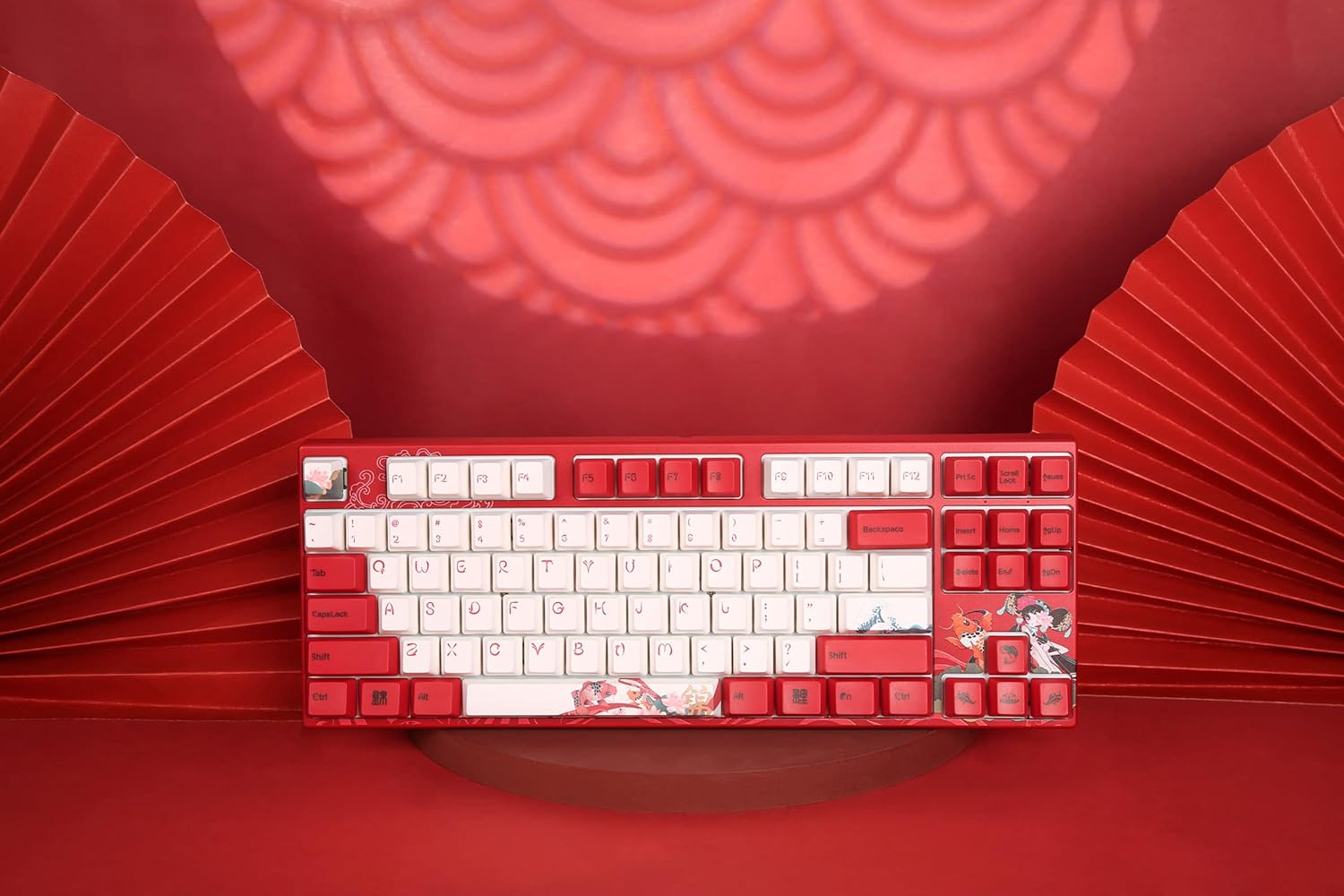
ภาพ: จากบนลงล่าง view of the keyboard, highlighting the TKL layout and keycap design.
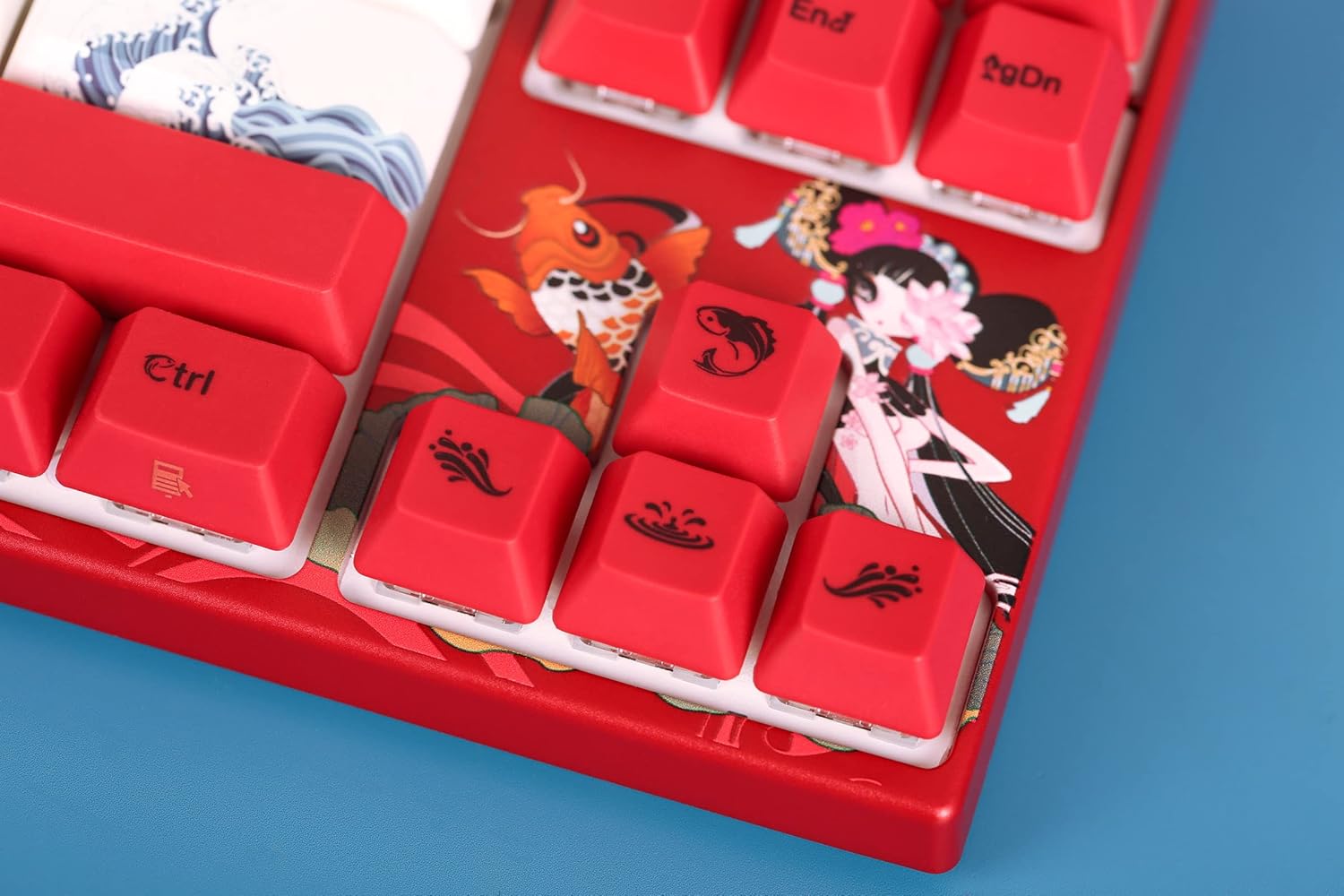
Image: Close-up of the keyboard's keycaps, detailing the unique Koi artwork and legends.
การซ่อมบำรุง
การบำรุงรักษาอย่างเหมาะสมจะช่วยให้คีย์บอร์ดของคุณมีอายุการใช้งานยาวนานและมีประสิทธิภาพ:
- การทำความสะอาดคีย์บอร์ด: Regularly clean the keyboard with a soft, dry cloth. For dust and debris between keycaps, use compressed air. Avoid using harsh chemicals or abrasive materials.
- การถอดคีย์แคป: If you need to clean under the keycaps or replace them, use a keycap puller. Gently pull the keycap straight up to avoid damaging the switch stem. When reattaching, align the keycap with the switch stem and press down firmly until it clicks into place.
- การป้องกันการรั่วไหล: Keep liquids away from the keyboard to prevent damage to the internal electronics.

Image: Loose keycaps and a keycap puller, useful for cleaning and customization.
การแก้ไขปัญหา
หากคุณพบปัญหาเกี่ยวกับแป้นพิมพ์ โปรดลองทำตามขั้นตอนการแก้ไขปัญหาต่อไปนี้:
- แป้นพิมพ์ไม่ตอบสนอง:
- ตรวจสอบให้แน่ใจว่าสาย USB-C เชื่อมต่อกับคีย์บอร์ดและคอมพิวเตอร์ของคุณอย่างแน่นหนา
- ลองเชื่อมต่อคีย์บอร์ดกับพอร์ต USB อื่นบนคอมพิวเตอร์ของคุณ
- ทดสอบแป้นพิมพ์บนคอมพิวเตอร์เครื่องอื่นเพื่อตรวจสอบว่าปัญหาอยู่ที่แป้นพิมพ์หรือคอมพิวเตอร์เครื่องเดิม
- รีสตาร์ทเครื่องคอมพิวเตอร์ของคุณ
- กุญแจไม่ลงทะเบียน:
- Remove the keycap of the problematic key and check for any obstructions or debris around the switch. Clean if necessary.
- ตรวจสอบให้แน่ใจว่าคีย์แคปติดตั้งอยู่บนก้านสวิตช์อย่างถูกต้อง
- ปัญหาเกี่ยวกับแสงไฟด้านหลัง:
- Check if the backlighting is turned off or set to the lowest brightness level using the keyboard's function keys.
- ตรวจสอบให้แน่ใจว่าแป้นพิมพ์ได้รับพลังงานจากพอร์ต USB อย่างเพียงพอ
หากขั้นตอนเหล่านี้ไม่สามารถแก้ไขปัญหาได้ โปรดดูส่วนการรับประกันและการสนับสนุนเพื่อขอความช่วยเหลือเพิ่มเติม
ข้อมูลจำเพาะ
| คุณสมบัติ | รายละเอียด |
|---|---|
| ชื่อรุ่น | MA Series V2 Koi TKL |
| ผู้ผลิต | วาร์มิโล |
| หมายเลขรุ่นสินค้า | 06924427360865 |
| เทคโนโลยีการเชื่อมต่อ | ยูเอสบี-ซี |
| คำอธิบายแป้นพิมพ์ | เครื่องจักรกล |
| ประเภทสวิตซ์ | Varmilo EC Ivy V2 (Electrocapacitive) |
| วัสดุปุ่มกด | Thick Dye Sub PBT |
| แป้นพิมพ์แบ็คไลท์ | ไฟ LED สีเดียว |
| อุปกรณ์ที่รองรับ | Laptop, Smartphone, Tablet, PC |
| วัสดุ | Polybutylene Terephthalate (PBT), Silicone |
| ส่วนประกอบที่รวมอยู่ | สาย USB |
การรับประกันและการสนับสนุน
Varmilo products are manufactured with quality and reliability in mind. For specific warranty information regarding your Varmilo MA Series V2 Koi TKL EC Mechanical Keyboard, please refer to the warranty card included with your product or visit the official Varmilo webเว็บไซต์.
If you require technical support, have questions about your product, or need assistance with troubleshooting beyond what is covered in this manual, please contact Varmilo customer service through their official channels. Details can typically be found on the Varmilo webบรรจุภัณฑ์ไซต์หรือผลิตภัณฑ์
