
1. บทนำ
This manual provides detailed instructions for the safe and efficient operation, setup, and maintenance of your Xetron High-end HVAC Set, which includes the SRC-400 Refrigerant Scale and the LMG-10X Digital Manifold. Please read this manual thoroughly before using the equipment to ensure proper function and to prevent damage or injury.
2. ข้อมูลด้านความปลอดภัย
Always observe the following safety precautions when operating the Xetron HVAC Set:
- ควรสวมอุปกรณ์ป้องกันส่วนบุคคล (PPE) ที่เหมาะสม รวมถึงแว่นตานิรภัยและถุงมือ เมื่อต้องจัดการกับสารทำความเย็น
- ต้องแน่ใจว่ามีการระบายอากาศที่เหมาะสมเมื่อทำงานกับสารทำความเย็น
- Do not exceed the maximum pressure ratings of the manifold or the capacity of the scale.
- เก็บอุปกรณ์ให้ห่างจากความชื้นและอุณหภูมิที่สูงหรือต่ำเกินไป
- Only use the equipment for its intended purpose in HVAC/R systems.
- ตัดการเชื่อมต่อไฟฟ้าก่อนดำเนินการบำรุงรักษาหรือทำความสะอาดใดๆ
3. สินค้าหมดview
The Xetron HVAC Set combines a high-precision refrigerant scale and a versatile digital manifold for comprehensive HVAC system analysis and servicing.
3.1. Xetron SRC-400 Refrigerant Scale
The SRC-400 is designed for accurate refrigerant charging and recovery. It features a robust construction and high-resolution measurements.

ภาพที่ 3.1.1: The Xetron SRC-400 Refrigerant Scale, highlighting its high-performance chip for accurate and high-resolution measurements.
- ความจุ: มากถึง 220 ปอนด์ (100 กก.)
- ความแม่นยำ: ≤±0.05% ของการอ่าน
- ปณิธาน: 0.011 ปอนด์
- การตรวจจับการโอเวอร์โหลด: Displays 'FULL' and alarms to protect sensors.
- การก่อสร้าง: Strong aluminum with rubber armors for collision resistance.

ภาพที่ 3.1.2: The SRC-400 scale supports three optional units: Kilograms (KG), Pounds (LB), and Ounces (OZ).
3.2. Xetron LMG-10X Digital Manifold
The LMG-10X Digital Manifold replaces traditional analog gauges, offering advanced features for precise HVAC system diagnostics.

ภาพที่ 3.2.1: The Xetron LMG-10X Digital Manifold, demonstrating its ability to replace multiple analog gauges with a single digital display.
- Refrigerant Database: Built-in data for up to 88 types of refrigerants.
- การคำนวณ: Automatic supercool and superheat calculations.
- Sight Window: Allows observation of refrigerant filling status.
- ช่วงความดัน: -14.5 ถึง 800 psi
- ช่วงอุณหภูมิ: -40 ถึง 320 °F (-40 ถึง 160 °C)
- ความแม่นยำของแรงดัน: ±0.5% ฟอซ.
- ความแม่นยำของอุณหภูมิ: ±0.9 องศาฟาเรนไฮต์
- ความละเอียดความดัน: 0.5 ปอนด์ต่อตารางนิ้ว
- ความละเอียดอุณหภูมิ: 0.2 องศาฟาเรนไฮต์
- หน่วย: Pressure: [psi, kg/cm², kPa, Mpa, bar]; Temperature: [°F/°C].
- การปฏิบัติตาม: Meets SAE (Society of Automotive Engineers) requirements.

ภาพที่ 3.2.2: Key components of the LMG-10X Digital Manifold, including control valves, hose bracket, and SAE 1/4 inch refrigerant hose fittings.
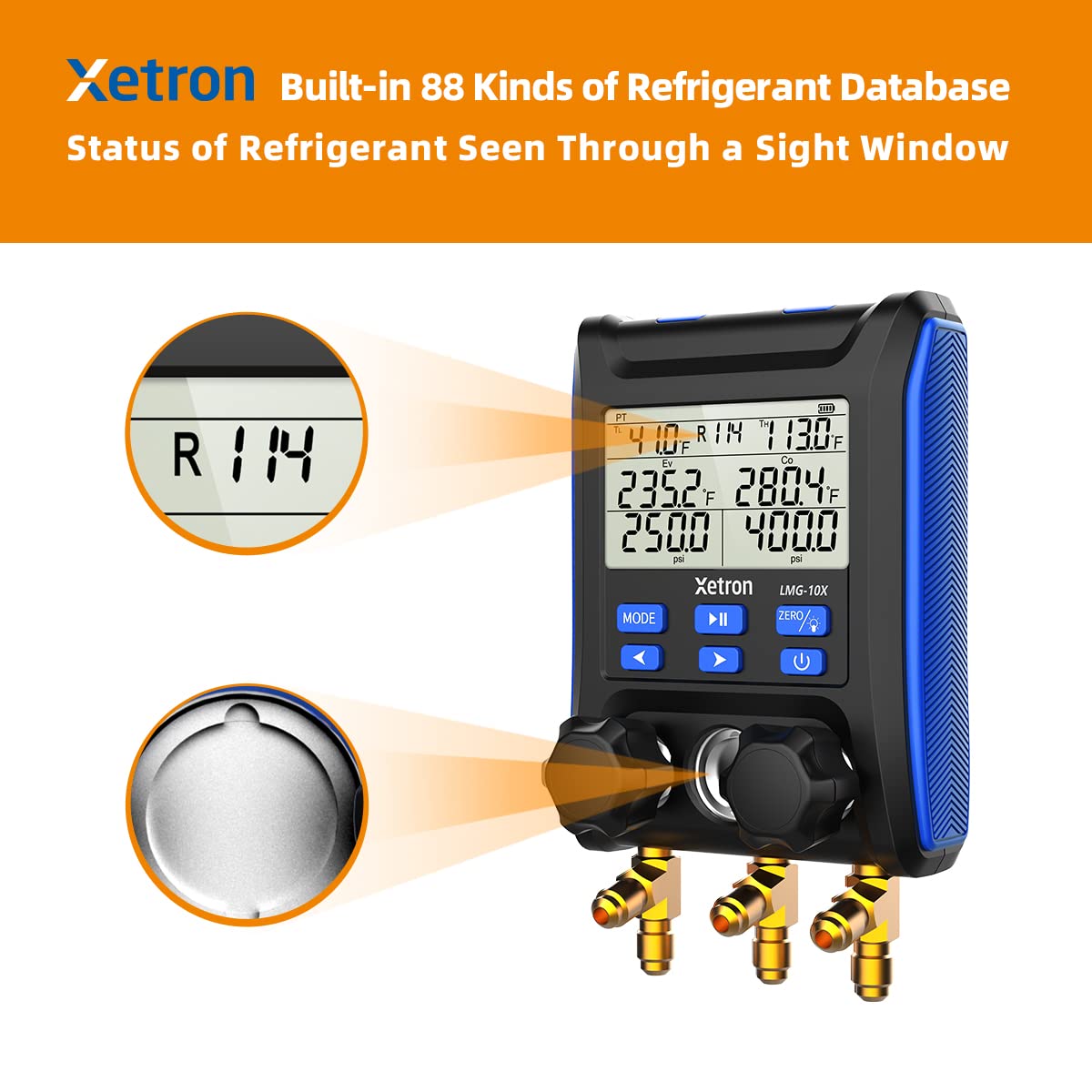
ภาพที่ 3.2.3: The LMG-10X features a built-in database of 88 refrigerants and a sight window to visually check the refrigerant's state.
4. การตั้งค่า
4.1. Refrigerant Scale (SRC-400) Setup
- การติดตั้งแบตเตอรี่: The remote control for the SRC-400 scale is powered by 5 AAA batteries. Open the battery compartment on the remote and insert the batteries, observing correct polarity.
- การจัดวาง: Place the scale on a flat, stable surface. The remote can be placed directly into the designated slot on the scale for storage or detached for remote viewการไอเอ็นจี

ภาพที่ 4.1.1: The SRC-400 scale with its remote control, illustrating battery power and remote placement.
4.2. Digital Manifold (LMG-10X) Setup
- การเชื่อมต่อท่อ: Connect the appropriate refrigerant hoses to the SAE 1/4 inch fittings on the manifold. Ensure connections are tight to prevent leaks.
- เปิดเครื่อง: Press the power button to turn on the manifold. The display will illuminate, showing initial readings.
5. คู่มือการใช้งาน
5.1. Using the Refrigerant Scale (SRC-400)
- เปิดเครื่อง: Press the 'ON/OFF' button on the remote to power on the scale.
- การเลือกหน่วย: Use the 'UNIT' button to cycle through available units (KG, LB, OZ) until your desired unit is displayed.
- การทำให้เป็นศูนย์: Place the empty refrigerant cylinder on the scale. Press the 'ZERO' or 'TARE' button to zero out the weight of the cylinder.
- การชาร์จ/การกู้คืน: Connect the refrigerant hose to the cylinder and the system. Monitor the weight change on the display during charging or recovery processes.
5.2. Using the Digital Manifold (LMG-10X)
- การเลือกสารทำความเย็น: Use the 'MODE' button to navigate through the menu and select the specific refrigerant type (e.g., R114) being used in the system.
- Pressure/Temperature Readings: The main display will show real-time pressure and temperature readings for both high and low sides.
- Superheat/Subcooling Measurement: The manifold automatically calculates and displays superheat (SH) and subcooling (SC) values based on the selected refrigerant and measured temperatures.

ภาพที่ 5.2.1: The LMG-10X Digital Manifold actively measuring and displaying both superheat and subcooling values.
- การแปลงหน่วย: Use the dedicated buttons to switch between pressure units (psi, kg/cm², kPa, Mpa, bar) and temperature units (°F/°C) as needed.
- Zeroing Pressure: If necessary, use the 'ZERO' button to calibrate the pressure sensors before taking readings.
6. การบำรุงรักษา
- การทำความสะอาด: Wipe the scale platform and manifold display with a soft, damp ผ้า ห้ามใช้สารทำความสะอาดที่มีฤทธิ์กัดกร่อนหรือตัวทำละลาย
- การเปลี่ยนแบตเตอรี่: Replace batteries in the scale remote when the low battery indicator appears.
- การตรวจสอบท่อ: Regularly inspect refrigerant hoses for wear, cracks, or damage. Replace damaged hoses immediately.
- พื้นที่จัดเก็บ: Store the equipment in a clean, dry place away from direct sunlight and extreme temperatures when not in use.
7 การแก้ไขปัญหา
| ปัญหา | สาเหตุที่เป็นไปได้ | สารละลาย |
|---|---|---|
| เครื่องชั่งน้ำหนักไม่เปิดเครื่อง | แบตเตอรี่หมดในรีโมท | Replace 5 AAA batteries in the remote. |
| Inaccurate scale readings | Scale not level; Overload; External vibrations | Ensure scale is on a flat surface; Do not exceed 220 lbs; Operate in a stable environment. |
| Manifold display blank | No power; Low battery | Check power connection or replace batteries (if applicable). |
| Manifold pressure readings incorrect | Sensors need zeroing; Incorrect refrigerant selected | Perform pressure zeroing; Verify correct refrigerant type is selected. |
| 'FULL' displayed on scale | สเกลโอเวอร์โหลด | Remove excess weight; Do not exceed 220 lbs capacity. |
8. ข้อมูลจำเพาะ
8.1. SRC-400 Refrigerant Scale
- ความจุ: 220 ปอนด์ (100 กก.)
- ความแม่นยำ: ≤±0.05% ของการอ่าน
- ปณิธาน: 0.011 ปอนด์
- หน่วย: KG, LB, OZ
- พลัง: แบตเตอรี่ AAA 5 ก้อน (สำหรับรีโมท)
- วัสดุ: อลูมิเนียมยาง
8.2. LMG-10X Digital Manifold
- Refrigerant Database: 88 แบบ
- ช่วงความดัน: -14.5 ถึง 800 psi
- ช่วงอุณหภูมิ: -40 ถึง 320 °F (-40 ถึง 160 °C)
- ความแม่นยำของแรงดัน: ±0.5% ฟอซ.
- ความแม่นยำของอุณหภูมิ: ±0.9 องศาฟาเรนไฮต์
- ความละเอียดความดัน: 0.5 ปอนด์ต่อตารางนิ้ว
- ความละเอียดอุณหภูมิ: 0.2 องศาฟาเรนไฮต์
- หน่วยแรงดัน: psi, kg/cm², kPa, Mpa, bar
- หน่วยอุณหภูมิ: °ฟาเรนไฮต์, °เซลเซียส
- ฟิตติ้ง: SAE 1/4 inch
9. การรับประกันและการสนับสนุน
For warranty information, technical support, or service inquiries, please refer to the official Xetron webหรือติดต่อฝ่ายบริการลูกค้า เก็บใบเสร็จรับเงินไว้เป็นหลักฐานการซื้อสำหรับการเคลมประกัน