
การแนะนำ
This manual provides detailed instructions for the setup, operation, and maintenance of your Wiszodet Kids Smart Game Watch S16. Please read this manual thoroughly to ensure proper use and to maximize the watch's features.

ภาพ: ด้านหน้า view of the Wiszodet Kids Smart Game Watch S16 in blue, showing the digital time and date.
มีอะไรอยู่ในกล่อง
เมื่อเปิดบรรจุภัณฑ์ ตรวจสอบว่ามีรายการทั้งหมดดังต่อไปนี้:
- Wiszodet Kids Smart Watch (S16)
- ฟิล์มกันรอยกระจกหน้าจอ
- สายชาร์จ USB
สินค้าเกินview
ทำความคุ้นเคยกับส่วนประกอบทางกายภาพของสมาร์ทวอทช์ของคุณ

Image: Diagram illustrating the watch's features including the camera, soft band, flashlight (torch), home button, USB charging port, and aluminum casing.
- กล้อง: Located at the top of the watch face for photos and videos.
- Soft Band: Comfortable and adjustable strap.
- ไฟฉาย (ไฟฉายส่องสว่าง): ระบบไฟในตัวสำหรับให้แสงสว่าง
- ปุ่มโฮม: Used to return to the main screen or activate certain functions.
- ซ็อกเก็ต USB: For charging the watch and transferring data.
- เปลือกอลูมิเนียม: เปลือกนอกที่ทนทานasing.
- หน้าจอสัมผัส: 1.54-inch display for interactive control.
การตั้งค่า
1. การชาร์จนาฬิกา
Before first use, fully charge the watch.
- Connect the provided USB charging cable to the USB socket on the watch.
- เสียบปลายอีกด้านของสาย USB เข้ากับอะแดปเตอร์แปลงไฟ USB ที่ใช้งานร่วมกันได้ (ไม่ได้รวมอยู่ในชุด) หรือพอร์ต USB ของคอมพิวเตอร์
- หน้าจอของนาฬิกาจะแสดงสถานะการชาร์จ ใช้เวลาประมาณ 2-3 ชั่วโมงในการชาร์จจนเต็ม
2. การเปิด/ปิดเครื่อง
- การเปิดเครื่อง: Press and hold the Home button until the screen lights up.
- วิธีปิดเครื่อง: Press and hold the Home button, then follow the on-screen prompts to confirm power off.
3. การตั้งค่าเริ่มต้น (เวลาและวันที่)
Upon first power-on or after a factory reset, you may need to set the correct time and date.
- From the main screen, swipe to find and tap the "Settings" icon.
- Navigate to "Time & Date" or a similar option.
- Adjust the hour, minute, year, month, and day as needed.
- เลือกรูปแบบเวลา 12 ชั่วโมง หรือ 24 ชั่วโมง
- ยืนยันการตั้งค่าของคุณ
คำแนะนำการใช้งาน
The Wiszodet S16 Smart Watch offers a variety of functions accessible via its touch screen.

Image: The watch interface showing various application icons, including Camera, Games, Music, and more.
1. กล้องและการบันทึกวิดีโอ
Capture photos and record videos directly from your watch.
- From the main menu, tap the "Camera" icon to open the camera application.
- Tap the screen to take a photo.
- To switch to video recording, look for a video camera icon within the camera app and tap it.
- Tap again to start recording, and tap once more to stop.
- Photos and videos are saved to the watch's internal storage.

Image: The watch demonstrating its selfie camera function, with options for video recording and playback.
2. เกม
The watch includes 24 built-in puzzle games designed to engage and entertain.
- Tap the "Game" icon from the main menu.
- Select from the list of available games.
- Follow the on-screen instructions to play.

Image: A visual representation of the 24 puzzle games available on the watch, such as 'Fruit Weighing' and 'Time Teaching'.
3.เครื่องเล่นเพลง
ฟังเพลง files stored on the watch.
- แตะที่ไอคอน "เพลง"
- Browse and select the desired audio file.
- ใช้ปุ่มควบคุมบนหน้าจอเพื่อควบคุมการเล่น (เล่น หยุดชั่วคราว ข้าม)
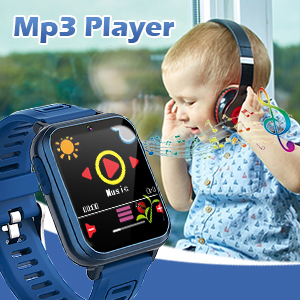
Image: The watch displaying its MP3 player interface, with a child listening to music in the background.
4 pedometer
Track daily steps and estimated calories burned.
- แตะที่ไอคอน "เครื่องนับก้าว"
- The watch will automatically begin tracking steps when worn.
- View your daily step count and calorie estimates on the screen.

Image: The watch highlighting its fitness tracking features, including pedometer, stopwatch, and timer, with children engaged in physical activity.
5.นาฬิกาปลุก
ตั้งนาฬิกาปลุกเพื่อเตือนความจำหรือทำตามกิจวัตรประจำวัน
- Tap the "Alarm" icon.
- Tap "+" or "Add Alarm" to set a new alarm.
- Adjust the time and select repeat days if desired.
- บันทึกการแจ้งเตือนไว้
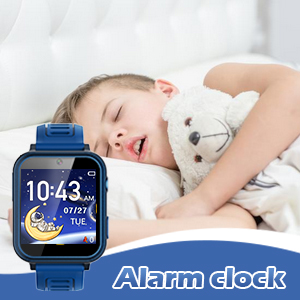
Image: The watch displaying the alarm clock feature, with a child sleeping, suggesting its use for morning routines.
6.ไฟฉาย
Activate the built-in flashlight for quick illumination.
- Tap the "Torch" or "Flashlight" icon.
- Tap again to turn it off.
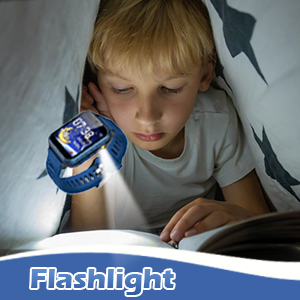
Image: The watch's flashlight feature in use, providing light for a child reading under a blanket.
7.เครื่องบันทึกเสียง
Record short audio messages or notes.
- Tap the "Voice Recorder" icon.
- แตะปุ่มบันทึกเพื่อเริ่มบันทึก
- Tap again to stop and save the recording.

Image: The watch displaying the voice recorder function, with children singing, indicating its use for capturing audio.
8.เครื่องคิดเลข
Perform basic arithmetic calculations.
- Tap the "Calculator" icon.
- Use the on-screen keypad to input numbers and operations.
9. คุณสมบัติอื่น ๆ
- ธีม: Customize the watch face and interface theme.
- สกรีนเซฟเวอร์: Select different screensaver options.
- นาฬิกาจับเวลา การวัดช่วงเวลา
- ตัวจับเวลา: Set countdown timers.
- ปฏิทิน: View the current date and navigate through months.
- การปรับระดับเสียง: Control the watch's audio output level.
- เวลาแบ็คไลท์: Adjust how long the screen stays lit.

ภาพ: ภาพตัดปะแสดงasing various watch functions including alarm, recorder, music, calculator, flashlight, and calendar, with children demonstrating their use.
การซ่อมบำรุง
Proper care will extend the life of your Wiszodet S16 Smart Watch.
- การทำความสะอาด: Wipe the watch screen and band with a soft, dry cloth. Avoid harsh chemicals or abrasive materials.
- ความต้านทานน้ำ: The watch is designed for daily use and splash resistance, but it is not suitable for swimming or showering. Avoid submerging the watch in water.
- พื้นที่จัดเก็บ: เก็บนาฬิกาไว้ในที่แห้งและเย็น หลีกเลี่ยงแสงแดดโดยตรงและอุณหภูมิที่สูงหรือต่ำเกินไป
- ฟิล์มกันรอยหน้าจอ: Apply the included screen glass protector to prevent scratches.
การแก้ไขปัญหา
| ปัญหา | สาเหตุที่เป็นไปได้ | สารละลาย |
|---|---|---|
| นาฬิกาไม่เปิด | แบตเตอรี่อ่อน | ชาร์จนาฬิกาเป็นเวลาอย่างน้อย 30 นาที |
| หน้าจอไม่ตอบสนอง | ซอฟต์แวร์มีปัญหาชั่วคราว | Restart the watch by holding the Home button. |
| ไม่สามารถบันทึกรูปภาพ/วิดีโอได้ | พื้นที่จัดเก็บไม่เพียงพอ | ลบอันเก่า fileหรือโอนไปยังคอมพิวเตอร์ |
| เวลา/วันที่ไม่ถูกต้อง | Settings need adjustment. | Go to Settings > Time & Date to adjust. |
ข้อมูลจำเพาะ
| คุณสมบัติ | รายละเอียด |
|---|---|
| ชื่อรุ่น | S16 |
| ยี่ห้อ | วิสโซเดต |
| ขนาดหน้าจอ | 1.54 นิ้ว |
| ประเภทจอภาพ | หน้าจอสัมผัส |
| ประเภทแบตเตอรี่ | ลิเธียมโพลีเมอร์ 1 อัน (รวมอยู่ด้วย) |
| การเชื่อมต่อ | ยูเอสบี |
| จีพีเอส | ไม่มีจีพีเอส |
| ความละเอียดของกล้อง | HD (not full HD) |
| ขนาดสินค้า | 9.4 x 2.4 x 0.71 นิ้ว |
| น้ำหนักสินค้า | 0.353 ออนซ์ (10 กรัม) |
การรับประกันและการสนับสนุน
For warranty information or technical support, please refer to the contact details provided with your purchase or visit the official Wiszodet webไซต์ เก็บหลักฐานการซื้อของคุณไว้เพื่อใช้ในกรณีเรียกร้องการรับประกัน