1. บทนำและเรื่องอื่นๆview
This manual provides comprehensive instructions for the safe operation, maintenance, and troubleshooting of your SJRC F11S 4K PRO Drone. Please read this manual thoroughly before operating the drone to ensure proper functionality and to prevent damage or injury.
The SJRC F11S 4K PRO is a professional-grade foldable brushless quadcopter equipped with a 4K HD camera, 2-axis gimbal with EIS (Electronic Image Stabilization), GPS, and 5G WiFi for extended range and stable image transmission.
2. คุณสมบัติหลัก
- กล้อง 4K HD: Captures high-resolution video (3840*2160P) and photos (3840*2160P).
- 2-Axis Stabilized Gimbal with EIS: Ensures stable and clear footage by minimizing camera shake.
- การระบุตำแหน่ง GPS: Provides precise positioning awareness for secure flight, including features like low battery return, return beyond distance, runaway return, and return home.
- เวลาบินขยาย: Approximately 26-28 minutes with a fully charged 11.1V 2500 mAh battery.
- Long Remote Distance: Up to 3000 meters (3KM) for the F11S PRO model.
- การส่งภาพผ่าน WiFi 5G: Real-time image transmission distance up to 3KM.
- Intelligent Tracking System: GPS intelligent tracking for dynamic shooting.
- 5x Image Zoom: Allows for detailed capture from a distance.
- Gesture Shooting: Enables photo and video capture using hand gestures.
- Point of Interest Shooting: Automatically orbits a designated point for cinematic shots.
- การวางแผนเส้นทาง: Plan custom flight paths via the app.
- การออกแบบพับได้: กะทัดรัดและพกพาสะดวกสำหรับการพกพา
3. เนื้อหาบรรจุภัณฑ์
เมื่อแกะกล่องแล้ว โปรดตรวจสอบว่าสิ่งของทั้งหมดที่ระบุไว้ด้านล่างครบถ้วนและอยู่ในสภาพดี:
- SJRC F11S 4K PRO Drone
- รีโมทคอนโทรล
- Flight Battery (Quantity may vary based on package, e.g., "Three Batteries")
- Propellers (Spare set included)
- สายชาร์จ USB
- ไขควง
- คู่มือการใช้งาน
- Portable Storage Bag (Included with some packages)
- กล้อง (ในตัว)

Image: Contents of the SJRC F11 4K Pro package, including the drone, remote controller, three batteries, spare propellers, and a portable carrying bag.
4. การตั้งค่า
4.1 การติดตั้งแบตเตอรี่
- โปรดตรวจสอบให้แน่ใจว่าโดรนและรีโมทคอนโทรลปิดอยู่
- Insert the fully charged flight battery into the drone's battery compartment until it clicks securely into place.
- For the remote control, insert the required batteries (refer to the remote control section for type and quantity) into its compartment.
4.2 การติดตั้งใบพัด
Attach the propellers according to the markings (A/B) on the propellers and motor arms. Ensure they are securely fastened to prevent detachment during flight.
4.3 ตั้งค่าการควบคุมระยะไกล
Unfold the remote control's phone holder and securely place your smartphone. Power on the remote control by pressing and holding the power button.

Image: The SJRC F11S 4K PRO drone and its remote controller, ready for operation.
4.4 การติดตั้งและการเชื่อมต่อแอป
Download the official SJRC drone application from your smartphone's app store. Connect your smartphone to the drone's 5G WiFi network (SSID usually starts with "SJRC-F11S-"). Launch the app to view the live camera feed and access flight controls.
5. คู่มือการใช้งาน
5.1 รายการตรวจสอบก่อนบิน
- ตรวจสอบให้แน่ใจว่าแบตเตอรี่โดรนและรีโมทคอนโทรลชาร์จเต็มแล้ว
- ตรวจสอบใบพัดว่ามีรอยชำรุดหรือไม่ และตรวจสอบให้แน่ใจว่าติดตั้งแน่นสนิทดีแล้ว
- เลือกพื้นที่โล่งกว้างสำหรับการบิน หลีกเลี่ยงสิ่งกีดขวาง ผู้คน และน่านฟ้าหวงห้าม
- Verify GPS signal strength on the app before takeoff.
5.2 การขึ้นและลงจอด
After successful GPS lock, use the one-key takeoff button on the remote or within the app. For landing, use the one-key landing feature or manually descend the drone to a safe, clear area.
5.3 โหมดการบิน
The drone supports various flight modes, typically including:
- โหมด GPS: Provides stable hovering and precise positioning. Recommended for beginners.
- โหมดปกติ: Offers more manual control, suitable for experienced pilots.
- โหมดกีฬา: Increases drone speed and agility for dynamic flight.

Image: The drone in flight, demonstrating its 5G+Repeater technology for real-time image transmission up to 3KM.
5.4 การทำงานของกล้อง
The integrated 4K HD camera features a 2-axis stabilized gimbal with EIS for smooth video and sharp photos. Control camera tilt and capture photos/videos via the remote control or the app interface.
5.4.1 ซูมภาพ
Utilize the 5x image zoom feature through the app to get closer views without physically moving the drone.
5.4.2 Gesture Shooting
Enable gesture shooting in the app settings. Perform specific hand gestures (e.g., V-sign for photo, open palm for video) to trigger camera functions remotely.
5.5 โหมดการบินอัจฉริยะ
Leverage the drone's intelligent flight modes for enhanced flight experience:
- GPS Intelligent Tracking: The drone can automatically follow a designated subject (e.g., the remote controller user).
- จุดที่น่าสนใจ: Set a central point, and the drone will orbit it at a specified radius and altitude, capturing a 360-degree view.
- Route Planning (Waypoint Flight): Draw a desired flight path on the app's map, and the drone will automatically follow it. Ensure the flight path is safe and clear of obstacles.
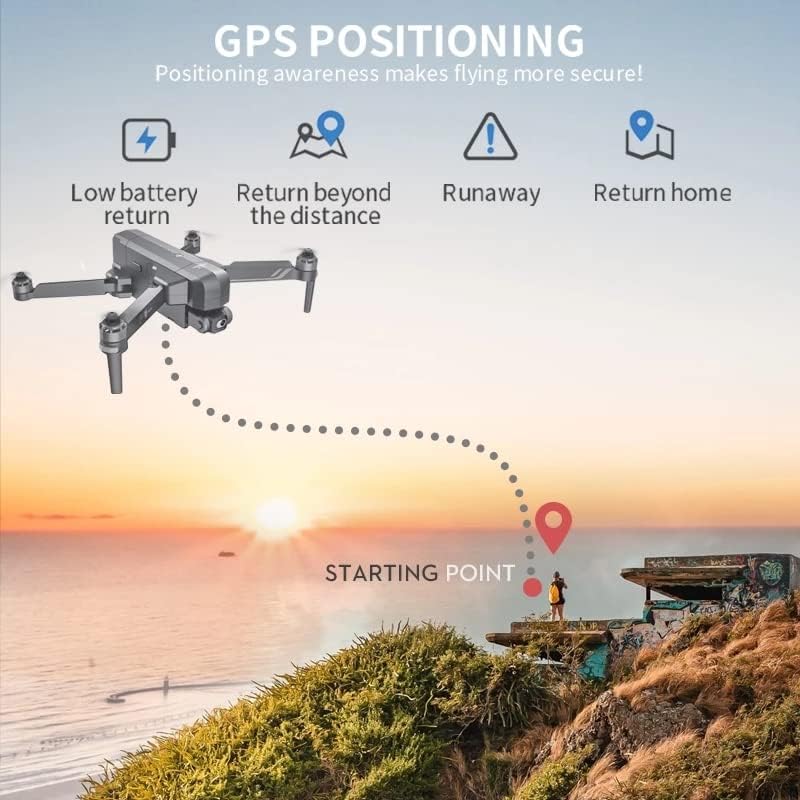
Image: Illustration of GPS positioning features, including low battery return, return beyond distance, runaway protection, and automatic return home.
5.6 การส่งภาพ
The 5G WiFi system provides stable and long-range real-time image transmission to your connected smartphone, allowing for FPV (First Person View) flying and monitoring of your shots.
Video: Official product video demonstrating the SJRC F11S 4K PRO drone's features, including flight capabilities, camera stabilization, intelligent tracking, and image transmission range.
6. การบำรุงรักษา
6.1 การทำความสะอาด
Regularly clean the drone body, propellers, and camera lens with a soft, dry cloth. Avoid using harsh chemicals or solvents.
6.2 พื้นที่จัดเก็บ
Store the drone in a cool, dry place, away from direct sunlight and extreme temperatures. If storing for an extended period, ensure batteries are charged to approximately 50% to prolong their lifespan.
6.3 การดูแลแบตเตอรี่
Always use the provided charging cable and adapter. Do not overcharge or over-discharge batteries. Discontinue use if batteries show signs of swelling or damage.
7 การแก้ไขปัญหา
| ปัญหา | สาเหตุที่เป็นไปได้ | สารละลาย |
|---|---|---|
| โดรนไม่สามารถเปิดเครื่องได้ | แบตเตอรี่อ่อนหรือหมด หรือติดตั้งแบตเตอรี่ไม่ถูกต้อง | ชาร์จแบตเตอรี่ให้เต็ม และตรวจสอบให้แน่ใจว่าใส่แบตเตอรี่ถูกต้องแล้ว |
| ไม่มีรูปภาพในแอป | Incorrect WiFi connection; app not launched. | Reconnect to drone's 5G WiFi; restart app. |
| โดรนลอยไปมาระหว่างบิน | Insufficient GPS signal; uncalibrated sensors. | Fly in open area for better GPS; perform compass calibration. |
| เวลาบินสั้น | Battery degradation; aggressive flying. | Replace battery if old; fly more conservatively. |
8. ข้อมูลจำเพาะ
| คุณสมบัติ | รายละเอียด |
|---|---|
| ชื่อรุ่น | SJRC F11S |
| ความละเอียดในการจับภาพวิดีโอ | 4K (3840*2160พิกเซล) |
| เลนส์กล้อง | F/2.15 100° FOV |
| กิมบอล | 2-Axis Stabilized Gimbal with EIS |
| เทคโนโลยีการเชื่อมต่อ | ไวไฟ (5G) |
| ความจุของแบตเตอรี่ | 2000 มิลลิวินาทีamp Hours (11.1V 2500 mAh for F11S PRO) |
| เวลาบิน | ประมาณ 26-28 นาที |
| ระยะทางไกล | About 3000 M (3KM) |
| ระยะทาง WiFi | 3000 M (3KM) |
| น้ำหนักผลิตภัณฑ์ | 585กรัม |
| อัตราเฟรม | 30 เฟรมต่อวินาที |
| Support SD Card | 32-128GB (for F11S PRO) |
| ประเภทการควบคุม | รีโมทคอนโทรล |
| ช่วงอายุ (คำอธิบาย) | ผู้ใหญ่ |
| ยูพีซี | 717378105069 |

Image: Comparison of specifications between F11 4K PRO and F11S 4K PRO models, highlighting differences in remote distance and WiFi distance.
9. การรับประกันและการสนับสนุน
For warranty information, technical support, or service inquiries, please refer to the contact details provided on the product packaging or the official SJRC webไซต์ โปรดเก็บใบเสร็จรับเงินไว้เป็นหลักฐานการซื้อสำหรับการเรียกร้องการรับประกัน
For further assistance, you may also contact the seller directly via the platform where the product was purchased.