
BIGTREETECH SKR V1.4
คู่มือผู้ใช้แผงควบคุม BIGTREETECH SKR V1.4
สินค้าเกินview
The BIGTREETECH SKR V1.4 Control Board is a 32-bit main control board designed for FDM 3D printers, offering significant performance improvements and compatibility with various display types and stepper drivers. It serves as an upgrade to the SKR V1.3 motherboard, providing enhanced functionality and ease of use for DIY enthusiasts and professional users.

The image displays the BIGTREETECH SKR V1.4 Control Board, a black PCB with various connectors and components, alongside a coiled blue USB cable. This board is the central processing unit for 3D printers.
เนื้อหาแพ็คเกจ
- BIGTREETECH SKR V1.4 Control Board
- สาย USB
คุณสมบัติหลัก
- High-Performance Main Control Chip: Utilizes a 32-bit 100MHz ARM-class Cortex-M3 series LPC1768 main control chip for significantly improved performance.
- Open Source Firmware: Equipped with highly modular open source firmware Marlin 2.0, facilitating user DIY and secondary development.
- ความเข้ากันได้ของจอภาพ: Supports 2.4, 2.8, 3.5-inch color touch screens, as well as LCD2004 and LCD12864 screens.
- Easy Firmware Upgrade: Firmware can be upgraded conveniently and efficiently via an SD card.
- External Power Module Support: Capable of supplying power to TFT screens, BLtouch, and Neo-pixel devices by plugging in an external DC5V power module.
- Reserved Interfaces for DIY: Includes reserved I2C, SPI, and WIFI interfaces for custom modifications and expansions.
- Integrated TMC Driver Modes: On-board support for TMC driver SPI and UART working modes, with convenient on-board DIAG function pins for simplified wiring.
- ฟังก์ชั่นขั้นสูง: Supports features such as continuous power on, material detection, and shutdown after power off.
คุณสมบัติโดยละเอียดมากกว่าview

This image highlights the main control chips used in the SKR V1.4 (100MHz) and SKR V1.4 Turbo (120MHz) boards, both featuring NXP LPC1768/LPC1769 microcontrollers, emphasizing the 32-bit architecture.

The image shows the BIGTREETECH SKR V1.4 board with an external DCDC MODE V1.0 power module connected, illustrating how it provides 5V power to peripherals like TFT screens, BLtouch, and Neopixels. Note that the DCDC module is sold separately.

This image points out the dedicated I2C, SPI, and WIFI interfaces on the SKR V1.4 board, which are reserved for users to integrate custom modules and facilitate advanced DIY projects, including firmware flashing and serial port debugging with a BTT Writer.
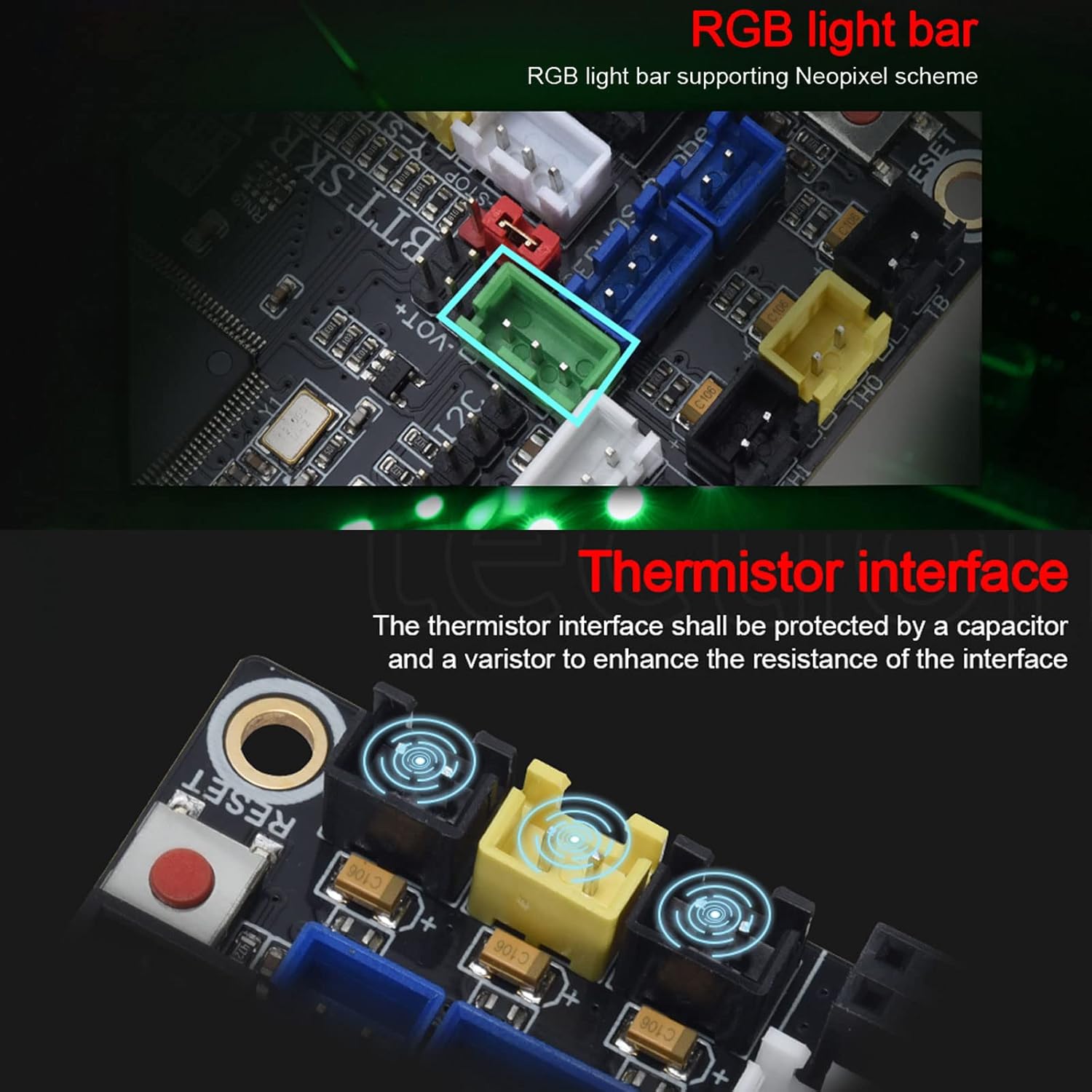
The image details the RGB light bar support for Neopixel schemes and the thermistor interface on the SKR V1.4 board. The thermistor interface is protected by a capacitor and a varistor to enhance its resistance.

This image illustrates the expanded fan interfaces on the SKR V1.4, including a 1-way CNC fan and 3-way frequent fans. It also highlights the dual Z-axis interface, which simplifies wiring by eliminating the need for an external drive expansion module.

This visual comparison shows the differences in driver-STEP/DIY mode, TMC Driver-UART mode, and SPI mode driven by TMC between the SKR V1.3 and SKR V1.4 boards, indicating simplified jumper cap configurations on the V1.4.
การติดตั้งและการตั้งค่า
การติดตั้งฮาร์ดแวร์
Carefully install the SKR V1.4 control board into your 3D printer's electronics enclosure. Ensure all connections are secure and correctly oriented. Refer to the wiring diagram for proper component placement.
Connecting Stepper Drivers
The SKR V1.4 supports various stepper drivers (e.g., TMC2209, EZ2209, TMC2208, TMC5160). Ensure the drivers are inserted correctly into their respective slots. The board supports both SPI and UART working modes for TMC drivers, simplifying configuration by using jumper caps for DIAG functions.
การเชื่อมต่อไฟฟ้า
Connect the main power supply to the DCIN terminals. If using external peripherals like TFT screens, BLtouch, or Neo-pixels, connect an optional DC5V power module to the reserved DCDC MODE V1.0 interface.
การเชื่อมต่ออุปกรณ์ต่อพ่วง
- จอแสดงผล: Connect your compatible LCD (LCD2004, LCD12864) or color touch screen (2.4, 2.8, 3.5-inch TFT) to the designated display ports.
- แฟนๆ: Utilize the multiple fan interfaces for part cooling, hotend cooling, and enclosure fans.
- ตัวหยุดปลาย: Connect your endstops to the X-CLS, Y-CLS, Z-CLS, E0-CLS, E1-CLS ports.
- ฮีตเตอร์และเทอร์มิสเตอร์: Connect hotend and heated bed heaters to HE0, HE1, HB, and their corresponding thermistors to TH0, TH1, TB.
- ยูเอสบี: Connect the board to your computer using the provided USB cable for communication and firmware flashing.

This image provides a comprehensive wiring diagram for the BIGTREETECH SKR V1.4 board, labeling all major connection points including fan headers, stepper motor drivers, endstop pins, heater outputs, thermistor inputs, LCD/TFT display ports, SD card slot, USB port, and reset key.
คู่มือการใช้งาน
Firmware Configuration and Flashing
The SKR V1.4 board comes with highly modular open-source Marlin 2.0 firmware. To configure the board for your specific printer setup, you will need to compile the firmware. This involves modifying configuration files (e.g., Configuration.h, Configuration_adv.h) to match your printer's dimensions, components, and desired features.
Once configured, the firmware can be easily flashed to the board using an SD card. Simply place the compiled firmware file (e.g., firmware.bin) onto the root directory of a formatted SD card, insert it into the board's SD card slot, and power on the board. The board will automatically update its firmware.
ฟังก์ชั่นพื้นฐาน
- เปิด/ปิดเครื่อง: Ensure proper power supply connection before powering on. Use the reset button if needed.
- Material Detection: If supported by your setup, the board can detect filament run-out.
- Shutdown After Power Off: Utilize this feature for safe shutdown procedures.
การซ่อมบำรุง
- รักษาความสะอาด: Regularly clean the board and its connectors to prevent dust and debris accumulation, which can lead to short circuits or poor connections. Use compressed air or a soft brush.
- ตรวจสอบการเชื่อมต่อ: Periodically inspect all wiring connections to ensure they are secure and free from damage. Loose connections can cause erratic behavior or component failure.
- อัพเดตเฟิร์มแวร์: Stay updated with the latest firmware releases from BIGTREETECH or the Marlin community to benefit from bug fixes, performance improvements, and new features.
- สภาพแวดล้อม : Operate the board within recommended temperature and humidity ranges to ensure optimal performance and longevity. Avoid extreme temperatures or high moisture environments.
การแก้ไขปัญหา
ปัญหาทั่วไปและแนวทางแก้ไข
| ปัญหา | สาเหตุที่เป็นไปได้ | สารละลาย |
|---|---|---|
| Board not powering on. | Incorrect power connection, faulty power supply. | ตรวจสอบแหล่งจ่ายไฟ voltage and polarity. Ensure main power cables are securely connected. |
| Stepper motors not moving or moving erratically. | Incorrect stepper driver installation, wrong driver mode, misconfigured firmware. | Check driver orientation and jumper settings (SPI/UART). Verify motor wiring and firmware configuration for stepper drivers. |
| จอแสดงผลไม่ทำงาน | Incorrect display connection, incompatible display type, firmware not configured for display. | Ensure display cables are correctly connected. Confirm display type is supported and enabled in firmware. |
| การอัปเดตเฟิร์มแวร์ล้มเหลว | ไม่ถูกต้อง file name, corrupted SD card, incompatible firmware. | Rename firmware file to `firmware.bin` (or as required). Use a properly formatted SD card. Ensure firmware version is compatible with the board. |
| Thermal runaway errors. | Loose thermistor connection, faulty thermistor, incorrect thermistor type in firmware. | Check thermistor wiring and connections. Verify thermistor type setting in firmware. Replace thermistor if faulty. |
ข้อมูลจำเพาะทางเทคนิค
| คุณสมบัติ | รายละเอียด |
|---|---|
| ชิปควบคุมหลัก | ARM-class Cortex-M3 series LPC1768 (100MHz) |
| อินพุต Voltage | 5 โวลต์ (แรงดันใช้งานtage) |
| ความเข้ากันได้ของจอภาพ | 2.4", 2.8", 3.5" Color Touch Screen, LCD2004, LCD12864 |
| Stepper Driver Support | TMC2209, EZ2209, TMC2208, TMC5160 (SPI/UART modes) |
| เฟิร์มแวร์ | Marlin 2.0 (Open Source) |
| อินเทอร์เฟซ | I2C, SPI, WIFI (reserved), USB, SD Card |
| อินเทอร์เฟซพัดลม | 1-way CNC fan, 3-way Frequent fans |
| Z-axis Support | Dual Z-axis interface |
| ขนาด | 5.43 x 4.92 x 1.34 นิ้ว |
| น้ำหนัก | 5.61 ออนซ์ |
| หมายเลขรุ่น | KINGPRINTER-1020000399 |
การรับประกันและการสนับสนุน
ข้อมูลการรับประกัน
For detailed warranty information regarding your BIGTREETECH SKR V1.4 Control Board, please refer to the official BIGTREETECH website or contact your point of purchase. Warranty terms typically cover manufacturing defects for a specified period from the date of purchase.
การสนับสนุนด้านเทคนิค
Should you encounter any issues or require technical assistance, please visit the official BIGTREETECH support resources. You can often find extensive documentation, FAQs, and community forums that can help resolve common problems. For direct support, contact BIGTREETECH customer service through their official channels.
ร้านค้าอย่างเป็นทางการของ BIGTREETECH: ร้านค้า BIGTREETECH บน Amazon
Ask a question about this manual
Ask about setup, troubleshooting, compatibility, parts, safety, or missing instructions. Manuals+ will review the question and use this page’s manual context to help answer it.