
สินค้าเกินview
The Monarch Specialties I 7346 Computer Desk is an L-shaped desk designed for home office environments, particularly suitable for corners or smaller spaces. It features a durable industrial grey wood-look laminate finish and offers integrated storage solutions.
The main worksurface measures 46 inches L x 21.5 inches W, providing ample space for a laptop or a monitor and keyboard. An additional, slightly lower worksurface is created by the desktop panel overlapping the storage unit. The storage unit includes 2 open cubbies with a fixed shelf, 1 storage drawer, and 1 cabinet, all with finished interiors and silver handles. The desk is finished on all sides, allowing for flexible placement within a room.
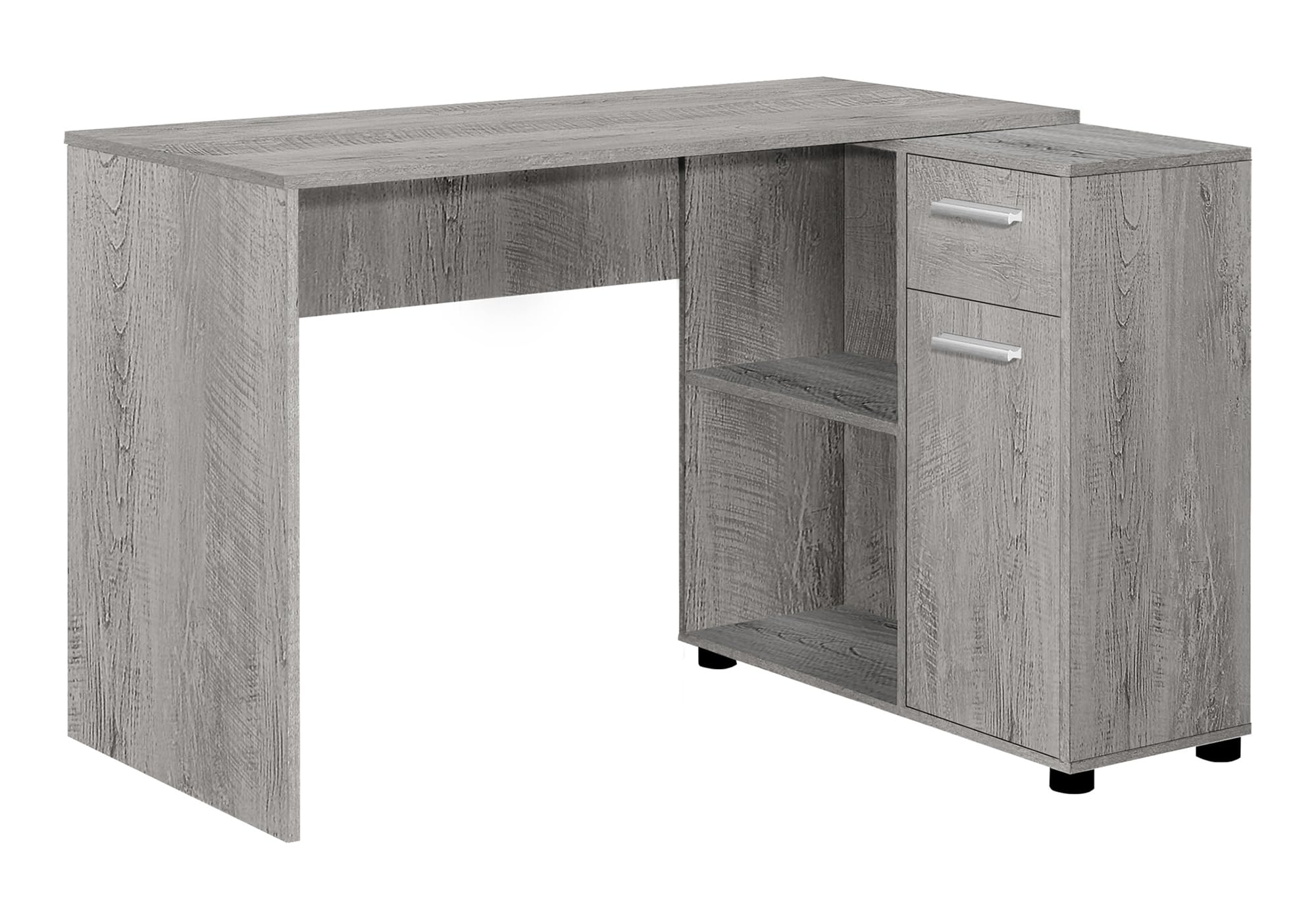
Image: The Monarch Specialties I 7346 L-shaped computer desk, showcasing its design and storage features in a home office setting.
การติดตั้งและการประกอบ
Assembly of the Monarch Specialties I 7346 Computer Desk is required. Illustrated instructions and all necessary hardware are provided in the package. Additional tools, such as a screwdriver, may be needed for complete assembly. It is recommended that one person performs the assembly.
- แกะส่วนประกอบ: Carefully remove all parts from the packaging and verify against the parts list in the included instructions.
- เตรียมพื้นที่ทำงาน: Ensure you have a clear, flat, and clean area for assembly to prevent damage to the desk components.
- ปฏิบัติตามคำแนะนำ: Adhere strictly to the step-by-step illustrated instructions provided with the desk.
- ตัวยึดที่ปลอดภัย: ตรวจสอบให้แน่ใจว่าสกรูและตัวยึดทั้งหมดขันแน่นดีแล้ว แต่อย่าขันแน่นเกินไปเพื่อป้องกันความเสียหายต่อวัสดุ

Image: Detailed dimensional drawing of the desk, indicating measurements for the main worksurface, storage cubbies, drawer, and cabinet.
คำแนะนำการใช้งาน
The Monarch Specialties I 7346 Computer Desk is designed for versatile use in various settings, including bedrooms, dorm rooms, and home offices. Its L-shape is ideal for corner placement, maximizing space efficiency. The desk offers multiple storage options to keep your workspace organized.
- Main Worksurface: Use the primary 46-inch L x 21.5-inch W desktop for your computer, writing, or other tasks.
- Secondary Worksurface: The smaller, slightly lower surface on top of the storage unit can be used for additional items or as an extended workspace.
- Open Cubbies: Two open cubbies (18 inches L x 11.5 inches W x 13.25 inches H each) provide easy access storage for books, binders, or decorative items.
- ลิ้นชักเก็บของ: A single storage drawer (interior: 9.75 inches L x 8.5 inches W x 3 inches H) with metal glides is suitable for smaller office supplies.
- คณะรัฐมนตรี: The cabinet (interior: 11.5 inches L x 11.5 inches W x 20.5 inches H) offers concealed storage for larger items.

Image: A close-up of the desk's storage section, highlighting the drawer and cabinet with their silver handles and the grey wood-look finish.
การบำรุงรักษาและการดูแล
To maintain the appearance and longevity of your Monarch Specialties I 7346 Computer Desk, follow these care instructions:
- การทำความสะอาด: เช็ดพื้นผิวด้วยโฆษณาamp cloth. Avoid using harsh chemicals or abrasive cleaners, which can damage the laminate finish.
- การรั่วไหล: Clean up spills immediately to prevent staining or damage to the wood-look laminate.
- ความร้อนและความชื้น: Protect the desk from direct heat sources and excessive moisture. Use coasters for drinks and heat pads for hot items.
- แสงแดด: หลีกเลี่ยงการสัมผัสแสงแดดโดยตรงเป็นเวลานานเพื่อป้องกันการซีดจางหรือการเปลี่ยนสีของพื้นผิว
- ความจุน้ำหนัก: Do not exceed the maximum weight recommendation of 100 pounds on the desktop to ensure stability and prevent damage.

ภาพ: รายละเอียด view of the desk's industrial grey wood-look laminate finish, illustrating its texture and pattern.
การแก้ไขปัญหา
If you encounter any issues with your Monarch Specialties I 7346 Computer Desk, consider the following general troubleshooting steps:
- ปัญหาเสถียรภาพ: Ensure all assembly hardware is properly tightened. Check that the desk is placed on a level surface.
- การทำงานของลิ้นชัก: If a drawer is sticking or not closing smoothly, check the metal drawer glides for any obstructions or misalignment. Ensure the drawer is correctly installed.
- ส่วนที่หายไป: If any parts were missing upon delivery, refer to the customer support section for assistance.
ข้อมูลจำเพาะผลิตภัณฑ์
| หมายเลขรุ่น | ฉัน 7346 |
| ยี่ห้อ | มอนาร์ค สเปเชียลตี้ |
| รูปร่าง | รูปตัว L |
| การออกแบบโต๊ะทำงาน | โต๊ะคอมพิวเตอร์ |
| สี | สีเทา |
| สไตล์ | ร่วมสมัย |
| วัสดุ | Particle Board, Laminate |
| ประเภทวัสดุยอดนิยม | ไม้แปรรูป |
| ประเภทการเสร็จสิ้น | ลามิเนต |
| ขนาดสินค้า (กว้าง x ยาว x สูง) | 46" L x 34.25" W x 29.5" H (116.8W x 87D x 74.9H Centimetres) |
| น้ำหนักสินค้า | 61 ปอนด์ (27.67 กก.) |
| คำแนะนำน้ำหนักสูงสุด | 100 ปอนด์ |
| จำนวนลิ้นชัก | 1 |
| จำนวนชั้นวาง | 2 (open cubbies) |
| จำนวนตู้ | 1 |
| จำเป็นต้องประกอบ | ใช่ |
| บุคคลที่แนะนำสำหรับการประกอบ | 1 |
| เครื่องมือที่แนะนำสำหรับการประกอบ | ไขควง |
| รวมเครื่องมือประกอบทั้งหมด | ใช่ |
ข้อมูลการรับประกัน
The Monarch Specialties I 7346 Computer Desk comes with a limited warranty. Specifically, there is a 5 Year Limited Warranty on Manufacturer's Defects Onlyนอกจากนี้ ยังมี 1 Year Limited Warranty on Parts Only is provided. Please retain your proof of purchase for any warranty claims.
การสนับสนุนลูกค้า
For further assistance, missing parts, or warranty inquiries, please contact Monarch Specialties customer service. Refer to the contact information provided in your product packaging or visit the official Monarch Specialties webเว็บไซต์สำหรับรายละเอียดการสนับสนุน