
การแนะนำ
Thank you for choosing the Goshyda 1080P FHD Dash Cam. This manual provides essential information for the proper installation, operation, and maintenance of your device. Please read it thoroughly before use to ensure optimal performance and safety.
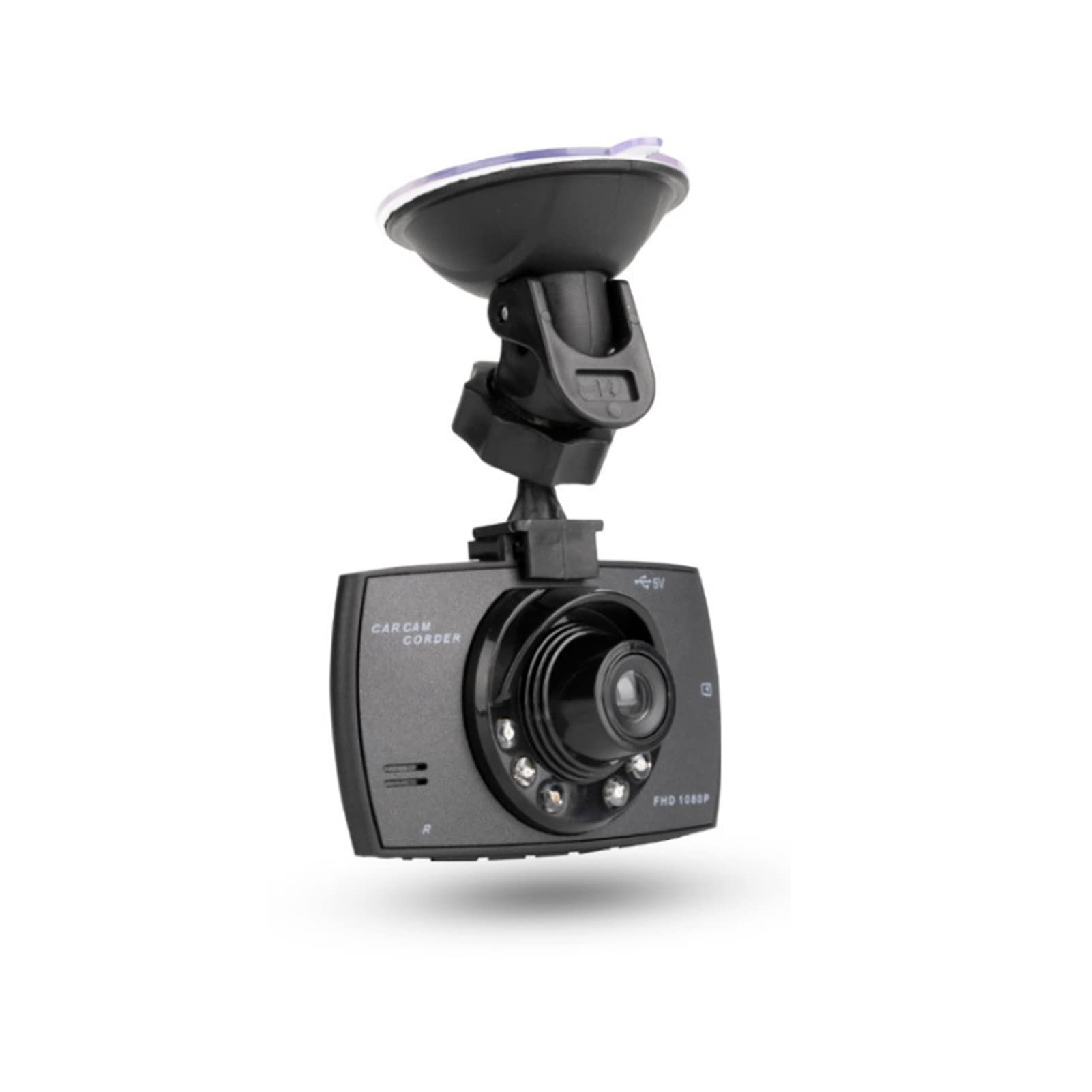
ภาพ: ด้านหน้า view of the Goshyda 1080P FHD Dash Cam.
เนื้อหาแพ็คเกจ
ตรวจสอบว่ารายการทั้งหมดที่ระบุไว้ด้านล่างนี้รวมอยู่ในแพ็คเกจของคุณ:
- 1 x Driving Recorder (Dash Cam)
- เครื่องชาร์จในรถยนต์ 1 ชิ้น
- ชุดใส่ถ้วยดูด 1 x
- 1 x คู่มือผู้ใช้

Image: Contents of the Goshyda Dash Cam package, including the dash cam unit, car charger, and suction cup mount.
การติดตั้งและการตั้งค่า
- การติดตั้ง Dash Cam: Attach the suction cup mount to the dash cam. Securely affix the suction cup mount to your vehicle's windshield, ensuring it does not obstruct your view ของถนน
- การเชื่อมต่อไฟฟ้า: Connect the car charger to the dash cam's USB port. Plug the other end of the car charger into your vehicle's cigarette lighter socket. Route the cable neatly to avoid interference with driving controls.
- การใส่การ์ดหน่วยความจำ: Insert a compatible micro SD card (8-32 GB, not included) into the dash cam's memory card slot. Ensure the card is inserted correctly until it clicks into place.

Image: The dash cam mounted on a car windshield, showing the driver's view ของถนน
การชาร์จอุปกรณ์
The dash cam can be charged using two methods:
- ชาร์จผ่านที่ชาร์จในรถยนต์: Connect the dash cam to the included car charger and plug it into your vehicle's 12V cigarette lighter socket. The device will automatically begin recording when the car starts.
- Via USB to Computer: Connect the dash cam to a computer's USB port using a compatible USB cable (not included). A green light will indicate charging. The green light will turn off automatically when the battery is fully charged.
สำคัญ: Only use a 5V output car power supply. When using the car charger, long-press the power button or disconnect the power to turn off the recorder.
คำแนะนำการใช้งาน
การบันทึกอัตโนมัติ
When connected to the car's 12V power supply and the vehicle starts, the dash cam will automatically power on and begin recording. In case of power failure, the recorder will automatically shut down after 15 seconds and save the recorded files.
การบันทึกแบบวนซ้ำ
The dash cam features seamless loop recording. When the memory card is full, the camera will automatically overwrite the oldest unlocked video files. This ensures continuous recording without manual intervention.

Image: The dash cam screen showing a recording in progress, demonstrating the loop recording function.
G-Sensor (Gravity Detection)
In the event of a collision or sudden impact, the built-in G-sensor will detect the event and automatically lock the current video file. ถูกล็อค files are protected from being overwritten by loop recording, preserving critical evidence.
คู่มือ File ล็อค
During recording, you can manually press the lock button on the dash cam to protect the current video file from being deleted or overwritten.

Image: The dash cam's front, highlighting the night vision lights and indicating G-sensor functionality in a traffic scenario.
การตรวจจับการเคลื่อนไหว
When enabled, the dash cam will automatically start recording if it detects motion in its field of view while parked. This feature helps monitor your vehicle when you are away.
คุณสมบัติหลัก
- บันทึกวิดีโอความละเอียด Full HD 1080P: บันทึกวิดีโอได้ชัดเจน footage at 1920x1080P resolution.
- เลนส์มุมกว้าง 170 องศา: ให้ความกว้าง view บนท้องถนน ช่วยลดจุดบอดให้น้อยที่สุด
- หน้าจอ LCD ขนาด 2.4 นิ้ว: สำหรับแบบเรียลไทม์ viewการบันทึกและการเล่นซ้ำไฟล์เสียง
- 6 Infrared Fill Lights: Enhances night vision for clearer recordings in low-light conditions.
- จีเซ็นเซอร์: Automatically detects impacts and protects video files.
- การบันทึกแบบวนซ้ำ: Ensures continuous recording by overwriting old, unlocked files.
- การตรวจจับการเคลื่อนไหว: Records automatically when motion is detected while parked.

Image: The dash cam mounted inside a car, illustrating its 1080P Full HD recording capability and 170-degree wide-angle view.

ภาพ: ภาพระยะใกล้ view of the dash cam's lens, clearly showing the six infrared fill lights designed for improved night vision.
ข้อมูลจำเพาะ
| คุณสมบัติ | ข้อมูลจำเพาะ |
|---|---|
| พิกเซล | 1000W (10 Megapixels) |
| Viewอิงแองเกิล | 170 องศา |
| รูปแบบวิดีโอ | เอวีไอ |
| Video Encoding Mode | เอ็ม-เจเพ็ก |
| ความละเอียดวิดีโอ | 1920x1080P |
| เอาท์พุตวิดีโอ | AVOUT, HD Multimedia Interface |
| รูปแบบเอาท์พุตวิดีโอ | ป.ป.ท |
| ความเข้ากันได้ของระบบปฏิบัติการ | Windows 2000, Windows XP, Windows 7, etc. |
| ความจุของการ์ดหน่วยความจำ | 8-32 GB Micro SD card (not included) |
| แบตเตอรี่ | 3.7V 120mAh Polymer Battery (built-in) |
| Power Consumption (Video) | 200 มิลลิแอมป์ |
| การใช้พลังงาน (สแตนด์บาย) | 250-315มิลลิแอมป์ชั่วโมง |
| ขนาดหน้าจอ | 2.4 นิ้ว |
| ประเภทการติดตั้ง | ถ้วยคัพดูด |
| วิธีการควบคุม | ระยะไกล |
| อัตราเฟรม | 30 เฟรมต่อวินาที |
| น้ำหนักสินค้า | 172 กรัม |
การซ่อมบำรุง
- การทำความสะอาด: ใช้ผ้าแห้งนุ่มๆ เช็ดทำความสะอาดเลนส์และหน้าจอของกล้องติดรถยนต์ หลีกเลี่ยงการใช้สารทำความสะอาดที่มีฤทธิ์กัดกร่อนหรือตัวทำละลาย
- อุณหภูมิ: Do not expose the device to extreme temperatures, either hot or cold, as this can affect battery life and performance.
- การ์ดหน่วยความจำ: Regularly format your memory card (at least once a month) to ensure optimal performance and prevent data corruption. Back up important fileก่อนทำการฟอร์แมต
การแก้ไขปัญหา
- อุปกรณ์ไม่เปิดเครื่อง: Ensure the car charger is securely connected to both the dash cam and the vehicle's cigarette lighter socket. Check if the vehicle's 12V power outlet is functioning.
- ปัญหาการบันทึก: Verify that a compatible memory card is inserted and has sufficient free space. Format the memory card if necessary.
- คุณภาพวิดีโอไม่ดี: Clean the lens of the dash cam. Ensure the windshield is clean where the camera is mounted.
- แบตเตอรี่หมดเร็ว: The built-in battery is primarily for emergency power-off and saving files. For continuous operation, the dash cam should remain connected to the car charger.
การรับประกันและการสนับสนุน
For warranty information or technical support, please refer to the contact details provided with your purchase or visit the official Goshyda webไซต์ โปรดเก็บใบเสร็จรับเงินไว้เป็นหลักฐานการซื้อ