
1. บทนำ
The eppfun AK3040R is a versatile Bluetooth 5.3 audio receiver designed to upgrade your existing wired audio systems, such as home speakers or car stereos, with wireless Bluetooth capabilities. It allows you to stream music from your smartphone or other Bluetooth-enabled devices. Featuring NFC for quick pairing, multiple audio output options (3.5mm AUX, RCA), and a TF card slot for direct music playback, the AK3040R offers a convenient and enhanced audio experience.
2. คุณสมบัติของผลิตภัณฑ์
- เทคโนโลยีบลูทูธ 5.3: Incorporates the latest low-energy Bluetooth Ver 5.3 chip, providing a longer transmission distance and faster speed compared to Bluetooth 4.0, while maintaining compatibility with older versions.
- ฟังก์ชันเอ็นเอฟซี: Supports one-touch pairing with NFC-enabled mobile phones for quick and convenient connection.
- เอาต์พุตเสียงหลายช่อง: Equipped with 3.5mm AUX and RCA ports for broad compatibility with various audio systems.
- ช่องเสียบการ์ด TF: Allows direct playback of music files from a TF (MicroSD) card.
- การออกแบบที่กะทัดรัดและน้ำหนักเบา: Portable and easy to integrate into any audio setup.
3. เนื้อหาบรรจุภัณฑ์
กรุณาตรวจสอบแพ็คเกจสำหรับรายการต่อไปนี้:
- eppfun AK3040R Bluetooth 5.3 Audio Receiver
- สายชาร์จ USB (Type-C)
- สายสัญญาณเสียงขนาด 3.5 มม.
- สายสัญญาณเสียง RCA
- คู่มือการใช้งาน
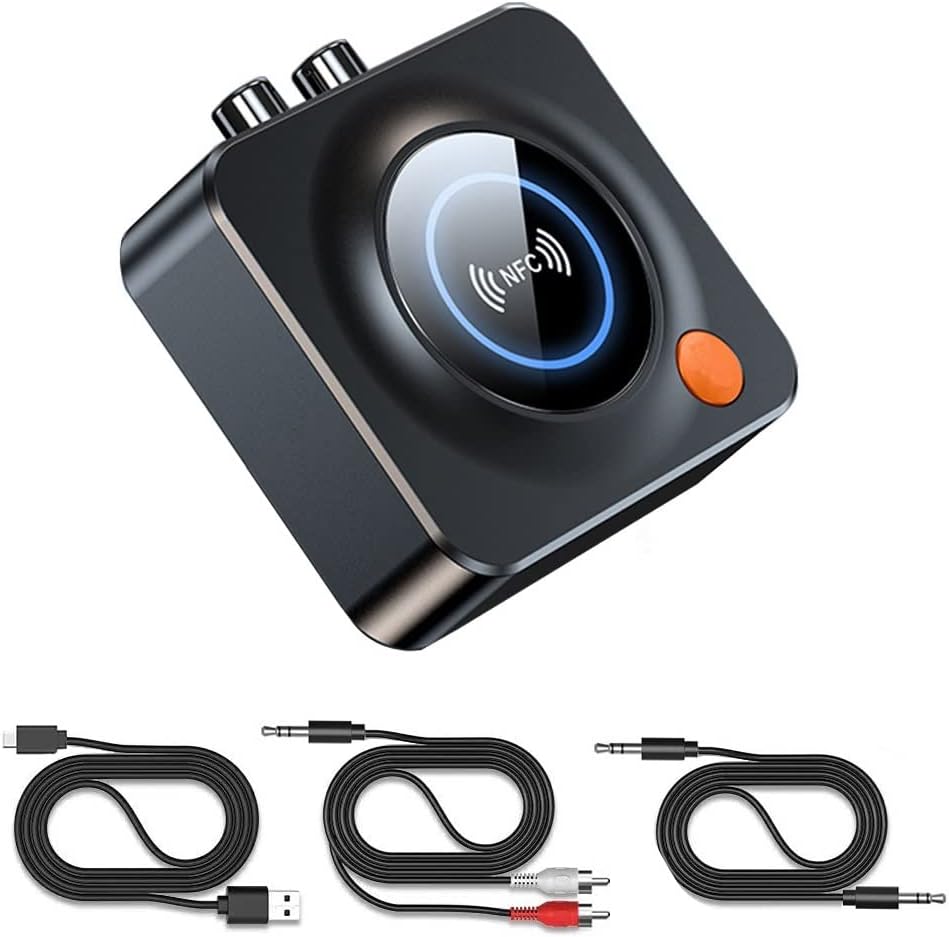
Image: The eppfun AK3040R Bluetooth receiver shown with its included USB charging cable, 3.5mm audio cable, and RCA audio cable.
4. เค้าโครงอุปกรณ์

ภาพ: จากบนลงล่าง view of the eppfun AK3040R Bluetooth receiver. The top surface features a circular NFC sensing area with an NFC logo and a blue LED ring. An orange power button is visible on the side. The rear panel shows RCA (red and white) audio output ports, a 3.5mm AUX output, and a USB-C power input. A TF card slot is on the right side.
Familiarize yourself with the device's ports and controls:
- พื้นที่การตรวจจับ NFC: เพื่อการจับคู่กับอุปกรณ์ที่รองรับ NFC อย่างรวดเร็ว
- ปุ่มเปิด/ปิด: To turn the device on/off and initiate pairing.
- เอาต์พุต AUX 3.5 มม.: Connects to speakers or headphones via a 3.5mm audio cable.
- อาร์ซีเอเอาท์พุต: Connects to home stereo systems or amplifiers via RCA cables.
- ช่องเสียบการ์ด TF: Insert a TF (MicroSD) card for local music playback.
- กำลังไฟเข้า USB-C: สำหรับเชื่อมต่อสายไฟ
5. การตั้งค่า
Follow these steps to set up your eppfun AK3040R Bluetooth receiver:
- เชื่อมต่อพลังงาน: Plug the USB charging cable into the USB-C power input on the AK3040R and connect the other end to a USB power adapter (not included) or a powered USB port. The device will automatically power on and enter pairing mode.
- เชื่อมต่อกับระบบเสียง:
- For speakers or headphones with a 3.5mm input, use the provided 3.5mm audio cable to connect the AK3040R's 3.5mm AUX output to your audio device's input.
- For home stereo systems or amplifiers with RCA inputs, use the provided RCA audio cable to connect the AK3040R's RCA outputs to your audio system's RCA inputs.

Image: A diagram illustrating the connection process. It shows a USB-C cable and RCA/3.5mm audio cables being plugged into the receiver's ports. A smartphone is shown pairing with the device, and the receiver is connected to a home theater system.
6. คู่มือการใช้งาน
6.1. การจับคู่บลูทู ธ
The AK3040R will automatically enter pairing mode when powered on. The LED indicator will flash, indicating it's ready to pair.
- การจับคู่บลูทูธมาตรฐาน:
- Enable Bluetooth on your smartphone or other audio source device.
- ค้นหา available Bluetooth devices and select "AK3040R" from the list.
- Once connected, the LED indicator on the receiver will turn solid blue.
- การจับคู่ NFC แบบสัมผัสเดียว:
- โปรดตรวจสอบให้แน่ใจว่าได้เปิดใช้งาน NFC บนโทรศัพท์มือถือของคุณแล้ว
- Gently tap your NFC-enabled phone on the NFC sensing area of the AK3040R.
- Confirm the pairing request on your phone. The devices will connect automatically.
6.2. เล่นเพลง
Once successfully paired, you can start playing music:
- From a Bluetooth Device: Play music on your paired smartphone or tablet. The audio will be streamed wirelessly to the AK3040R and output through your connected speakers.
- From TF Card: Insert a TF (MicroSD) card containing music files into the TF card slot. The receiver will automatically detect and begin playing music from the card.

Image: A visual representation of a smartphone streaming music wirelessly via Bluetooth to the eppfun AK3040R receiver, which is then connected to a pair of wired speakers, enhancing the audio experience.
7. การบำรุงรักษา
To ensure the longevity and optimal performance of your AK3040R:
- เก็บอุปกรณ์ให้แห้งและห่างจากความชื้น
- ทำความสะอาดอุปกรณ์ด้วยผ้านุ่มและแห้ง ห้ามใช้สารเคมีรุนแรงหรือน้ำยาทำความสะอาดที่มีฤทธิ์กัดกร่อน
- หลีกเลี่ยงอุณหภูมิที่สูงหรือต่ำเกินไป
- ห้ามถอดประกอบหรือซ่อมแซมอุปกรณ์ด้วยตนเอง การกระทำดังกล่าวจะทำให้การรับประกันเป็นโมฆะ
8 การแก้ไขปัญหา
| ปัญหา | สาเหตุที่เป็นไปได้ | สารละลาย |
|---|---|---|
| อุปกรณ์ไม่เปิดเครื่อง | ไม่มีแหล่งจ่ายไฟหรือสายไฟชำรุด | Ensure the USB-C cable is securely connected to a working power source. Try a different cable or power adapter. |
| ไม่สามารถจับคู่กับอุปกรณ์บลูทูธได้ | Bluetooth is off on your device; AK3040R is not in pairing mode; too many devices connected. | Ensure Bluetooth is enabled on your phone/tablet. Confirm the AK3040R LED is flashing (pairing mode). Disconnect other Bluetooth devices from your phone. Restart both devices. |
| No sound after connecting. | Incorrect audio cable connection; volume too low; wrong input selected on audio system. | Check that audio cables are firmly connected to the correct input/output ports. Increase volume on both the AK3040R and your audio system. Select the correct input source on your ampเครื่องขยายเสียง/ลำโพง |
| การจับคู่ NFC ล้มเหลว | NFC is off on your phone; phone not placed correctly. | Ensure NFC is enabled on your phone. Place your phone directly over the NFC sensing area on the AK3040R. |
| เพลงจากการ์ด TF เล่นไม่ได้ | ใส่การ์ด TF ไม่ถูกต้อง ไม่รองรับ file รูปแบบไม่ถูกต้อง; การ์ดเสียหาย | Ensure the TF card is fully inserted. Check if music fileไฟล์เสียงอยู่ในรูปแบบที่รองรับ (เช่น MP3) ลองใช้การ์ด TF อื่นดู |
9. ข้อมูลจำเพาะ
| คุณสมบัติ | รายละเอียด |
|---|---|
| แบบอย่าง | AK3040R |
| เวอร์ชันบลูทูธ | 5.3 |
| โหมดเอาต์พุตเสียง | สเตอริโอ |
| เทคโนโลยีการเชื่อมต่อ | บลูทูธ, ช่องต่อ AUX 3.5 มม., ช่องต่อ RCA |
| คุณสมบัติพิเศษ | NFC, Hands-free calling, Low latency |
| อุปกรณ์ที่รองรับ | Android Smartphones, iPhones, iPads, Laptops, Wired Speakers |
| ระยะการรับ | Up to 10m (indoors) |
| อินพุต Voltage | 4.8V ~ 5.25V |
| ขนาดสินค้า | 6.9 x 6.9 x 2.4 ซม. (2.7 x 2.7 x 0.94 นิ้ว) |
| น้ำหนักสินค้า | 45 กรัม (1.59 ออนซ์) |
| วัสดุ | ABS, โลหะ |
10. การรับประกันและการสนับสนุน
eppfun provides a รับประกัน 12 เดือน for this product. We are committed to ensuring a positive customer experience.
If you encounter any issues or have questions regarding your eppfun AK3040R Bluetooth 5.3 Audio Receiver, please do not hesitate to contact our customer support. You can typically reach us through your purchase platform via your order history (e.g., on Amazon: [Order History] - [Contact Seller]). We aim to resolve your concerns as quickly as possible.