
การแนะนำ
This manual provides detailed instructions for the proper setup, operation, and maintenance of your TOMLOV DM04 Digital Microscope. Please read this manual thoroughly before using the device to ensure optimal performance and longevity.
The TOMLOV DM04 is a versatile digital microscope featuring a 9-inch LCD screen, 16MP camera, and up to 1300X digital magnification. It is designed for various applications including coin inspection, circuit board repair, and general observation of small objects. It is compatible with Windows and Mac OS for advanced functions.
เนื้อหาแพ็คเกจ
ตรวจสอบว่ารายการทั้งหมดที่ระบุไว้ด้านล่างนี้รวมอยู่ในแพ็คเกจของคุณ:
- 9-inch Microscope Unit
- แผ่นฐาน
- 10-inch Stand Pole
- รีโมทคอนโทรล
- USB Cable for Microscope (Micro USB)
- USB Cable for Base (USB-C)
- แผงกั้นแสง
- คู่มือการใช้งาน
- การ์ด SD 32GB (ติดตั้งไว้ล่วงหน้าหรือรวมแยกต่างหาก)

Image: All components included in the TOMLOV DM04 Digital Microscope package, including the microscope unit, stand, base, cables, remote, and manual.
คำแนะนำการตั้งค่า
- ประกอบขาตั้ง: Attach the 10-inch stand pole to the base plate. Ensure it is securely fastened.
- ติดตั้งกล้องจุลทรรศน์: Slide the microscope unit onto the stand pole and tighten the securing screw at the desired height.
- เชื่อมต่อพลังงาน:
- Connect the Micro USB cable to the microscope unit and a power source (e.g., USB adapter, computer USB port).
- Connect the USB-C cable to the base plate (for auxiliary lights) and a separate power source.
- ใส่การ์ด SD: If not pre-installed, insert the provided 32GB SD card into the slot on the back of the microscope unit.
- Position Auxiliary Lights: Adjust the flexible auxiliary lights on the base to illuminate your observation area as needed.
- เปิดเครื่อง: Press and hold the power button on the microscope unit to turn it on.
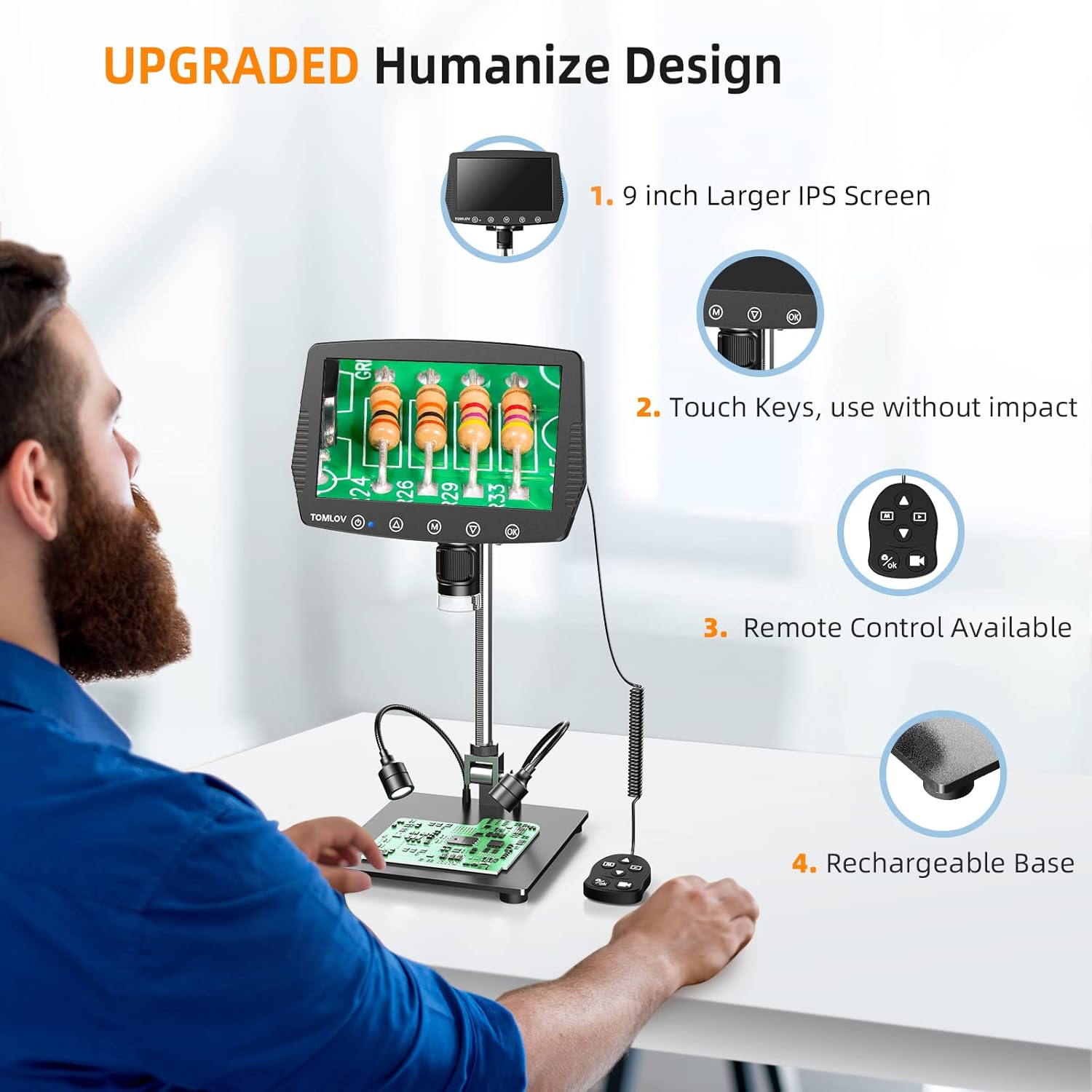
Image: A user setting up the TOMLOV DM04 microscope, demonstrating the assembly of the stand and placement of the microscope unit.
คำแนะนำการใช้งาน
การทำงานพื้นฐาน
- เปิด/ปิดเครื่อง: กดปุ่มเปิด/ปิดค้างไว้ (⑂) เพื่อเปิดหรือปิดอุปกรณ์
- การปรับโฟกัส: Rotate the focus wheel on the microscope unit to achieve a clear image on the 9-inch LCD screen.
- กำลังขยาย: The microscope offers digital magnification up to 1300X. Adjust the height of the microscope on the stand and use the digital zoom functions (if available via menu) to change magnification.
- แสงสว่าง:
- ไฟ LED ในตัว: The microscope head has built-in LED lights. These can be adjusted via the menu or dedicated buttons.
- Auxiliary Base Lights: The two flexible lights on the base can be adjusted independently using their respective controllers to provide additional illumination.
- จับภาพ/วิดีโอ:
- กดปุ่ม OK button on the microscope or remote control to take a picture.
- กดปุ่มค้างไว้ OK ปุ่มสำหรับเริ่ม/หยุดบันทึกวิดีโอ
- Captured images and videos are saved to the inserted SD card.
คุณสมบัติขั้นสูง
- การนำทางเมนู: ใช้ M (Menu) button and arrow buttons (▲, ▼) to navigate through settings and options on the LCD screen.
- รีโมทคอนโทรล: The included remote control allows for stable operation, reducing image shake during capture.
- Rotatable Screen & Bracket Pole: The screen can be rotated up to 80 degrees and the bracket pole up to 180 degrees for flexible viewมุมการเอียง
- PC Connection (Windows/Mac OS):
- Connect the microscope to your computer using the appropriate USB cable.
- Select "PC Camera" mode on the microscope's screen.
- Install the dedicated software (refer to the included software CD or manufacturer's website for download) to enable measurement and marking functions, and to view the live feed on your computer.
- Files can be transferred directly from the SD card when connected to a PC.

Image: The TOMLOV DM04 microscope connected to a laptop, showing the "PC Camera" function and measurement capabilities on the computer screen.

ภาพ: ระยะใกล้ view of the TOMLOV DM04 microscope's dual auxiliary lighting system, highlighting the built-in LED ring light and the two flexible base lights.
Video: A demonstration of the TOMLOV DM04 digital microscope's capabilities, showing a detailed view of a fly. This video illustrates the clarity and magnification achievable with the device.
การซ่อมบำรุง
- การทำความสะอาด:
- Use a soft, dry cloth to clean the exterior of the microscope and screen.
- สำหรับการทำความสะอาดเลนส์ ให้ใช้ผ้าทำความสะอาดเลนส์และน้ำยาทำความสะอาดเลนส์โดยเฉพาะ หลีกเลี่ยงวัสดุที่มีฤทธิ์กัดกร่อน
- Do not use liquid cleaners directly on the screen or lens.
- พื้นที่จัดเก็บ: Store the microscope in a clean, dry environment away from direct sunlight and extreme temperatures.
- การดูแลแบตเตอรี่ For optimal battery life, charge the microscope regularly and avoid fully discharging it for extended periods.
- การอัปเดตซอฟต์แวร์: Periodically check the TOMLOV official website for any available software or firmware updates for your DM04 model.
การแก้ไขปัญหา
| ปัญหา | สาเหตุที่เป็นไปได้ | สารละลาย |
|---|---|---|
| ไม่มีภาพบนหน้าจอ | Device not powered on; lens cap on; focus not adjusted. | Ensure device is powered on. Remove lens cap. Adjust focus wheel. |
| ภาพเบลอ | Improper focus; insufficient lighting; dirty lens. | Adjust focus wheel. Increase illumination using built-in or auxiliary lights. Clean the lens. |
| ไม่สามารถบันทึกภาพ/วิดีโอได้ | No SD card inserted; SD card full or corrupted; incorrect file การตั้งค่ารูปแบบ | ใส่การ์ด SD ที่ใช้งานร่วมกันได้ ลบข้อมูลที่ไม่จำเป็นออก files or replace SD card. Check menu settings for file รูปแบบ |
| PC connection not working | Incorrect USB cable; "PC Camera" mode not selected; driver issues. | Ensure correct USB cable is used. Select "PC Camera" mode on microscope. Install necessary drivers/software. |
ข้อมูลจำเพาะ
- แบบอย่าง: ดีเอ็ม04
- ขนาดหน้าจอ: จอ LCD ขนาด 9 นิ้ว
- ความละเอียดกล้อง: 16 ล้านพิกเซล
- ความละเอียดวิดีโอ: 1080พ
- Digital Magnification: สูงถึง 1300X
- Stand Length: 10 นิ้ว
- ระยะโฟกัส: Up to 8 inches (with enhanced stand)
- แสงสว่าง: Built-in 8-LED fill lights, Rechargeable base lights (2)
- ควบคุม: Touch buttons, Remote control
- พื้นที่จัดเก็บ: Supports Micro SD card (32GB included)
- ความเข้ากันได้ของพีซี: วินโดวส์, แมคโอเอส
- แหล่งพลังงาน: ใช้แบตเตอรี่ (5 โวลต์)
- วัสดุ: 10'' Metal Stand + 9'' LCD Screen + Large Metal Base
ข้อมูลการรับประกัน
TOMLOV products typically come with a standard manufacturer's warranty. Please refer to the warranty card included in your product packaging or visit the official TOMLOV webเข้าชมเว็บไซต์เพื่อดูรายละเอียดข้อกำหนดและเงื่อนไขการรับประกันโดยละเอียด รวมถึงระยะเวลาคุ้มครองและขั้นตอนการเรียกร้องค่าสินไหมทดแทน
การสนับสนุนลูกค้า
For technical assistance, troubleshooting not covered in this manual, or warranty inquiries, please contact TOMLOV customer support:
- Webเว็บไซต์: www.tomlov.com (หมายเหตุ: นี่เป็นเพียงตัวอย่างชั่วคราว URLโปรดดูเอกสารประกอบผลิตภัณฑ์ของคุณสำหรับข้อมูลการสนับสนุนอย่างเป็นทางการ webเว็บไซต์.)
- อีเมล: Refer to your product documentation.
- โทรศัพท์: Refer to your product documentation.
When contacting support, please have your product model (DM04) and purchase information ready.