การแนะนำ
This manual provides instructions for the safe and effective use of your Generic Non-Contact Infrared Thermometer. This device is designed for measuring body temperature and object surface temperature without physical contact. Please read this manual thoroughly before use and keep it for future reference.

ภาพ: ด้านหน้า view of the Generic Infrared Thermometer, showing the display, control buttons, and handle.
คุณสมบัติหลัก:
- Non-contact measurement for hygiene.
- LCD display with backlight for clear readings in various lighting conditions.
- Switchable temperature units (Celsius/Fahrenheit).
- Object mode function for surface temperature measurement.
- ปิดเครื่องอัตโนมัติเพื่อประหยัดแบตเตอรี่
การตั้งค่า
1. การติดตั้งแบตเตอรี่
The thermometer requires a DC9V battery (not included). To install the battery:
- Locate the battery compartment cover, usually on the handle.
- เปิดฝาครอบ
- Insert the DC9V battery, ensuring correct polarity (+/-).
- ปิดฝาช่องใส่แบตเตอรี่ให้แน่น
บันทึก: If the thermometer will not be used for an extended period, remove the battery to prevent leakage and damage.
คำแนะนำการใช้งาน
1. เปิด/ปิดเครื่อง
Press the trigger button to power on the device. The thermometer will automatically power off after a period of inactivity to save battery.
2. Taking a Temperature Measurement
ในการวัดอุณหภูมิ:
- ตรวจสอบให้แน่ใจว่าเทอร์โมมิเตอร์เปิดอยู่
- Aim the infrared sensor at the target (forehead for body temperature, or object surface). The optimal measurement distance is between 0.4-2.5 inches (1-5 cm).
- Press and hold the trigger button. The temperature reading will appear on the LCD display within approximately 1 second.
- Release the trigger button to hold the reading.

Image: A hand holding the infrared thermometer, aiming at a baby's forehead to take a temperature reading. The display shows a temperature of 36.8 degrees Celsius.
3. Switching Measurement Modes (Body/Object)
The thermometer supports both body temperature and object surface temperature measurement. Refer to the device's specific buttons (often labeled "Mode" or with icons) to switch between these modes. The current mode is typically indicated on the LCD display.

Image: An infrared thermometer displaying 36.3 degrees Celsius, surrounded by icons illustrating its use for baby temperature, adult temperature, milk temperature, pet temperature, food measurement, and water measurement.
4. การเปลี่ยนหน่วยอุณหภูมิ (เซลเซียส/ฟาเรนไฮต์)
To switch between Celsius (℃) and Fahrenheit (℉):
- With the thermometer powered on, simultaneously press the "M" key and the "+" key.
- The display will change to the alternate unit. Repeat the action to switch back.
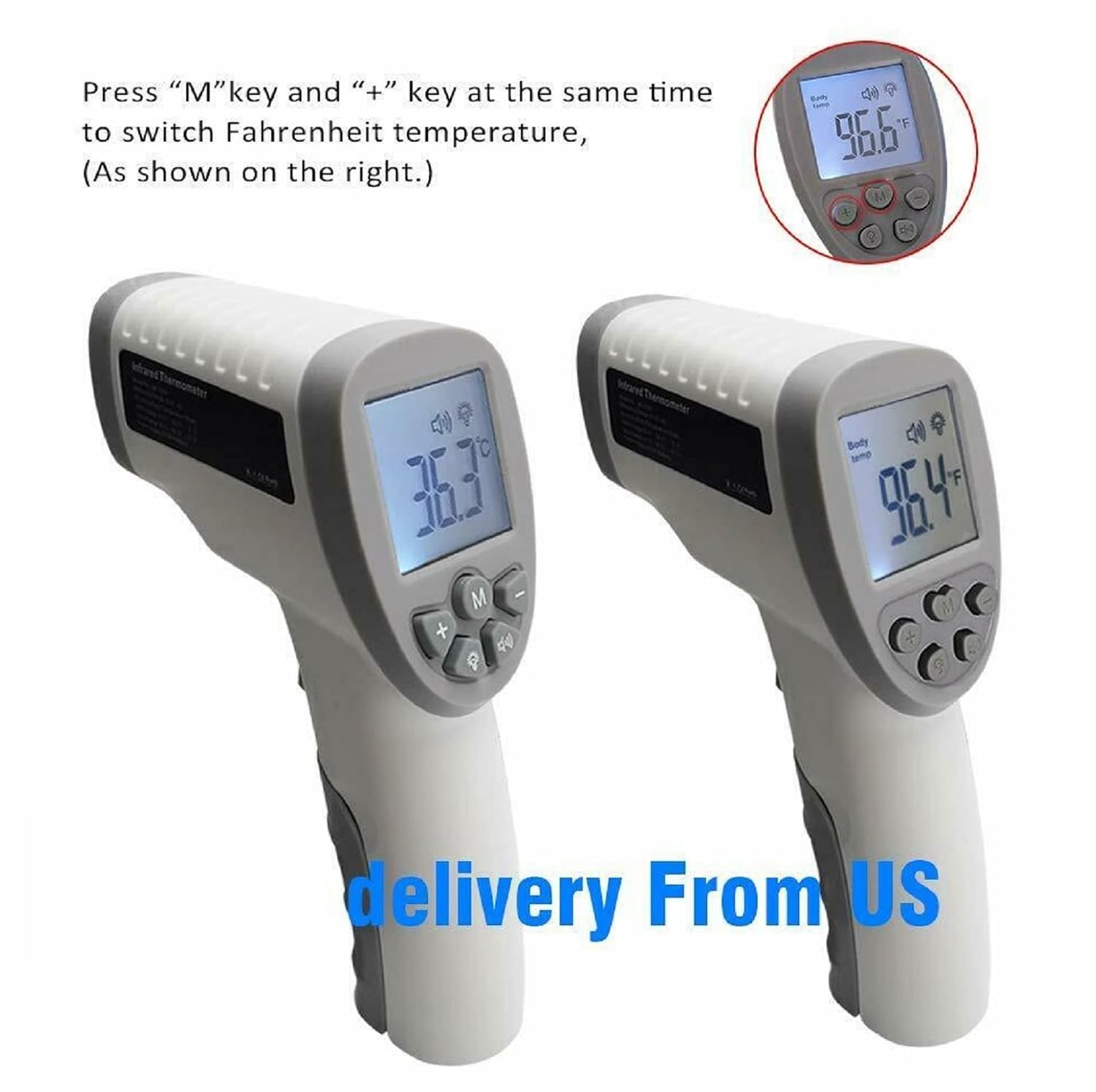
Image: Two infrared thermometers side-by-side. One displays 36.3 degrees Celsius, and the other displays 96.4 degrees Fahrenheit, illustrating the unit switching function.
5. Backlight and Mute Mode
The thermometer features an LCD backlight for visibility in low light and a mute function for silent operation. Consult the device's buttons (often indicated by light bulb or speaker icons) to toggle these features.

Image: An infrared thermometer with its LCD display illuminated, next to icons for "Mute/Unmute" and "Backlight," indicating these features.
6. เรียกคืนหน่วยความจำ
This thermometer can store previous temperature readings. To access memory recall, press the "M" button (Memory button). Repeated presses will cycle through stored readings. The number of stored memories is typically 32.
การซ่อมบำรุง
1. การทำความสะอาด
To clean the thermometer, wipe it with a soft, damp cloth. Do not immerse the device in water or use abrasive cleaners. Ensure the infrared sensor lens is clean and free of debris for accurate readings.
2. การจัดเก็บ
Store the thermometer in a cool, dry place away from direct sunlight and extreme temperatures. If not in use for an extended period, remove the battery.
การแก้ไขปัญหา
| ปัญหา | สาเหตุที่เป็นไปได้ | สารละลาย |
|---|---|---|
| Thermometer does not power on. | แบตเตอรี่หมดหรือติดตั้งไม่ถูกต้อง | Check battery polarity. Replace with a new DC9V battery. |
| การอ่านอุณหภูมิไม่ถูกต้อง | Incorrect measurement distance; dirty sensor lens; environmental interference. | Ensure measurement distance is 0.4-2.5 inches. Clean the sensor lens. Avoid strong electromagnetic fields. Allow thermometer to acclimate to room temperature. |
| หน้าจอจะแสดง "Lo" หรือ "Hi" | อุณหภูมิอยู่นอกช่วงที่สามารถวัดได้ | Ensure the target temperature is within the specified range (Body: 32.0℃~42.9℃). |
ข้อมูลจำเพาะ
| คุณสมบัติ | รายละเอียด |
|---|---|
| Measuring Range (Body Mode) | 32.0℃~42.9℃ (89.6℉~109.2℉) |
| Accuracy (Body Mode) | ±0.2℃ (35.0℃-42.0℃); ±0.3℃ (outside 35.0℃-42.0℃) |
| ระยะการวัด | 1-5 ซม. (0.4-2.5 นิ้ว) |
| แหล่งจ่ายไฟ | DC9V Battery |
| แสดง | LCD พร้อม Backlight |
| ปิดเครื่องอัตโนมัติ | ใช่ |
| การเรียกคืนความทรงจำ | อ่าน 32 ครั้ง |
| วัสดุ | พลาสติก |
| การดูแลผลิตภัณฑ์ | เช็ดทำความสะอาด |
| หมายเลขรุ่น | 904d806c-ed01-42fa-b40f-d8514c10701d |
การรับประกันและการสนับสนุน
สำหรับข้อมูลการรับประกันหรือการสนับสนุนทางเทคนิค โปรดดูเอกสารประกอบที่แนบมากับสินค้าหรือติดต่อผู้ขายโดยตรง โปรดเก็บใบเสร็จรับเงินไว้เป็นหลักฐานการซื้อ


