
1. บทนำ
This manual provides essential information for the proper setup, operation, and maintenance of your Hotsmtbang Replacement Remote Control. This remote is designed to be a direct replacement for various Metz Smart LED LCD HDTV TV models, ensuring seamless compatibility and ease of use.
The remote control is pre-programmed and requires no additional setup or coding. Simply insert the batteries, and it will be ready for immediate use with your compatible Metz television.
2. สินค้าหมดview
Familiarize yourself with the components of your new remote control.

รูปที่ 2.1: ด้านหน้า view of the Hotsmtbang Replacement Remote Control, showing all buttons including power, number pad, navigation, volume, channel, and special function keys.
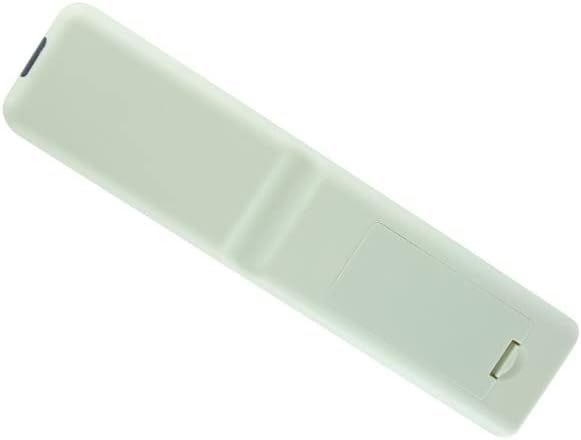
รูปที่ 2.2: กลับ view of the Hotsmtbang Replacement Remote Control, showing the smooth, ergonomic design and the battery compartment cover.

รูปที่ 2.3: กลับ view of the Hotsmtbang Replacement Remote Control with the battery compartment cover removed, revealing the slots for two AAA batteries.
3. การตั้งค่า
Setting up your new remote control is a simple process that primarily involves installing the batteries.
3.1 การติดตั้งแบตเตอรี่
- ค้นหาช่องใส่แบตเตอรี่ที่ด้านหลังของรีโมทคอนโทรล
- Slide the battery compartment cover downwards or press the latch and lift to remove it.
- Insert two (2) new AAA batteries into the compartment, ensuring the positive (+) and negative (-) terminals align correctly with the markings inside the compartment.
- ปิดฝาช่องใส่แบตเตอรี่กลับเข้าที่โดยเลื่อนกลับเข้าที่จนกระทั่งล็อคเข้าที่อย่างแน่นหนา
สำคัญ: This remote control is pre-programmed and requires no additional programming or pairing. It will function immediately after battery installation.
4. คู่มือการใช้งาน
Once batteries are installed, your remote is ready to operate your compatible Metz TV. Point the remote directly at the TV's infrared sensor for optimal performance.
4.1 ฟังก์ชั่นพื้นฐาน
- พลัง: เปิดหรือปิดทีวี
- ปุ่มตัวเลข (0-9): เลือกช่องโดยตรง
- ฉบับ +/-: ปรับระดับเสียง
- CH +/- (or PR +/-): เปลี่ยนช่องตามลำดับ
- ใบ้: ปิดเสียงหรือเปิดเสียงทีวี
- เมนู: เข้าถึงเมนูหลักของทีวี
- ปุ่มนำทาง (ขึ้น, ลง, ซ้าย, ขวา): นำทางผ่านตัวเลือกเมนู
- OK (or ENTER): ยืนยันการเลือกในเมนู
- EXIT: ออกจากเมนูหรือหน้าจอปัจจุบัน
- SOURCE (or INPUT): เลือกแหล่งสัญญาณอินพุต (HDMI, AV ฯลฯ)
- BACK (or RETURN): กลับไปยังหน้าจอหรือช่องก่อนหน้า
Refer to your Metz TV's original user manual for specific functions of advanced buttons if present on this replacement remote.
5. การบำรุงรักษา
การดูแลรักษาอย่างถูกวิธีจะช่วยยืดอายุการใช้งานของรีโมทคอนโทรลของคุณได้
- การทำความสะอาด: ใช้ผ้าแห้งนุ่มๆ เช็ดทำความสะอาดรีโมทคอนโทรล ห้ามใช้น้ำยาทำความสะอาดหรือสเปรย์กระป๋อง
- การเปลี่ยนแบตเตอรี่: เปลี่ยนแบตเตอรี่เมื่อรีโมททำงานช้าลงหรือหยุดทำงาน ควรเปลี่ยนแบตเตอรี่ทั้งสองก้อนพร้อมกันด้วยแบตเตอรี่ชนิดเดียวกัน (AAA) เสมอ
- พื้นที่จัดเก็บ: หากไม่ได้ใช้งานรีโมทเป็นเวลานาน ควรนำแบตเตอรี่ออกเพื่อป้องกันการรั่วไหลและความเสียหาย เก็บไว้ในที่แห้งและเย็น
- หลีกเลี่ยงความเสียหาย: ห้ามทำรีโมทตกพื้น ห้ามวางไว้ในที่ที่มีอุณหภูมิสูงหรือต่ำเกินไป หรือห้ามจุ่มลงในน้ำ
6 การแก้ไขปัญหา
หากคุณประสบปัญหาเกี่ยวกับรีโมทคอนโทรล ให้ลองทำตามขั้นตอนการแก้ไขปัญหาต่อไปนี้:
- รีโมตไม่ตอบสนอง:
- ตรวจสอบให้แน่ใจว่าได้ใส่แบตเตอรี่อย่างถูกต้อง โดยให้ขั้ว (+/-) ถูกต้อง
- เปลี่ยนแบตเตอรี่เก่าด้วยแบตเตอรี่ AAA ใหม่
- Make sure there are no obstructions between the remote control and the TV's infrared sensor.
- ตรวจสอบให้แน่ใจว่าคุณอยู่ในระยะการทำงานของเซ็นเซอร์ทีวี
- การทำงานเป็นระยะ:
- สิ่งนี้มักบ่งบอกว่าแบตเตอรี่เหลือน้อย ควรเปลี่ยนแบตเตอรี่
- Check for strong light sources (like direct sunlight or bright fluorescent lights) that might interfere with the infrared signal.
If the problem persists after trying these steps, please contact the seller for further assistance.
7. ข้อมูลจำเพาะ
| คุณสมบัติ | รายละเอียด |
|---|---|
| ยี่ห้อ | ทั่วไป (Hotsmtbang) |
| ความเข้ากันได้ของรุ่น | Metz 40MTB2000, 40MTB2000Z, 32MTB2000, 32MTB2000Z, 40MTB7000, 40MTB7000Z Smart LED LCD HDTV TVs |
| แบตเตอรี่ที่จำเป็น | 2 x AAA (ไม่รวม) |
| คุณสมบัติพิเศษ | ไม่จำเป็นต้องเขียนโปรแกรมเพิ่มเติม |
| ASIN | B0B2P2T116 |
| ประเทศต้นกำเนิด | จีน |
8. การรับประกันและการสนับสนุน
This manual does not contain specific warranty information. For details regarding warranty coverage, returns, or technical support, please refer to the product listing on the retailer's webดูรายละเอียดเพิ่มเติมได้ที่เว็บไซต์ หรือติดต่อผู้ขายโดยตรง
As per product information, this remote is sold by Hotsmtbang. Please reach out to them for any support inquiries.
9. วิดีโอผลิตภัณฑ์อย่างเป็นทางการ
ผู้ขายไม่ได้จัดทำวิดีโอแนะนำสินค้าอย่างเป็นทางการสำหรับสินค้านี้