
เพื่อน 4300401
Fellowes LX25 Paper Shredder Instruction Manual
รุ่น : 4300401
1. บทนำ
This manual provides essential instructions for the safe and efficient operation, setup, and maintenance of your Fellowes LX25 Paper Shredder. Please read this manual thoroughly before using the shredder and retain it for future reference.
The Fellowes LX25 is designed for personal use, offering cross-cut shredding for enhanced security of your documents.
2. ข้อมูลด้านความปลอดภัยที่สำคัญ
คำเตือน: การไม่ปฏิบัติตามคำแนะนำด้านความปลอดภัยเหล่านี้ อาจส่งผลให้เกิดการบาดเจ็บหรือความเสียหายต่อเครื่องทำลายเอกสารได้
- โปรดระวังอย่าให้มือ ผม หรือเสื้อผ้าหลวมๆ อยู่ใกล้ช่องใส่เอกสาร
- ควรกันเด็กและสัตว์เลี้ยงให้อยู่ห่างจากเครื่องทำลายเอกสารตลอดเวลา
- ถอดปลั๊กเครื่องทำลายเอกสารก่อนเคลื่อนย้าย ทำความสะอาด หรือเทถังขยะ
- Do not use aerosol products, petroleum-based lubricants, or other flammable products on or near the shredder.
- Do not shred metal objects, wet paper, or adhesive materials as this can damage the cutting mechanism.
- เครื่องทำลายเอกสารนี้มีคุณสมบัติดังนี้ Patented Safety Lock. Always engage the safety lock when the shredder is not in use to prevent accidental operation.

Image: A hand is shown pushing a switch on the top of the shredder, labeled 'Safety Lock', indicating the activation of the safety feature.
3. เนื้อหาบรรจุภัณฑ์
ตรวจสอบว่ามีรายการทั้งหมดอยู่ในแพ็คเกจ:
- Fellowes LX25 Shredder Unit
- ถังขยะ
- คู่มือการใช้งาน (เอกสารนี้)
4. การตั้งค่า
- แกะกล่องเครื่องทำลายเอกสาร: Carefully remove all packaging materials from the shredder and its components.
- จัดวางเครื่องทำลายเอกสารให้อยู่ในตำแหน่งที่เหมาะสม: Place the shredder on a flat, stable surface near a power outlet. Ensure there is adequate space around the unit for ventilation and operation.
- ใส่ถังขยะ: ตรวจสอบให้แน่ใจว่าได้ใส่ถังขยะลงในเครื่องทำลายเอกสารอย่างถูกต้อง เครื่องทำลายเอกสารจะไม่ทำงานหากถังขยะไม่ได้ติดตั้งอย่างถูกต้อง
- เชื่อมต่อพลังงาน: เสียบสายไฟเข้ากับเต้ารับไฟฟ้ามาตรฐาน

Image: The Fellowes LX25 shredder is positioned on the floor next to an office desk, illustrating its compact size and typical placement. Dimensions are indicated as 14¼" H x 12⅜" W x 8⅛" D.
5. คู่มือการใช้งาน
- เปิดเครื่อง: Locate the power switch on the top of the shredder. Slide the switch to the 'ON' position.
- ปลดล็อคเพื่อความปลอดภัย: If the safety lock is engaged, slide the safety lock switch to the 'UNLOCKED' position.
- Feed Documents: ใส่กระดาษได้สูงสุด 6 แผ่นลงในช่องใส่กระดาษ เครื่องทำลายเอกสารจะเริ่มทำงานและหยุดทำงานโดยอัตโนมัติ
- Shredding Other Materials: The LX25 can also shred staples, small paper clips, and plastic credit cards. Insert these items one at a time into the paper entry slot.
- การทำงานต่อเนื่อง: The shredder is designed for intermittent use. It has a maximum continuous run time of approximately 3 minutes, followed by a cool-down period.
- Power Off and Engage Safety Lock: When finished shredding, slide the power switch to the 'OFF' position and engage the safety lock for security.

Image: A hand feeds multiple sheets of paper into the shredder's entry slot. Graphics indicate a sheet capacity of 6 sheets and illustrate the cross-cut shredding pattern (5/32" x 1¼"). Icons also show that staples, paper clips, and credit cards can be shredded.

Image: The shredder is displayed alongside icons indicating it is suitable for 1 user, has a run time of up to 3 minutes, and operates quietly.
6. การบำรุงรักษา
- การล้างถังขยะ: Regularly check and empty the 3-gallon waste bin to prevent paper jams and ensure optimal performance. Always unplug the shredder before removing the bin.
- Cleaning the Shredder: Use a soft, dry cloth to clean the exterior of the shredder. Do not use abrasive cleaners or solvents.
- การหยอดน้ำมันหล่อลื่นใบมีด: For optimal performance and longevity, it is recommended to oil the shredder blades periodically (e.g., after every 30 minutes of accumulated shredding or when performance decreases). Use a shredder-specific oil and follow the oil manufacturer's instructions.
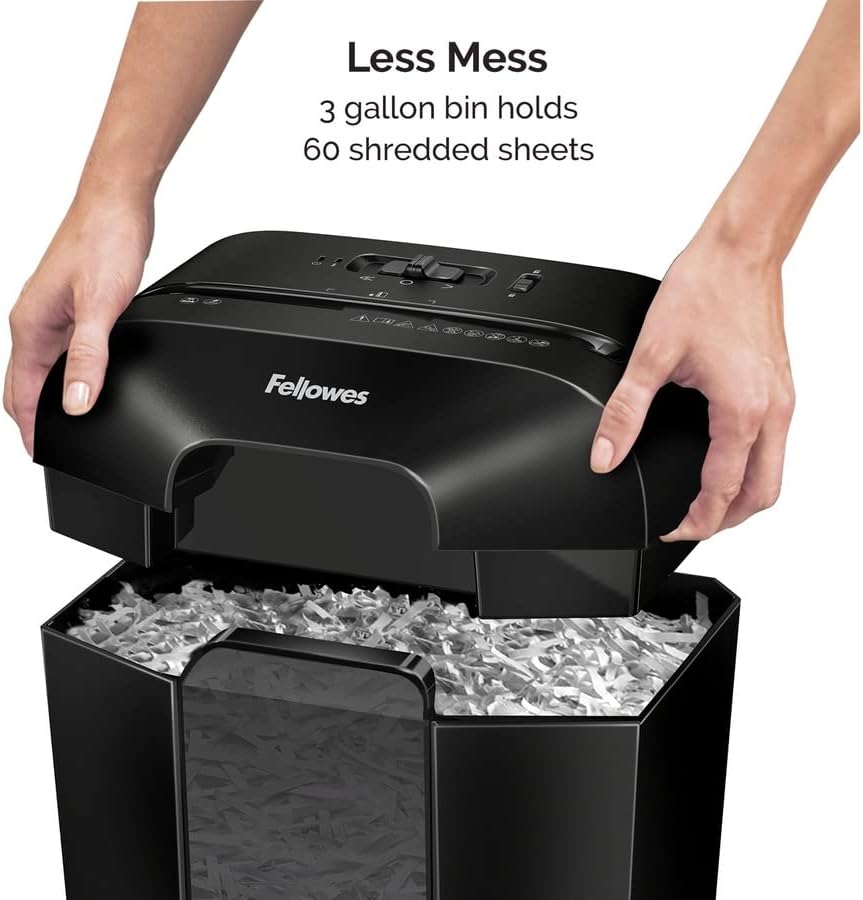
Image: A person's hands are shown lifting the top section of the shredder, exposing the waste bin below, which contains shredded paper. Text indicates 'Less Mess' and that the '3 gallon bin holds 60 shredded sheets'.
7 การแก้ไขปัญหา
| ปัญหา | สาเหตุที่เป็นไปได้ | สารละลาย |
|---|---|---|
| เครื่องทำลายเอกสารไม่ทำงาน | Not plugged in; Waste bin not properly seated; Safety lock engaged; Overheat protection activated. | Ensure power cord is securely plugged in. Re-seat the waste bin. Disengage the safety lock. Allow shredder to cool down for 20-30 minutes. |
| กระดาษติด. | ใส่เอกสารมากเกินไป; วัสดุไม่เหมาะสำหรับการฉีกทำลาย | Unplug the shredder. Carefully remove paper from the entry slot. If accessible, remove paper from the cutting mechanism. Plug in and try again with fewer sheets. |
| เครื่องทำลายเอกสารหยุดทำงานระหว่างการใช้งาน | ระบบป้องกันความร้อนสูงเกินทำงานแล้ว; ถังขยะเต็ม | Allow shredder to cool down for 20-30 minutes. Empty the waste bin. |
8. ข้อมูลจำเพาะ
- แบบอย่าง: LX25 (4300401)
- ประเภทฉีก: ตัดข้าม
- ระดับความปลอดภัย: พี-4
- ความจุแผ่น: 6 แผ่นต่อรอบ
- ขนาดอนุภาค: 5/32" x 1-1/4"
- เศษ: Paper, staples, small paper clips, plastic credit cards
- ความจุถัง: 3 แกลลอน
- ขนาด (สูง x กว้าง x ลึก): 14.2 x 8.7 x 12.2 นิ้ว
- น้ำหนัก: 9.28 ปอนด์
- เวลาทำงานต่อเนื่อง: สูงสุด 3 นาที
- ระยะเวลาเย็นลง: Approximately 20-30 minutes after continuous use
9. การรับประกันและการสนับสนุน
For warranty information or technical support, please refer to the warranty card included with your product or visit the official Fellowes website. You may also contact Fellowes customer service directly for assistance with your LX25 Paper Shredder.
Ask a question about this manual
Ask about setup, troubleshooting, compatibility, parts, safety, or missing instructions. Manuals+ will review the question and use this page’s manual context to help answer it.