
1. บทนำ
The MAXDONE PH800 Trail Camera is designed for wildlife monitoring, hunting, farm surveillance, and home security. It captures high-resolution photos and videos with advanced features like night vision and rapid trigger speed.

Figure 1: MAXDONE PH800 Trail Camera. This camera features a camouflage casing, a lens, and infrared LEDs for night vision.

Figure 2: The MAXDONE Trail Camera is ideal for capturing wildlife, bringing the natural world closer to observation.
2. การตั้งค่าและการติดตั้ง
2.1 เนื้อหาบรรจุภัณฑ์

Figure 3: Included accessories with your trail camera, such as the USB cable, mounting bracket, tree strap, and user manual.
2.2 การติดตั้งแบตเตอรี่และการ์ด SD
The camera requires 4 or 8 AA alkaline batteries. A 32GB Micro SD card is included for storage. Ensure the memory card is formatted via the camera's menu before first use.

Figure 4: The trail camera shown with its included 32GB SD card, ready for installation.
ทำตามขั้นตอนเหล่านี้สำหรับการตั้งค่าเริ่มต้น:
- เปิดกล้องคasing.
- Insert 4 or 8 AA alkaline batteries into the designated slots, ensuring correct polarity.
- Insert the 32GB Micro SD card into the memory card slot.
- Turn the camera to "TEST" mode.
- Access the MENU settings. Navigate to "Format memory card" and confirm "YES" to format.
- Navigate to "Reset settings" and confirm "YES" to reset to default settings.
- Set the correct time and date via MENU -> Time & Date -> Set time & date.
- ปิดกล้องcasinก. อย่างปลอดภัย
Video 1: Easy Set up Trail Camera. This video demonstrates the process of inserting batteries, installing the SD card, and performing initial setup steps like formatting the card and setting the time.
Video 2: PH800 Hunting Trail Camera Deer Camera. This video provides an unboxing and initial setup guide for the PH800 model, including battery and SD card insertion.
3. การใช้งานกล้อง
3.1 โหมดและการตั้งค่า
The camera offers various modes and customizable settings to suit different monitoring needs.
- โหมดภาพถ่าย: บันทึกภาพนิ่ง
- โหมดวิดีโอ: บันทึกคลิปวิดีโอ
- Photo & Video Mode: ถ่ายภาพนิ่งแล้วตามด้วยคลิปวิดีโอ
- โหมดไทม์แลปส์: Captures images at set intervals for time-lapse sequences.
การตั้งค่าหลักที่จะกำหนดค่า:
- ความละเอียดภาพ: Up to 32MP for clear images.
- ความละเอียดวิดีโอ: Up to 4K (3840x2160P) for vivid video.
- ความยาววิดีโอ: Adjustable from 3 to 59 seconds, or 1 to 5 minutes.
- การบันทึกเสียง: Can be turned ON/OFF.
- ช็อตแล็ก: Sets the delay between detections. Recommended 20 seconds for general use.
- เซ็นเซอร์ตรวจจับการเคลื่อนไหวความไว: Adjustable (Low, Middle, High) to control trigger sensitivity.

Figure 5: The camera supports 32MP photo resolution and 4K video resolution for detailed captures.

Figure 6: The camera is equipped with audio recording, capturing sounds along with video footage.

Figure 7: Utilize the time-lapse feature to observe gradual changes over extended periods, such as plant growth.
3.2 Photo and Video Quality
The camera delivers ultra-clear pictures up to 32MP and videos up to 4K. The 0.2s trigger speed ensures quick capture of moving objects within its 120° wide-angle detection range.

Figure 8: Observe every detail better with 4K HD video resolution, providing superior clarity compared to 1080P.

Figure 9: Present a clearer world with 32MP HD photo resolution, capturing finer details than 20MP cameras.
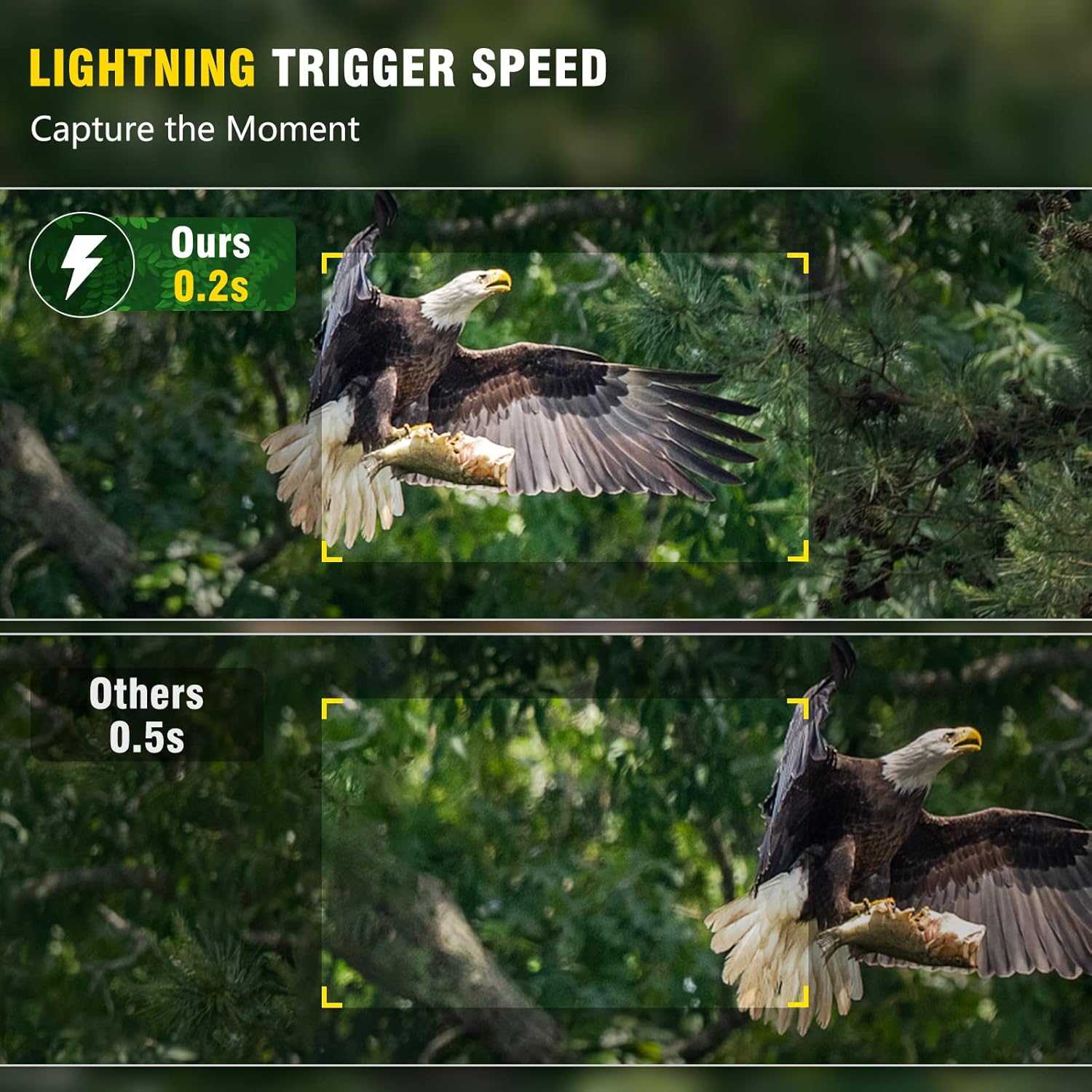
Figure 10: Capture the moment with lightning-fast 0.2s trigger speed, ensuring no movement is missed.
Video 3: 32MP 1920P Trail Camera with Night Vision. This video showcases the camera's ability to capture high-resolution photos and videos, including night vision footage.
Video 4: 4K Trail Camera. This video highlights the camera's 4K video capabilities, demonstrating clear footagในสถานการณ์ต่างๆ
3.3 การมองเห็นตอนกลางคืน
Equipped with 40pcs no-glow 940nm Infrared LEDs, the camera captures clear black and white videos/images in the dark without disturbing animals. Adaptive illumination technology prevents overexposure or underexposure.

Figure 11: Experience clear 65ft night vision, delivering sharp images and videos even in complete darkness.
Video 5: 940nm No Glow Deer Camera Avoid Disturbing Animals. This video demonstrates the camera's no-glow infrared LEDs, capturing clear night footage of deer without startling them.
Video 6: Clear Night Vision Wildlife Trail Camera Garden Camera. This video showcases the camera's clear night vision capabilities for monitoring wildlife in various environments.
3.4 Data Transfer and Playback
View captured photos and videos directly on the built-in 2.4" LCD color screen. Connect the camera to a computer via USB to transfer files.

Figure 12: Easily transfer photos and videos to your computer using the provided USB cable for convenient viewไอเอ็นจีและการจัดเก็บ
4. การบำรุงรักษา
The MAXDONE PH800 is built with high-grade IP66 waterproof material and a quality rubber ring to prevent water infiltration, ensuring reliable operation in harsh environments. Its sturdy materials protect against external force, extending its service life.

Figure 13: The camera is IP66 waterproof, designed to withstand various weather conditions from rain to extreme cold.

Figure 14: The IP66 rating ensures the camera remains functional even when exposed to rain and other wet conditions.
เคล็ดลับการมีอายุยืนยาว:
- Regularly check battery levels and replace them as needed.
- Clean the lens and PIR sensors periodically to ensure optimal performance.
- ตรวจสอบให้แน่ใจว่าคasing is securely latched to maintain waterproof integrity.
- Avoid placing the camera in direct sunlight for prolonged periods to prevent overheating.
5 การแก้ไขปัญหา
If you encounter issues with your MAXDONE PH800 Trail Camera, refer to the following common troubleshooting tips:
| ปัญหา | สาเหตุที่เป็นไปได้ / วิธีแก้ไข |
|---|---|
| กล้องไม่เปิด | Check battery installation and ensure batteries are fresh. Verify power switch is in "TEST" or "ON" mode. |
| คุณภาพรูปภาพ/วิดีโอไม่ดี | Ensure lens is clean. Check resolution settings (set to 32MP/4K). Verify sufficient lighting for night vision (within 65ft range). |
| No recordings / Missed triggers | Check SD card: ensure it's inserted correctly, formatted, and has free space. Adjust motion sensor sensitivity (Middle/High). Ensure camera is positioned correctly to capture motion. |
| อายุการใช้งานแบตเตอรี่สั้น | Use 8 high-quality AA alkaline batteries. Reduce video length or increase shot lag. Extreme cold can affect battery performance. |
| การแทรกซึมของน้ำ | Ensure all latches are securely closed and the rubber seal is intact before deployment in wet conditions. |
6. ข้อมูลจำเพาะ
| คุณสมบัติ | รายละเอียด |
|---|---|
| ความละเอียดของภาพ | สูงสุด 32 MP |
| ความละเอียดวิดีโอ | 4K (3840x2160P) |
| ความเร็วในการเรียก | 0.2 วินาที |
| มุมการตรวจจับ | มุมกว้าง 120° |
| ไฟ LED ในตอนกลางคืน | 40pcs 940nm No Glow Infrared LEDs |
| ช่วงการมองเห็นตอนกลางคืน | 65 ฟุต |
| ความต้านทานต่อน้ำ | กันน้ำระดับ IP66 |
| หน้าจอแสดงผล | หน้าจอ LCD สีขนาด 2.4 นิ้ว |
| แหล่งพลังงาน | แบตเตอรี่ AA 8 ก้อน (ไม่รวม) |
| พื้นที่จัดเก็บ | Micro SD Card (up to 512GB, 32GB included) |
| วัสดุ | ยาง |
| น้ำหนักสินค้า | 1.28 ปอนด์ |
| ขนาด | 7.13 x 4.76 x 4.45 นิ้ว |

Figure 15: The camera features a 120° wide detection angle and a 110° lens viewเพื่อให้มั่นใจได้ว่าได้รับความคุ้มครองอย่างครอบคลุม

Figure 16: The 2.4-inch LCD screen allows for easy viewing of captured media and menu navigation.
7. การรับประกันและการสนับสนุน
MAXDONE offers a 1-Year Warranty for this product. To activate your warranty or for any support inquiries, please contact:
- โทรศัพท์: (323)-250-0585 (24/7)
- อีเมล: service@ucanfix.net
สำหรับข้อมูลเพิ่มเติมและการอัพเดตผลิตภัณฑ์ โปรดไปที่ MAXDONE Store on Amazon.
8. การสมัคร
The MAXDONE PH800 Trail Camera is versatile and can be applied for various scenarios:
- การล่าสัตว์: Monitor game trails and animal activity.
- การสังเกตสัตว์ป่า: Capture candid moments of animals in their natural habitat.
- Farm Surveillance: Keep an eye on livestock or property.
- การติดตามที่บ้าน: Enhance security around your home or garden.

Figure 17: One device to meet your various needs, from monitoring deer and bears to observing birds and other wildlife.